While running asmca, I have got the following error:
Cause - Following nodes does not have required file ownership/permissions: Node :mk23ai-b PRVG-11960 : Set user ID bit is not set for file "/u01/app/oracle/product/23ai/dbhome_1/bin/oradism" on node "mk23ai-b". Action - Run the Oracle home root script as the "root" user to fix the permissions.
The error message includes an action section that states the steps to follow. Connect to the database server as the root user and execute the root.sh script from the RDBMS home directory, since oradism mentioned in the error is located there.
root@mk23ai-b:~# /u01/app/oracle/product/23ai/dbhome_1/root.sh
Performing root user operation.

The following environment variables are set as:
    ORACLE_OWNER= oracle
    ORACLE_HOME=  /u01/app/oracle/product/23ai/dbhome_1

Enter the full pathname of the local bin directory: [/usr/local/bin]:
The contents of "dbhome" have not changed. No need to overwrite.
The contents of "oraenv" have not changed. No need to overwrite.
The contents of "coraenv" have not changed. No need to overwrite.

Entries will be added to the /etc/oratab file as needed by
Database Configuration Assistant when a database is created
Finished running generic part of root script.
Now product-specific root actions will be performed.
Normally, when you run a program (an executable file), it runs with your own permissions – meaning it can only do what your user account is allowed to do. But if the setuid bit is set on a file, the program runs with the permissions of the file’s owner, regardless of who is running it.
While running the root.sh script, I encountered the following error:
root@mk23ai-b:~# /u01/app/23ai/grid/root.sh
Performing root user operation.
...
  /u01/app/oracle/crsdata/mk23ai-b/crsconfig/roothas_2025-05-16_07-10-12PM.log
2025/05/16 19:10:17 CLSRSC-400: A system reboot is required to continue installing.
Died at /u01/app/23ai/grid/crs/install/oraafd.pm line 688.
If you think rebooting the system and rerunning the root.sh script will help, well, no… I’ve already tried :).
Based on the previous output, Secure Boot is enabled. If you received a different output, such as “Secure Boot disabled,” continue your search.
Solution:
To disable Secure Boot, you cannot do it from the terminal; you need to access your computer’s firmware settings (BIOS or UEFI) and disable the Secure Boot option there.
In my case, I am using an Azure VM, and I can show you how I disabled it using the Azure console.
Note: This action requires VM downtime.
VM -> Configuration -> Security type section -> uncheck “Enable secure boot” -> Apply
Connect to the VM and rerun root.sh script:
root@mk23ai-b:~# /u01/app/23ai/grid/root.sh
...

mk23ai-b     2025/05/16 19:32:48     /u01/app/oracle/crsdata/mk23ai-b/olr/backup_20250516_193248.olr     0
2025/05/16 19:32:50 CLSRSC-327: Successfully configured Oracle Restart for a standalone server
Note: The post may seem related to Linux only. However, the issue of high rxdrop/s affects anything, especially Oracle database performance, if it occurs on the database server.
In this post, I will explain the parameters that affect the behavior of receive packet drops per second (rxdrop/s). The post is more about workarounds and tuning values rather than identifying exactly what has changed and why the fragmentation level has increased. We will discuss several key /etc/sysctl.conf parameters that can help make fragmentation more manageable, these are:
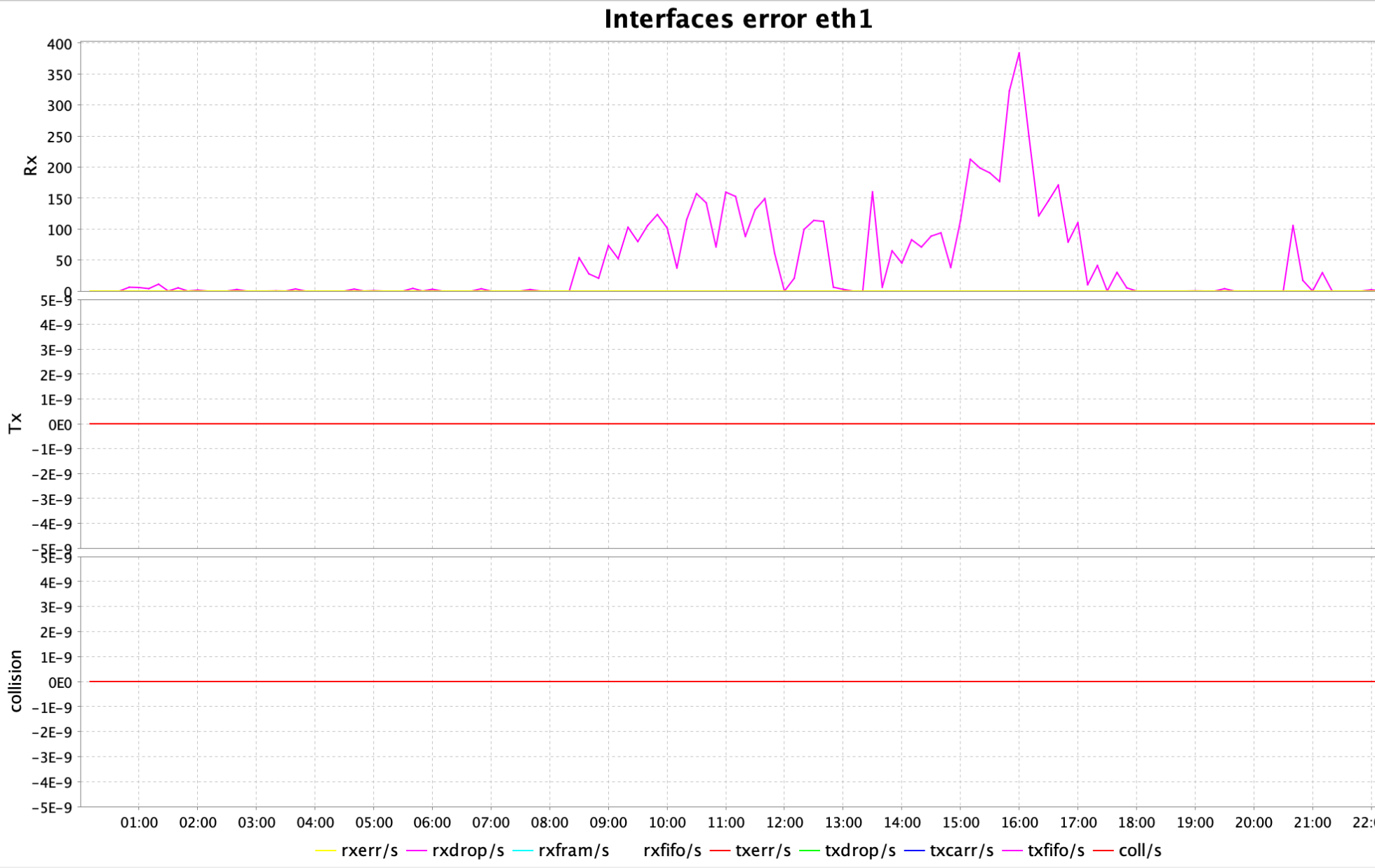
The ksar graph (a tool that interprets output from sar) was displaying peaks for interface errors on eth1 interface, particularly rxdrop/s:
Workaround:
The following kernel parameters in Linux control how the system handles IP packet fragments in the IPv4 stack.
The maximum memory threshold (in bytes) that the kernel can use to store IPv4 fragmented packets:
net.ipv4.ipfrag_high_thresh = 67108864
When the total memory used for IP fragments exceeds 64 MB (67108864), the kernel will start dropping fragments until memory usage falls below the low threshold (ipfrag_low_thresh next parameter).
The minimum memory threshold to stop dropping fragments:
net.ipv4.ipfrag_low_thresh = 66060288
Once memory drops below ~63 MB (66060288), fragment discarding stops.
The time (in seconds) the kernel will keep an incomplete, fragmented packet in memory before discarding it:
net.ipv4.ipfrag_time = 10
The default is often 30 seconds. Here it’s reduced to 10 seconds.
This helps prevent memory from being held too long by incomplete or malicious fragment streams, which are common in DoS attacks.
After changing these parameters in /etc/sysctl.conf you need to run sysctl -p to apply the modified kernel parameters and make them effective at runtime.




 DBA Knowledge Base