Connection to host as user oracle failed: NMO not setuid-root

Error in Oracle Enterprise Manager:
Error – Connection to host as user oracle failed: ERROR: NMO not setuid-root (Unix-only)

Solution:

–Connect as a root user:

$ su -
Password:

# /u0/app/oracle/product/10.2.0/db_1/root.sh

ORACLE_OWNER= oracle
ORACLE_HOME=/u0/app/oracle/product/10.2.0/db_1

Enter the full pathname of the local bin directory: [/usr/local/bin]: PRESS ENTER
The file “dbhome” already exists in /usr/local/bin. Overwrite it? (y/n)[n]:y
.. type  for each question

That’s it!

ORA-32589:unable to drop minimal supplemental logging

Error: ORA-32589: unable to drop minimal supplemental logging

Cause: Minimal supplemental logging cannot be dropped until one of the PRIMARY KEY, FOREIGN KEY, UNIQUE or ALL COLUMN supplemental logging is enabled.

For example: You may have enabled the following supplemental logging:

ALTER DATABASE ADD SUPPLEMENTAL LOG DATA (PRIMARY KEY) COLUMNS;

And now trying to turn off supplemental logging like this:

ALTER DATABASE DROP SUPPLEMENTAL LOG DATA;

Action: Use the following query to determine which supplemental logging is turned on:

select supplemental_log_data_min
       ,supplemental_log_data_all
       ,supplemental_log_data_pk
       ,supplemental_log_data_ui
from v$database

For example: If the output is the following:

SUPPLEMENTAL_LOG_DATA_MIN SUPPLEMENTAL_LOG_DATA_ALL SUPPLEMENTAL_LOG_DATA_PK SUPPLEMENTAL_LOG_DATA_UI
------------------------- ------------------------ ------------------------ ------------------------
IMPLICIT                  NO                       YES                      NO

Do the following:

ALTER DATABASE DROP SUPPLEMENTAL LOG DATA (PRIMARY KEY) COLUMNS;

And then:

ALTER DATABASE DROP SUPPLEMENTAL LOG DATA;

Enabling ARCHIVELOG Mode

For High Availability features in Oracle you need to enable archivelog mode. When database is in ARCHIVELOG mode, redo logs are archived. These archivelog files are saved in a separate place and can be backed up. Archive logs are used by RMAN, Data Guard, Flashback and so on…

Log Miner, that is discussed in the next post, uses archive logs to show you the changes made to the database during some period of time.

If you are going to enable archivelog mode on a real database, it is better to shutdown database and make a cold backup. To save final noarchivelog mode backup.

Parameter that defines the location of archivelog files is LOG_ARCHIVE_DEST. You are able to set 10 different locations

for archivelogs: using log_archive_dest_1 through log_archive_dest_10 parameters.

The following system views provide us with the information about archiving:

V$DATABASE- identifies whether database is in ARCHIVELOG or NOARCHIVELOG mode.

SQL> select log_mode from v$database;

LOG_MODE
------------
ARCHIVELOG

V$ARCHIVED_LOG – displays historical archived log information from the control file. If you are using recovery catalog, then RC_ARCHIVED_LOG view contains similar information.

V$ARCHIVE_DEST- displays archivelog destinations, its status…

SQL> select DEST_NAME, STATUS, DESTINATION from V$ARCHIVE_DEST;

DEST_NAME                  STATUS    DESTINATION
------------------------- ---------- ---------------------------------------
LOG_ARCHIVE_DEST_1    VALID        C:\oracle\product\10.2.0\db_1\RDBMS
LOG_ARCHIVE_DEST_2    INACTIVE
…
LOG_ARCHIVE_DEST_10    INACTIVE

As you can see my archivelogs will go to “C:\oracle\product\10.2.0\db_1\RDBMS”.

V$ARCHIVE_PROCESSES-Displays information about the state of the various archive processes for an instance.

V$BACKUP_REDOLOG- Contains information about any backups of archived logs. If you use a recovery catalog, then RC_BACKUP_REDOLOG contains similar information.V$LOG-Displays all redo log groups,their sizes,number of members,are they archived or not and their status.

Now, after a brief introduction, let take our database into archivelog mode…

–Connect as sysdba

>set ORACLE_SID=ORCL

>sqlplus sys/pass as sysdba

–Shutdown database

SQL> shutdown immediate;

–Mount database

SQL> startup mount;

–Take DB into archivelog mode

SQL> alter database archivelog;

–Open database

SQL> alter database open;

–Check database mode

SQL> select log_mode from v$database;

LOG_MODE
------------
ARCHIVELOG

Good Archiving!

Oracle Advanced Replication(Master-to-Master Definition)

In my previous post I discussed “Master-to-Master” replication configuration.

Master-to-Master Definition Replication implies that the transactions in the first database will be reflected to the second database, BUT NOT vise-versa.

Let’s start Master-to-Master Definition Replication:

I have created two databases:

ORCL-Master Site,
TEST-Master Definition Site

In this case, when there are DML operations on the ORCL site changes ARE reflected on the TEST database, but changes on the TEST site are not reflected on the ORCL database.


————————————ORCL——————————-

–Connect as sysdba

SQL> connect sys/sys_passwdg@orcl as sysdba

–Create user “REPADMIN”

SQL> CREATE USER REPADMIN IDENTIFIED BY REPADMIN DEFAULT TABLESPACE USERS TEMPORARY TABLESPACE TEMP;
–Grant necessary privileges to “REPADMIN”
SQL> EXEC DBMS_REPCAT_ADMIN.GRANT_ADMIN_ANY_SCHEMA('REPADMIN');
SQL> EXEC DBMS_DEFER_SYS.REGISTER_PROPAGATOR('REPADMIN');
SQL> EXEC DBMS_REPCAT_ADMIN.REGISTER_USER_REPGROUP (USERNAME => 'REPADMIN', PRIVILEGE_TYPE => 'RECEIVER', LIST_OF_GNAMES => NULL);
–Create public database link of another database
SQL> CREATE PUBLIC DATABASE LINK test using 'test';
–Connect as REPADMIN
SQL> connect repadmin/repadmin@orcl
–Create private database link in REPADMIN schema
CREATE DATABASE LINK test CONNECT TO REPADMIN IDENTIFIED BY repadmin USING 'test';
————————————TEST——————————-
–Connect as sysdba
SQL> connect sys/sys_passwdg@test as sysdba

–Create user “REPADMIN”

SQL> CREATE USER REPADMIN IDENTIFIED BY REPADMIN DEFAULT TABLESPACE USERS TEMPORARY TABLESPACE TEMP;
–Grant necessary privileges to “REPADMIN”
SQL> EXEC DBMS_REPCAT_ADMIN.GRANT_ADMIN_ANY_SCHEMA('REPADMIN');
SQL> EXEC DBMS_DEFER_SYS.REGISTER_PROPAGATOR('REPADMIN');
SQL> EXEC DBMS_REPCAT_ADMIN.REGISTER_USER_REPGROUP (USERNAME => 'REPADMIN', PRIVILEGE_TYPE => 'RECEIVER', LIST_OF_GNAMES => NULL);
–Create public database link of another database
SQL> CREATE PUBLIC DATABASE LINK orcl using 'orcl';
–Connect as REPADMIN
SQL> connect repadmin/repadmin@test
–Create private database link in REPADMIN schema
CREATE DATABASE LINK orcl CONNECT TO REPADMIN IDENTIFIED BY repadmin USING 'orcl';
–Create replication group, in which replication objects can be assigned
SQL> EXEC DBMS_REPCAT.CREATE_MASTER_REPGROUP('REP2');
–Assign replication object(HR.JOBS table) to the created group
SQL> EXEC DBMS_REPCAT.CREATE_MASTER_REPOBJECT('HR', 'JOBS', 'TABLE', GNAME=>'REP2');
–Assign replication object(Index on HR.JOBS table) to the created group
SQL> EXEC DBMS_REPCAT.CREATE_MASTER_REPOBJECT('HR', 'JOB_ID_PK', 'INDEX', GNAME=>'REP2');
Before declaring master database, I remind you that replicated tables must have primary key or at least unique constraints should be defined on the column(s).
If your table has primary key then continue from “Declare master database” section. Or do the following:

Define alternative key for table that have no primary key:

BEGIN
   DBMS_REPCAT.SET_COLUMNS(
     sname => 'HR',
     oname => 'AAA',
     column_list => 'A');
END;
/
Note: JOBS table already has primary key…
If your table has neither primary key nor unique constraint, during generating replication support it will give the following error:
ORA-23308: object HR.AAA does not exist or is invalid
ORA-06512: at "SYS.DBMS_SYS_ERROR", line 95
ORA-06512: at "SYS.DBMS_REPCAT_UTL", line 2874
ORA-06512: at "SYS.DBMS_REPCAT_UTL", line 2849
ORA-06512: at "SYS.DBMS_REPCAT_UTL4", line 2928
ORA-06512: at "SYS.DBMS_REPCAT_MAS", line 2856
ORA-06512: at "SYS.DBMS_REPCAT", line 766
ORA-06512: at line 2
–Declare master database
SQL>  EXEC DBMS_REPCAT.ADD_MASTER_DATABASE (GNAME=>'REP2', MASTER=>'ORCL', USE_EXISTING_OBJECTS =>TRUE, COPY_ROWS=>FALSE,PROPAGATION_MODE=> 'ASYNCHRONOUS');
  • ASYNCHRONOUS –With asynchronous replication, changes made at one master site occur at a later time at all other participating master sites.
  • SYNCHRONOUS – With synchronous replication, changes made at one master site occur immediately at all other participating master sites.
————————————ORCL——————————-
–Create job which pushes the deferred transactions to TEST master definition site after 10 seconds
SQL> show user;
User is "repadmin"
BEGIN
dbms_defer_sys.schedule_push(
destination => 'TEST',
interval => '/*10:Sec*/ sysdate + 10 / (3600*24)',
next_date => sysdate,
stop_on_error => FALSE,
delay_seconds => 0,
parallelism => 1);
END;
/

–Create job which purges the deferred transactions after 3 days(means that deferred transactions were not pushed)

BEGIN
dbms_defer_sys.schedule_purge(
next_date => sysdate,
interval => '/*3 : days*/ sysdate + 3',
delay_seconds => 0,
rollback_segment => '');
END;
/

————————————TEST——————————-

SQL> show user
User is "repadmin"

—Generate replication support for the replicated object

SQL> exec dbms_repcat.generate_replication_support('HR','JOBS','TABLE');

In this case our repgroup is in QUIESCED mode, in which you cannot perform DML operations on the replicated objects, just SELECT is permitted. To solve this, you should run the following:

SQL> select status from dba_repgroup where gname='REP2';

STATUS
--------
QUIESCED

–Resume master activity

SQL> EXEC DBMS_REPCAT.RESUME_MASTER_ACTIVITY('REP2');

If it fails with ORA-23419 error, do this:

SQL> begin
  2  dbms_repcat.generate_replication_support('HR','JOBS','TABLE');
  3  DBMS_REPCAT.RESUME_MASTER_ACTIVITY('REP2');
  4  end;
  5  /

—Check the status again

SQL> select status from dba_repgroup where gname='REP2';

STATUS
--------
NORMAL

If you have read my previous post, you should notice that the only difference between previous and recent posts is that: in this post jobs are not created in TEST database(Jobs are created just in ORCL database).

Now let’s test that everything is OK.

–In ORCL database

SQL> show user;
User is "repadmin"

SQL> select * from hr.jobs;

JOB_ID     JOB_TITLE                           MIN_SALARY MAX_SALARY
---------- ----------------------------------- ---------- ----------
AD_PRES    President                                20000      40000
AD_VP      Administration Vice President            15000      30000
AD_ASST    Administration Assistant                  3000       6000
FI_MGR     Finance Manager                           8200      16000
FI_ACCOUNT Accountant                                4200       9000
AC_MGR     Accounting Manager                        8200      16000
AC_ACCOUNT Public Accountant                         4200       9000
SA_MAN     Sales Manager                            10000      20000
SA_REP     Sales Representative                      6000      12000
PU_MAN     Purchasing Manager                        8000      15000
PU_CLERK   Purchasing Clerk                          2500       5500
ST_MAN     Stock Manager                             5500       8500
ST_CLERK   Stock Clerk                               2000       5000
SH_CLERK   Shipping Clerk                            2500       5500
IT_PROG    Programmer                                4000      10000
MK_MAN     Marketing Manager                         9000      15000
MK_REP     Marketing Representative                  4000       9000
HR_REP     Human Resources Representative            4000       9000
PR_REP     Public Relations Representative           4500      10500

19 rows selected

–In TEST database

SQL> show user;
User is "repadmin"

SQL> select * from hr.jobs;

JOB_ID     JOB_TITLE                           MIN_SALARY MAX_SALARY
---------- ----------------------------------- ---------- ----------
AD_PRES    President                                20000      40000
AD_VP      Administration Vice President            15000      30000
AD_ASST    Administration Assistant                  3000       6000
FI_MGR     Finance Manager                           8200      16000
FI_ACCOUNT Accountant                                4200       9000
AC_MGR     Accounting Manager                        8200      16000
AC_ACCOUNT Public Accountant                         4200       9000
SA_MAN     Sales Manager                            10000      20000
SA_REP     Sales Representative                      6000      12000
PU_MAN     Purchasing Manager                        8000      15000
PU_CLERK   Purchasing Clerk                          2500       5500
ST_MAN     Stock Manager                             5500       8500
ST_CLERK   Stock Clerk                               2000       5000
SH_CLERK   Shipping Clerk                            2500       5500
IT_PROG    Programmer                                4000      10000
MK_MAN     Marketing Manager                         9000      15000
MK_REP     Marketing Representative                  4000       9000
HR_REP     Human Resources Representative            4000       9000
PR_REP     Public Relations Representative           4500      10500

19 rows selected

–In ORCL database

SQL> insert into hr.jobs values('AAA','Aaa',1500,2000);

1 row inserted

SQL> commit;

Commit complete

–In TEST database

SQL> select * from hr.jobs;

JOB_ID     JOB_TITLE                           MIN_SALARY MAX_SALARY
---------- ----------------------------------- ---------- ----------
AD_PRES    President                                20000      40000
AD_VP      Administration Vice President            15000      30000
AD_ASST    Administration Assistant                  3000       6000
FI_MGR     Finance Manager                           8200      16000
FI_ACCOUNT Accountant                                4200       9000
AC_MGR     Accounting Manager                        8200      16000
AC_ACCOUNT Public Accountant                         4200       9000
SA_MAN     Sales Manager                            10000      20000
SA_REP     Sales Representative                      6000      12000
PU_MAN     Purchasing Manager                        8000      15000
PU_CLERK   Purchasing Clerk                          2500       5500
ST_MAN     Stock Manager                             5500       8500
ST_CLERK   Stock Clerk                               2000       5000
SH_CLERK   Shipping Clerk                            2500       5500
IT_PROG    Programmer                                4000      10000
MK_MAN     Marketing Manager                         9000      15000
MK_REP     Marketing Representative                  4000       9000
HR_REP     Human Resources Representative            4000       9000
PR_REP     Public Relations Representative           4500      10500

19 rows selected

–Output is the same data, because 10 seconds was not passed yet!

SQL> select * from hr.jobs;

JOB_ID     JOB_TITLE                           MIN_SALARY MAX_SALARY
---------- ----------------------------------- ---------- ----------
AAA        Aaa                                       1500       2000
AD_PRES    President                                20000      40000
AD_VP      Administration Vice President            15000      30000
AD_ASST    Administration Assistant                  3000       6000
FI_MGR     Finance Manager                           8200      16000
FI_ACCOUNT Accountant                                4200       9000
AC_MGR     Accounting Manager                        8200      16000
AC_ACCOUNT Public Accountant                         4200       9000
SA_MAN     Sales Manager                            10000      20000
SA_REP     Sales Representative                      6000      12000
PU_MAN     Purchasing Manager                        8000      15000
PU_CLERK   Purchasing Clerk                          2500       5500
ST_MAN     Stock Manager                             5500       8500
ST_CLERK   Stock Clerk                               2000       5000
SH_CLERK   Shipping Clerk                            2500       5500
IT_PROG    Programmer                                4000      10000
MK_MAN     Marketing Manager                         9000      15000
MK_REP     Marketing Representative                  4000       9000
HR_REP     Human Resources Representative            4000       9000
PR_REP     Public Relations Representative           4500      10500

20 rows selected

As you can see the push process was happened after 10seconds, as it is indicated in the pushing job.

Warning!

Replication is not resistant to schema changes. It will fail with ORA-23474 error.

For example, if you change the type of existing columns(Adding columns do not arise any error), during inserting/deleting/updating(DML) there will arise the following error:

ORA-23474: definition of "HR"."AAA" has changed since generation of replication support

To solve this, do the following:

–From TEST database

SQL> exec dbms_repcat.suspend_master_activity(gname => 'REP2');
SQL> exec dbms_repcat.generate_replication_support(sname => 'HR',oname => 'AAA',type => 'TABLE');
SQL> exec dbms_repcat.resume_master_activity(gname => 'REP2');

I mentioned previously that adding columns do not arise an error, but it makes data inconsistency.

Look at this…

I have table HR.AAA on TEST  and ORCL databases, HR.AAA is already a repobject and support is also generated for it.

–TEST

SQL> delete from HR.AAA;

SQL> alter table HR.AAA add(B number);

–ORCL

SQL> alter table HR.AAA add(B number);

Do not forget that DDL changes are not replicated, just DML!!!

–TEST

SQL> insert into HR.AAA values(1,1);

SQL> commit;

SQL> select * from HR.AAA;

         A          B
---------- ----------
         1          1

–ORCL

SQL> select * from HR.AAA;

         A          B
---------- ----------
         1

As you can see “B” column was not reflected, to solve this do the following:

–TEST

SQL> exec dbms_repcat.suspend_master_activity(gname => 'REP2');
SQL> exec dbms_repcat.generate_replication_support(sname => 'HR',oname => 'AAA',type => 'TABLE');
SQL> exec dbms_repcat.resume_master_activity(gname => 'REP2');

Now check again:

–TEST

SQL> insert into HR.AAA values(2,1);

SQL> commit;

SQL> select * from hr.aaa;

         A          B
---------- ----------
         1          1

2 1

–ORCL

SQL> select * from HR.AAA;

         A          B
---------- ----------
         1

2 1
 

Good Luck!

Oracle Advanced Replication(Master-to-Master)

Oracle Advanced Replication is a technique, which is used to maintain two objects the same. This technique is built-in to the Oracle.

If you want to use this technique, it will be better to consider its limitations:

Oracle Advanced Replication

  • has error prone administration.
  • has problems with high transaction rates more then 50 – 100 transactions per second, depending on platform or machine .
  • not resistant to schema changes.
  • has serious performance overhead on both sides. .

Another well-known issue is that sequences could not be replicated.

The following objects can be replicated:

  • Tables
  • Indexes
  • Views and Object Views
  • Packages and Package Bodies
  • Procedures and Functions
  • User-Defined Types and Type Bodies
  • Triggers
  • Synonyms
  • Indextypes
  • User-Defined Operators

Master-to-Master Replication means that the transactions in each database will be reflected in another database.

There also exists “Master-to-Master Definition” Replication, which means that the transactions in the first database will be reflected to the second database, BUT NOT vise-versa.

Let’s start Master-to-Master Replication:

I have created two databases:

ORCL-Master Site 1,
TEST-Master Site 2


————————————ORCL——————————-

–Connect as sysdba

SQL> connect sys/sys_passwdg@orcl as sysdba

–Create user “REPADMIN”

SQL> CREATE USER REPADMIN IDENTIFIED BY REPADMIN DEFAULT TABLESPACE USERS TEMPORARY TABLESPACE TEMP;
 
–Grant necessary privileges to “REPADMIN”
 
SQL> EXEC DBMS_REPCAT_ADMIN.GRANT_ADMIN_ANY_SCHEMA('REPADMIN');
SQL> EXEC DBMS_DEFER_SYS.REGISTER_PROPAGATOR('REPADMIN');
SQL> EXEC DBMS_REPCAT_ADMIN.REGISTER_USER_REPGROUP (USERNAME => 'REPADMIN', PRIVILEGE_TYPE => 'RECEIVER', LIST_OF_GNAMES => NULL);
 
–Create public database link of another database
 
SQL> CREATE PUBLIC DATABASE LINK test using 'test';
 
–Connect as REPADMIN
 
SQL> connect repadmin/repadmin@orcl
 
–Create private database link in REPADMIN schema
 
CREATE DATABASE LINK test CONNECT TO REPADMIN IDENTIFIED BY repadmin USING 'test';
 
————————————TEST——————————-
 
–Connect as sysdba
 
SQL> connect sys/sys_passwdg@test as sysdba

–Create user “REPADMIN”

SQL> CREATE USER REPADMIN IDENTIFIED BY REPADMIN DEFAULT TABLESPACE USERS TEMPORARY TABLESPACE TEMP;
 
–Grant necessary privileges to “REPADMIN”
 
SQL> EXEC DBMS_REPCAT_ADMIN.GRANT_ADMIN_ANY_SCHEMA('REPADMIN');
SQL> EXEC DBMS_DEFER_SYS.REGISTER_PROPAGATOR('REPADMIN');
SQL> EXEC DBMS_REPCAT_ADMIN.REGISTER_USER_REPGROUP (USERNAME => 'REPADMIN', PRIVILEGE_TYPE => 'RECEIVER', LIST_OF_GNAMES => NULL);
 
–Create public database link of another database
 
SQL> CREATE PUBLIC DATABASE LINK orcl using 'orcl';
 
–Connect as REPADMIN
 
SQL> connect repadmin/repadmin@test
 
–Create private database link in REPADMIN schema
 
CREATE DATABASE LINK orcl CONNECT TO REPADMIN IDENTIFIED BY repadmin USING 'orcl';
 
–Create replication group, in which replication objects can be assigned
 
SQL> EXEC DBMS_REPCAT.CREATE_MASTER_REPGROUP('REP2');
 
–Assign replication object(HR.JOBS table) to the created group
 
SQL> EXEC DBMS_REPCAT.CREATE_MASTER_REPOBJECT('HR', 'JOBS', 'TABLE', GNAME=>'REP2');
 
–Assign replication object(Index on HR.JOBS table) to the created group
 
SQL> EXEC DBMS_REPCAT.CREATE_MASTER_REPOBJECT('HR', 'JOB_ID_PK', 'INDEX', GNAME=>'REP2');
 
Before declaring master database, I remind you that replicated tables must have primary key or at least unique constraints should be defined on the column(s).
If your table has primary key then continue from “Declare master database” section. Or do the following:

Define alternative key for table that have no primary key:

BEGIN
   DBMS_REPCAT.SET_COLUMNS(
     sname => 'HR',
     oname => 'AAA',
     column_list => 'A');
END;
/
Note: JOBS table already has primary key…
 
If your table has neither primary key nor unique constraint, during generating replication support it will give the following error:
 
ORA-23308: object HR.AAA does not exist or is invalid
ORA-06512: at "SYS.DBMS_SYS_ERROR", line 95
ORA-06512: at "SYS.DBMS_REPCAT_UTL", line 2874
ORA-06512: at "SYS.DBMS_REPCAT_UTL", line 2849
ORA-06512: at "SYS.DBMS_REPCAT_UTL4", line 2928
ORA-06512: at "SYS.DBMS_REPCAT_MAS", line 2856
ORA-06512: at "SYS.DBMS_REPCAT", line 766
ORA-06512: at line 2
 
–Declare master database

SQL> EXEC DBMS_REPCAT.ADD_MASTER_DATABASE (GNAME=>'REP2', MASTER=>'ORCL', USE_EXISTING_OBJECTS =>TRUE, COPY_ROWS=>FALSE,PROPAGATION_MODE=> 'ASYNCHRONOUS');

 
Let’s stop here and discuss available values of PROPAGATION_MODE property:
 
  • ASYNCHRONOUS –With asynchronous replication, changes made at one master site occur at a later time at all other participating master sites.
  • SYNCHRONOUS – With synchronous replication, changes made at one master site occur immediately at all other participating master sites.

“When you use synchronous replication, an update of a table results in the immediate replication of the update at all participating master sites. In fact, each transaction includes all master sites. Therefore, if one master site cannot process a transaction for any reason, then the transaction is rolled back at all master sites.

Although you avoid the possibility of conflicts when you use synchronous replication, it requires a very stable environment to operate smoothly. If communication to one master site is not possible because of a network problem, for example, then users can still query replicated tables, but no transactions can be completed until communication is reestablished. Also, it is possible to configure asynchronous replication so that it simulates synchronous replication.”

————————————ORCL——————————-
 
–Create job which pushes the deferred transactions to TEST master site after 10 seconds

SQL> show user; User is "repadmin"


BEGIN
dbms_defer_sys.schedule_push(
destination => 'TEST',
interval => '/*10:Sec*/ sysdate + 10 / (3600*24)',
next_date => sysdate,
stop_on_error => FALSE,
delay_seconds => 0,
parallelism => 1);
END;
/

–Create job which purges the deferred transactions after 3 days(means that deferred transactions were not pushed)

BEGIN
dbms_defer_sys.schedule_purge(
next_date => sysdate,
interval => '/*3 : days*/ sysdate + 3',
delay_seconds => 0,
rollback_segment => '');
END;
/

————————————TEST——————————-

SQL> show user
User is "repadmin"

—Generate replication support for the replicated object

SQL> exec dbms_repcat.generate_replication_support('HR','JOBS','TABLE');

In this case our repgroup is in QUIESCED mode, in which you cannot perform DML operations on the replicated objects, just SELECT is permitted. To solve this, you should run the following:

SQL> select status from dba_repgroup where gname='REP2';

STATUS
--------
QUIESCED

–Resume master activity

SQL> EXEC DBMS_REPCAT.RESUME_MASTER_ACTIVITY('REP2');

—Check the status again

SQL> select status from dba_repgroup where gname='REP2';

STATUS
--------
NORMAL

Now DML operations can be performed.

–Create job which pushes the deferred transactions to ORCL master site after 10 seconds
 
BEGIN
dbms_defer_sys.schedule_push(
destination => 'ORCL',
interval => '/*10:Sec*/ sysdate + 10 / (3600*24)',
next_date => sysdate,
stop_on_error => FALSE,
delay_seconds => 0,
parallelism => 1);
END;
/

–Create job which purges the deferred transactions after 3 days(means that deferred transactions were not pushed)

BEGIN
dbms_defer_sys.schedule_purge(
next_date => sysdate,
interval => '/*3 : days*/ sysdate + 3',
delay_seconds => 0,
rollback_segment => '');
END;
/

That’s all…

Now let’s test that everything is OK.

–In ORCL database

SQL> show user;
User is "repadmin"

SQL> select * from hr.jobs;

JOB_ID     JOB_TITLE                           MIN_SALARY MAX_SALARY
---------- ----------------------------------- ---------- ----------
AD_PRES    President                                20000      40000
AD_VP      Administration Vice President            15000      30000
AD_ASST    Administration Assistant                  3000       6000
FI_MGR     Finance Manager                           8200      16000
FI_ACCOUNT Accountant                                4200       9000
AC_MGR     Accounting Manager                        8200      16000
AC_ACCOUNT Public Accountant                         4200       9000
SA_MAN     Sales Manager                            10000      20000
SA_REP     Sales Representative                      6000      12000
PU_MAN     Purchasing Manager                        8000      15000
PU_CLERK   Purchasing Clerk                          2500       5500
ST_MAN     Stock Manager                             5500       8500
ST_CLERK   Stock Clerk                               2000       5000
SH_CLERK   Shipping Clerk                            2500       5500
IT_PROG    Programmer                                4000      10000
MK_MAN     Marketing Manager                         9000      15000
MK_REP     Marketing Representative                  4000       9000
HR_REP     Human Resources Representative            4000       9000
PR_REP     Public Relations Representative           4500      10500

19 rows selected

–In TEST database

SQL> show user;
User is "repadmin"

SQL> select * from hr.jobs;

JOB_ID     JOB_TITLE                           MIN_SALARY MAX_SALARY
---------- ----------------------------------- ---------- ----------
AD_PRES    President                                20000      40000
AD_VP      Administration Vice President            15000      30000
AD_ASST    Administration Assistant                  3000       6000
FI_MGR     Finance Manager                           8200      16000
FI_ACCOUNT Accountant                                4200       9000
AC_MGR     Accounting Manager                        8200      16000
AC_ACCOUNT Public Accountant                         4200       9000
SA_MAN     Sales Manager                            10000      20000
SA_REP     Sales Representative                      6000      12000
PU_MAN     Purchasing Manager                        8000      15000
PU_CLERK   Purchasing Clerk                          2500       5500
ST_MAN     Stock Manager                             5500       8500
ST_CLERK   Stock Clerk                               2000       5000
SH_CLERK   Shipping Clerk                            2500       5500
IT_PROG    Programmer                                4000      10000
MK_MAN     Marketing Manager                         9000      15000
MK_REP     Marketing Representative                  4000       9000
HR_REP     Human Resources Representative            4000       9000
PR_REP     Public Relations Representative           4500      10500

19 rows selected

–In ORCL database

SQL> insert into hr.jobs values('AAA','Aaa',1500,2000);

1 row inserted

SQL> commit;

Commit complete

–In TEST database

SQL> select * from hr.jobs;

JOB_ID     JOB_TITLE                           MIN_SALARY MAX_SALARY
---------- ----------------------------------- ---------- ----------
AD_PRES    President                                20000      40000
AD_VP      Administration Vice President            15000      30000
AD_ASST    Administration Assistant                  3000       6000
FI_MGR     Finance Manager                           8200      16000
FI_ACCOUNT Accountant                                4200       9000
AC_MGR     Accounting Manager                        8200      16000
AC_ACCOUNT Public Accountant                         4200       9000
SA_MAN     Sales Manager                            10000      20000
SA_REP     Sales Representative                      6000      12000
PU_MAN     Purchasing Manager                        8000      15000
PU_CLERK   Purchasing Clerk                          2500       5500
ST_MAN     Stock Manager                             5500       8500
ST_CLERK   Stock Clerk                               2000       5000
SH_CLERK   Shipping Clerk                            2500       5500
IT_PROG    Programmer                                4000      10000
MK_MAN     Marketing Manager                         9000      15000
MK_REP     Marketing Representative                  4000       9000
HR_REP     Human Resources Representative            4000       9000
PR_REP     Public Relations Representative           4500      10500

19 rows selected

--Output is the same data, because 10 seconds was not passed yet!

SQL> select * from hr.jobs;

JOB_ID     JOB_TITLE                           MIN_SALARY MAX_SALARY
---------- ----------------------------------- ---------- ----------
AAA        Aaa                                       1500       2000
AD_PRES    President                                20000      40000
AD_VP      Administration Vice President            15000      30000
AD_ASST    Administration Assistant                  3000       6000
FI_MGR     Finance Manager                           8200      16000
FI_ACCOUNT Accountant                                4200       9000
AC_MGR     Accounting Manager                        8200      16000
AC_ACCOUNT Public Accountant                         4200       9000
SA_MAN     Sales Manager                            10000      20000
SA_REP     Sales Representative                      6000      12000
PU_MAN     Purchasing Manager                        8000      15000
PU_CLERK   Purchasing Clerk                          2500       5500
ST_MAN     Stock Manager                             5500       8500
ST_CLERK   Stock Clerk                               2000       5000
SH_CLERK   Shipping Clerk                            2500       5500
IT_PROG    Programmer                                4000      10000
MK_MAN     Marketing Manager                         9000      15000
MK_REP     Marketing Representative                  4000       9000
HR_REP     Human Resources Representative            4000       9000
PR_REP     Public Relations Representative           4500      10500

20 rows selected
 

As you can see the push process was happened after 10seconds, as it is indicated in the pushing job.

The same will happen if you perform DML on the TEST database first…You can check it!

Warning! 

Replication is not resistant to schema changes. It will fail with ORA-23474 error.

For example, if you change the type of existing columns(Adding columns do not arise any error), during inserting/deleting/updating(DML) there will arise the following error:

ORA-23474: definition of "HR"."AAA" has changed since generation of replication support

To solve this, do the following:

–From TEST database

SQL> exec dbms_repcat.suspend_master_activity(gname => 'REP2');
SQL> exec dbms_repcat.generate_replication_support(sname => 'HR',oname => 'AAA',type => 'TABLE');
SQL> exec dbms_repcat.resume_master_activity(gname => 'REP2');

I mentioned previously that adding columns do not arise an error, but it makes data inconsistency.

Look at this…

I have table HR.AAA on TEST  and ORCL databases, HR.AAA is already a repobject and support is also generated for it.

–TEST

SQL> delete from HR.AAA;

SQL> alter table HR.AAA add(B number);

–ORCL

SQL> alter table HR.AAA add(B number);

Do not forget that DDL changes are not replicated, just DML!!!

–TEST

SQL> insert into HR.AAA values(1,1);

SQL> commit;

SQL> select * from HR.AAA;

         A          B
---------- ----------
         1          1

–ORCL

SQL> select * from HR.AAA;

         A          B
---------- ----------
         1 

As you can see “B” column was not reflected, to solve this do the following:

–TEST

SQL> exec dbms_repcat.suspend_master_activity(gname => 'REP2');
SQL> exec dbms_repcat.generate_replication_support(sname => 'HR',oname => 'AAA',type => 'TABLE');
SQL> exec dbms_repcat.resume_master_activity(gname => 'REP2');

Now check again:

–TEST

SQL> insert into HR.AAA values(2,1);

SQL> commit;

SQL> select * from hr.aaa;

         A          B
---------- ----------
         1          1
         2          1

–ORCL

SQL> select * from HR.AAA;

         A          B
---------- ----------
         1
         2          1

ORA-01157: cannot identify/lock data file

I recently removed datafile by O.S command but did not updated database about it…

Let’s try to startup database:

SQL> startup;
ORACLE instance started.

Total System Global Area  612368384 bytes
Fixed Size                  1298160 bytes
Variable Size             167772432 bytes
Database Buffers          436207616 bytes
Redo Buffers                7090176 bytes
Database mounted.
ORA-01157: cannot identify/lock data file 5 - see DBWR trace file
ORA-01110: data file 5: 'C:\ORACLE\PRODUCT\10.2.0\ORADATA\TEST\TESTTBS.DBF'

Database is going just in mount mode and giving an error, which is indicating that datafile 5 cannot be identified.

This is the datafile, which I have removed by O.S command.

Let’s solve this problem:

SQL> alter database datafile 5 offline drop;

Database altered.

SQL> alter database open;

Database altered.

That’s it.

Resize Datafile to Reduce Gaps and release free space for others-Oracle

If there are many inserts and deletes in the database, some datafile becomes gapped.

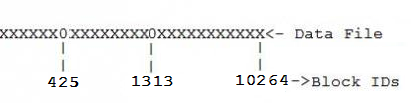
Which means, the following:

X is busy block and 0 is free block

Picture 1.

Block Alocation in Datafile(Gapped Datafile)1

You can determine how much free space is in datafile:

SQL> SELECT a.file_id
  2        ,b.file_name
  3        ,SUM(a.bytes)/1024/1024 AS "Free MB"
  4  FROM dba_free_space a
  5      ,dba_data_files b
  6  WHERE a.file_id=b.file_id
  7  GROUP BY a.file_id,b.file_name
  8  ORDER BY 3 DESC
  9  /

   FILE_ID FILE_NAME                                            Free MB
---------- ---------------------------------------------------- ----------
         2 C:\ORACLE\PRODUCT\10.2.0\ORADATA\ORCL\UNDOTBS01.DBF  914.5
         1 C:\ORACLE\PRODUCT\10.2.0\ORADATA\ORCL\SYSTEM01.DBF   382.4375
         6 C:\ORACLE\PRODUCT\10.2.0\ORADATA\ORCL\TESTTBS.DBF    19.9375
         3 C:\ORACLE\PRODUCT\10.2.0\ORADATA\ORCL\SYSAUX01.DBF   13.625
         5 C:\ORACLE\PRODUCT\10.2.0\ORADATA\ORCL\EXAMPLE01.DBF  3.625
         4 C:\ORACLE\PRODUCT\10.2.0\ORADATA\ORCL\USERS01.DBF    2.1875

6 rows selected

As you can see UNDOTBS01.DBF and SYSTEM01.DBF have biggest free spaces, but it’s better not to touch them.

Let’s choose TESTTBS.DBF datafile.

Calculate the total size of this datafile:

SQL> SELECT file_id,bytes/1024/1024 AS "Size MB"
  2  FROM dba_data_files
  3  WHERE file_id=6
  4  /

   FILE_ID    Size MB
---------- ----------
         6         20

Used Size Calculation: 20MB(Total)-19MB(Free)=1MB(Used)

SQL> ALTER DATABASE DATAFILE 6 RESIZE 1M;

Database altered

Everything is OK, but there may happen the following situation

Let’s choose another datafile EXAMPLE01.DBF and see the total size of it:

SQL> SELECT file_id,bytes/1024/1024 AS "Size MB"
  2      FROM dba_data_files
  3      WHERE file_id=5
  4  /

   FILE_ID    Size MB
---------- ----------
         5         81

Used Size Calculation: 81MB(Total)-3MB(Free)=78MB(Used)

SQL> ALTER DATABASE DATAFILE 5 RESIZE 78M;

ALTER DATABASE DATAFILE 5 RESIZE 78M

ORA-03297: file contains used data beyond requested RESIZE value

This shows that EXAMPLE01.DBF datafile is gapped, as it is shown on the Picture 1.

Let’s see what blocks are free:

SQL> SELECT file_id
  2        ,block_id
  3        ,bytes
  4  FROM dba_free_space
  5  WHERE file_id=5
  6  /

   FILE_ID   BLOCK_ID      BYTES
---------- ---------- ----------
         5        425    2490368
         5       1313     458752
         5      10265     851968

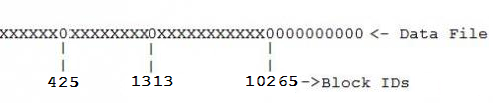
Picture describing the current situation:

Block Alocation in Datafile(Gapped Datafile)2

Size Calculation: 81(Total size MB)*1024*1024=84934656(Bytes)
In block 10265-free space is 851968(Bytes)
84934656(Bytes)-851968(Bytes)=84082688(Bytes)


SQL>  ALTER DATABASE DATAFILE 5 RESIZE 84082688;

Database altered


Now our datafile looks like that:

Block Alocation in Datafile(Gapped Datafile)3

If this is not enough and you still want to reduce datafile size to be just used space in it, then you may do the following:

Identify objects that are located in the blocks from 425, drop them, reduce datafile size till 424 block, recreate objects…not good yes?!Smile

The steps described in this post would be very useful if there was a lot of(or only) free space after the last block(In our case after 10264).

The best way it to create new datafile with the actual used size in your gapped datafile, export objects from old one and then import these objects to the new file.

The moral of this post is to show the logic, in what situation these steps are useful and what is the alternative solution.

I hope it was helpful for youSmile

How to move datafile to another location?

First of all, let’s determine in what tablespace this datafile is:

select file_name,
       tablespace_name
from dba_data_files

—My output on Windows

FILE_NAME                                                TABLESPACE_NAME
-------------------------------------------------------- ------------------
C:\ORACLE\PRODUCT\10.2.0\ORADATA\ORCL\USERS01.DBF        USERS
C:\ORACLE\PRODUCT\10.2.0\ORADATA\ORCL\SYSAUX01.DBF       SYSAUX
C:\ORACLE\PRODUCT\10.2.0\ORADATA\ORCL\UNDOTBS01.DBF      UNDOTBS1
C:\ORACLE\PRODUCT\10.2.0\ORADATA\ORCL\SYSTEM01.DBF       SYSTEM
C:\ORACLE\PRODUCT\10.2.0\ORADATA\ORCL\EXAMPLE01.DBF      EXAMPLE
D:\TESTTBS.DBF                                           TESTTBS

—My output on Linux

FILE_NAME                            TABLESPACE_NAME
------------------------------------ -----------------
/u0/ORADATA/ORCL/USERS01.dbf         USERS
/u0/ORADATA/ORCL/SYSAUX01.dbf        SYSAUX
/u0/ORADATA/ORCL/UNDOTBS01.dbf       UNDOTBS1
/u0/ORADATA/ORCL/SYSTEM01.dbf        SYSTEM
/u0/ORADATA/ORCL/EXAMPLE01.dbf       EXAMPLE
/u7/TESTTBS.dbf                      TESTTBS

1. TESTTBS tablespace should be taken to offline:

alter tablespace TESTTBS offline

2. Datafile should be moved to another location manually:

—On Windows

copy D:\TESTTBS.DBF C:\ORACLE\PRODUCT\10.2.0\ORADATA\ORCL

—On Linux

cp /u7/TESTTBS.DBF /u0/ORADATA/ORCL/TESTTBS.DBF

3.

—On Windows

alter tablespace TESTTBS rename datafile 'D:\TESTTBS.DBF' to 'C:\ORACLE\PRODUCT\10.2.0\ORADATA\ORCL\TESTTBS.DBF'

—On Linux

alter tablespace TESTTBS rename datafile '/u7/TESTTBS.DBF ' to '/u0/ORADATA/ORCL/TESTTBS.DBF'

4. Take TESTTBS tablespace to online

alter tablespace TESTTBS online

5. Check datafile location and tablespace status:

select file_name,
       tablespace_name
from dba_data_files

—My output on Windows

FILE_NAME                                                TABLESPACE_NAME
-------------------------------------------------------- ------------------------------
C:\ORACLE\PRODUCT\10.2.0\ORADATA\ORCL\USERS01.DBF        USERS
C:\ORACLE\PRODUCT\10.2.0\ORADATA\ORCL\SYSAUX01.DBF       SYSAUX
C:\ORACLE\PRODUCT\10.2.0\ORADATA\ORCL\UNDOTBS01.DBF      UNDOTBS1
C:\ORACLE\PRODUCT\10.2.0\ORADATA\ORCL\SYSTEM01.DBF       SYSTEM
C:\ORACLE\PRODUCT\10.2.0\ORADATA\ORCL\EXAMPLE01.DBF      EXAMPLE
C:\ORACLE\PRODUCT\10.2.0\ORADATA\ORCL\TESTTBS.DBF        TESTTBS

—My output on Linux

FILE_NAME                            TABLESPACE_NAME
------------------------------------ -----------------
/u0/ORADATA/ORCL/USERS01.dbf         USERS
/u0/ORADATA/ORCL/SYSAUX01.dbf        SYSAUX
/u0/ORADATA/ORCL/UNDOTBS01.dbf       UNDOTBS1
/u0/ORADATA/ORCL/SYSTEM01.dbf        SYSTEM
/u0/ORADATA/ORCL/EXAMPLE01.dbf       EXAMPLE
/u0/ORADATA/ORCL/TESTTBS.dbf         TESTTBS


SQL> select tablespace_name,
  2         status
  3  from dba_tablespaces
  4  where tablespace_name='TESTTBS'
  5  /

TABLESPACE_NAME                STATUS
------------------------------ ---------
TESTTBS                        ONLINE

That’s all.

How to determine if PGA is set properly

PGA is a memory region, that contains data and control information for a server process. This is not shared region. For each server process there is one PGA allocated.

In order to determine the proper size of PGA, we need to examine measuring criteria from performance views.

1. v$PGASTAT –displays PGA memory usage statistics.

select name,value
from v$pgastat
where name in ('aggregate PGA target parameter'
               ,'aggregate PGA auto target'
               ,'total PGA inuse'
               ,'total PGA allocated'
               ,'over allocation count'
               ,'extra bytes read/written'
               ,'cache hit percentage')

—My output

NAME                                                                  VALUE
---------------------------------------------------------------- ----------
aggregate PGA target parameter                                   8589934592
aggregate PGA auto target                                         536870912
total PGA inuse                                                 18699225088
total PGA allocated                                             23640664064
over allocation count                                                187532
extra bytes read/written                                       305283407872
cache hit percentage                                                  99.2

7 rows selected
 
As you can see “total PGA inuse” is greater than “aggregate PGA target parameter” this happens when PGA_AGGREGATE_TARGET is too small and it in turn causes lots of system I/O as indicated “extra bytes read/written”.
 
2. v$SQL_WORKAREA – displays information about work areas used by SQL cursors. SQL statements, that are stored in the shared pool have one or more child cursor that are shown in V$SQL view. And v$SQL_WORKAREA shows all work areas needed by these child cursors.
The important columns of this view are the followings:

OPTIMAL_EXECUTIONS– number of times, this work area ran optimally without using temporary tablespace.

ONEPASS_EXECUTIONS– number of times, this work area used temporary tablespace only once to get it finished.

MULTIPASSES_EXECUTIONS-number of times, this work area used temporary tablespace in multiple times to get it finished.

Let’s see the total picture, how are they distributed:

select sum(optimal_executions) optimal,
       sum(onepass_executions) onepass,
       sum(multipasses_executions) multipass
from v$sql_workarea

—My output

OPTIMAL    ONEPASS  MULTIPASS
------- ---------- ----------
0487582         51         16
 
We have 51 onepass and 16 multipass executions… They are not big numbers but it would be better if all of them would be optimal.
So we should think about properly adjusting PGA size.
 
3. If we join the following views v$SESSTAT, v$SYSSTAT and v$STATNAME we can see if PGA is properly set or not:
 

select b.name,sum(a.value) value from v$sesstat a, v$statname b where a.STATISTIC#=b.STATISTIC# and b.name like '%workarea executions – %' group by b.name;

—My output

NAME                                                                  VALUE
---------------------------------------------------------------- ----------
workarea executions - onepass                                            19
workarea executions - multipass                                           0
workarea executions - optimal                                       2633589


select b.name, sum(a.value) value
from v$sysstat a, v$statname b
where a.STATISTIC#=b.STATISTIC#
and b.name like '%workarea executions - %'
group by b.name;

—My output

NAME                                                                  VALUE
---------------------------------------------------------------- ----------
workarea executions - onepass                                          4712
workarea executions - multipass                                         800
workarea executions - optimal                                    9760345515


The result above shows that PGA size is not properly set because number of onepass and multipass are considerable.

4. v$PGA_TARGET_ADVICE– view shows the predicted cache hit-ratio improvement.

select round(pga_target_for_estimate/1024/1024) pga_size_mb
       ,estd_pga_cache_hit_percentage
       ,estd_overalloc_count
from v$pga_target_advice;

—My output

PGA_SIZE_MB ESTD_PGA_CACHE_HIT_PERCENTAGE ESTD_OVERALLOC_COUNT
----------- ----------------------------- --------------------
       1024                            96                38530
       2048                            97                28413
       4096                            97                19187
       6144                            97                17741
       8192                           100                16326
       9830                           100                15458
      11469                           100                15049
      13107                           100                14336
      14746                           100                13136
      16384                           100                10570
      24576                           100                    0
      32768                           100                    0
      49152                           100                    0
      65536                           100                    0

Setting PGA to 24576MB can eliminate over allocation count and gain maximum hit ratio.

To change PGA size:

alter system set pga_aggregate_target=24576m;

NO_UNNEST hint, query optimization

There are multiple useful hints, that are changing Oracle execution plan for some SQL statement and reduces  the cost. One of them is NO_UNNEST hint.

First of all, let’s discuss briefly what UNNEST hint does.

UNNEST hint “Instructs the optimizer to unnest and merge the body of the subquery into the body of the query block that contains it, allowing the optimizer to consider them together when evaluating access paths and joins.”

For example, if we have the query with inline view like that:

select *
from   hr.employees outer
where  outer.salary > (
              select avg(inner.salary)
              from   hr.employees inner
              where  inner.department_id = outer.department_id
       );

What UNNEST hint actually does, is the following:

select *
from   hr.employees outer,
       (
              select department_id, avg(salary) avg_sal
              from   hr.employees
              group by department_id
       )      inner
Where
       outer.department_id = inner.department_id
and    outer.salary > inner.avg_sal;


Now, when we already know what UNNEST hint does. Let’s see how optimizes the sql statement its opposite NO_UNNEST hint.

–Original SQL Statement

SELECT /*+ index(v1.table1 table1_IX1) */
      v1.col1,
      v1.col2,
      v1.col3,
      v1.col4,
      v1.col5
FROM VIEW1 v1
WHERE v1.code = :B1
AND v1.ID = NVL(NULL, v1.ID)
AND v1.ID IN
             (SELECT v2.sid
              FROM VIEW2 v2                 
              WHERE 'N' = 'N'
              AND v2.Key1 = NVL(NULL, Key1)
              AND NVL(NULL, Active_Flag) = Active_Flag
              AND NVL(NULL, Inform_Flag) = Inform_Flag
              OR('Y' = 'Y' AND :b2 = KEY1 AND Active_Flag = 'Y')
             )

–Explain Plan

--------------------------------------------------------------------------------
| Id  | Operation                         | Name                | Rows  | Bytes
--------------------------------------------------------------------------------
|   0 | SELECT STATEMENT                  |                     |     1 |   244
|   1 |  HASH JOIN SEMI                   |                     |     1 |   244
|   2 |   NESTED LOOPS OUTER              |                     |     1 |   231
|   3 |    TABLE ACCESS BY INDEX ROWID    | TABLE1              |     1 |   110
|   4 |     INDEX RANGE SCAN              | TABLE1_IX1          |     2 |
|   5 |    TABLE ACCESS BY INDEX ROWID    | TABLE2              |     1 |   121
|   6 |     INDEX UNIQUE SCAN             | TABLE2_PK           |     1 |
|   7 |   VIEW                            | VW_NSO_1            |     2 |    26
|   8 |    CONCATENATION                  |                     |       |
|   9 |     TABLE ACCESS BY INDEX ROWID   | TABLE3              |     1 |    21
|  10 |      NESTED LOOPS                 |                     |     1 |    49
|  11 |       NESTED LOOPS                |                     |     1 |    28
|  12 |        TABLE ACCESS BY INDEX ROWID| TABLE4              |     1 |    18
|  13 |         INDEX UNIQUE SCAN         | TABLE4_PK           |     1 |
|  14 |        TABLE ACCESS BY INDEX ROWID| TABLE5              |     1 |    10
|  15 |         INDEX RANGE SCAN          | TABLE5_PK           |     1 |
|  16 |       INDEX RANGE SCAN            | TABLE1_IX1          |     1 |
|  17 |     TABLE ACCESS BY INDEX ROWID   | TABLE5              |     1 |    10
|  18 |      NESTED LOOPS                 |                     |     1 |    49
|  19 |       NESTED LOOPS                |                     |     1 |    39
|  20 |        TABLE ACCESS FULL          | TABLE3              |  4559 | 95739
|  21 |        TABLE ACCESS BY INDEX ROWID| TABLE4              |     1 |    18
|  22 |         INDEX UNIQUE SCAN         | TABLE4_PK           |     1 |
|  23 |       INDEX RANGE SCAN            | TABLE5_PK           |     1 |
--------------------------------------------------------------------------------

COST IS:  9192

–With hint

SELECT /*+ index(v1.table1 table1_IX1) NO_UNNEST(@sq1)*/
      v1.col1,
      v1.col2,
      v1.col3,
      v1.col4,
      v1.col5
FROM VIEW1 v1
WHERE v1.code = :B1
AND v1.ID = NVL(NULL, v1.ID)
AND v1.ID IN
             (SELECT /*+ qb_name(sq1)*/v2.sid
              FROM VIEW2 v2
              WHERE 'N' = 'N'
              AND v2.Key1 = NVL(NULL, Key1)
              AND NVL(NULL, Active_Flag) = Active_Flag
              AND NVL(NULL, Inform_Flag) = Inform_Flag
              OR('Y' = 'Y' AND :b2 = KEY1 AND Active_Flag = 'Y')
             )

Note: I used query naming qb_name.

–Explain plan

--------------------------------------------------------------------------------
| Id  | Operation                       | Name                 | Rows  | Bytes |
--------------------------------------------------------------------------------
|   0 | SELECT STATEMENT                |                      |     1 |   231 |
|   1 |  FILTER                         |                      |       |       |
|   2 |   NESTED LOOPS OUTER            |                      |     1 |   231 |
|   3 |    TABLE ACCESS BY INDEX ROWID  | TABLE1               |     1 |   110 |
|   4 |     INDEX RANGE SCAN            | TABLE1_IX1           |     2 |       |
|   5 |    TABLE ACCESS BY INDEX ROWID  | TABLE2               |     1 |   121 |
|   6 |     INDEX UNIQUE SCAN           | TABLE2_PK            |     1 |       |
|   7 |   TABLE ACCESS BY INDEX ROWID   | TABLE5               |     1 |    10 |
|   8 |    NESTED LOOPS                 |                      |     1 |    49 |
|   9 |     NESTED LOOPS                |                      |     1 |    39 |
|  10 |      TABLE ACCESS BY INDEX ROWID| TABLE3               |     3 |    63 |
|  11 |       INDEX RANGE SCAN          | TABLE3_IX1           |     3 |       |
|  12 |      TABLE ACCESS BY INDEX ROWID| TABLE4               |     1 |    18 |
|  13 |       INDEX UNIQUE SCAN         | TABLE4_PK            |     1 |       |
|  14 |     INDEX RANGE SCAN            | TABLE5_PK            |     1 |       |

COST IS: 16

I hope it was helpful…