Useful tools for analyzing OS diagnostic data
February 12, 2022 Leave a comment
Oracle, Linux, AWS, Azure, GCP
December 17, 2021 Leave a comment
Yes, it can be changed without impacting the business operations.
Oracle source: Doc ID 2269728.1
RHEL source: https://access.redhat.com/solutions/437043
========================Additional information========================
Additional explanation, why you may need to change that value.
Alert log shows:
ORA-27090: Unable to reserve kernel resources for asynchronous disk I/O
Linux-x86_64 Error: 2: No such file or directory
Additional information: 3
Additional information: 128
Additional information: 139817340277512
The problem is caused by a lower than recommended value for aio-max-nr. The current value is 1048576, but recommended is 3145728.
Set fs.aio-max-nr to 3145728 in /etc/sysctl.conf.
# grep fs.aio-max-nr /etc/sysctl.conf
fs.aio-max-nr = 3145728
Make a new value effective:
# sysctl -p /etc/sysctl.conf
Verify the new value:
# sysctl -a|grep fs.aio-max-nr
fs.aio-max-nr = 3145728
May 20, 2021 4 Comments
Problem:
After checking if flashgrid-clan package was installed, got this error:
error: rpmdb: BDB0113 Thread/process 2884/140438918064192 failed: BDB1507 Thread died in Berkeley DB library
error: db5 error(-30973) from dbenv->failchk: BDB0087 DB_RUNRECOVERY: Fatal error, run database recovery
error: cannot open Packages index using db5 - (-30973)
error: cannot open Packages database in /var/lib/rpm
error: rpmdb: BDB0113 Thread/process 2884/140438918064192 failed: BDB1507 Thread died in Berkeley DB library
error: db5 error(-30973) from dbenv->failchk: BDB0087 DB_RUNRECOVERY: Fatal error, run database recovery
error: cannot open Packages database in /var/lib/rpm
package flashgrid-clan is not installed
Reason:
If you see rpmdb errors during package management (rpm, yum), it means that the RPM database is corrupted.
Solution:
# mkdir /var/lib/rpm/backup
# cp -a /var/lib/rpm/__db* /var/lib/rpm/backup/
# rm -f /var/lib/rpm/__db.[0-9][0-9]*
# rpm --quiet -qa
# rpm --rebuilddb
# yum clean all
May 9, 2021 Leave a comment
I have used this command many times, but the interval between each usage is so big that I almost always forget the syntax.
So here it is:
# du -a / | sort -n -r | head -n 5

51190272	/
37705424	/root
33040524	/root/apache-tomcat-7.0.53
32802516	/root/apache-tomcat-7.0.53/logs
32802440	/root/apache-tomcat-7.0.53/logs/catalina.out
January 19, 2021 Leave a comment
Life is too short, that’s why it’s mandatory to use shortcuts… Instead of typing frequently used ssh client options such as port, user, hostname, identity-file and so on, you can save that information in sshd config file and then access it with defined alias.
/etc/ssh/ssh_config~/.ssh/config same as $HOME/.ssh/configInstead of connecting to the server everytime using the following command:
# ssh root@95.80.12.10 -i ~/.ssh/my_id_rsa
Save the following entries in ~/.ssh/config file:
# vim ~/.ssh/config
Host my_db
     HostName 95.80.12.10
     IdentityFile ~/.ssh/my_id_rsa
     User root
And connect to the server using this simple way:
# ssh my_db
For other options check https://linuxize.com/post/using-the-ssh-config-file/
August 1, 2020 Leave a comment
There are several ways to identify that, I will suggest one of them using rpm -qf, that finds out what package a file belongs to:
Oracle Linux:
#  rpm -qf /etc/redhat-release
oraclelinux-release-7.8-1.0.7.el7.x86_64
RHEL:
# rpm -qf /etc/redhat-release
redhat-release-server-7.8-2.el7.x86_64
June 19, 2019 Leave a comment
Problem:
There are a lot of warnings “kernel: serial8250: too much work for irq4 ” in /var/log/messages and are likely your system experiences stability problems. And can lead to Oracle cluster node evictions.
Cause:
The problem was related to Azure OAM Agent pushing very large messages to serial console. The problem was introduced by the latest update of the Azure OMS agent.
Temporary Solution:
Temporarily remove OMS Linux Agent Extension until Microsoft resolves this bug:
1. On Azure portal click the link of the affected VM.
2. Click the “Extensions” section.
3. Click the OMS Linux Agent in the list.
4. Click the “Uninstall” button at the top
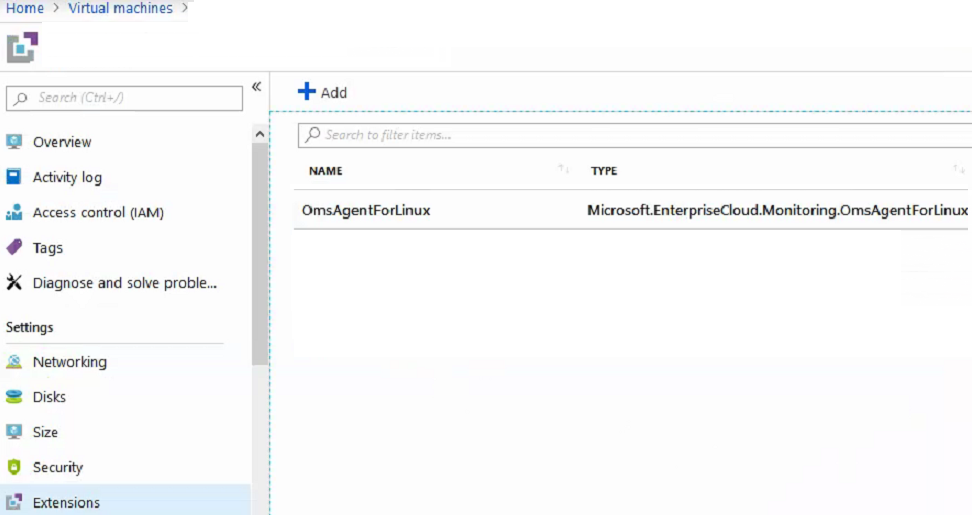
When you make sure that OMS agent bug is fixed (should be verified with Microsoft support), then you can reinstall the pluggin.
June 13, 2019 1 Comment
Problem:
I am not able to receive email alerts from database server. Because message transfer agent is trying to connect to the Google SMTP via IPv6, which fails.
# tail /var/log/maillog

Jun 12 15:35:10 rac1 postfix/smtp[19725]:connect to
gmail-smtp-in.l.google.com [2607:f8b0:400c:c0b::1a]:25:
Network is unreachable
Solution:
Configure Postfix not to use IPv6 by editing /etc/postfix/main.cf with the following:
[root@rac1 ~]# cat /etc/postfix/main.cf | grep inet_protocols
inet_protocols = ipv4
Restart Postfix and check the status:
[root@rac1 ~]# systemctl restart postfix

[root@rac1 ~]# systemctl status  postfix
 ● postfix.service - Postfix Mail Transport Agent
    Loaded: loaded (/usr/lib/systemd/system/postfix.service; enabled; vendor preset: disabled)
    Active: active (running) since Thu 2019-06-13 10:20:48 UTC; 52s ago
   Process: 17431 ExecStop=/usr/sbin/postfix stop (code=exited, status=0/SUCCESS)
   Process: 17449 ExecStart=/usr/sbin/postfix start (code=exited, status=0/SUCCESS)
   Process: 17445 ExecStartPre=/usr/libexec/postfix/chroot-update (code=exited, status=0/SUCCESS)
   Process: 17442 ExecStartPre=/usr/libexec/postfix/aliasesdb (code=exited, status=0/SUCCESS)
  Main PID: 17520 (master)
    Memory: 3.0M
    CGroup: /system.slice/postfix.service
            ├─17520 /usr/libexec/postfix/master -w
            ├─17521 pickup -l -t unix -u
            └─17522 qmgr -l -t unix -u
 Jun 13 10:20:48 rac1.example.com systemd[1]: Starting Postfix Mail Transport Agent…
 Jun 13 10:20:48 rac1.example.com postfix/postfix-script[17518]: starting the Postfix mail system
 Jun 13 10:20:48 rac1.example.com postfix/master[17520]: daemon started -- version 2.10.1, configuration /etc/postfix
 Jun 13 10:20:48 rac1.example.com systemd[1]: Started Postfix Mail Transport Agent
April 2, 2013 2 Comments
1. Check if you have already installed device-mapper-multipath rpm, if not then install it.
rpm -qa device-mapper-multipath
2. If /etc/multipath.conf file doesn’t exist, then copy it from /usr/share/doc/device-mapper-multipath-*
cp /usr/share/doc/device-mapper-multipath-0.4.9/multipath.conf /etc/multipath.conf
3. Find WWIDs that should be added to multipath configuration.
# scsi_id -g -u /dev/sdb
36001438009b044d90000900000780000
4. Edit the /etc/multipath.conf configuration file
defaults {
user_friendly_names yes
path_grouping_policy failover
}blacklist {
wwid "*"
}blacklist_exceptions {
wwid "36001438009b044d90000900000780000"
}multipaths {
multipath {
wwid "36001438009b044d90000900000780000"
alias asm1
}
}
5. Add module to the Linux kernel:
modprobe dm-multipath
6. Start multipath service:
service multipathd start
7. If you have any syntax errors or any parameters that do not work in your Linux version, the following command will show:
multipath -d
8. Commit the configuration:
multipath -v2
9. The following command must find the paths , or you have a bad configuration in multipath.conf file:
multipath -ll
10. Make devices configured after a reboot:
chkconfig multipathd on
If you have made any mistakes in multipath.conf file then correct them and do the following steps to make changes take affect :
1. edit the /etc/multipath.conf
2. Reload the multipath service:
service multipathd reload
3. Remove all unused multipath devices
multipath -F
4. Check again that syntax is correct:
multipath –d
5. Commit the changes:
multipath –v2
Note that, this configuration is very simple, but it is working also perfectly.
For more multipath options and more sophisticated configuration, see the following documentation.
 DBA Knowledge Base