SQL Access Advisor(Tuning a single sql)

SQL Access Advisor Overview

The SQL Access Advisor gives you the recommendations about performance tuning. For example it may recommend you to create materialized views, partitions, and/or indexes..You should just give it sql/sqls which are somehow problematic.For example sql which needs big amount of time to execute.

Now  I will discuss Quick Tune, because it is a simple way to tune sqls and also it is widely used . But its “disadvantage” may be counted that it tunes just one sql than multiple sqls(which can be performed by workloads).

Privileges Needed to Use the SQL Access Advisor

You need to have the ADVISOR privilege to manage or use the SQL Access Advisor.

If that user does not have SELECT privileges to a particular table, the SQL Access Advisor neglects  the statement referencing the table. To avoid missing recommendations, the current database user must have SELECT privileges on the tables.

Performing a Quick Tune

QUICK_TUNE procedure accepts as its input a task_name and a SQL statement text or id. It will then create a task and workload and execute that task.

BEGIN
DBMS_ADVISOR.QUICK_TUNE(DBMS_ADVISOR.SQLACCESS_ADVISOR,
                        'MY_QUICKTUNE_TASK',
                        'SELECT COUNT(*)
                         FROM CLIENTS');
END;

To see the result:

SELECT DBMS_ADVISOR.GET_TASK_SCRIPT('MY_QUICKTUNE_TASK')
FROM dual;

How to know that the database was started by spfile or pfile?

–Run the following command

SQL> show parameter spfile;

–Output

NAME  | TYPE |VALUE
——————|——————|—————————————————
spfile|string|

If the output is this(value is empty), means that oracle database was started by pfile.

NOTE :One reason oracle database was started by pfile is that it didn’t find spfile.Another is that you indicated pfile during the startup.

Sql server 2005 change collation for database

Collation is a set of rules how to compare and sort data in a database.Changing database collation may cause some problems especially:

Error-5030 The database could not be exclusively locked to perform the operation.

To resolve this problem you should do the following from command line:

–Uses a trusted connection instead of requesting a password.

C:\>osql -E
1>use djbadmin
2>GO

–Specifies that only one user can connect to the database at a time. By rolling back other connected users immediately.

1>ALTER DATABASE djbadmin SET SINGLE_USER WITH ROLLBACK IMMEDIATE
2>GO

–Changes collation for database to Latin1_General_CI_AS

1>ALTER DATABASE djbadmin COLLATE Latin1_General_CI_AS
2>GO

–Returns database to its usual state(Available for multiple users).

1>ALTER DATABASE djbadmin SET MULTI_USER
2>GO

Oracle Errors(ORA-…)

Here is discussed just one variant how to solve the problem.

ORA-01033; ORA-01034; ORA-01035;  ORA-01203; ORA-02069; ORA-12518;

ORA-01034 and ORA-27101; ORA-19809 and ORA-19804; ORA-27101;
RMAN-06059 & ORA-19625 & ORA-27041

Error

ORA-27101: shared memory realm does not exist

Action

SQL> startup
SQL> shutdown immediate

(It helped me,I hope it will help you too )

Error

ORA-01033: ORACLE initialization or shutdown in progress

Cause

Database is in mount or nomount mode.

Action

–If it is in nomount mode:

SQL>alter database mount;
SQL>alter database open;

–if it is in mount mode:

SQL>alter database open;

Error

ORA-01035:  ORACLE only available to users with RESTRICTED SESSION privilege

Cause

Instance started in restricted mode.

Action

–Ask sysdba to disable restricted session

SQL>alter system disable restricted session;

–Or ask sysdba to give you RESTRICTED SESSION system privilege.

SQL>grant restricted session to yourUserName

Error

ORA-01034: ORACLE not available

Cause

The database and the instance are not started.

Action

SQL>startup;

Error

ORA-12518: TNS:listener could not hand off client connection tips

Action

–On windows

Start->Run->services.msc->OracleServiceMFD manually start it

Note: MFD is instance name

Error:

ORA-02069: global_names parameter must be set to TRUE for this operation

Cause:

You are trying to make DML operation on the remote database using local function.

This is the “Oracle Bug”, it should work but it doesn’t.

Example (for better understanding):

–Assume that we have two databases DB1 and DB2

–On DB1 we have function fun1

create function fun1 return number is
begin
return 1;
end;

–On DB1 we have a database link referring to DB2 called, for simplicity, DB2.

–Check that it works.

select *
from dual@DB2

–If the output is the following, then it works.

DUMMY
-----
X

–Let’s create test table in DB2(connect to DB2 database)

create table tesTable(
id         number,
testColumn number
);

–Let’s make some DML operation, which should cause this ORA-02069 error.

insert into testable@DB2(id,testColumn)
values(1, fun1);


“ORA-02069: global_names parameter must be set to TRUE for this operation”

Now, when you already know in what situation this error occurs let’s write the solution. It has two solutions:

Solution one:

1. Set the global_names parameter to true, it can be done on the system level or session level(consider that session level sometimes is not available)

-On DB1

alter session set global_names=true;

2. Create database link on the remote database, in our case on DB2, which will refer to the database DB1(make link name the same as the database global name, because setting global_names parameter to true requires it).

–On DB2

Create database link DB1 connect to <username> identified by <password>
using ‘DB1’;

Now it should work, but I should mention that creating database link may not be preferable, because it is not secure (You should guess why, because if you do this you will be able to connect to DB1 with some user through database link…if it doesn’t matter for you then use itJ).

Solution  two:

1.  Create temporary table on the local database.

2.  Insert row into the temporary table.

3.  Insert the temporary row from the temporary table to the remote database.

4.  Delete the temporary row.

Note that this solution is slower than the first one. But it also solves the problem and is much more secure.

Error

ORA-01203 wrong incarnation of this file – wrong creation SCN

Cause

The SCN in datafile is not the same as the SCN in the control file.
This is probably a copy of a file that was dropped.

Action

Restore the current  copy of the datafile.

Error

ORA-01034: ORACLE not available
ORA-27101: shared memory realm does not exist
SVR4 Error: 2: No such file or directory

Action

Check ORACLE_SID if it is correctly set.. For example, you may need to set this parameter with uppercase letters or lowercase letters…Try one of them


Error


RMAN-03009: failure of backup command on ORA_DISK_1 channel at …
ORA-19809: limit exceeded for recovery files
ORA-19804: cannot reclaim 52428800 bytes disk space from 104857600 limit

Cause

The flash recovery area is full.

Action

Run the following command to identify limit and used space:

   select name
          ,floor(space_limit / 1024 / 1024) "Limit(MB)"
          ,ceil(space_used  / 1024 / 1024) "Used(MB)"
   from	v$recovery_file_dest

You can change the limit:

 alter system set db_recovery_file_dest_size= scope=both;

You can continue.. backuping


Error


RMAN-06059: expected archived log not found, lost of archived log compromises recoverability
ORA-19625: error identifying file string
ORA-27041: unable to open file
OSD-04002: unable to open file
O/S-Error: (OS 3) The system cannot find the path specified.

Cause

RMAN attempted to backup an archive log file, but couldn’t find it.

Action

Restore missing file or run the following:

change archivelog all crosscheck;

RMAN makes a check and if any archivelog file is missing will be marked as unavailable.

Put Multiple Rows in a Single Row

In my working experience selecting multiple rows into one row was in “high-demand” query. So I decided to write here these queries as in Oracle also in SQL Server 2005:

First of all let’s create table and fill it with desired rows.

————————————————————Oracle—————————————————————–

–Create table

CREATE TABLE testTable(
deptno number,
ename varchar2(50)
);

–Fill table with data

insert into testTable
values(1,'Mari');

insert into testTable
values(1,'Gio');

insert into testTable
values(1,'Anna');

insert into testTable
values(2,'Sopo');

insert into testTable
values(2,'Vaso');

insert into testTable
values(2,'Temo');

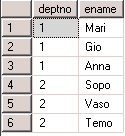
–Let see the data in testTable

select *
from testTable

–Output

Query from the table(Oracle)

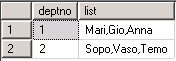
–But  our desired output is the following:

Multiple rows in a single row(Oracle)

–To achieve this,we should write the following query:

SELECT deptno
       ,LTRIM(SYS_CONNECT_BY_PATH(ename,','),',') as list
FROM(SELECT deptno
            ,ename
            ,ROW_NUMBER() OVER (PARTITION BY deptno ORDER BY ename) AS seq
     FROM  testTable)
WHERE  connect_by_isleaf = 1
CONNECT BY seq = PRIOR seq +1 AND deptno = PRIOR deptno
START WITH seq = 1;

———————————————————–Sql Server 2005——————————————————-

–Create table

CREATE TABLE testTable(
deptno numeric(18) ,
ename varchar(50)
);

–Fill table with data

insert into testTable
values(1,'Mari');

insert into testTable
values(1,'Gio');

insert into testTable
values(1,'Anna');

insert into testTable
values(2,'Sopo');

insert into testTable
values(2,'Vaso');

insert into testTable
values(2,'Temo');

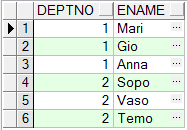
–Let see the data in testTable

select *
from testTable

–Output

Query from the table(SQL server)

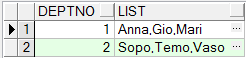
–But  our desired output is the following:

Multiple rows in a single row(SQL server)

–To achieve this,we should write the following query:

SELECT DISTINCT deptno,
       STUFF(value_list, 1, 1, '') AS list
FROM testTable AS A
CROSS APPLY (
     SELECT ',' + ename
     FROM testTable AS B
     WHERE B.deptno =A.deptno
     FOR XML PATH('')
) AS t(value_list);

–Let’s discuss the following functions:

*STUFF-It will replace substring started by position 1 with length 1 by '',
       which means substring started by position 1 with length 1 will be removed.
Note:  We need to remove first character,because it is extra comma(output was ,Mari...)
* CROSS APPLY-this function will return corresponding rows from right table expression
              to left table expression.
* FOR XML PATH-returns a single string in xml format.

Signature Pad with HTML5 Canvas

If you hurry and don’t want explanations click here to see the final result 🙂

Long time has passed since everything is migrating from real world to digital world. let’s create digital signature pad with HTML5 Canvas technology. It will be little area on web-page and with mouse a user will be able to sign as it is in some classical painting software.

The only markup (for example: canvas.html file) we will need looks like this:

<html>
    <head>
        <title>Signature Pad</title>
        <script type="text/javascript">
            //javascript code goes here ...
        </script>
    <head>
    <body>
       <canvas width="300" height="200" id="canvas"></canvas>
    </body>
</html>

We marked-up a simple html page, with title: “Signature Pad” and in the body of document there is a canvas element. For simplicity lets write JavaScript code inside html (it is not a good pattern, but the aim of this post is idea and realization of making signature pad in Canvas). So in the head part of our markup we have script tag.

Before we start coding lets explain general idea. We will need to listen to mouse events: when mouse is moving on canvas element and mouse button is pressed then we should draw a line from previous point to current point. Actually, event fires too fast and our drown lines looks like a point. Finally, there is natural signature curve.

Let’s formulate technical tasks and then write solutions:
Tasks:

1.

Function that draws a line on canvas from the first point to the second point.

2.

Listen to moment when mouse button is pressed, save the state and put a dot.

3.

Listen to moment when mouse button is released and save the state.

4.

Listen to mouse move event all the time and when mouse button is in pressed state draw a line from previous (x,y) to current (x,y).

Solutions:

1.

Why to draw a line and not a point? Because canvas doesn’t have this feature 🙂 So let’s talk a little about canvas. To draw on canvas firstly we must retrieve drawing context from it, in this case two dimensional context (there is no three dimensional context implemented yet). The idea of drawing with canvas is that firstly you have to create a path. Then move to some (x,y) point and then from that point do what you need (In this case draw a line) then again move to some point and do what you need until you complete your task but nothing will appear on canvas because path needs to be filled with “ink” and then you have to close path. Therefore our JavaScript function drawLine will look like this:

    drawLine = function(x1, y1, x2, y2){
        context.beginPath(); //create a path
        context.moveTo(x1, y1); //move to
        context.lineTo(x2, y2); //draw a line
        context.stroke(); // filled with "ink"
        context.closePath(); //close path
    };

But here we have one side efect “context” is not defined here. Let’s define it and not only “context” but all other staff in our script tag when document is ready:

<script type="text/javascript">
    //fires when document is loaded and DOM is ready.
    window.onload = function(){
        var context, canvas, drawLine;
        canvas = document.getElementById('canvas'); //retrieve canvas from dom by id that we have assigned
        context = canvas.getContext('2d'); //retrieve context
        //definition of function drawLine goes below.
    }
</script>

Let’s note that all our further definitions of functions and variables goes in window.onload = function(){ … } function!

2.

This is a simple task, we will assign listener on canvas’ onmousedown event.

    canvas.onmousedown = function(evt){
        mouseIsPressed = true; //save that mouse is pressed
        drawLine(evt.offsetX, evt.offsetY, evt.offsetX + 1, evt.offsetY + + 1) //draw short line that looks like a dot
    };

3.

Similarly, we will assign listener on canvas’ onmouseup event.

    canvas.onmouseup = function(evt){
        mouseIsPressed = false; //save that mouse is released
    };

4.

And finally, canvas’ onmousemove. This handler has to do the following: get current X and Y coordinates of mouse, check if mouse is pressed, if is pressed then draw a line from previous coordinates to current coordinates, and last, save current coordinates to another variables as previous coordinates.

    canvas.onmousemove = function(evt){
        x = evt.offsetX; y = evt.offsetY; //get current X and Y
        if(mouseIsPressed){
            drawLine(prevX, prevY, x, y);  //draw a line on canvas from previous to current point.
        }
        prevX = x; prevY = y; //save previous x and y in both case, weather mouse is pressed or not
    };

But there is a little problem, the canvas element is not visible on page. This is because both, canvas and page’s background color is white. So, let’s do borders to canvas element that is was seen where is it on page. For this we will need to add one line in onload function that will apply CSS style to canvas. But let’s do it in clever way. When we get evt.offsetX or evt.offsetY it returns coordinates related to canvas edges include border width. So, let’s save border width in variable and subtract that value while drawing line in function drawLine. The change will look like this:

    context.moveTo(x1 - borderWidth, y1 - borderWidth); //move to
    context.lineTo(x2 - borderWidth, y2 - borderWidth); //draw a line

and in onload function add a line:

    canvas.style.border = borderWidth + " px solid #00F000";

If me merge JavaScript functions and add variable declarations in onload function described above, finally, we will get this result :

<html>
    <head>
        <title>Signature Pad</title>
        <script type="text/javascript">
			//fires when document is loaded and DOM is ready.
			window.onload = function(){
				var context, canvas, drawLine, mouseIsPressed, x, y, prevX, prevY, borderWidth;

				canvas = document.getElementById('canvas'); //retrieve canvas from dom by id that we have assigned
				context = canvas.getContext('2d'); //retrieve context
				borderWidth = 5; //let border width will be 5 pixel
				canvas.style.border = borderWidth + " px solid #00F000"; // 5 pixel width solid green border

				drawLine = function(x1, y1, x2, y2){
					context.beginPath(); //create a path
					context.moveTo(x1 - borderWidth, y1 - borderWidth); //move to
					context.lineTo(x2 - borderWidth, y2 - borderWidth); //draw a line
					context.stroke(); // filled with "ink"
					context.closePath(); //close path
				};

				canvas.onmousedown = function(evt){
					mouseIsPressed = true; //save that mouse is pressed
                                        drawLine(evt.offsetX, evt.offsetY, evt.offsetX + 1, evt.offsetY + + 1) //draw short line that looks like a dot
				};

			        canvas.onmouseup = function(evt){
					mouseIsPressed = false; //save that mouse is released
				};

				canvas.onmousemove = function(evt){
					x = evt.offsetX; y = evt.offsetY; //get current X and Y
					if(mouseIsPressed){
						drawLine(prevX, prevY, x, y);  //draw a line on canvas from previous to current point.
					}
					prevX = x; prevY = y; //save previous x and y in both case, weather mouse is pressed or not
				};

			}
        </script>
    <head>
    <body>
       <canvas width="300" height="200" id="canvas"></canvas>
    </body>
</html>

Canvas has a method toDataURL that returns image in base64 format in “image/png” or “image/jpeg”. From base64 we can convert it into binary image. So this way we can get signature image with help of canvas.
Interested Transaction Lists (ITL) Waits

When I’ve generated AWR report, there I’ve noticed “Segments by ITL Waits” at this moment I‘ve not had any idea what was that. But after searching it on the internet I found very good information…Now, I want to share it with you.

First of all let’s discuss what ITLs is:

When a row is locked by a transaction, this information is placed in the block(header), where this row exists. The portion of the block header, which saves this information(transaction address and rowid) is called ITLs(Interested Transaction Lists).

ITLs contains several slots, initial number of slots are defined by the parameter INITRANS, which is indicated during the creation of the object (table, index) and can be increased till MAXTRANS.

Example:
CREATE TABLE test_tab
( COL1 NUMBER,
  COL2 VARCHAR2(50))
INITRANS 1
MAXTRANS 1

When one transaction tries to modify row, one slot will be filled by the info about this transaction(Assume that transaction is not finished, means commit or rollback is not performed). If another transaction will try to change the row within this block, this process will wait till the first transaction will not end.

Question is why?

Because for the second transaction there(in the block header) must be allocated another free slot, but free slot doesn’t exist and also slots number can’t increase because of  MAXTRANS is 1 which equals to the number of already allocated slot. At this time increasing MAXTRANS will solve the problem, to change MAXTRANS do as follows:

–Maximum 10 slots can be allocated(10 transaction can be placed)

Alter table test_tab MAXTRANS 10;

What is ITL wait?

When slot can’t be increased and free slots still not available… Following transaction will wait until any slot will not be available, as we have had previously… This wait is called ITL waits. We solved this waits by increasing MAXTRANS but there may happen another problem. That ,for example we have initially 1 slot(INITRANS is 1) and can be allocated maximum 10 slots (MAXTRANS is 10), info  about one transaction is placed in one slot, then  comes another transaction and its info can’t be placed in the next slot(causes waiting) but as we know we can have 9 other available slots, still can’t be placed, why?

Let me draw some pictures so that you can easily guess what happens.

–Newly created block with initially one slot(during creation table we indicated INITRANS 1) looks like this:

Empty Block with one ITL slot

–Three rows are inserted in the block.

Full block with one ITL slot

–One transaction modified one row and did not commit. The Info is written to the available slot.

Full block with one alocated ITL slot(locking,filling ITL slot)

–Another transaction comes and wants to modify row, consequently info about this transaction should be placed in another free slot(do not forget we have initially one slot and number of this slots can be increased till 10)

Full block with one alocated ITL slot and not enought space for another slot

Note:In this case there is not empty space for new slot, that is why it can’t be allocated… If we have had indicated initially more slots another transaction would be able to be placed, as you can guess to solve this problem you should indicate bigger INITRANS during creation of object, or alter object and change this parameter…For the blocks which are already full as I can guess it will not affect, but for future it will be usefull. However this also means that there is less space in the block for actual data.

Apex Uninstall

It is a very simple to uninstall apex.

1.Just go to the folder where apex exists(where you unzipped Oracle Application Express software).

2.Connect to the database as a SYS user:

On Windows:

SYSTEM_DRIVE:\ sqlplus /nolog
SQL> CONNECT SYS as SYSDBA
Enter password:SYS_password

On UNIX and Linux:

$ sqlplus /nolog
SQL>CONNECT SYS as SYSDBA
Enter password: SYS_password

3. Execute the following command:

SQL> @apxremov.sql

Gather table statistics(using dbms_stats)

World Scenario
If we have had a big table and then we decided to delete a big amount of rows from this table.Oracle “knew” that it was a big table on which a query was slow and now it is a small table on which a query should be faster than the old one,BUT oracle still needs more time to execute a query…
The question is why???
BECAUSE oracle still has the old statistics on this table ,which means that oracle still thinks that it is a big table…And the solution is to gather new statistics manually:

begin
    dbms_stats.unlock_table_stats(ownname =>'username',
                                  tabname=>'table_name);
    dbms_stats.gather_table_stats(ownname =>'username',
                                  tabname=>'table_name',
                                  degree => 4,
                                  cascade => true);
end;
Note:
dbms_stats.unlock_table_stats
Table statistics can be locked..This is a good opportunity to be sure that estimated statistics will not be changed.So to estimate new statistics you should unlock it.
dbms_stats.gather_table_stats
Here, not easy understandable option is just cascade.
Cascade->Indicates oracle to gather statistics on the indexes also for this table.

Global Hints

Oracle hints just refer to the table in the query. But there exist GLOBAL HINTS which allows you specify hints for a table within a view.

For example hint index:

SELECT /*+ index(v_standart_struct.ss indx_name) */col1,
col2,
col3 - 15,
col4
FROM v_standard_struct
WHERE col1= 910
AND col2 = 2
ORDER BY col4;
Note: I have written “.ss”-> alias of the table within a view, not the actual name. When table has alias, you must use it. If you forget it and write the actual name of the table, but not alias, it will not work.(If table doesn’t have an alias,you must use the actual name.)