EM 24ai: Applying Management Agent Release Update (RU) from the EM web interface

Prerequisites

Before installing or uninstalling the RU, ensure that you meet the following requirements:

  1. Apply EM 24ai Release 1 Update 2 Patch 37629905 or it’s later Release Update version patch on the OMS before applying this RU.

    If you have not done this already, you can check my previous post.
  2. Deinstall this RU before deinstalling Enterprise Manager 24ai Release 1 Update 2 Patch 37629905 on OMS.

Installation

1. Login to the Enterprise Manager and navigate to Enterprise -> My Oracle Support -> Patches & Updates:

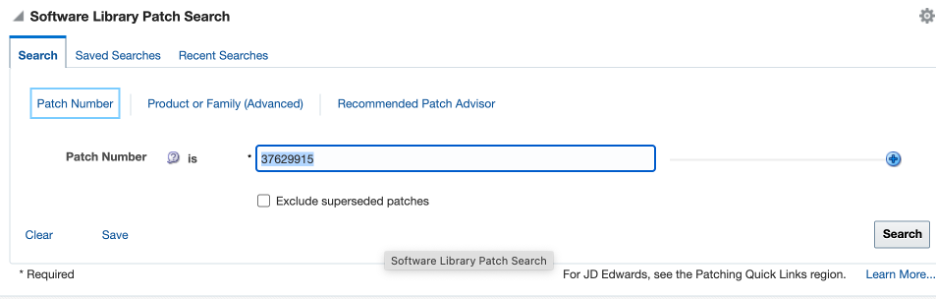
2. Enter the patch number (e.g. 37629915) in the “Software Library Patch Search” section and click Search:

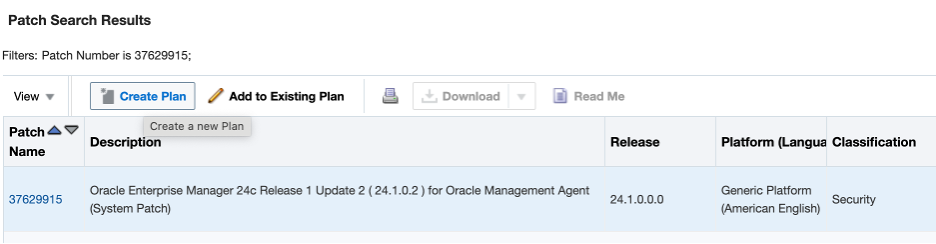
3. Select the patch and click “Create Plan.” :

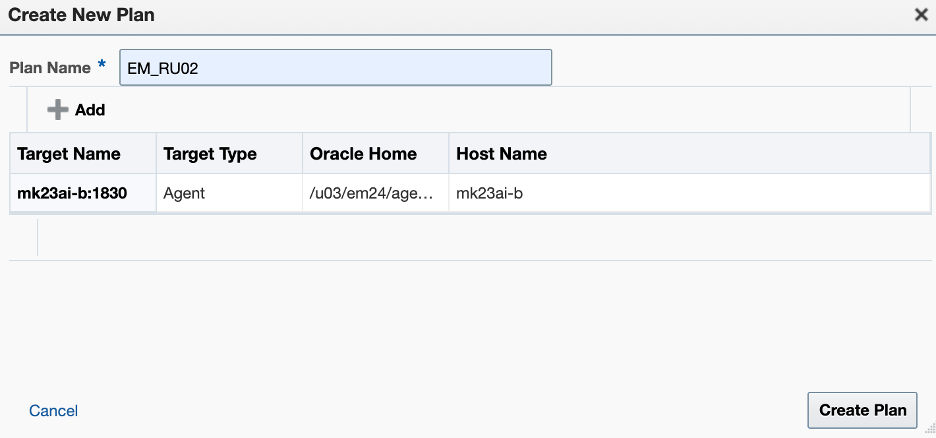
4. Enter the plan name and select the target agent:

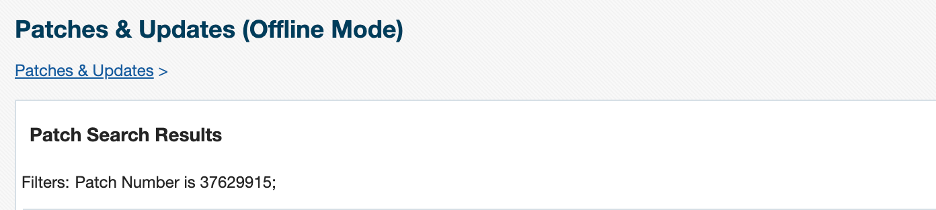
5. Click the “Patches & Updates” hyperlink in the upper left corner:

6. Click on the plan name:

7. Click Next:

8. Click Next:

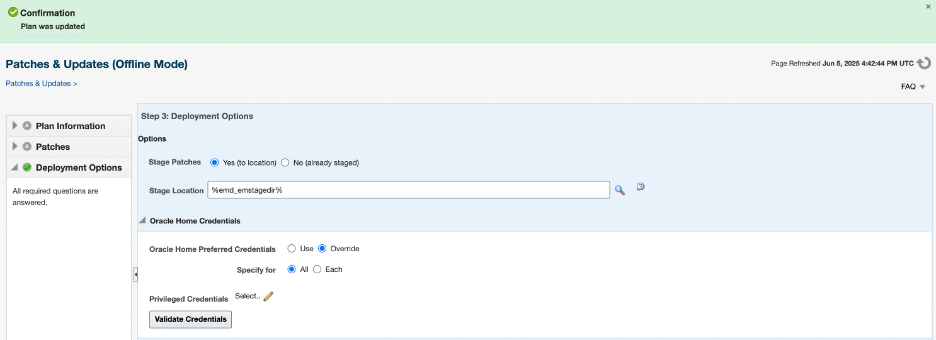
9. Deployment options:

In the Stage location, retain the default location (%emd_emstagedir%) available on the target machine, or edit the Stage Location to provide a new location for staging the Management Agent patches.
In the Oracle Home Credentials section, select Oracle Home Preferred Credentials if you have already set them earlier. You can otherwise click Override (like me):

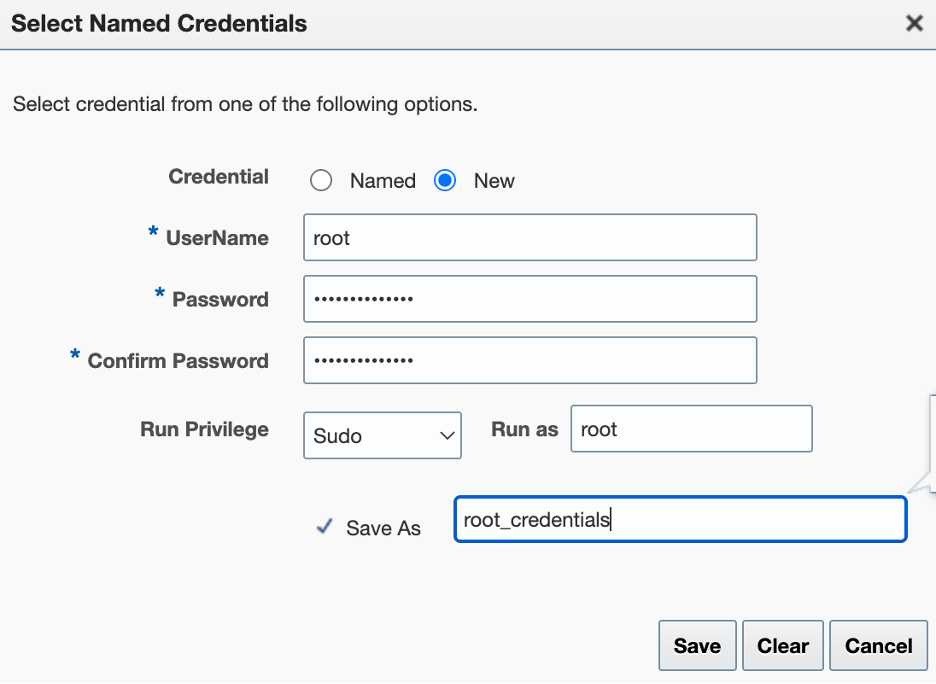
9. Click “Select…” next to “Privileged Credentials,” then choose “New” in the pop-up window:

10. Click Validate Credentials:

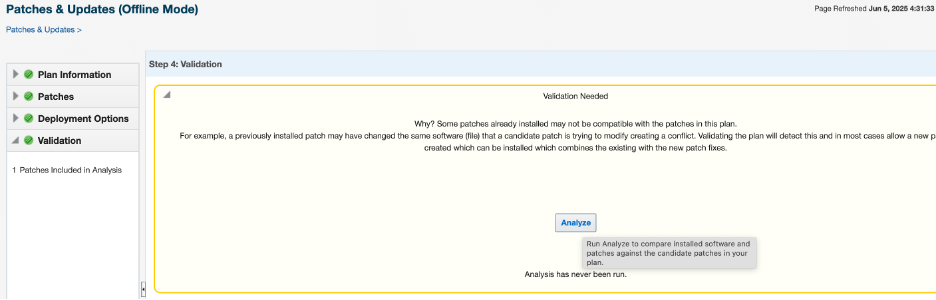
11. Click Analyze:

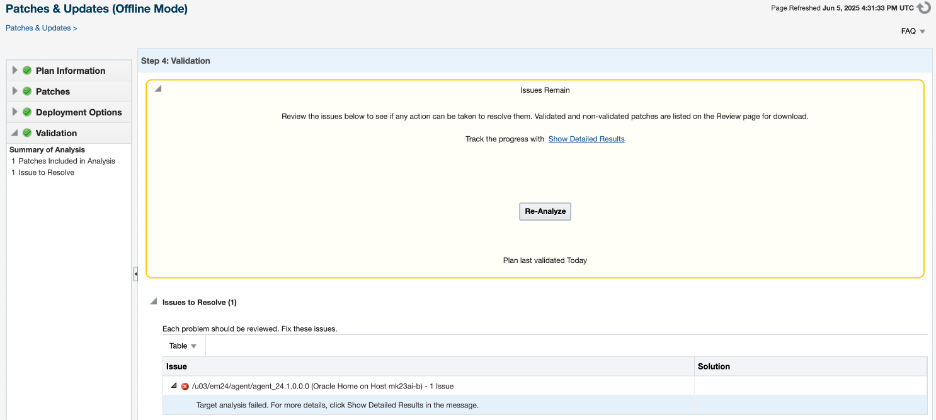
If analysis fails, click Show Detailed Results:

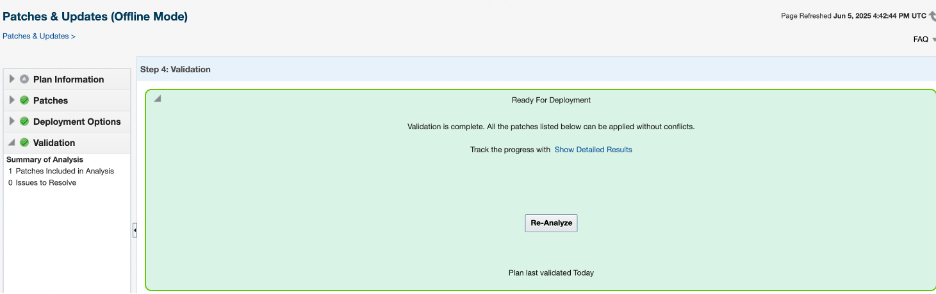
To view the complete log, click on “Download Logs” in the upper right corner. Correct failed components. In my case, I did not have enough swap space; after increasing it, I re-analyzed and it became ready for deployment:

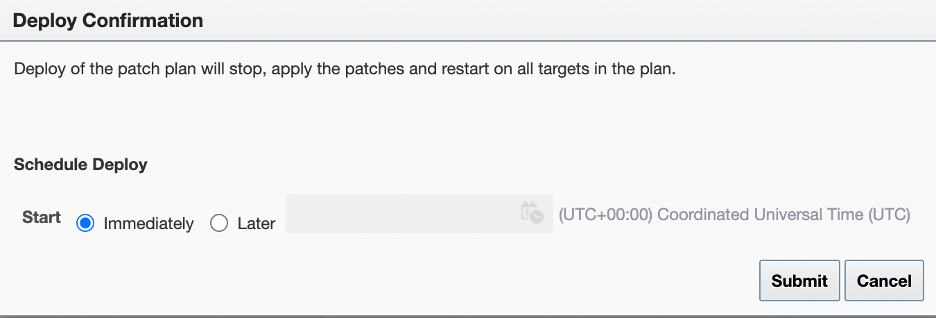
12. Click ‘Next’ and then ‘Deploy’. Select your desired time; I will choose immediately and click ‘Submit’.

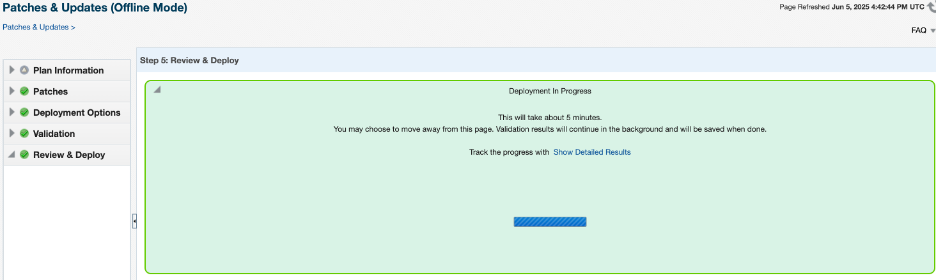
13. The deployment status:

The deployment is in progress:

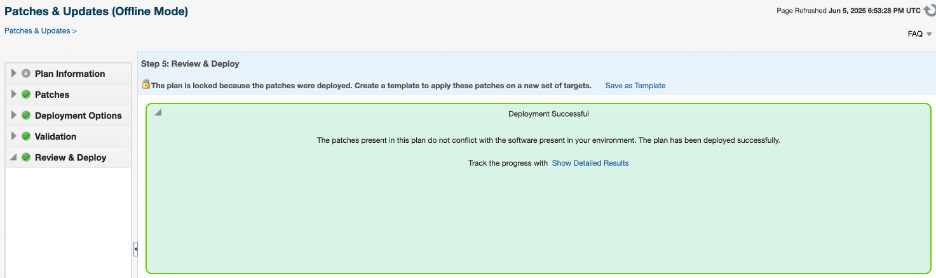
The deployment was successful:

14. You can check the applied patch using agentpatcher as well:

Set the oraclehome to proper agenthome and run lspatches:

$ export ORACLE_HOME=/u03/em24/agent/agent_24.1.0.0.0
$ /u03/em24/agent/agent_24.1.0.0.0/AgentPatcher/agentpatcher lspatches

oracle.sysman.si.agent.plugin/24.1.1.0.0 Plugin 37629915 37629956 Oracle Enterprise Manager for Systems Infrastructure 24ai Release 1 Plug-in Update 2 (24.1.1.2) for Oracle Management Agent

EM 24ai: Apply RU02 (24.1.0.2) on Oracle Management Service

The blog may appear extensive, but most of the content consists of the output from the command. The reason for including the output is to allow for comparison.

1. Ensure that you have OMSPatcher version 13.9.24.4.0

$ $ORACLE_HOME/OMSPatcher/omspatcher version

If the version returned is lower than that, which it most likely is, then you need to update OMSPatcher in the OMS home.

To update OMSPatcher, please follow the steps outlined below:

1.1. Download patch 19999993 for EM 24.1.0.0.0 (for your version) from My Oracle Support

1.2. Backup the current “OMSPatcher” folder

$ mv <MIDDLEWARE_HOME>/OMSPatcher <MIDDLEWARE_HOME>/OMSPatcher_backup

For example:

$ mv /u03/em24/middleware/oms_home/OMSPatcher /u03/em24/middleware/oms_home/OMSPatcher_backup

1.3. Unzip the “p19999993_241000_Generic.zip” under /u03/em24/middleware/oms_home

$ unzip /u03/install/p19999993_241000_Generic.zip -d /u03/em24/middleware/oms_home

1.4. Check the version again and make sure the version is correct

$ export ORACLE_HOME=/u03/em24/middleware/oms_home
$ $ORACLE_HOME/OMSPatcher/omspatcher version

OMSPatcher Version: 13.9.24.4.0
OPlan Version: 12.2.0.1.16
OsysModel build: Tue Apr 28 18:16:31 PDT 2020

2. Analyze the patch before actual application to ensure that all prerequisites are met:

$ /u03/em24/middleware/oms_home/OMSPatcher/omspatcher apply -analyze 37629905/

OMSPatcher Automation Tool
Copyright (c) 2024, Oracle Corporation. All rights reserved.

OMSPatcher version : 13.9.24.4.0
OUI version : 13.9.4.0.0
Running from : /u03/em24/middleware/oms_home
Log file location : /u03/em24/middleware/oms_home/cfgtoollogs/omspatcher/opatch2025-06-05_02-31-25AM_1.log

OMSPatcher log file: /u03/em24/middleware/oms_home/cfgtoollogs/omspatcher/37629905/omspatcher_2025-06-05_02-31-44AM_analyze.log

Please enter OMS weblogic admin server URL(t3s://mk23ai-b:7102):>
Please enter OMS weblogic admin server username(weblogic):>
Please enter OMS weblogic admin server password:>

Enter SYS or Non-SYS (Admin User) username: sys
Enter 'sys' password :
Checking if current repository database is a supported version
Current repository database version is supported

Prereq "checkComponents" for patch 37616329 passed.
Prereq "checkComponents" for patch 37616365 passed.
Prereq "checkComponents" for patch 37616341 passed.
Prereq "checkComponents" for patch 37616358 passed
Prereq "checkComponents" for patch 37616336 passed.
Prereq "checkComponents" for patch 37616362 passed.
Prereq "checkComponents" for patch 37616375 passed.

Configuration Validation: Success

Running apply prerequisite checks for sub-patch(es) "37616375" and Oracle Home "/u03/em24/middleware/ext_oms_home"...
Sub-patch(es) "37616375" are successfully analyzed for Oracle Home "/u03/em24/middleware/ext_oms_home"

Running apply prerequisite checks for sub-patch(es) "37616362,37616329,37616358,37616341,37616336,37616365" and Oracle Home "/u03/em24/middleware/oms_home"...
Sub-patch(es) "37616362,37616329,37616358,37616341,37616336,37616365" are successfully analyzed for Oracle Home "/u03/em24/middleware/oms_home"

Complete Summary
================

All log file names referenced below can be accessed from the directory "/u03/em24/middleware/oms_home/cfgtoollogs/omspatcher/2025-06-05_02-31-25AM_SystemPatch_37629905_1"

Prerequisites analysis summary:
-------------------------------

The following sub-patch(es) are applicable:

Featureset Sub-patches Log file
---------- ----------- --------
oracle.sysman.top.oms 37616362,37616329,37616358,37616341,37616336,37616365 37616362,37616329,37616358,37616341,37616336,37616365_opatch2025-06-05_02-35-33AM_2.log
oracle.sysman.top.zdt 37616375
37616375_opatch2025-06-05_02-35-19AM_2.log

The following sub-patches are not needed by any component installed in the OMS system:
37465809,37616360,37616345,37616371

Log file location: /u03/em24/middleware/oms_home/cfgtoollogs/omspatcher/37629905/omspatcher_2025-06-05_02-31-44AM_analyze.log

OMSPatcher succeeded.

3. Installing the Release Update using a traditional patching method

3.1. Set the ORACLE_HOME to the location of the OMS home, and ensure the bin directory from the OMS home is included in the PATH environment variable:

$ export ORACLE_HOME=/u03/em24/middleware/oms_home
$ export PATH=$ORACLE_HOME/bin:$PATH

3.2. Shut down the OMS:

$ emctl stop oms

Oracle Enterprise Manager 24ai Release 1
Copyright (c) 1996, 2024 Oracle Corporation. All rights reserved.
Stopping Oracle Management Server...
Oracle Management Server Successfully Stopped
Oracle Management Server is Down
JVMD Engine is Down

3.3. Navigate to the patch 37629905 directory and run apply

$ cd 37629905
$ /u03/em24/middleware/oms_home/OMSPatcher/omspatcher apply ./

OMSPatcher Automation Tool
Copyright (c) 2024, Oracle Corporation. All rights reserved.

OMSPatcher version : 13.9.24.4.0
OUI version : 13.9.4.0.0
Running from : /u03/em24/middleware/oms_home
Log file location : /u03/em24/middleware/oms_home/cfgtoollogs/omspatcher/opatch2025-06-05_03-04-16AM_1.log

OMSPatcher log file: /u03/em24/middleware/oms_home/cfgtoollogs/omspatcher/37629905/omspatcher_2025-06-05_03-04-37AM_apply.log

Please enter OMS weblogic admin server URL(t3s://mk23ai-b:7102):>
Please enter OMS weblogic admin server username(weblogic):>
Please enter OMS weblogic admin server password:>

Enter SYS or Non-SYS (Admin User) username: sys
Enter 'sys' password :
Checking if current repository database is a supported version
Current repository database version is supported

Prereq "checkComponents" for patch 37616329 passed.
Prereq "checkComponents" for patch 37616365 passed.
Prereq "checkComponents" for patch 37616341 passed.
Prereq "checkComponents" for patch 37616358 passed.
Prereq "checkComponents" for patch 37616336 passed.
Prereq "checkComponents" for patch 37616362 passed.
Prereq "checkComponents" for patch 37616375 passed.

Configuration Validation: Success

Running apply prerequisite checks for sub-patch(es) "37616375" and Oracle Home "/u03/em24/middleware/ext_oms_home"...
Sub-patch(es) "37616375" are successfully analyzed for Oracle Home "/u03/em24/middleware/ext_oms_home"

Running apply prerequisite checks for sub-patch(es) "37616362,37616329,37616358,37616341,37616336,37616365" and Oracle Home "/u03/em24/middleware/oms_home"...
Sub-patch(es) "37616362,37616329,37616358,37616341,37616336,37616365" are successfully analyzed for Oracle Home "/u03/em24/middleware/oms_home"

To continue, OMSPatcher will do the following:
[Patch and deploy artifacts] : Apply sub-patch(es) [ 37616329 37616336 37616341 37616358 37616362 37616365 37616375 ]
Apply sub-patch(es) [ 37616329 37616336 37616341 37616358 37616362 37616365 37616375 ]
Apply RCU artifact with patch "/u03/em24/middleware/oms_home/.omspatcher_storage/37616329_May_13_2025_03_57_04/original_patch";
Apply RCU artifact with patch "/u03/em24/middleware/ext_oms_home/.omspatcher_storage/37616375_May_13_2025_05_14_54/original_patch";
Apply RCU artifact with patch "/u03/em24/middleware/oms_home/.omspatcher_storage/37616365_May_13_2025_05_15_38/original_patch";
Apply RCU artifact with patch "/u03/em24/middleware/oms_home/.omspatcher_storage/37616341_May_13_2025_05_15_15/original_patch";
Apply RCU artifact with patch "/u03/em24/middleware/oms_home/.omspatcher_storage/37616358_May_13_2025_05_15_47/original_patch";
Apply RCU artifact with patch "/u03/em24/middleware/oms_home/.omspatcher_storage/37616336_May_13_2025_05_16_05/original_patch";
Apply RCU artifact with patch "/u03/em24/middleware/oms_home/.omspatcher_storage/37616362_May_13_2025_05_16_27/original_patch";
Register MRS artifact "assoc";
Register MRS artifact "procedures";
Register MRS artifact "commands";
Register MRS artifact "omsPropertyDef";
Register MRS artifact "targetType";
Register MRS artifact "default_collection";
Register MRS artifact "jobTypes";
Register MRS artifact "systemStencil";
Register MRS artifact "discovery";
Register MRS artifact "EcmMetadataOnlyRegistration";
Register MRS artifact "namedQuery";
Register MRS artifact "storeTargetType";
Register MRS artifact "swlib";
Register MRS artifact "OracleCertifiedTemplate";
Register MRS artifact "TargetPrivilege";
Register MRS artifact "gccompliance";
Register MRS artifact "runbooks"


Do you want to proceed? [y|n]
y
Could not recognize input. Please re-enter.
y
User Responded with: Y
Stopping all the services on primary OMS.....
Please monitor log file: /u03/em24/middleware/oms_home/cfgtoollogs/omspatcher/2025-06-05_03-29-16AM_SystemPatch_37629905_9/stop_oms_all_2025-06-05_03-29-16AM.log
Stopping the Central agent .....

Applying the one-off patch .....

Applying sub-patch(es) "37616329,37616336,37616341,37616358,37616362,37616365"
Please monitor log file: /u03/em24/middleware/oms_home/cfgtoollogs/opatch/opatch2025-06-05_03-39-19AM_4.log
Applying sub-patch(es) "37616375"
Please monitor log file: /u03/em24/middleware/ext_oms_home/cfgtoollogs/opatch/opatch2025-06-05_03-46-21AM_5.log

Starting the ADMIN .....
Please monitor log file: /u03/em24/middleware/oms_home/cfgtoollogs/omspatcher/2025-06-05_03-46-50AM_SystemPatch_37629905_14/start_admin_2025-06-05_03-46-50AM.log

Configure API Gateway .....
Please monitor log file: /u03/em24/middleware/oms_home/cfgtoollogs/omspatcher/2025-06-05_03-48-17AM_SystemPatch_37629905_15/config_apigateway_2025-06-05_03-48-17AM.log

Registering the start OP ......

DB user 'sys' is allowed to perform startOP patching operation.
Update the patching flag .....

Updating repository with RCU reference file "/u03/em24/middleware/oms_home/.omspatcher_storage/37616329_May_13_2025_03_57_04/original_patch"

<This block has been intentionally secluded>

Registering service "jobTypes" with register file "/u03/em24/middleware/oms_home/plugins/oracle.sysman.db.oms.plugin_24.1.1.0.0/metadata/jobTypes/DGFileTransfer.xml" for plugin id as "oracle.sysman.db"...
...
Starting the central agent .....
Resetting the patching flag .....
Resetting the job queue process .....
The job_queue_processes parameter is set to 0 in the repository database. Resetting the job_queue_processes parameter to its original value 248 in the repository database to start the OMS.
Registering the end OP ......

DB user 'sys' is allowed to perform endOP patching operation.
Running the post apply sql .....
Starting the oms
...

Patching summary:
-----------------

Binaries of the following sub-patch(es) have been applied successfully:

Featureset Sub-patches Log file
---------- ----------- --------
oracle.sysman.top.zdt_24.1.0.0.0 37616375 37616375_opatch2025-06-05_03-46-21AM_5.log
oracle.sysman.top.oms_24.1.0.0.0 37616329,37616336,37616341,37616358,37616362,37616365 37616329,37616336,37616341,37616358,37616362,37616365_opatch2025-06-05_03-39-19AM_4.log

The following sub-patches are not needed by any component installed in the OMS system:
37465809,37616360,37616345,37616371
...
OMSPatcher succeeded

3.4. Make sure that omspatcher started OMS automatically, that is also visible from the above output (3.3 step):

$ export ORACLE_HOME=/u03/em24/middleware/oms_home
$ emctl status oms

WebTier is Up
Oracle Management Server is Up
JVMD Engine is Up

Otherwise, start it manually:

$ emctl start oms

4. Review the inventory to confirm the applied patch

$ export ORACLE_HOME=/u03/em24/middleware/oms_home
$ /u03/em24/middleware/oms_home/OMSPatcher/omspatcher lspatches

EM 24ai: This version of OMSPatcher is not compatible to apply the given patch

Problem:

While analyzing EM 24ai Release 1 Update 2 (24.1.0.2) for Oracle Management Service patch application, I encountered an error indicating that the OMSPatcher located under the OMS home is outdated and needs to be updated before starting the patching process.:

$ export ORACLE_HOME=/u03/em24/middleware/oms_home
$ /u03/em24/middleware/oms_home/OMSPatcher/omspatcher apply -analyze 37629905/
...
This version of OMSPatcher(13.9.24.1.0) is not compatible to apply the given patch.
Minimum Required Version of OMSPatcher to apply the patch is 13.9.24.4.0
Procure the compatible version from My Oracle Support, and try again.
OMSPatcher failed with error code 255

Solution:

1. Download patch 19999993 for EM 24.1.0.0.0 (for your version) from My Oracle Support

2. Backup the current “OMSPatcher” folder

    $ mv <MIDDLEWARE_HOME>/OMSPatcher <MIDDLEWARE_HOME>/OMSPatcher_backup

    For example:

    mv /u03/em24/middleware/oms_home/OMSPatcher /u03/em24/middleware/oms_home/OMSPatcher_backup

    3. Unzip the “p19999993_241000_Generic.zip” under /u03/em24/middleware/oms_home

      $ unzip /u03/install/p19999993_241000_Generic.zip -d /u03/em24/middleware/oms_home

      4. Check the version again and make sure the version is correct

      $ export ORACLE_HOME=/u03/em24/middleware/oms_home
      $ $ORACLE_HOME/OMSPatcher/omspatcher version

      OMSPatcher Version: 13.9.24.4.0
      OPlan Version: 12.2.0.1.16
      OsysModel build: Tue Apr 28 18:16:31 PDT 2020

      OMSPatcher succeeded.

      5. Retry running the analyze patch

      $ /u03/em24/middleware/oms_home/OMSPatcher/omspatcher apply -analyze 37629905/
      ...
      Checking if current repository database is a supported version
      Current repository database version is supported


      Prereq "checkComponents" for patch 37616329 passed.
      Prereq "checkComponents" for patch 37616365 passed.

      ...

      EM 24ai: Configure EM agent manually after failure

      Problem:

      While installing EM 24ai, everything was configured except for the agent which is the last step. It failed with the following vague error:

      ...
      1. state_dir=/u03/em24/agent/agent_inst
      2. agentBaseDir=/u03/em24/agent
      3. oraHome=/u03/em24/agent/agent_24.1.0.0.0
      INFO: oracle.sysman.top.agent:Agent Home is : {0}
      SEVERE: oracle.sysman.top.agent:Agent configuration has failed
      INFO: oracle.sysman.top.agent:AgentConfiguration:agent configuration finished with status = false
      INFO: oracle.sysman.top.agent:AgentConfiguration:agent configuration finished with status = false
      INFO: oracle.sysman.top.agent:The plug-in Agent Configuration Assistant has failed its perform method

      Solution:

      Make sure agent_inst directory is empty, otherwise rename the folder and recreate:

      $ cd /u03/em24/agent
      $ mv agent_inst agent_inst2
      $ mkdir agent_inst; chmod 755 agent_inst

      Make sure libnsl package is installed, otherwise install it using yum:

      $ yum install libnsl

      Reconfigure agent manually:

      $ /u03/em24/middleware/oms_home/oui/bin/runConfig.sh ORACLE_HOME=/u03/em24/middleware/oms_home MODE=perform ACTION=configure COMPONENT_XML={encap_oms.1_0_0_0_0.xml}

      Setting the invPtrLoc to /u03/em24/middleware/oms_home/oraInst.loc
      ...
      Setting system property CUSTOM_INVENTORY to {0}
      chain install is :true

      Cloning of agent home completed successfully
      Agent Configuration completed successfully
      The following configuration scripts need to be executed as the "root" user. Root script to run : /u03/em24/agent/agent_24.1.0.0.0/root.sh

      perform - mode finished for action: configure

      Run root.sh script that is requested in the output of the above command:

      # /u03/em24/agent/agent_24.1.0.0.0/root.sh

      It worked for me and I hope it will work for you as well. The solution was found after a lot of digging, and there might be another solution too.

      Oracle EM 24ai: _allow_insert_with_update_check failed

      Problem:

      While installing Oracle Enterprise Manager 24ai, the check for the parameter value _allow_insert_with_update_check failed:

      Solution:

      If the repository database is a PDB, you need to set this parameter at PDB level.

      1) Connect to the repository database using sqlplus as SYS user and run:

      SQL> alter system set "_allow_insert_with_update_check"=true;

      2) Rerun the check:

      It succeeded this time:

      Oracle EM 24ai: Install the partitioning option on the EM repository database

      Problem:

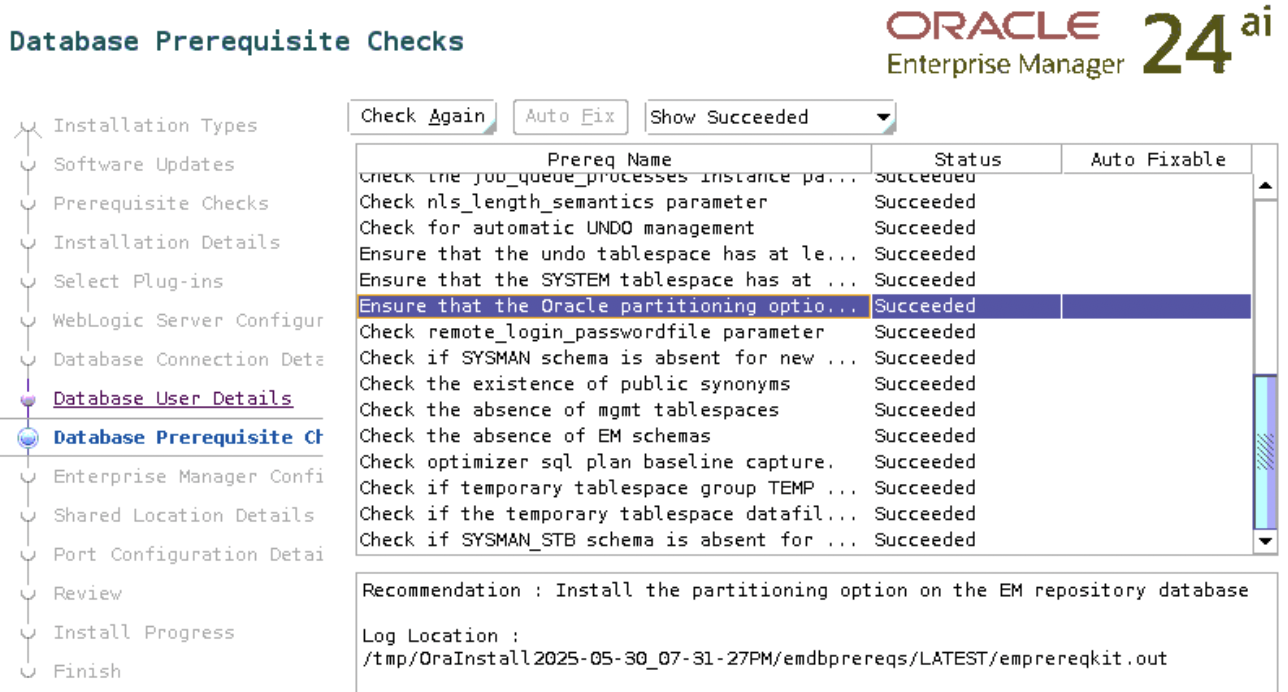
      While installing Oracle Enterprise Manager 24ai, the check “Ensure that the Oracle partitioning option is installed” failed.

      Toubleshooting:

      Check if the EM repository database (the database you selected for the EM repository) has partitioning enabled:

      SQL> select value from v$option where parameter = 'Partitioning';

      VALUE
      ----------------------------------------------------------------
      FALSE

      The output above indicates that the partitioning is disabled.

      Solution:

      Let’s not think about the licensing part yet, since we are currently using Oracle for learning.

      If partitioning is disabled, enable it on the database as follows:

      1. Shut down the database using srvctl or sqlplus:

        srvctl stop database -d orclasm

        2. Connect to the database server as RBDMS owner and run the following commands:

        $ su - oracle
        $ cd $ORACLE_HOME/bin
        $ chopt enable partitioning

        The output of the command would appear as follows:

          Writing to /u01/app/oracle/product/23ai/dbhome_1/install/enable_partitioning_2025-05-30_21-46-30PM.log...
          /usr/bin/make -f /u01/app/oracle/product/23ai/dbhome_1/rdbms/lib/ins_rdbms.mk part_on ORACLE_HOME=/u01/app/oracle/product/23ai/dbhome_1
          /usr/bin/make -f /u01/app/oracle/product/23ai/dbhome_1/rdbms/lib/ins_rdbms.mk ioracle ORACLE_HOME=/u01/app/oracle/product/23ai/dbhome_1

          3. Start the database using srvctl or sqlplus:

          srvctl start database -d orclasm

          4. Connect to the database using sqlplus and verify the option status again:

          SQL> select value from v$option where parameter = 'Partitioning';

          VALUE
          ----------------------------------------------------------------
          TRUE

            5. Rerun the check again

            It shows succeeded this time:

            Deinstalling Oracle Enterprise Manager 13c

            Fortunatelly, deinstalling OEM 13c can be done in one command.

            1. The middleware home will be removed after successful deinstall. So copy the deinstall script to a temporary location:

            $ cp /u01/app/oracle/middleware/sysman/install/EMDeinstall.pl /home/oracle/

            2.  Run deinstall script.

            Please note that I am using -force option because, I have played with repository database before deinstalling EM, so my SYSMAN schema is broken. In case your EM is up and running, then you don’t have to indicate -force option.

            $ cd /home/oracle

            $ perl EMDeinstall.pl -mwHome /u01/app/oracle/middleware -stageLoc /home/oracle/ -force

            Refer to /home/oracle/deinstall_2018-12-25_12-02-37.log for deinstall log
            Substring valuye is /u01/app/oracle/gc_inst
            This is a First OMS install. So, this deinstalls the OMS , Repository and Agent. Confirm (y/n)y
            User confirmed for deinstallation.

            Enter the SYS Password :
            Enter the sysman Password :
            Enter the Admin Server password :
            dbConnectStr – (DESCRIPTION=(ADDRESS_LIST=(ADDRESS=(PROTOCOL=TCP)(HOST=stbyracq.example.com)(PORT=1521)))(CONNECT_DATA=(SID=emrep)))

            The command is /u01/app/oracle/middleware/bin/emctl stop oms

            Stopping oms………… Wait for the completion of the execution.
            Oracle Enterprise Manager Cloud Control 13c Release 3
            Copyright (c) 1996, 2018 Oracle Corporation. All rights reserved.
            Stopping Oracle Management Server…
            Oracle Management Server Already Stopped
            Oracle Management Server is Down
            JVMD Engine is Down
            return value is : 0

            The command is /u01/app/oracle/middleware/bin/omsca delete -full -OMSNAME EMGC_OMS1 -AS_USERNAME weblogic -REP_CONN_STR “(DESCRIPTION=(ADDRESS_LIST=(ADDRESS=(PROTOCOL=TCP)(HOST=stbyracq.example.com)(PORT=1521)))(CONNECT_DATA=(SID=emrep)))” -force

            The oms delete will take sometime. Wait for the completion of the execution. Don’t abort the execution.

            log4j:WARN No appenders could be found for logger (emctl.secure.oms.SecureOMSCmds).
            log4j:WARN Please initialize the log4j system properly.
            Oracle Enterprise Manager Cloud Control 13c Release 13.3.0.0.0
            Copyright (c) 1996, 2018, Oracle. All rights reserved.
            Cannot determine if BI Publisher is configured with Enterprise Manager: JPS-01030: Cannot get credential. Reason oracle.security.jps.service.policystore.PolicyStoreException: javax.persistence.PersistenceException: Exception [EclipseLink-4002] (Eclipse Persistence Services – 2.5.2.v20140319-9ad6abd): org.eclipse.persistence.exceptions.DatabaseException
            Internal Exception: weblogic.jdbc.extensions.PoolDisabledSQLException: weblogic.common.resourcepool.ResourceDisabledException: Pool opss-data-source is Suspended, cannot allocate resources to applications..
            Error Code: 0
            Call: SELECT t1.JPS_ATTRS_ID, t1.ATTRNAME, t1.ATTRVAL, t1.JPS_DN_ENTRYID, t1.RFU1, t1.RFU2 FROM JPS_DN t0, JPS_ATTRS t1 WHERE (((t1.JPS_DN_ENTRYID = t0.ENTRYID) AND (t0.RDN = ?)) AND (t0.PARENTDN = ?))
            bind => [2 parameters bound]
            Query: ReadAllQuery(referenceClass=JpsStore sql=”SELECT t1.JPS_ATTRS_ID, t1.ATTRNAME, t1.ATTRVAL, t1.JPS_DN_ENTRYID, t1.RFU1, t1.RFU2 FROM JPS_DN t0, JPS_ATTRS t1 WHERE (((t1.JPS_DN_ENTRYID = t0.ENTRYID) AND (t0.RDN = ?)) AND (t0.PARENTDN = ?))”).
            OMSCA-WRN:Enterprise Manager repository database is down. The system cannot clean up the OMS from the repository
            OMS Deleted successfully

            return value is : 0
            Running the command /u01/app/oracle/middleware/sysman/admin/emdrep/bin/RepManager -action drop -dbUser sys -dbRole sysdba -connectString “(DESCRIPTION=(ADDRESS_LIST=(ADDRESS=(PROTOCOL=TCP)(HOST=stbyracq.example.com)(PORT=1521)))(CONNECT_DATA=(SID=emrep)))” -mwHome /u01/app/oracle/middleware -mwOraHome /u01/app/oracle/middleware -oracleHome /u01/app/oracle/middleware

            Repository drop will take sometime. Wait for the completion of the execution. Don’t abort the execution.

            stty: standard input: Inappropriate ioctl for device
            stty: standard input: Inappropriate ioctl for device
            stty: standard input: Inappropriate ioctl for device
            stty: standard input: Inappropriate ioctl for device
            processing arguments
            compiling arguments for validation
            Enter sys user password :
            Verify :
            Performing PreDropAll action…
            Enter password for: sys process_id:1eqaqmmifkgo4
            null
            Done PreDropAll action…
            Dropping BIP schema…
            Enter sys user password :
            Verify :
            Action on BIP schema succeed.
            Dropping APM schema… Component is already dropped Enter sysdba password:
            Dropping OPSS schema… Component is already dropped Enter sysdba password:
            Dropping SYSMANUPGR_OPSS schema… Component is already dropped Enter sysdba password:
            Dropping STB schema… Processing command line …. Enter sysdba password:
            Repository Creation Utility – Checking Prerequisites
            Checking Global Prerequisites
            Repository Creation Utility – Checking Prerequisites
            Checking Component Prerequisites
            Repository Creation Utility – Drop
            Repository Drop in progress.
            Percent Complete: 9
            Percent Complete: 9
            Percent Complete: 9
            Percent Complete: 18
            Percent Complete: 47
            Percent Complete: 100
            Repository Creation Utility: Drop – Completion Summary
            Database details:
            Connect Descriptor : (DESCRIPTION=(ADDRESS_LIST=(ADDRESS=(PROTOCOL=TCP)(HOST=stbyracq.example.com)(PORT=1521)))(CONNECT_DATA=(SID=emrep)))
            Connected As : sys
            Prefix for (prefixable) Schema Owners : SYSMAN
            RCU Logfile : /u01/app/oracle/middleware/cfgtoollogs/cfgfw/emsecrepmgr.log
            Component schemas dropped:
            Component Status Logfile
            Common Infrastructure Services Success /u01/app/oracle/middleware/cfgtoollogs/cfgfw/stb.log

            Repository Creation Utility – Drop : Operation Completed
            Successfully dropped schema
            Dropping MDS schema…
            Enter sys user password :
            Verify :
            Action on MDS schema succeed.
            Enter password for: sys process_id:1plaza1hs1ba
            Processing command line ….
            Repository Creation Utility – Checking Prerequisites
            Checking Global Prerequisites
            Repository Creation Utility – Checking Prerequisites
            Checking Component Prerequisites
            Repository Creation Utility – Drop
            Repository Drop in progress.
            Repository Creation Utility: Drop – Completion Summary
            Database details:
            Connect Descriptor : (DESCRIPTION=(ADDRESS_LIST=(ADDRESS=(PROTOCOL=TCP)(HOST=stbyracq.example.com)(PORT=1521)))(CONNECT_DATA=(SID=emrep)))
            Connected As : sys
            RCU Logfile : /u01/app/oracle/middleware/sysman/log/schemamanager/m_122518_1204_PM/m_122518_1204_PM.DROP/rcu.log
            Component schemas dropped:
            Component Status Logfile
            EM Repository Drop Success /u01/app/oracle/middleware/sysman/log/schemamanager/m_122518_1204_PM/m_122518_1204_PM.DROP/em_repos_drop.log

            Repository Creation Utility – Drop : Operation Completed
            Performing PostDropAll action…
            Enter password for: sys process_id:10wli8gmmbnqm
            drop completed successfully
            return value is : 0
            The command executed is /u01/app/oracle/middleware/oui/bin/detachHome.sh
            Launcher log file is /tmp/OraInstall2018-12-25_12-05-42PM/launcher2018-12-25_12-05-42PM.log.
            Starting Oracle Universal Installer

            Checking swap space: must be greater than 500 MB. Actual 0 MB Failed <<<<
            Checking if this platform requires a 64-bit JVM. Actual 64 Passed (64-bit not required)

            Some system prerequisite checks failed.
            You must fulfill these requirements before continuing.
            The log is located here: /tmp/OraInstall2018-12-25_12-05-42PM/launcher2018-12-25_12-05-42PM.log.
            return value is : 256
            The detachHome of /u01/app/oracle/middleware allDepHomes has failed. Rectify the error and try again

            Deleting the instance home
            Deleting the em home
            The deinstallation of OMS is successful.

            The location of the file is : /etc/oragchomelist

            EM: CPU chart Error: Invalid BoundDataSource: no class, method or dataSource provided.

            Error:

            CPU_Chart

            Also no other tabs are available to click.

            Reason:

            One of the reason could be that you converted single instance database to RAC.

            or you created EM repository without indicating -cluster option.

            run:

            emca -config dbcontrol db -repos recreate -cluster

            answer the questions carefully 🙂

            My settings:

            You have specified the following settings

            Database ORACLE_HOME ……………. /u01/app/oracle/product/11.2.0/db_1

            Database instance hostname ……………. Listener ORACLE_HOME ……………. /u01/app/11.2.0/grid
            Listener port number ……………. 1521
            Cluster name ……………. oracle-db
            Database unique name ……………. orcl
            Email address for notifications …………… mariam.kupa@gmail.com
            Outgoing Mail (SMTP) server for notifications …………… mail.ar.ge
            ASM ORACLE_HOME ……………. /u01/app/11.2.0/grid
            ASM port ……………. 1521
            ASM user role ……………. SYSDBA
            ASM username ……………. ASMSNMP