Oracle EM 24ai: Install the partitioning option on the EM repository database

Problem:

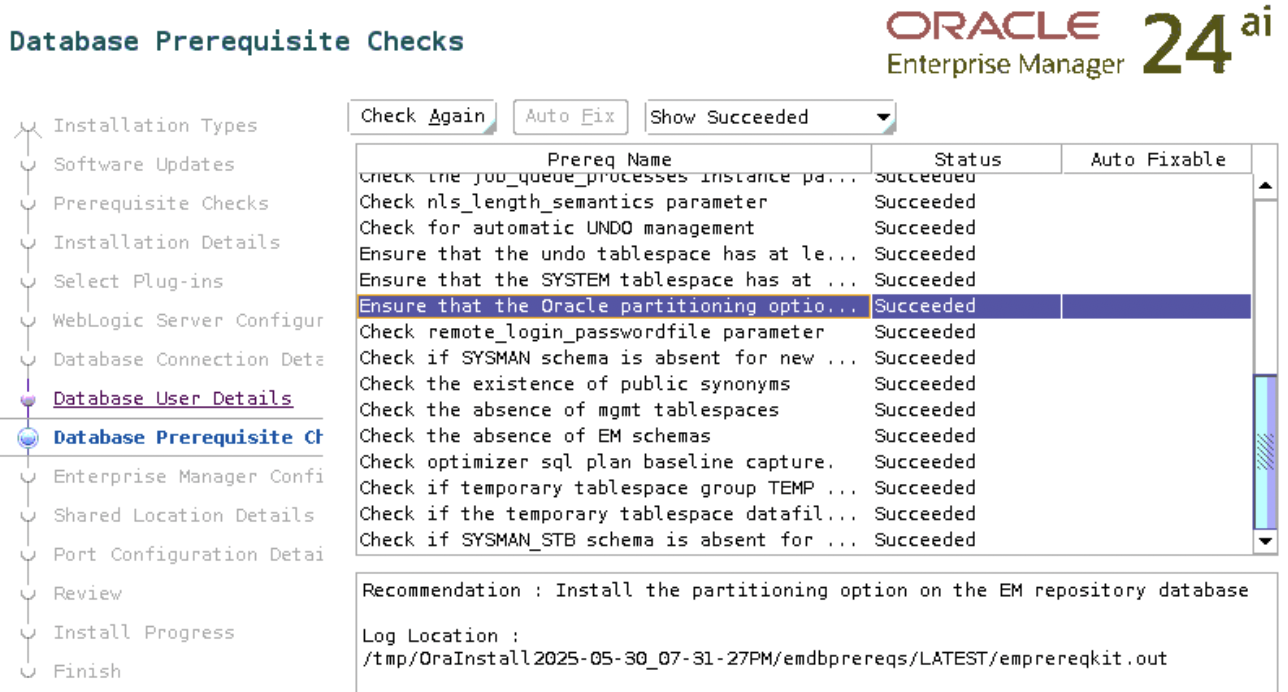
While installing Oracle Enterprise Manager 24ai, the check “Ensure that the Oracle partitioning option is installed” failed.

Toubleshooting:

Check if the EM repository database (the database you selected for the EM repository) has partitioning enabled:

SQL> select value from v$option where parameter = 'Partitioning';

VALUE
----------------------------------------------------------------
FALSE

The output above indicates that the partitioning is disabled.

Solution:

Let’s not think about the licensing part yet, since we are currently using Oracle for learning.

If partitioning is disabled, enable it on the database as follows:

1. Shut down the database using srvctl or sqlplus:

    srvctl stop database -d orclasm

    2. Connect to the database server as RBDMS owner and run the following commands:

    $ su - oracle
    $ cd $ORACLE_HOME/bin
    $ chopt enable partitioning

    The output of the command would appear as follows:

      Writing to /u01/app/oracle/product/23ai/dbhome_1/install/enable_partitioning_2025-05-30_21-46-30PM.log...
      /usr/bin/make -f /u01/app/oracle/product/23ai/dbhome_1/rdbms/lib/ins_rdbms.mk part_on ORACLE_HOME=/u01/app/oracle/product/23ai/dbhome_1
      /usr/bin/make -f /u01/app/oracle/product/23ai/dbhome_1/rdbms/lib/ins_rdbms.mk ioracle ORACLE_HOME=/u01/app/oracle/product/23ai/dbhome_1

      3. Start the database using srvctl or sqlplus:

      srvctl start database -d orclasm

      4. Connect to the database using sqlplus and verify the option status again:

      SQL> select value from v$option where parameter = 'Partitioning';

      VALUE
      ----------------------------------------------------------------
      TRUE

        5. Rerun the check again

        It shows succeeded this time:
        Create a Local Yum Repository for Oracle Linux 6

        0. Just to note –repoid parameter has two dashes in front (- – repoid). Unfortunately wordpress makes it one dash. Please, do not blame me 🙂

        1. Create OEL.repo file in /etc/yum.repos.d and add the following entry

        # vi /etc/yum.repos.d/OEL.repo

        [oraclerpms]
        name=OracleEnterpriseLinux
        baseurl=http://yum.oracle.com/repo/OracleLinux/OL6/latest/$basearch/
        gpgcheck=1
        gpgkey=file:///etc/pki/rpm-gpg/RPM-GPG-KEY-oracle
        enabled=1

        2. Install yum-utils and createrepo packages

        # yum install yum-utils createrepo

        3. It is better to add another disk and create repository there, do not use / disk(disk where OS is installed) for repository. It is just a best practice.

        Create necessary folders:

        # mkdir -p /OEL_repo/OEL6/latest
        # mkdir -p /OEL_repo/logs
        # mkdir -p /OEL_repo/scripts

        4. Download rpms.
        If you are using proxy you may need to set proxy parameters like  export http_proxy=http://proxy_server_ip:proxy_port/

        /usr/bin/reposync –newest-only –repoid=oraclerpms -p /OEL_repo/OEL6/latest

        5. After download completes create repository on downloaded rpms:

        /usr/bin/createrepo /OEL_repo/OEL6/latest/oraclerpms/getPackage/

        ####################
        The above steps should be done every time you want to update your local repository, so let’s create script and place all them in one file.

        vi /OEL_repo/scripts/repo_sync.sh

        #!/bin/bash

        LOG_FILE=/OEL_repo/logs/repo_sync_$(date +%Y.%m.%d).log

        # Delete old logs
        find /OEL_repo/logs/repo_sync* -mtime +5 -delete; >> $LOG_FILE 2>&1

        #Clean cache
        yum clean all

        # Sync repositories
        /usr/bin/reposync /usr/bin/reposync –newest-only –repoid=oraclerpms -p /OEL_repo/OEL6/latest >> $LOG_FILE 2>&1

        /usr/bin/createrepo /OEL_repo/OEL6/latest/oraclerpms/getPackage/ >> $LOG_FILE 2>&1

        2. Change permissions for the executable script:

        # chmod u+x /OEL_repo/scripts/repo_sync.sh

        3. Set up a CRON job to run the script on a daily basis. The following entry runs the script each day at 01:00.

        0 1 * * * /OEL_repo/scripts/repo_sync.sh > /dev/null 2>&1

        ###############

        1. Install the Apache HTTP servers, start it and make sure it restarts automatically on reboot.

        # yum install httpd
        # service httpd start
        # chkconfig httpd on

        2. Create directory and place link there

        mkdir -p /var/www/html/OEL_repo/OEL6/latest
        ln -s /OEL_repo/OEL6/latest/oraclerpms/getPackage/ /var/www/html/OEL_repo/OEL6/latest/x86_64

        # cd /var/www/html
        # wget http://public-yum.oracle.com/RPM-GPG-KEY-oracle-ol6

        Note: /var/www/html is the default DocumentRoot directory. To check yours(sysadmin may have changed it) please check /etc/httpd/conf/httpd.conf file and find the keyword DocumentRoot

        ##############

        1. Configure clients

        vi /etc/yum.repos.d/local-ol6.repo

        [oraclerpms]
        name=Oracle Linux $releasever Latest ($basearch)
        baseurl=http://RepositoryServerHostname.domain.ge/OEL_repo/OEL6/latest/$basearch/
        gpgkey=http://RepositoryServerHostname.domain.ge/RPM-GPG-KEY-oracle-ol6
        gpgcheck=1
        enabled=1

        Now you are able to install packages on clients by

        # yum install ntp

        Recreate Oracle 11g OEM DBConsole manually for RAC

        If you have problems with existing OEM, the best way is to reconfigure it. Here are the steps, how to do it correctly:

        $ emca -config dbcontrol db -repos recreate -cluster

        STARTED EMCA at Jan 22, 2013 6:04:10 PM
        EM Configuration Assistant, Version 11.2.0.3.0 Production
        Copyright (c) 2003, 2011, Oracle. All rights reserved.

        Enter the following information:
        Database unique name: orcl
        Service name: orcl
        Listener ORACLE_HOME [ /u01/app/11.2.0/grid ]:
        Password for SYS user:
        Database Control is already configured for the database orcl
        You have chosen to configure Database Control for managing the database orcl
        This will remove the existing configuration and the default settings and perform a fresh configuration
        ———————————————————————-
        WARNING : While repository is dropped the database will be put in quiesce mode.
        ———————————————————————-
        Do you wish to continue? [yes(Y)/no(N)]: y
        Password for DBSNMP user:
        Password for SYSMAN user:
        Cluster name: oracle-db

        !!!Stop here for a while: if you don’t know your cluster name run the following command:

        $ su – grid
        cemutlo -n

        …continuing configuration

        Email address for notifications (optional):
        Outgoing Mail (SMTP) server for notifications (optional):
        ASM ORACLE_HOME [ /u01/app/11.2.0/grid ]:
        ASM port [ 1521 ]:
        ASM username [ ASMSNMP ]:
        ASM user password:
        Jan 22, 2013 6:05:02 PM oracle.sysman.emcp.util.GeneralUtil initSQLEngineRemotely
        WARNING: Error during db connection : ORA-12514: TNS:listener does not currently know of service requested in connect descriptor

        —————————————————————–

        You have specified the following settings

        Database ORACLE_HOME ……………. /u01/app/oracle/product/11.2.0/db_1

        Database instance hostname ……………. Listener ORACLE_HOME ……………. /u01/app/11.2.0/grid
        Listener port number ……………. 1521
        Cluster name ……………. oracle-db
        Database unique name ……………. orcl
        Email address for notifications …………… mariam.kupa@gmail.com
        Outgoing Mail (SMTP) server for notifications …………… mail.tbilisi.gov.ge
        ASM ORACLE_HOME ……………. /u01/app/11.2.0/grid
        ASM port ……………. 1521
        ASM user role ……………. SYSDBA
        ASM username ……………. ASMSNMP

        —————————————————————–
        ———————————————————————-
        WARNING : While repository is dropped the database will be put in quiesce mode.
        ———————————————————————-
        Do you wish to continue? [yes(Y)/no(N)]: y
        Jan 22, 2013 6:05:18 PM oracle.sysman.emcp.EMConfig perform
        INFO: This operation is being logged at /u01/app/oracle/cfgtoollogs/emca/orcl/emca_2013_01_22_18_04_10.log.
        Jan 22, 2013 6:05:20 PM oracle.sysman.emcp.util.PortManager isPortInUse
        WARNING: Specified port 5540 is already in use.
        Jan 22, 2013 6:05:20 PM oracle.sysman.emcp.util.PortManager isPortInUse
        WARNING: Specified port 5520 is already in use.
        Jan 22, 2013 6:05:20 PM oracle.sysman.emcp.util.PortManager isPortInUse
        WARNING: Specified port 1158 is already in use.
        Jan 22, 2013 6:05:20 PM oracle.sysman.emcp.util.DBControlUtil stopOMS
        INFO: Stopping Database Control (this may take a while) …
        Jan 22, 2013 6:06:01 PM oracle.sysman.emcp.EMReposConfig invoke
        INFO: Dropping the EM repository (this may take a while) …
        Jan 22, 2013 6:08:00 PM oracle.sysman.emcp.EMReposConfig invoke
        INFO: Repository successfully dropped
        Jan 22, 2013 6:08:01 PM oracle.sysman.emcp.EMReposConfig createRepository
        INFO: Creating the EM repository (this may take a while) …
        Jan 22, 2013 6:11:39 PM oracle.sysman.emcp.EMReposConfig invoke
        INFO: Repository successfully created
        Jan 22, 2013 6:11:44 PM oracle.sysman.emcp.EMReposConfig uploadConfigDataToRepository
        INFO: Uploading configuration data to EM repository (this may take a while) …
        Jan 22, 2013 6:12:17 PM oracle.sysman.emcp.EMReposConfig invoke
        INFO: Uploaded configuration data successfully
        Jan 22, 2013 6:12:18 PM oracle.sysman.emcp.EMDBCConfig instantiateOC4JConfigFiles
        INFO: Propagating /u01/app/oracle/product/11.2.0/db_1/oc4j/j2ee/OC4J_DBConsole_oracle-node1_orcl to remote nodes . ..
        Jan 22, 2013 6:12:20 PM oracle.sysman.emcp.EMDBCConfig instantiateOC4JConfigFiles
        INFO: Propagating /u01/app/oracle/product/11.2.0/db_1/oc4j/j2ee/OC4J_DBConsole_oracle-node2_orcl to remote nodes . ..
        Jan 22, 2013 6:12:26 PM oracle.sysman.emcp.EMAgentConfig deployStateDirs
        INFO: Propagating /u01/app/oracle/product/11.2.0/db_1/oracle-node1_orcl to remote nodes …
        Jan 22, 2013 6:12:28 PM oracle.sysman.emcp.EMAgentConfig deployStateDirs
        INFO: Propagating /u01/app/oracle/product/11.2.0/db_1/oracle-node2_orcl to remote nodes …
        Jan 22, 2013 6:12:31 PM oracle.sysman.emcp.util.DBControlUtil secureDBConsole
        INFO: Securing Database Control (this may take a while) …
        Jan 22, 2013 6:13:00 PM oracle.sysman.emcp.util.DBControlUtil startOMS
        INFO: Starting Database Control (this may take a while) …
        Jan 22, 2013 6:13:20 PM oracle.sysman.emcp.EMDBPostConfig performConfiguration
        INFO: Database Control started successfully
        Jan 22, 2013 6:13:20 PM oracle.sysman.emcp.EMDBPostConfig performConfiguration
        INFO: >>>>>>>>>>> The Database Control URL is https://oracle-node1.mr.gov.ge:1158/em <<<<<<<<<<<
        Jan 22, 2013 6:13:22 PM oracle.sysman.emcp.EMDBPostConfig showClusterDBCAgentMessage
        INFO:
        **************** Current Configuration ****************
        INSTANCE NODE DBCONTROL_UPLOAD_HOST
        ———- ———- ———————

        orcl oracle-node1 oracle-node1.mr.gov.ge
        orcl oracle-node2 oracle-node1.mr.gov.ge
        Jan 22, 2013 6:13:22 PM oracle.sysman.emcp.EMDBPostConfig invoke
        WARNING:
        ************************ WARNING ************************

        Management Repository has been placed in secure mode wherein Enterprise Manager data will be encrypted. The encry ption key has been placed in the file: /u01/app/oracle/product/11.2.0/db_1/oracle-node1_orcl/sysman/config/emkey.o ra. Ensure this file is backed up as the encrypted data will become unusable if this file is lost.

        ***********************************************************
        Enterprise Manager configuration completed successfully
        FINISHED EMCA at Jan 22, 2013 6:13:22 PM

        For me to access OEM the URL is  https://oracle-node1.mr.gov.ge:1158/em

        Good Luck!