Database not nomounting: ORA-00848: STATISTICS_LEVEL cannot be set to BASIC with SGA_TARGET or MEMORY_TARGET

I have Oracle database with ASM. Database is started by spfile, that is located on ASM. I have pfile that indicates to spfile.

Let’s start from the beginning. I run the following command:

alter system set STATISTICS_LEVEL=basic scope=spfile;

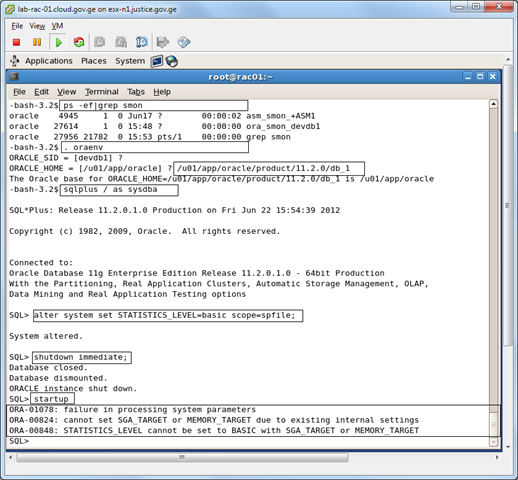
Restarted the database and tried to startup. Got the following error:

ORA-00848 STATISTICS_LEVEL cannot be set to BASIC with SGA_TARGET or MEMORY_TARGET

And because of this database is not nomounting.

image

My parameter file content is:

–/u01/app/oracle/product/11.2.0/db_1/dbs/initdevdb1.ora

SPFILE=’+DATA/devdb/spfiledevdb.ora’;

So let’s solve it. My aim is to set STATISTICS_LEVEL parameter to TYPICAL and start the database normally.

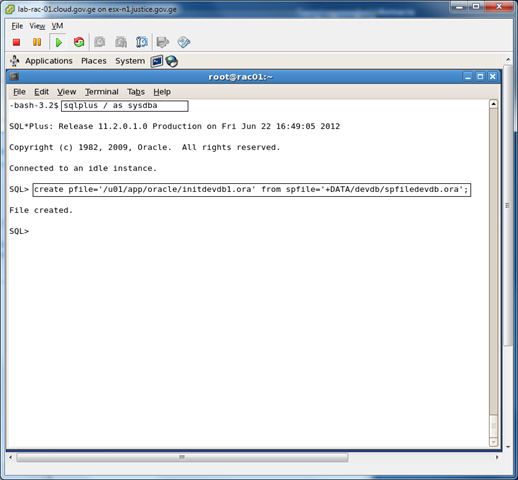
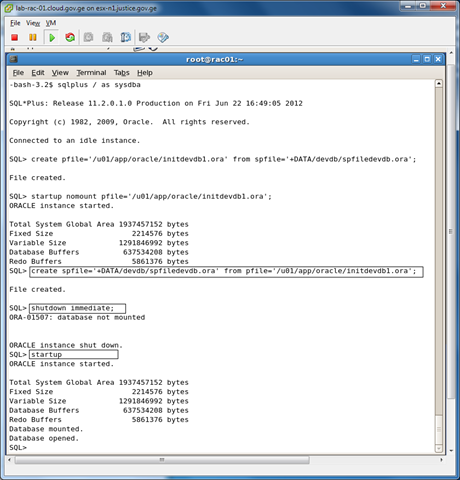
1. Create pfile from spfile.

image

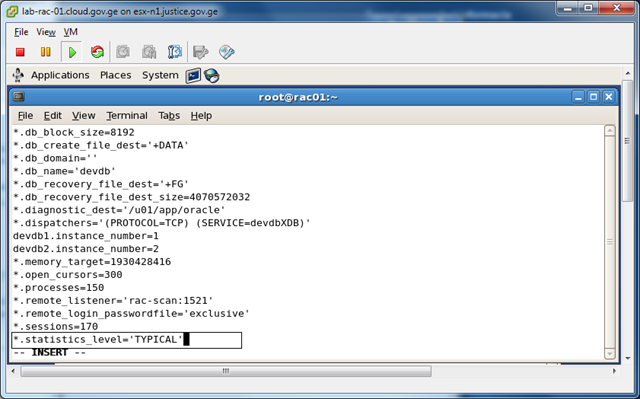
2. Change parameter file initdevdb1.ora(which was created form spfile)  and set statistics_level parameter to TYPICAL.

vi  /u01/app/oracle/initdevdb1.ora

image

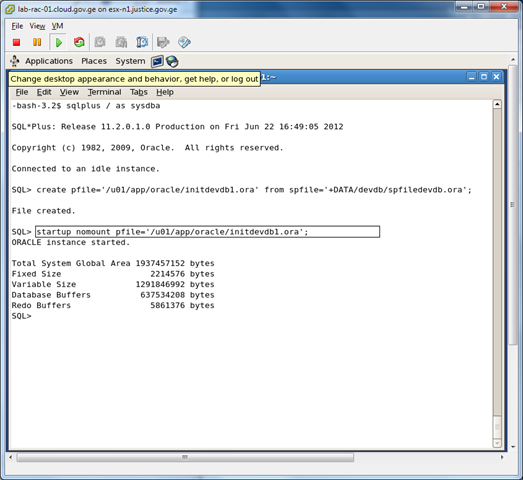
3. Nomount database with newly created pfile.

image

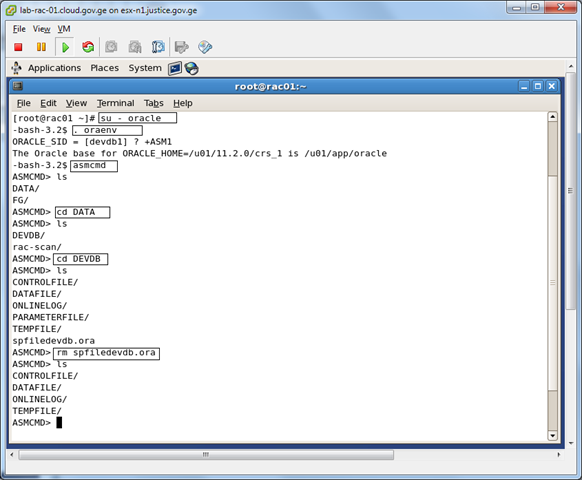
4. Delete old spfile using ASMCMD.

image

5.  create spfile from pfile.

image

Note: Default location for pfile is $ORACLE_HOME/dbs. STARTUP command reads pfile from default location, that in our case refers to spfile located on ASM.

That’s it!

External table with ORACLE_LOADER

Today, I will discuss how to create external table and show you the primary usage of it. 

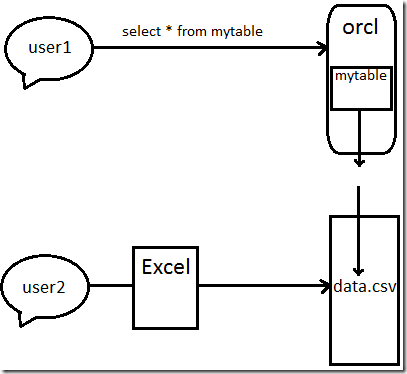
Data in external table is saved outside of the database. To easily understand what does it mean, let’s discuss the following example:
user1 is the user, who is connected to the ORCL database and should see mytable content.
user2 is the user, who modifies data.csv file using Excel and places it in the directory accessible for oracle database.

Pic 1.
image

This approach may be achieved by ORACLE_LOADER or ORACLE_DATA.

In my example , I will use ORACLE_LOADER.

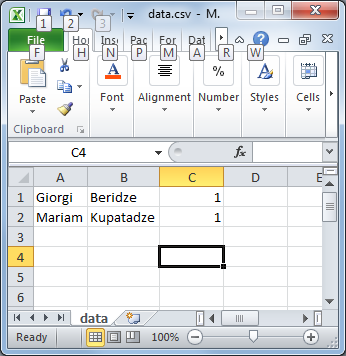
1. Create csv document and fill it with some data:
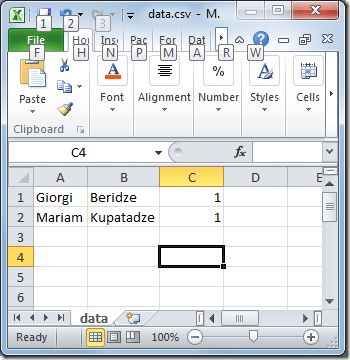
image

2. Change data.csv  with data.txt. So change csv extension to txt.

This will help you to determine by which character is data separated.
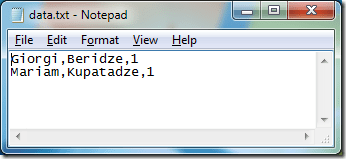
image

As you can see records are separated by newline and delimiter is comma (,)

So let’s write a script:

3.

/*Create necessary directories 

  Bad file will be saved in bad_dir. As you know bad file is for saving data, 
that was not loaded into the database because of some error.

*/


create directory data_dir as 'D:\data';

create directory bad_dir as 'D:\data\bad';

create directory log_dir as 'D:\log';


/*Create table owner*/

create user a identified by a default tablespace USERS;

/*Grant necessary privileges*/

grant create session to a;

grant read on directory data_dir to a;

grant write on directory bad_dir to a;

grant write on directory log_dir to a;

grant create table to a;

/*Connect as “a” user and create external table*/

Create table data_table(

  Name varchar2(30),

  Surname varchar2(60),

  quantity number

) 

organization external(

   type ORACLE_LOADER

   default directory data_dir

   access parameters(

     records delimited by newline

     badfile bad_dir:'data.bad'

     logfile log_dir:'data.log'

     fields terminated by ','

     missing field values are null

     (name,surname,quantity)

   )

  location('data.txt')

)

parallel

reject limit unlimited;


I think external table options are self-explanatory….

Let’s check table content:

SQL> select * from data_table;


NAME       SURNAME     QUANTITY

---------- ----------- ----------

Mariam     Kupatadze   1

Giorgi     Beridze     1

Change the content of data.txt file to the following

/*data.txt*/

Giorgi,Beridze,1

Mariam,Kupatadze,2

and re-run the query

SQL> select * from data_table;
 
NAME       SURNAME     QUANTITY
---------- ----------- ----------
Mariam     Kupatadze   2
Giorgi     Beridze     1

as you can see changes were reflected.

Note, external table is read only. Let’s try updating it:

update  data_table set surname='Kupa' where surname='Kupatadze';

You will get an error
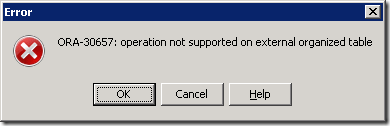
image

Now let’s change the content of data.txt to the following

/*data.txt*/

Giorgi,Beridze,1

Mariam,Kupatadze,2

mmmmmm,mmmmmmm,mmm

and re-run the query

SQL> select * from data_table; 


NAME       SURNAME     QUANTITY

---------- ----------- ----------

Mariam     Kupatadze   2

Giorgi     Beridze     1 


There is no changes, why  ?

Now let’s see the log file and then bad file:

At the end of the log file you will notice the following error:

error processing column QUANTITY in row 3 for datafile D:\data\data.csv

ORA-01722: invalid number

In the bad file, there is:

mmm,mmm,mmm

Because of quantity column type was number, string “mmm” was not inserted in it. 
So log file showed us the error “invalid number” and bad file saved data that was causing an error.

I hope it was helpful for you. Good Luck!
GRANT ANY OBJECT PRIVILEGE

Real world scenario:

I have users: A_DBA, B_JUNIOR, C_MAIN, D_USERS.

I want my junior, user B_JUNIOR,  to grant execute privilege on C_MAIN.testProc to D_USERS, without having him execute privilege on C_MAIN.testProc.

So I want my junior to grant(JUST grant) object privilege on one schema to another schema .

Solution:

GRANT ANY OBJECT PRIVILEGE  is the privilege which solves it.

SQL> connect A_DBA/ta@MYDB

Connected to Oracle Database 11g Enterprise Edition Release 11.2.0.1.0 

Connected as A_DBA

SQL> grant GRANT ANY OBJECT PRIVILEGE to B_JUNIOR.

Grant succeeded

SQL> connect B_JUNIOR/a@MYDB

Connected to Oracle Database 11g Enterprise Edition Release 11.2.0.1.0 

Connected as B_JUNIOR 

SQL> grant execute on C_MAIN.testProc to D_USERS

Grant succeeded

————————————BUT, junior can’t execute itself

SQL> exec C_MAIN.testProc;

begin C_MAIN.testProc; end;

ORA-06550: line 2, column 7:

PLS-00201: identifier 'C_MAIN.TESTPROC' must be declared

ORA-06550: line 2, column 7:

PL/SQL: Statement ignored

Oracle’s Password File: remote_login_passwordfile

Oracle’s password file helps you to authenticate the database until the instance has been started. As you can guess, the password cannot be saved in DB , because DBAs will not be able to access database until instance is started.

There are two methods to authentication the DBA:

1. OS authentication.

2. Password file authentication.

The initialization parameter remote_login_passwordfile indicates which method should be used.

Available Values:

1. NONE : No password file is used.  Authentication happens via OS.

2. EXCLUSIVE: This is a default value. Password file can only be used by one database. It enables you to grant SYSDBA or SYSOPER privileges to the users other than SYS. You are also able to change their passwords, which can’t be done in SHARED mode.

Note: Entries in password file is created automatically when you grant SYSDBA or SYSOPER privileges to the user. If user has any of these privileges, entry exists in password file. If you revoke  both of them entry will be deleted automatically.

To check what user entries are located in passwordfile:

select * from v$pwfile_users;

3. SHARED: Means password file is shared and one or more database can use it. But this also means that ONLY SYS user can be added to the password file. And you are not able to change its password.  

Note: Password file can contain non-SYS users, only if they were added before the value of this parameter has been changed to SHARED.

Note:  In Real Application Clusters each instance must have the same value.

Password file is created with the orapwd.

Oracle’s Password File: remote_login_passwordfile

Oracle’s password file helps you to authenticate the database until the instance has been started. As you can guess, the password cannot be saved in DB , because DBAs will not be able to access database until instance is started.

There are two methods to authentication the DBA:

1. OS authentication.

2. Password file authentication.

The initialization parameter remote_login_passwordfile indicates which method should be used.

Available Values:

1. NONE : No password file is used.  Authentication happens via OS.

2. EXCLUSIVE: This is a default value. Password file can only be used by one database. It enables you to grant SYSDBA or SYSOPER privileges to the users other than SYS. You are also able to change their passwords, which can’t be done in SHARED mode.

Note: Entries in password file is created automatically when you grant SYSDBA or SYSOPER privileges to the user. If user has any of these privileges, entry exists in password file. If you revoke  both of them entry will be deleted automatically.

To check what user entries are located in passwordfile:

select * from v$pwfile_users;

3. SHARED: Means password file is shared and one or more database can use it. But this also means that ONLY SYS user can be added to the password file. And you are not able to change its password.  

Note: Password file can contain non-SYS users, only if they were added before the value of this parameter has been changed to SHARED.

Note:  In Real Application Clusters each instance must have the same value.

Password file is created with the orapwd.

Could not validate ASMSNMP password due to…During DB creation

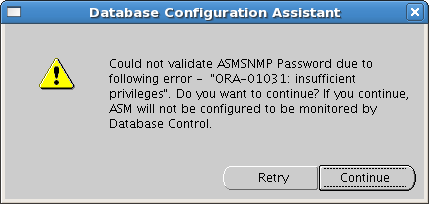
If you are creating database using DBCA and came across the following error:

Screenshot-Database Configuration Assistant

Do the following:

bash-3.2$ . oraenv
ORACLE_SID = [RDBMS] ? +ASM
The Oracle base for ORACLE_HOME=/u02/app/11.2.0/grid is /u01/app/oracle
bash-3.2$ sqlplus / as sysasm

SQL*Plus: Release 11.2.0.1.0 Production on Mon May 21 18:59:20 2012

Copyright (c) 1982, 2009, Oracle.  All rights reserved.
Connected to:
Oracle Database 11g Enterprise Edition Release 11.2.0.1.0 – 64bit Production
With the Automatic Storage Management option

SQL> create user ASMSNMP identified by testpas1;
create user ASMSNMP identified by testpas1
*
ERROR at line 1:
ORA-01990: error opening password file ‘/u02/app/11.2.0/grid/dbs/orapw’

SQL> exit
Disconnected from Oracle Database 11g Enterprise Edition Release 11.2.0.1.0 – 64bit Production
With the Automatic Storage Management option
bash-3.2$ echo $ORACLE_HOME
/u02/app/11.2.0/grid
bash-3.2$ cd /u02/app/11.2.0/grid/dbs/
bash-3.2$ orapwd file=orapw+ASM password=testpas1 entries=2
bash-3.2$ ls
ab_+ASM.dat  hc_+ASM.dat  init+ASM.ora  init.ora  orapw+ASM  spfile+ASM.ora
bash-3.2$ sqlplus / as sysasm

SQL*Plus: Release 11.2.0.1.0 Production on Mon May 21 19:01:20 2012

Copyright (c) 1982, 2009, Oracle.  All rights reserved.
Connected to:
Oracle Database 11g Enterprise Edition Release 11.2.0.1.0 – 64bit Production
With the Automatic Storage Management option

SQL> create user ASMSNMP identified by testpas1;

User created.

SQL> grant sysdba to ASMSNMP;

Grant succeeded.

That’s it. Re-run DBCA.

Could not validate ASMSNMP password due to…During DB creation

If you are creating database using DBCA and came across the following error:

Screenshot-Database Configuration Assistant

Do the following:

bash-3.2$ . oraenv
ORACLE_SID = [RDBMS] ? +ASM
The Oracle base for ORACLE_HOME=/u02/app/11.2.0/grid is /u01/app/oracle
bash-3.2$ sqlplus / as sysasm

SQL*Plus: Release 11.2.0.1.0 Production on Mon May 21 18:59:20 2012

Copyright (c) 1982, 2009, Oracle.  All rights reserved.
Connected to:
Oracle Database 11g Enterprise Edition Release 11.2.0.1.0 – 64bit Production
With the Automatic Storage Management option

SQL> create user ASMSNMP identified by testpas1;
create user ASMSNMP identified by testpas1
*
ERROR at line 1:
ORA-01990: error opening password file ‘/u02/app/11.2.0/grid/dbs/orapw’

SQL> exit
Disconnected from Oracle Database 11g Enterprise Edition Release 11.2.0.1.0 – 64bit Production
With the Automatic Storage Management option
bash-3.2$ echo $ORACLE_HOME
/u02/app/11.2.0/grid
bash-3.2$ cd /u02/app/11.2.0/grid/dbs/
bash-3.2$ orapwd file=orapw+ASM password=testpas1 entries=2
bash-3.2$ ls
ab_+ASM.dat  hc_+ASM.dat  init+ASM.ora  init.ora  orapw+ASM  spfile+ASM.ora
bash-3.2$ sqlplus / as sysasm

SQL*Plus: Release 11.2.0.1.0 Production on Mon May 21 19:01:20 2012

Copyright (c) 1982, 2009, Oracle.  All rights reserved.
Connected to:
Oracle Database 11g Enterprise Edition Release 11.2.0.1.0 – 64bit Production
With the Automatic Storage Management option

SQL> create user ASMSNMP identified by testpas1;

User created.

SQL> grant sysdba to ASMSNMP;

Grant succeeded.

That’s it. Re-run DBCA.

Candidate ASM disks not showing

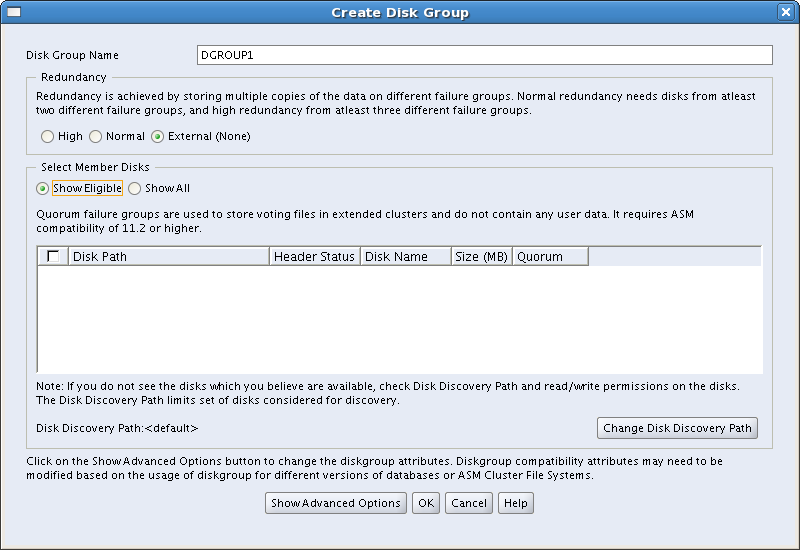
If you are in the middle of grid installation, and trying to create ASM disk group but Eligible(Candidate) disks location is empty, for example like this:Screenshot-Create Disk Group

moreover you have configured candidate disks using /etc/init.d/oracleasm and listdisks command showing the disk.

bash-3.2$ /etc/init.d/oracleasm listdisks

VOL1

Then follow my steps that may help:

1. Click “Change Disk Discovery Path” button

2. Enter the path /dev/oracleasm/disks and click OK

Screenshot-Change Disk Discovery Path

3. The picture should look like this:

Screenshot-Create Disk Group-1

That’s it. GOOD LUCK!

PL/SQL developer error_Could not initialize oci.dll

If you have the following error after trying to connect database using PL/SQL Developer

image

It means that you don’t have 32bits client installed.

Install 32bits client instead of 64bits version.

I hope, this simple solution will help you. Good Luck!

Install Guest Additions_use Shared Folders

Let’s assume that we have Linux as a guest OS.

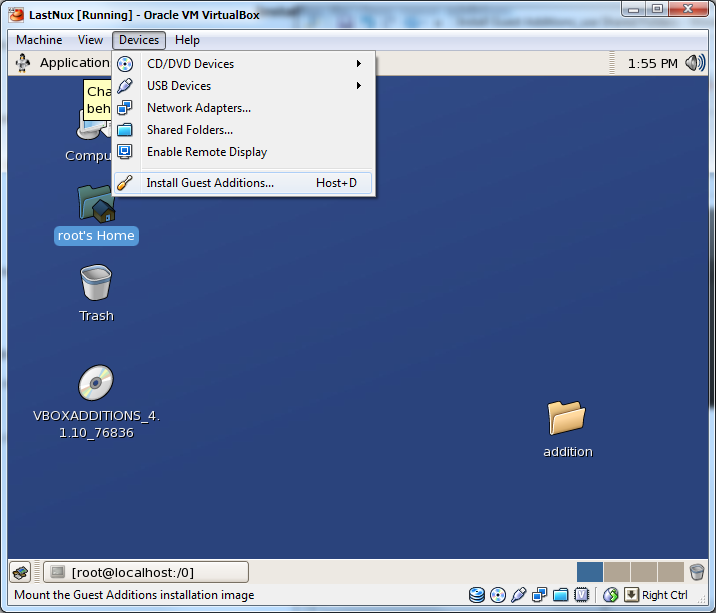
1. Install Guest Additions…

image

2. There will appear disk called like “VBOXADDITIONS_4.1.10_76836”. Copy content of the disk to another folder like this.

# mkdir /root/Desktop/addition

# cp /media/VBOXADDITIONS_4.1.10_76836  /root/Desktop/addition

# cd  /root/Desktop/addition

# sh ./VBoxLinuxAdditions.run

It will install guest additions.

Now reboot the system.

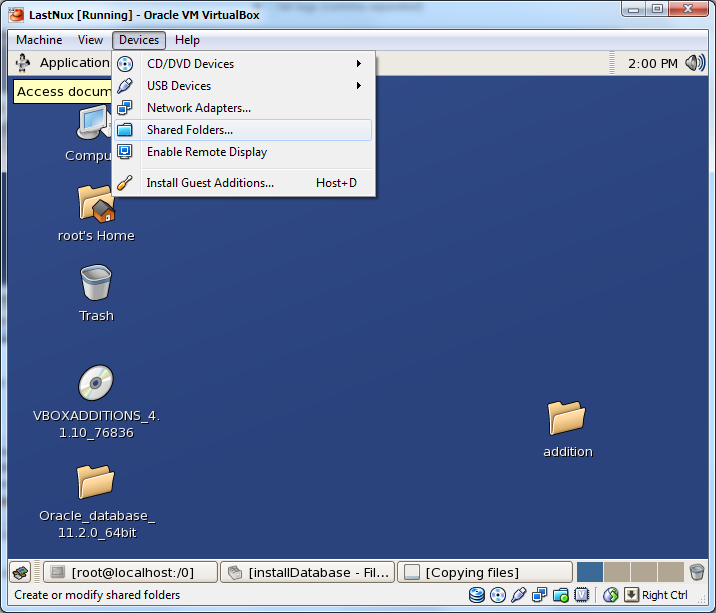
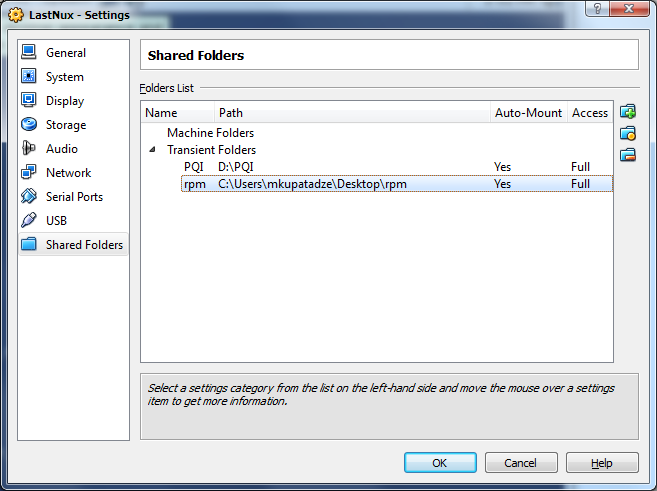
To use shared folder do this:

1.

image

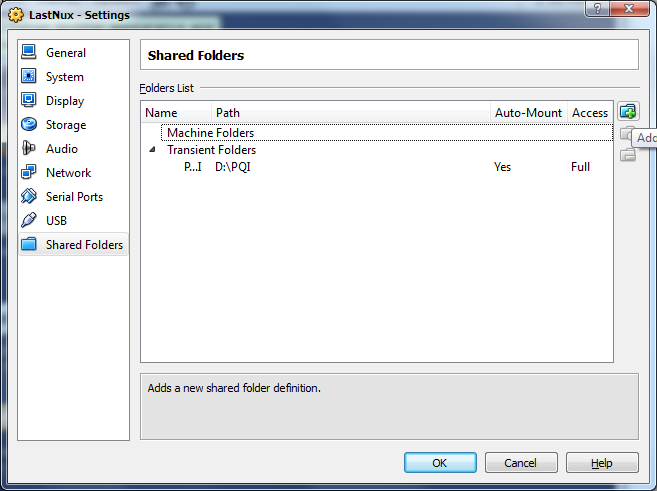
2. Click add

image

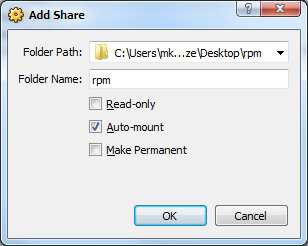
3.

image

4.

image

5. Mount the content of shared folder to guest directory, like this:

# mkdir /0

# sudo mount -t vboxsf rpm /0

Desired content will be located in /0.