Creating an Oracle RAC on Azure cloud with FlashGrid SkyCluster
March 17, 2020 3 Comments
Oracle, Linux, AWS, Azure, GCP
March 5, 2020 2 Comments
In this post I will discuss one of the reasons why golden gate startup may hang and fail on both nodes:
Problem:
[root@primrac1 tmp]# /u01/app/grid/xag/bin/agctl start goldengate gg_replicate
^[[ACRS-2672: Attempting to start 'xag.gg_replicate.goldengate' on 'primrac2'
CRS-2674: Start of 'xag.gg_replicate.goldengate' on 'primrac2' failed
CRS-2679: Attempting to clean 'xag.gg_replicate.goldengate' on 'primrac2'
CRS-2681: Clean of 'xag.gg_replicate.goldengate' on 'primrac2' succeeded
CRS-2563: Attempt to start resource 'xag.gg_replicate.goldengate' on 'primrac2' has failed. Will re-retry on 'primrac1' now.
CRS-2672: Attempting to start 'xag.gg_replicate.goldengate' on 'primrac1'
CRS-2674: Start of 'xag.gg_replicate.goldengate' on 'primrac1' failed
CRS-2679: Attempting to clean 'xag.gg_replicate.goldengate' on 'primrac1'
CRS-2681: Clean of 'xag.gg_replicate.goldengate' on 'primrac1' succeeded
CRS-2632: There are no more servers to try to place resource 'xag.gg_replicate.goldengate' on that would satisfy its placement policy
CRS-4000: Command Start failed, or completed with errors.
Troubleshooting:
Check crsd_scriptagent_oracle.trc trace file on each database node. For my environment the full path of this file is /u01/app/grid/diag/crs/primrac2/crs/trace/crsd_scriptagent_oracle.trc
I found that the following error was repeating in the trace file:
2020-03-05 23:36:30.467 : CLSDADR:3560113920: ERRORdynamic component [R2530613] mapped to [CLSDYNAM]
On the metalink found only this PRCR-1079 : Failed to start resource ora.oc4j, the problem is not the same, but glanced a sentence containing config file.. so here I realized it could be related to the config file. And I was correct.
Solution:
Delete existing GG resource:
# /u01/app/grid/xag/bin/agctl remove goldengate gg_replicate
Readd using correct config file location:--config_home /GG_HOME/sm/etc/conf --var_home /GG_HOME/sm/var
# /u01/app/grid/xag/bin/agctl add goldengate gg_replicate --gg_home /GG_HOME/ma --service_manager --config_home /GG_HOME/sm/etc/conf --var_home /GG_HOME/sm/var --port 9001 --adminuser oggadmin --user oracle --group oinstall --filesystems ora.ggdg.acfsgg.acfs --db_services ora.primorcl.orclservice.svc --use_local_services
Start Golden Gate, relocate and check:
[root@primrac1 ~]# /u01/app/grid/xag/bin/agctl start goldengate gg_replicate
[root@primrac1 ~]# /u01/app/grid/xag/bin/agctl status goldengate gg_replicate
Goldengate instance 'gg_replicate' is running on primrac2
[root@primrac1 ~]# /u01/app/grid/xag/bin/agctl relocate goldengate gg_replicate
[root@primrac1 ~]# /u01/app/grid/xag/bin/agctl status goldengate gg_replicate
Goldengate instance 'gg_replicate' is running on primrac1
February 13, 2020 Leave a comment
Before starting make sure that:
1. NFS server is accessible from DB nodes
2. nfs-utils is installed on all client and DB nodes
3. ASM is running on all nodes
NFS disk configuration steps:
1. On NFS server node (e.g. nfsserver)
# systemctl disable firewalld
# systemctl stop firewalld
# mkdir /NFS_DISKS

--Create quorum disk in nfs share:
# dd if=/dev/zero of=/NFS_DISKS/nfsdisk1 bs=1M count=1024

# chmod -R 755 /NFS_DISKS
# chown -R grid:oinstall /NFS_DISKS

# vim /etc/exports
/NFS_DISKS *(rw,async)

# systemctl enable nfs-server
# systemctl start nfs-server
2. On all DB nodes (e.g. rac1 rac2)
# mkdir /NFS_DISKS
# chown -R grid:oinstall /NFS_DISKS
# vim /etc/fstab

nfsserver:/NFS_DISKS /NFS_DISKS nfs rw,bg,hard,nointr,rsize=32768,wsize=32768,tcp,actimeo=0,noac,vers=3,timeo=600 0 0 0

# mount -a

--Update disk discovery string from grid user:
$ asmcmd dsset '/NFS_DISKS/*','/dev/flashgrid/*'
If this is Flashgrid-enabled cluster, then you can create diskgroup which contains NFS disk as quorum:
[grid@rac1 ~]$ flashgrid-dg create --name TEST --normal --asm-compat 19.0.0.0 --db-compat 19.0.0.0 --disks /dev/flashgrid/rac1.lun4 /dev/flashgrid/rac2.lun4 --quorum-disks /NFS_DISKS/nfsdisk1 FlashGrid 19.6.48.60391~~~~ Querying nodes: rac1, rac2, racq … Creating group… Completing this operation may take long time. Please wait… CREATE DISKGROUP "TEST" NORMAL REDUNDANCY FAILGROUP "rac1" DISK '/dev/flashgrid/rac1.lun4' NAME "rac1$LUN4" SIZE 20480M FAILGROUP "rac2" DISK '/dev/flashgrid/rac2.lun4' NAME "rac2$LUN4" SIZE 20480M QUORUM FAILGROUP "QUORUM0" DISK '/NFS_DISKS/nfsdisk1' NAME "TEST_Q0" ATTRIBUTE 'au_size' = '4M', 'compatible.asm' = '19.0.0.0', 'compatible.rdbms' = '19.0.0.0'; ALTER SYSTEM SET asm_preferred_read_failure_groups='DATA.rac1','FRA.rac1','GGDG.rac1','GRID.rac1','TEST.rac1' SID='+ASM1'; ALTER SYSTEM SET asm_preferred_read_failure_groups='DATA.rac2','FRA.rac2','GGDG.rac2','GRID.rac2','TEST.rac2' SID='+ASM2'; Success
December 23, 2019 Leave a comment
Details:
Environment: RAC
Source name: orclA
Target name: orcl
1. Make sure that you have a recoverable whole database backup.
2. In Real Application Cluster we need to set cluster_database parameter to false and mount an instance on only one node:
[oracle@primrac1 ~]$ sqlplus / as sysdba
SQL> alter system set cluster_database=false scope=spfile;

[oracle@primrac1 ~]$ srvctl stop database orclA
[oracle@primrac1 ~]$ sqlplus / as sysdba
SQL> startup mount;
3. From the 1st node run nid utility. Specify username with sysdba privilege, target database name, and SETNAME parameter to yes.
[oracle@primrac1 ~]$ . oraenv
ORACLE_SID = [oracle] ? orclA1
The Oracle base remains unchanged with value /u01/app/oracle

[oracle@primrac1 ~]$ nid TARGET=SYS DBNAME=orcl SETNAME=YES
DBNEWID: Release 19.0.0.0.0 - Production on Mon Dec 16 16:54:36 2019
Copyright (c) 1982, 2019, Oracle and/or its affiliates.  All rights reserved.
Password:
Connected to database ORCLA (DBID=3133348785)
Connected to server version 19.4.0
Control Files in database:
    +DATA/ORCLA/CONTROLFILE/current.290.1020357617
Change database name of database ORCLA to ORCL? (Y/[N]) => Y
Proceeding with operation
Changing database name from ORCLA to ORCL
     Control File +DATA/ORCLA/CONTROLFILE/current.290.1020357617 - modified
     Datafile +DATA/ORCLA/DATAFILE/system.283.102035744 - wrote new name
     Datafile +DATA/ORCLA/DATAFILE/sysaux.286.102035749 - wrote new name
     Datafile +DATA/ORCLA/DATAFILE/undotbs1.287.102035753 - wrote new name
     Datafile +DATA/ORCLA/DATAFILE/undotbs2.300.102035839 - wrote new name
     Datafile +DATA/ORCLA/DATAFILE/users.288.102035754 - wrote new name
     Datafile +DATA/ORCLA/TEMPFILE/temp.296.102035765 - wrote new name
     Control File +DATA/ORCLA/CONTROLFILE/current.290.1020357617 - wrote new name
     Instance shut down
 Database name changed to ORCL.
 Modify parameter file and generate a new password file before restarting.
 Succesfully changed database name.
 DBNEWID - Completed succesfully.
5. Change db_name parameter in the initialization parameter file:
[oracle@primrac1 dbs]$ . oraenv
ORACLE_SID = [orcl1] ? orclA1

[oracle@primrac1 dbs]$ sqlplus / as sysdba
SQL> startup nomount;
SQL> alter system set db_name=orcl scope=spfile;
SQL> alter system set cluster_database=true scope=spfile;
SQL> shut immediate;
6. Modify database name in srvctl:
[oracle@primrac1 dbs]$ srvctl modify database -db orclA -dbname orcl
7. Remove existing password file entry and create a new one:
[oracle@primrac1 dbs]$ srvctl modify database -db orclA -pwfile

[oracle@primrac1 dbs]$ orapwd  dbuniquename=orclA file='+DATA/ORCLA/PASSWORD/pwdorcl.ora'
Enter password for SYS:
8. Start the database using srvctl:
[oracle@primrac1 dbs]$ srvctl start database -db orclA
Depending on your needs you may also update instance names. If so, please make sure that you don’t have instance-specific parameters (e.g orclA1.instance_number), otherwise, it’s better to recreate the parameter file with the correct instance names.
I’ve shown you just a simple example of the database name change. In your specific case, there may be other things that depend on the database name.
October 28, 2019 1 Comment
Problem:
Applying OCW patch 28729234 on RDBMS home failed with the following error:
[oracle@rac1 28729234]$ $ORACLE_HOME/OPatch/opatch apply -oh $ORACLE_HOME

Oracle Interim Patch Installer version 11.2.0.3.20
...
UtilSession failed: Patch 28729234 requires component(s) that are not installed in OracleHome. These not-installed components are oracle.crs:11.2.0.4.0
Reason:
The error message is confusing, because the real reason is in the patch itself. There is a duplication of folders and files. Custom/server directory under 28729234, also contains 28729234 directory.
Solution:
As a workaround run opatch from inner 28729234 directory:
[oracle@rac1 ~]$ cd /home/oracle/28813878/28729234/custom/server/28729234
Generate emocmrsp file:
[oracle@rac1 28729234]$ /u01/app/oracle/product/11.2.0/dbhome_1/OPatch/ocm/bin/emocmrsp

OCM Installation Response Generator 10.3.7.0.0 - Production
Copyright (c) 2005, 2012, Oracle and/or its affiliates.  All rights reserved.
Provide your email address to be informed of security issues, install and
initiate Oracle Configuration Manager. Easier for you if you use your My Oracle Support Email address/User Name.
Visit http://www.oracle.com/support/policies.html for details.
Email address/User Name:
You have not provided an email address for notification of security issues.
Do you wish to remain uninformed of security issues ([Y]es, [N]o) [N]:  Y
The OCM configuration response file (ocm.rsp) was successfully created
Apply patch using the following command:
[oracle@rac1 28729234]$ $ORACLE_HOME/OPatch/opatch apply -oh $ORACLE_HOME -ocmrf ./ocm.rsp
...
Start OOP by Prereq process.
Launch OOP…
Oracle Interim Patch Installer version 11.2.0.3.20
Copyright (c) 2019, Oracle Corporation.  All rights reserved.
...
Applying interim patch '28729234' to OH '/u01/app/oracle/product/11.2.0/dbhome_1'
Patching component oracle.rdbms, 11.2.0.4.0…
Patch 28729234 successfully applied.
Checking that OCW is applied:
[oracle@rac1 28729234]$ $ORACLE_HOME/OPatch/opatch lspatches
28729234;OCW Patch Set Update : 11.2.0.4.190115 (28729234)
28729262;Database Patch Set Update : 11.2.0.4.190115 (28729262)
October 14, 2019 Leave a comment
My ACFS volume has intermittent problems, when I run ls command I get ls: cannot access sm: Input/output error and user/group ownership contains question marks.
[root@primrac1 GG_HOME]# ll
ls: cannot access ma: Input/output error
ls: cannot access sm: Input/output error
ls: cannot access deploy: Input/output error
total 64
d????????? ? ? ? ? ? deploy
drwx------ 2 oracle oinstall 65536 Sep 28 21:05 lost+found
d????????? ? ? ? ? ? ma
d????????? ? ? ? ? ? sm
Doc ID 2561145.1 mentions that kernel 3.10.0-957 changed behaviour of d_splice_alias interface which is used by ACFS driver.
My kernel is also the same:
[root@primrac1 GG_HOME]# uname -r
3.10.0-957.21.3.el7.x86_64
Download and apply patch 29963428 on GI home.
[root@primrac1 29963428]# /u01/app/19.3.0/grid/OPatch/opatchauto apply -oh /u01/app/19.3.0/grid
October 7, 2019 Leave a comment
Problem:
Connection using 11g ojdbc was very slow and most of the time was failing with Connection reset error after 60s (default inbound connection timeout). Database alert log contained WARNING: inbound connection timed out (ORA-3136) errors.
Reason:
Oracle 11g JDBC drivers use random numbers during authentication. Those random numbers are generated by OS using /dev/random and if there is faulty/slow hardware or not too much activity on the system this generation can be slow, which causes slowness during jdbc connection.
Solution:
Instead of /dev/random indicate non-blocking /dev/urandom as java command line argument:
# java -Djava.security.egd=file:/dev/urandom -cp ojdbc8.jar:. JDBCTest "stbyrac-scan.example.com"
September 30, 2019 4 Comments
Assuming that client computer does not have Oracle client installed.
1. Download necessary version of ojdbc jar file from Oracle. The latest version for now is ojdbc8.jar
2. Install java development tools:
# yum install java-devel * -y
3. Create a sample java code, which:
– connects to the database
– selects 1 from dual
– disconnects
# cat JDBCTest.java
import java.sql.*;
 class JDBCTest{
     public static void main(String args[]) throws SQLException {
         Connection con = null;
         try{
             Class.forName("oracle.jdbc.driver.OracleDriver");
             String dbURL = "jdbc:oracle:thin:@(DESCRIPTION=(ADDRESS=(PROTOCOL=TCP)(HOST=" + args[0] + ")(PORT=1521))(CONNECT_DATA=(SERVER = DEDICATED)(SERVICE_NAME=orclgg)))";
             System.out.println("jdbcurl=" + dbURL);
             String strUserID = "system";
             String strPassword = "Oracle123";
             con=DriverManager.getConnection(dbURL,strUserID,strPassword);
             System.out.println("Connected to the database.");
             Statement stmt=con.createStatement();
             System.out.println("Executing query");
             ResultSet rs=stmt.executeQuery("SELECT 1 FROM DUAL");
             while(rs.next())
                 System.out.println(rs.getInt("1"));
             con.close();
         }catch(Exception e){ System.out.println(e);}
         finally {
             con.close();
         }
 }
 }
4. Compile java code and check that *.class file was generated:
# javac JDBCTest.java

# ll  JDBCTest.*
 -rw-r--r-- 1 root root 1836 Sep 27 11:45 JDBCTest.class
 -rw-r--r-- 1 root root  925 Sep 27 11:45 JDBCTest.java
5. Run code:
# java -Djava.security.egd=file:/dev/../dev/urandom -cp ojdbc8.jar:. JDBCTest "stbyrac-scan.example.com"

jdbcurl=jdbc:oracle:thin:@(DESCRIPTION=(ADDRESS=(PROTOCOL=TCP)(HOST=stbyrac-scan.example.com)(PORT=1521))(CONNECT_DATA=(SERVER = DEDICATED)(SERVICE_NAME=orclgg)))

Connected to the database.
Executing query…
1
Please note that -Djava.security.egd=file:/dev/../dev/urandom parameter is required to have a stable connection. I will discuss the importance of this parameter in the next post.
September 23, 2019 Leave a comment
Problem:
My opatchauto outofplace patching failed on GI home. I was able to cleanup cloned GI home and information about it in inventory.xml, but after running opatchauto again I was getting the following error:
[root@rac1 29708703]# $ORACLE_HOME/OPatch/opatchauto apply -oh $ORACLE_HOME -outofplace
OPatchauto session is initiated at Sun Aug 18 20:40:43 2019
System initialization log file is /u01/app/18.3.0/grid/cfgtoollogs/opatchautodb/systemconfig2019-08-18_08-40-46PM.log.
Session log file is /u01/app/18.3.0/grid/cfgtoollogs/opatchauto/opatchauto2019-08-18_08-42-20PM.log
The id for this session is Z1CP
OPATCHAUTO-72115: Out of place patching apply session cannot be performed.
OPATCHAUTO-72115: Previous apply session  is not completed on node rac1.
OPATCHAUTO-72115: Please complete the previous apply  session across all nodes to perform apply session.
OPatchAuto failed.
Solution:
Clear checkpoint files from the previous session :
[root@rac1 29708703]# cd /u01/app/18.3.0/grid/.opatchauto_storage/rac1
[root@rac1 rac1]# ls
oopsessioninfo.ser
[root@rac1 rac1]# rm -rf oopsessioninfo.ser
Rerun opatchauto apply again.
September 9, 2019 Leave a comment
Problem:
Recently, I was applying p29963428_194000ACFSRU_Linux-x86-64.zip on top of 19.4 GI home and got the following error:
==Following patches FAILED in analysis for apply:
 Patch: /u01/swtmp/29963428/29963428
 Log: /u01/app/19.3.0/grid/cfgtoollogs/opatchauto/core/opatch/opatch2019-08-07_10-07-56AM_1.log
 Reason: Failed during Analysis: CheckConflictAgainstOracleHome Failed, [ Prerequisite Status: FAILED, Prerequisite output:
 Summary of Conflict Analysis:
 There are no patches that can be applied now.
 Following patches have conflicts. Please contact Oracle Support and get the merged patch of the patches :
 29851014, 29963428
 Conflicts/Supersets for each patch are:
 Patch : 29963428
 Bug Conflict with 29851014 Conflicting bugs are: 29039918, 27494830, 29338628, 29031452, 29264772, 29760083, 28855761 ...
 After fixing the cause of failure Run opatchauto resume
Solution:
Oracle MOS note ID 1317012.1 describes steps how to check such conflicts and request conflict/merged patches in previous:
1. Run lsinventory from the target home:
[grid@rac1 ~]$ /u01/app/19.3.0/grid/OPatch/opatch lsinventory > GI_lsinventory.txt
2. Logon to support.oracle.com -> Click the “Patch and Updates” tab -> Enter the patch number you want to apply:

2. Click Analyze with OPatch…
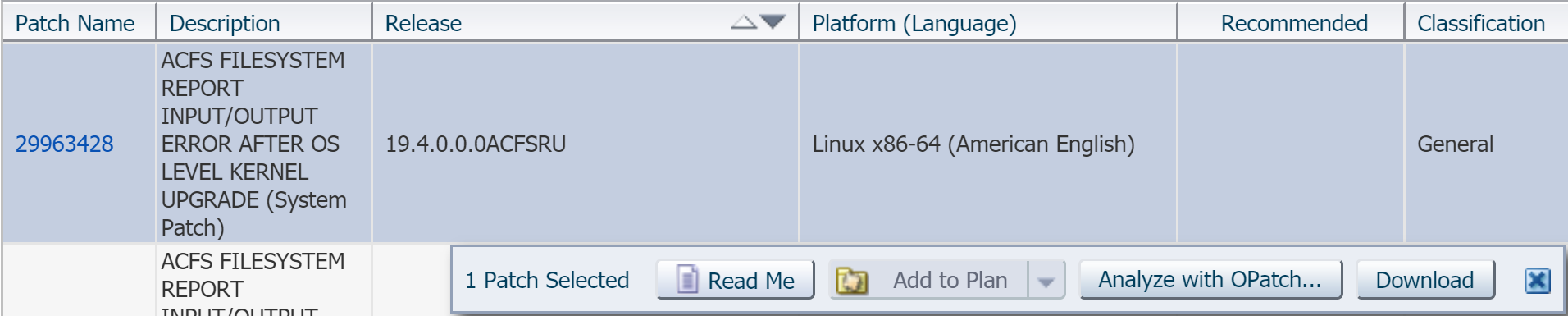
3. Attach GI_lsinventory.txt file created in the first step and click “Analyze for Conflict”:

4. Wait for a while and you will see the result. According to it, patch 29963428 conflicts with my current patches:

From the same screen I can “Request Patch”.
5. After clicking “Request Patch” button I got the following error:

Click “See Details”:
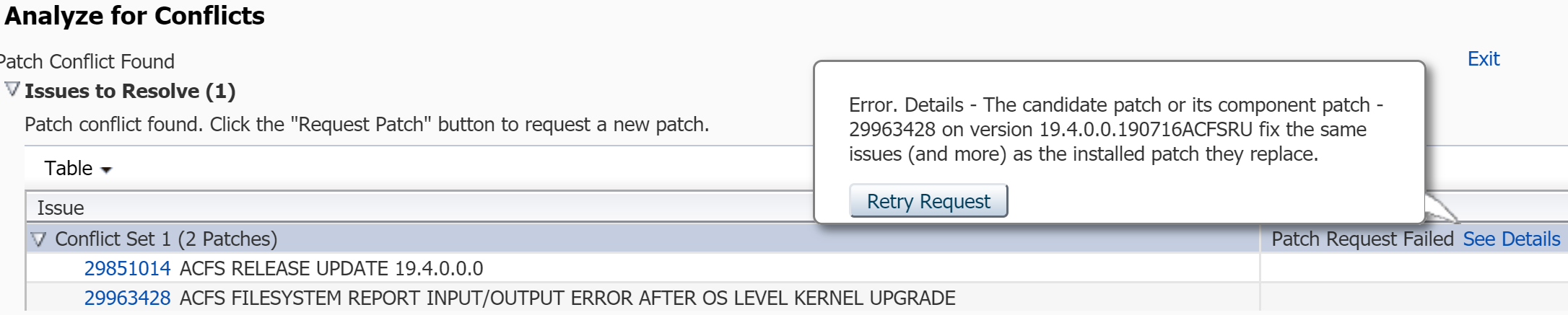
The message actually means that fix for the same bug is already included in currently installed 19.4.0.0.190716ACFSRU.
So I don’t have to apply 29963428 patch. I wanted to share the steps with you , because the mentioned tool is really useful.

