ORA-00600: internal error code, arguments: [kmgs_parameter_update_timeout_1], [17510]

Error message:

ORA-00600: internal error code, arguments: [kmgs_parameter_update_timeout_1], [17510], [], [], [], [], [], [], [], [], [], []
ORA-17510: Attempt to do i/o beyond file size

One of the solution:

1. First of all check oracle file permissions.

cd $ORACLE_HOME/bin
ls -l oracle

-r-xr-s–x 1 oracle oinstall 210824720 Sep 15  2010 oracle

As you can see , my oracle file permissions are wrong, because it should be -rwsr-s—x.

So change it:

chmod 6751 oracle

ls -l oracle
-rwsr-s–x 1 oracle oinstall 210824720 Sep 15  2010 oracle


2. Re-create spfile.

The problem may be caused by a possible corruption of spfile. Oracle is not able to write entry into the spfile and the error occurs.

The solution:

export ORACLE_SID=orcl

sqlplus / as sysdba

create pfile from spfile;

shutdown immediate;

startup pfile=’/u01/app/oracle/product/11.2.0/db_1/dbs/initorcl.ora’;

create spfile from pfile=’/u01/app/oracle/product/11.2.0/db_1/dbs/initorcl.ora’;

shutdown immediate;

startup;


Good Luck!
ORA-15045: ASM file name ‘+DATA’ is not in reference form

Error Message:

RMAN-06136: ORACLE error from auxiliary database: ORA-00200: control file could not be created
ORA-00202: control file: ‘+DATA’
ORA-15045: ASM file name ‘+DATA’ is not in reference form
ORA-17502: ksfdcre:5 Failed to create file +DATA
ORA-15081: failed to submit an I/O operation to a dis

Cause:

There are permissions problem.

Solution:

The following solution helped me, hope be the same for you.

[oracle@node2  ~] ls -la $ORACLE_HOME/bin/oracle

-r-sr-s–x 1 oracle oinstall  /u01/app/oracle/product/11.2.0/db_1/bin/oracle

[oracle@node2  ~] su –
Password:

[root@node2  ~] chown oracle:asmadmin  /u01/app/oracle/product/11.2.0/db_1/bin/oracle

[root@node2  ~] ls -la  /u01/app/oracle/product/11.2.0/db_1/bin/oracle

-r-xr-x–x 1 oracle asmadmin  /u01/app/oracle/product/11.2.0/db_1/bin/oracle

[root@node2  ~] chmod a+s  /u01/app/oracle/product/11.2.0/db_1/bin/oracle

[root@node2  ~] ls -la  /u01/app/oracle/product/11.2.0/db_1/bin/oracle

-r-sr-s–x 1 oracle asmadmin  /u01/app/oracle/product/11.2.0/db_1/bin/oracle

Note:

[root@node1 ~]# id oracle
uid=501(oracle) gid=500(oinstall) groups=500(oinstall),501(dba),503(asmdba),505(oper)
[root@node1 ~]# id grid
uid=500(grid) gid=500(oinstall) groups=500(oinstall),501(dba),502(asmadmin),503(asmdba),504(asmoper)

Oracle is oracle software owner and Grid user is grid software owner. So I have two different users.

How to catalog backup located on TAPE in RMAN?

If you are using Symantec Netbackup as a backup server, the following command will be useful for you:

1. To list available files located on tape taken by some client, run the following:

# /usr/openv/netbackup/bin/bplist -C r2n1 -t 4 -l -R /

where,

-C     client name
-t     is a policy type , where 4 means Oracle
-l     shows more details info
-R    recursively
/     root directory

–output

-rw-rw---- oracle oinstall 18939648K Aug 11 04:48 /al_dMEDIA_s3941_p1_t791009326_T20120811

2.  In my case this backuppiece is taken by r2n1 client and now I am cataloging it on orcl client. That’s why I need to pass additional parameters to channel. If these clients are the same , parameters are not necessary. (If you have some problem, like orcl can’t see r2n1’s backups see my post about alternate client)

RMAN> CONFIGURE CHANNEL DEVICE TYPE 'SBT_TAPE' PARMS 'ENV=(NB_ORA_CLIENT=r2n1,NB_ORA_SERV=JUS-BACKUP01)';

RMAN> catalog device type 'SBT_TAPE' backuppiece 'al_dMEDIA_s3941_p1_t791009326_T20120811';

3. If you want to clear your configuration do the following,or skip this step.

CONFIGURE CHANNEL DEVICE TYPE 'SBT_TAPE' CLEAR;

That’s all, good luck!

ORA-00265: instance recovery required, cannot set ARCHIVELOG mode

Error description:

SQL> alter database archivelog;
alter database archivelog
*
ERROR at line 1:
ORA-00265: instance recovery required, cannot set ARCHIVELOG mode

Cause:

The database was crashed itself or you issued shutdown abort or startup force commands.

In my case I issued the following command, to take database into mount state.

SQL> startup mount force;

Solution:

SQL> select status from v$instance;

STATUS
————————————
MOUNTED

SQL> alter database open;

Database altered.

SQL> shutdown immediate;

Database closed.
Database dismounted.
ORACLE instance shut down.

SQL> startup mount;
ORACLE instance started.

Total System Global Area 293601280 bytes
Fixed Size 1248600 bytes
Variable Size 88081064 bytes
Database Buffers 197132288 bytes
Redo Buffers 7139328 bytes
Database mounted.

SQL> alter database archivelog;

Database altered.

SQL> alter database open;

Database altered.


ORACLE BI Admintool.exe “The connection has failed”

First of all, let’s briefly describe Oracle Business Intelligence  Administartion Tool.

This tool is for to build, create, manage Oracle BI repository. The tool can be downloaded from Oracle site:

http://www.oracle.com/technetwork/middleware/bi-enterprise-edition/downloads/bus-intelligence-11g-165436.html

choose Oracle Business Intelligence Developer Client Tools Installer.

As you can see the tool is just for windows. I don’t know why, maybe Oracle gays are so busy, I hope it will be for Linux too.

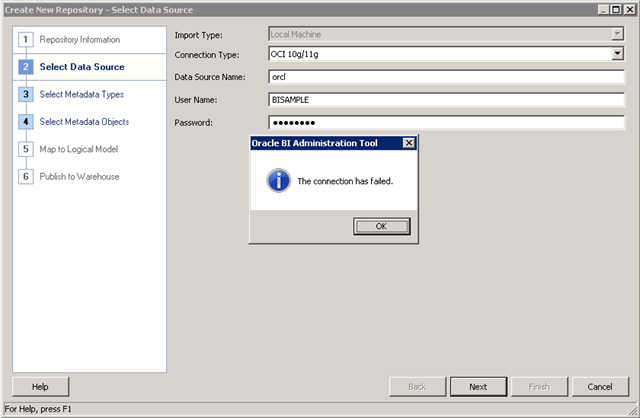
The installation for Oracle BI Suite(not Admin Tool) is for Windows as well as Linux. Installing on Windows is much easier, but because of I prefer Linux for my servers, I installed it on Linux. Unfortunately, I was not able to use Admin Tool on my Linux, and of course I did not want to install it with Wine. So I decided to configure Admintool.exe on windows with Oracle database client installed on it and tried to connect to the remote database called orcl. The error was the following “The connection has failed”

image

If you have the same error and all previous steps are satisfied (means you have installed Oracle client and AdminTool.exe on windows, you have database instance on somewhere that you can connect) the solution is very simple.

1. Close admin tool .

2. Describe TNS_ADMIN environment variable and set it to the value where tnsnames.ora file is located:

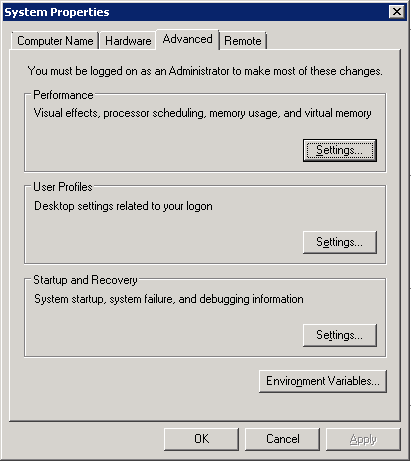
My Computer->Properties->Advanced System Settings. Appears the following windows and choose Environment Variables

image


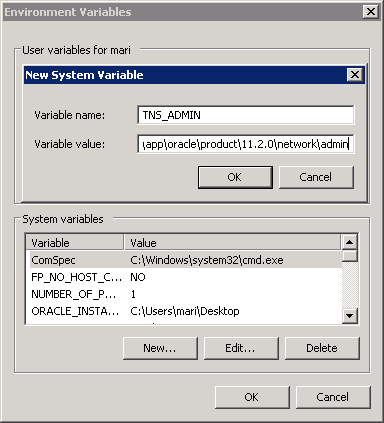
Click New button in System variables section and fill fields by the following:

Variable name: TNS_ADMIN

Variable value: %ORACLE_HOME%\network\admin

image


Click OK

3. Re-run AdminTool.exe

That is all, good luck. I hope the post was helpful for you.

ORACLE BI Admintool.exe “The connection has failed”

First of all, let’s briefly describe Oracle Business Intelligence  Administartion Tool.

This tool is for to build, create, manage Oracle BI repository. The tool can be downloaded from Oracle site:

http://www.oracle.com/technetwork/middleware/bi-enterprise-edition/downloads/bus-intelligence-11g-165436.html

choose Oracle Business Intelligence Developer Client Tools Installer.

As you can see the tool is just for windows. I don’t know why, maybe Oracle gays are so busy, I hope it will be for Linux too.

The installation for Oracle BI Suite(not Admin Tool) is for Windows as well as Linux. Installing on Windows is much easier, but because of I prefer Linux for my servers, I installed it on Linux. Unfortunately, I was not able to use Admin Tool on my Linux, and of course I did not want to install it with Wine. So I decided to configure Admintool.exe on windows with Oracle database client installed on it and tried to connect to the remote database called orcl. The error was the following “The connection has failed”

image

If you have the same error and all previous steps are satisfied (means you have installed Oracle client and AdminTool.exe on windows, you have database instance on somewhere that you can connect) the solution is very simple.

1. Close admin tool .

2. Describe TNS_ADMIN environment variable and set it to the value where tnsnames.ora file is located:

My Computer->Properties->Advanced System Settings. Appears the following windows and choose Environment Variables

image


Click New button in System variables section and fill fields by the following:

Variable name: TNS_ADMIN

Variable value: %ORACLE_HOME%networkadmin

image


Click OK

3. Re-run AdminTool.exe

That is all, good luck. I hope the post was helpful for you.

Database not nomounting: ORA-00848: STATISTICS_LEVEL cannot be set to BASIC with SGA_TARGET or MEMORY_TARGET

I have Oracle database with ASM. Database is started by spfile, that is located on ASM. I have pfile that indicates to spfile.

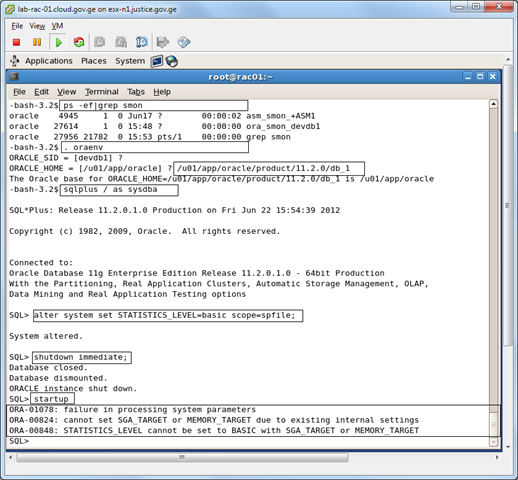
Let’s start from the beginning. I run the following command:

alter system set STATISTICS_LEVEL=basic scope=spfile;

Restarted the database and tried to startup. Got the following error:

ORA-00848 STATISTICS_LEVEL cannot be set to BASIC with SGA_TARGET or MEMORY_TARGET

And because of this database is not nomounting.

image

My parameter file content is:

–/u01/app/oracle/product/11.2.0/db_1/dbs/initdevdb1.ora

SPFILE=’+DATA/devdb/spfiledevdb.ora’;

So let’s solve it. My aim is to set STATISTICS_LEVEL parameter to TYPICAL and start the database normally.

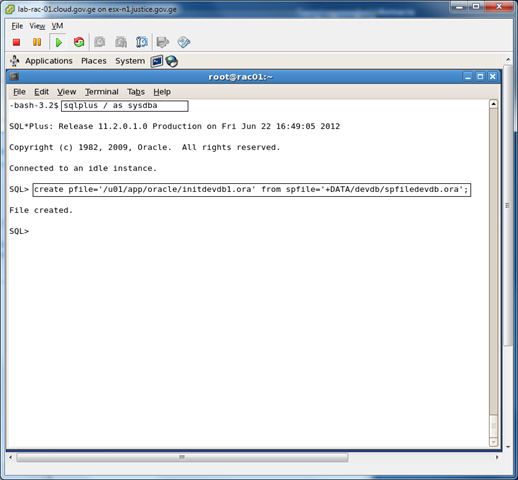
1. Create pfile from spfile.

image

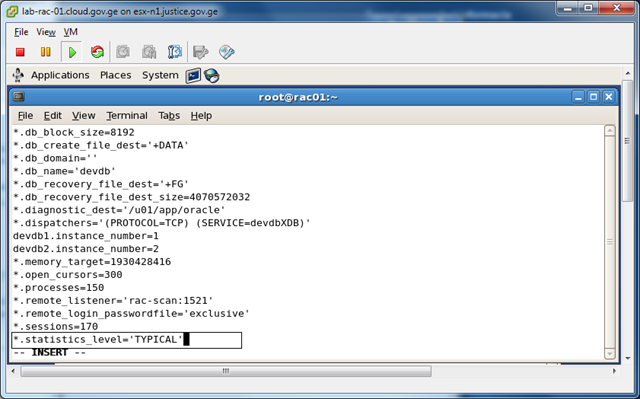
2. Change parameter file initdevdb1.ora(which was created form spfile)  and set statistics_level parameter to TYPICAL.

vi  /u01/app/oracle/initdevdb1.ora

image

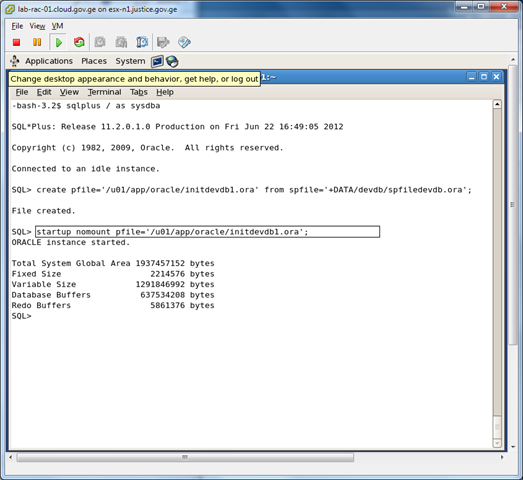
3. Nomount database with newly created pfile.

image

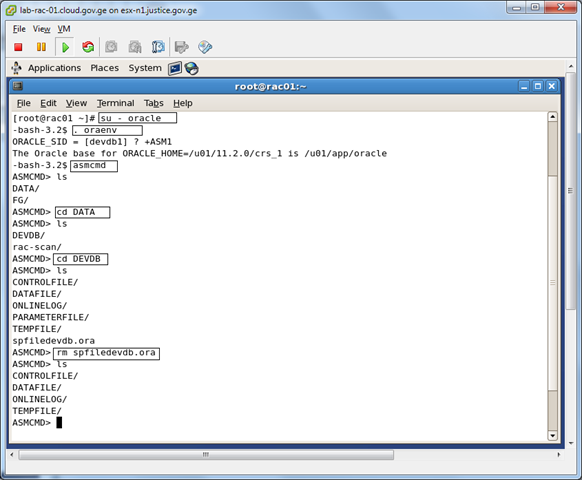
4. Delete old spfile using ASMCMD.

image

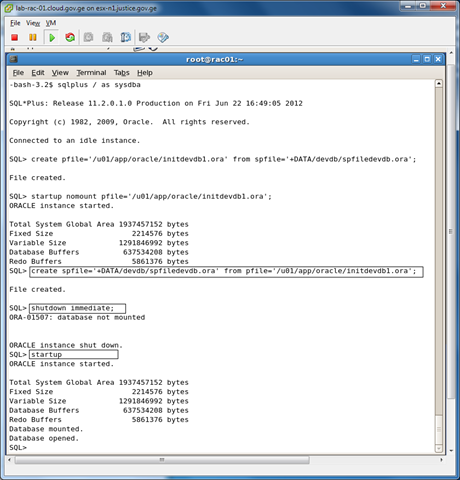
5.  create spfile from pfile.

image

Note: Default location for pfile is $ORACLE_HOME/dbs. STARTUP command reads pfile from default location, that in our case refers to spfile located on ASM.

That’s it!

GRANT ANY OBJECT PRIVILEGE

Real world scenario:

I have users: A_DBA, B_JUNIOR, C_MAIN, D_USERS.

I want my junior, user B_JUNIOR,  to grant execute privilege on C_MAIN.testProc to D_USERS, without having him execute privilege on C_MAIN.testProc.

So I want my junior to grant(JUST grant) object privilege on one schema to another schema .

Solution:

GRANT ANY OBJECT PRIVILEGE  is the privilege which solves it.

SQL> connect A_DBA/ta@MYDB

Connected to Oracle Database 11g Enterprise Edition Release 11.2.0.1.0 

Connected as A_DBA

SQL> grant GRANT ANY OBJECT PRIVILEGE to B_JUNIOR.

Grant succeeded

SQL> connect B_JUNIOR/a@MYDB

Connected to Oracle Database 11g Enterprise Edition Release 11.2.0.1.0 

Connected as B_JUNIOR 

SQL> grant execute on C_MAIN.testProc to D_USERS

Grant succeeded

————————————BUT, junior can’t execute itself

SQL> exec C_MAIN.testProc;

begin C_MAIN.testProc; end;

ORA-06550: line 2, column 7:

PLS-00201: identifier 'C_MAIN.TESTPROC' must be declared

ORA-06550: line 2, column 7:

PL/SQL: Statement ignored