Send Mail from SQL Server 2005

Hello Geeks,

I am planning to post very very useful thing.

Once at my work, one co-worker asked me to write such thing:

Retrieve query result from SQL Server 2005, save it as a .csv file and sent it to some recipients everyday at some time.

So let’s start it…

1. First of all you should create Profile and Account.
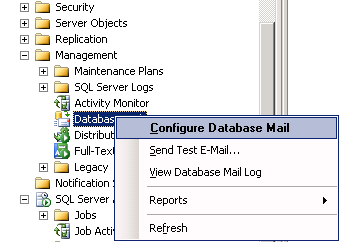
 

SQL Server Configure Database Mail

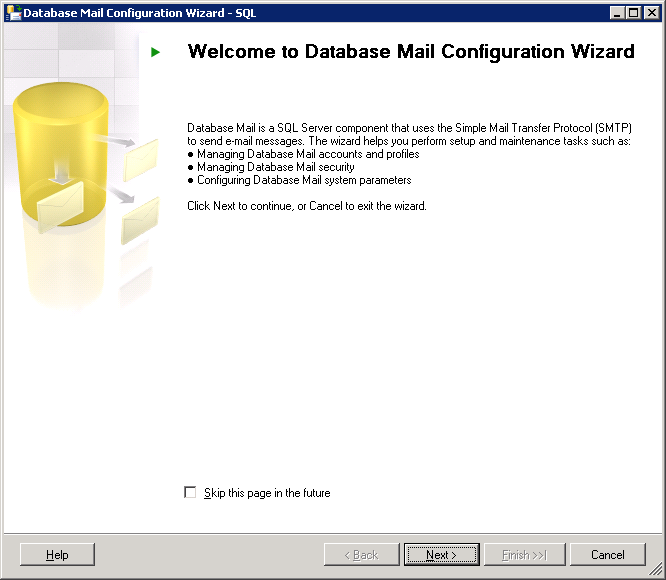
SQL Server  Database Mail Configuration Wizard

Next>

SQL Server  Database Mail Configuration Wizard_Select Configuration_Task

Next>

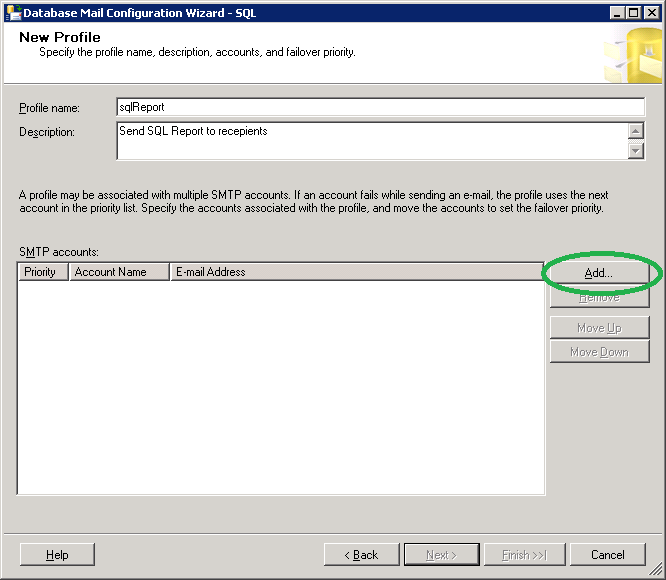
SQL Server  Database Mail Configuration Wizard_New_profile

Click Add…

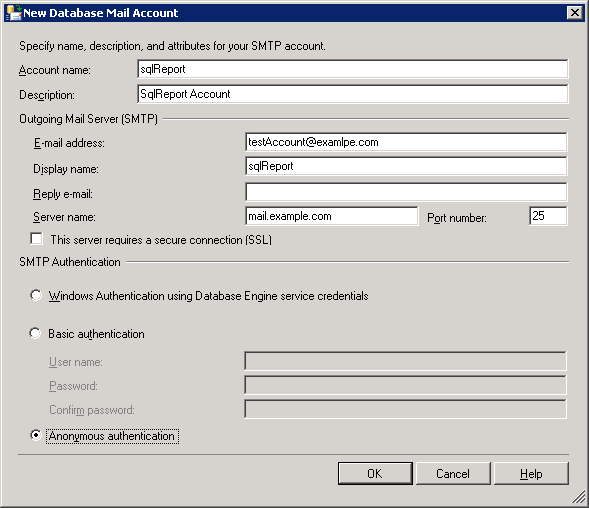
SQL Server Database mail Account

Click OK…

SQL Server Database Mail Configuration Wizard New Profile

Next>

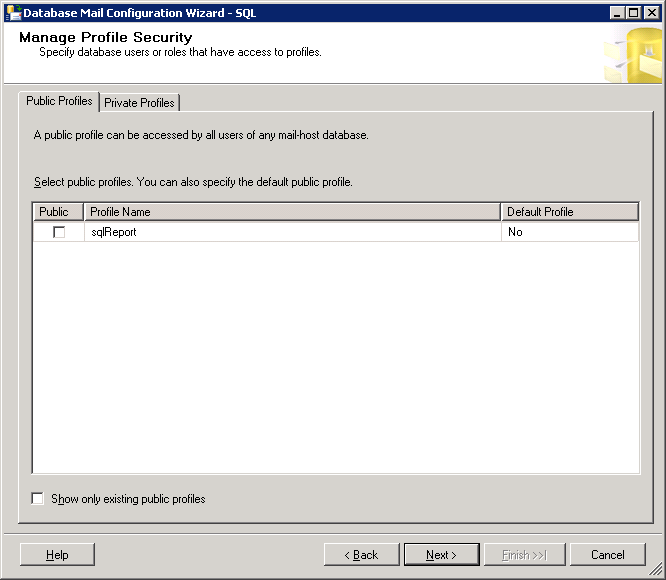
SQL Server Database Mail Configuration Wizard Manage Profile Security

Next>

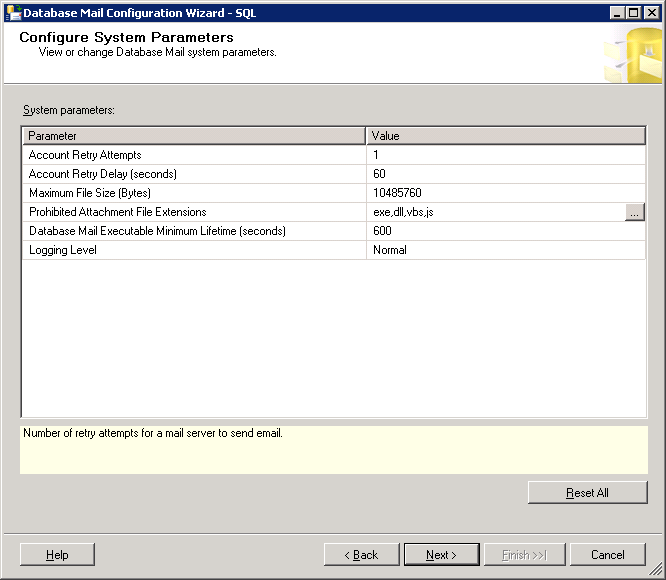
SQL Server Database Mail Configuration Wizard Configure System Parameters

Next>

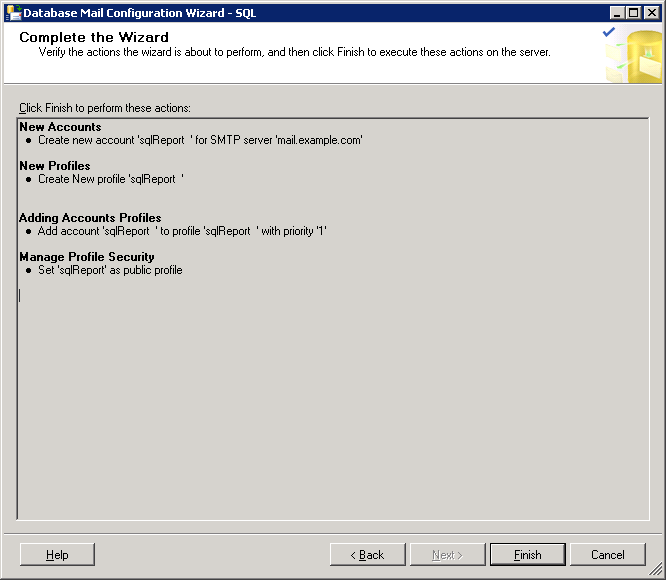
SQL Server Database Mail Configuration Wizard Complete the Wizard

Click Finish…

Everything should be successful.

2. We should enable Database Mail on the server. Using Database Mail XPs.

sp_configure 'show advanced options', 1;
GO
RECONFIGURE;
GO
sp_configure 'Database Mail XPs', 1;
GO
RECONFIGURE
GO
sp_configure 'show advanced options', 0;
GO
RECONFIGURE;
GO

3. Let’s send mail… Using msdb.dbo.sp_send_dbmail procedure… Indicating the following parameters.

EXEC msdb.dbo.sp_send_dbmail @profile_name = 'sqlReport', @recipients = 'mariam.kupa@gmail.com', @subject = 'SQL Report', @body_format = 'HTML',
@body = '.............', @query = 'SELECT * from [testDB].[dbo].[v_Report_Mari] order by [Computer Name]', @attach_query_result_as_file = 1, @query_attachment_filename = 'qry.csv', @query_result_no_padding = 1, @append_query_error = 1, @exclude_query_output = 1, @query_result_header = 1, @query_result_separator=' '

Let’s discuss each parameter:

[ @profile_name = ]  This is the name of the profile from where message will be sent(We set up it before, 1st step)

[ @recipients = ]       This is a semicolon-delimited list of e-mail addresses to send the message to.

[ @subject = ]           This is the subject of the e-mail message.

[ @body_format = ]   This is the format of the message body. Available values are: TEXT (default) and HTML.

[ @body = ]               This is the body of the e-mail message.

[ @query = ]              This is a query to execute. It’s result can be attached as a file, or included as a text message included in the body . Consider that the query is executed in a separate session and local  variables in the script using sp_send_dbmail can not be used.

[ @attach_query_result_as_file = ] Available values are 1 (YES) and 0 (NO).

[ @query_attachment_filename = ] Name of the attached file.

[ @query_result_no_padding = ]     Available values are 0 (padding) and 1 (no padding). If you indicate 1 it possibly reduce the file size,because there will not be any padding. Default value is 0.

[ @append_query_error = ]             Available values are 0 and 1. If any error occurs in the query indicated in [ @query = ] and that parameter value is 1, then mail will be sent appended with the error message. If the value is 0 then mail will not be sent. Default value is 0.

[ @exclude_query_output = ]        When the value is 1, the execution of the sp_send_dbmail does not print any of the query execution messages on the console. For 0 it is vice versa. The default value is 0.

[ @query_result_header = ]           Specifies whether the query results include column headers. Available values are 1 and 0.

[ @query_result_separator = ]       Indicates by which columns should be separated. Default value is ‘ ’(space). In our example, i ‘ve indicated TAB, just type 2 quotation marks place cursor between of them and press desired key, in our case TAB.

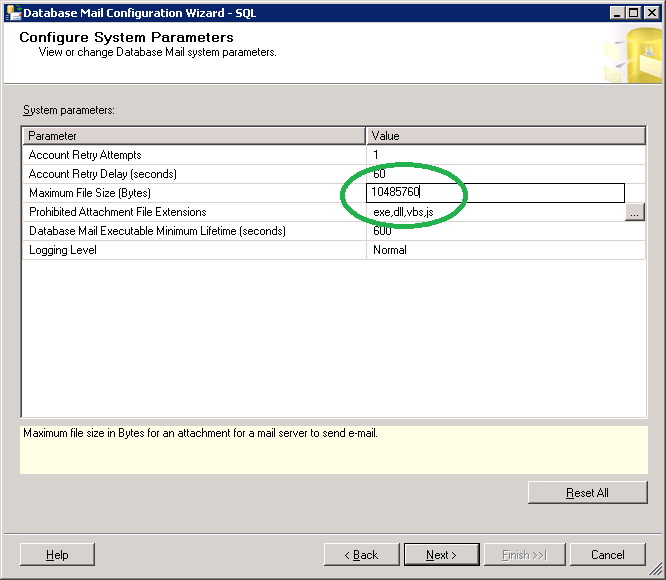
4. Increase the mail size limit from Database Mail. You can do it during setting up the account but I prefer to discuss it separately.
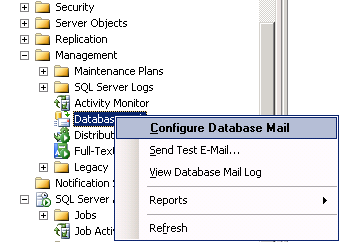
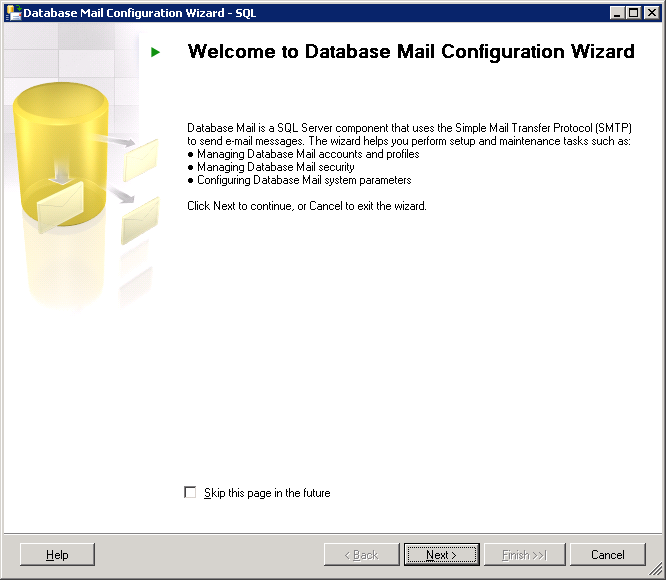
SQL Server Configure Database Mail

SQL Server  Database Mail Configuration Wizard

Next>

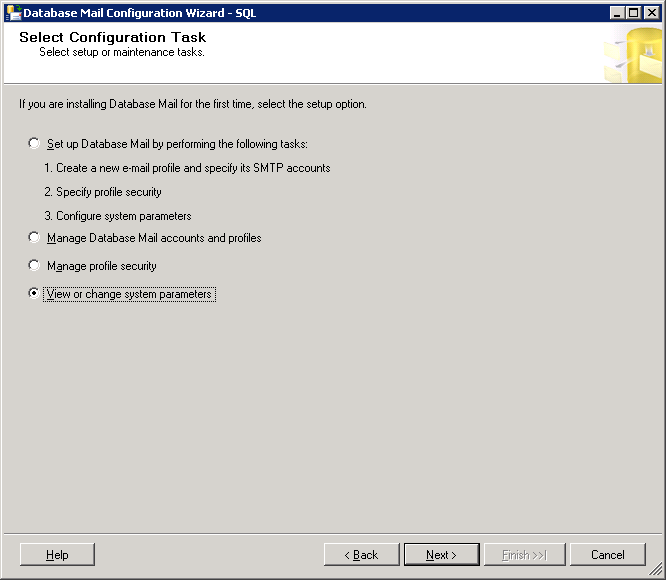
SQL Server  Database Mail Configuration Wizard View Change system parameters

Next>

SQL Server  Database Mail Configuration Wizard View Change system parameters

Next>

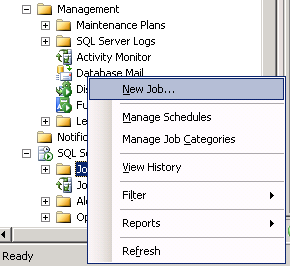
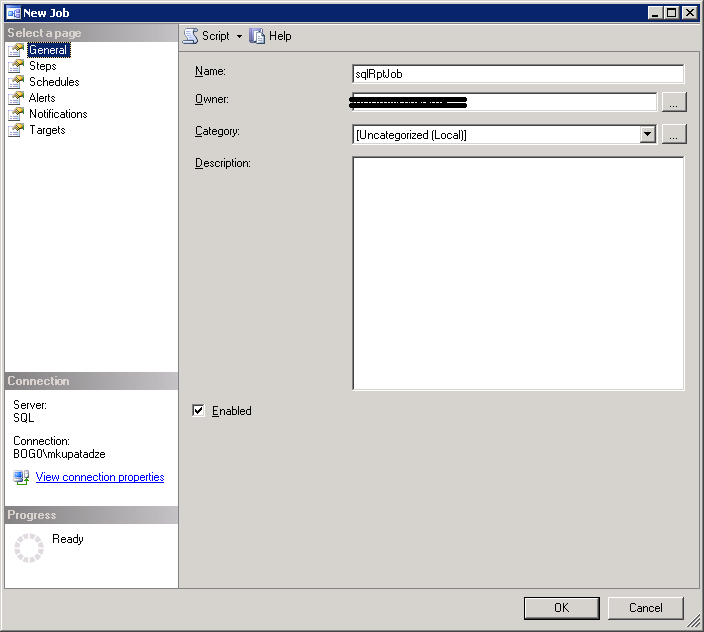
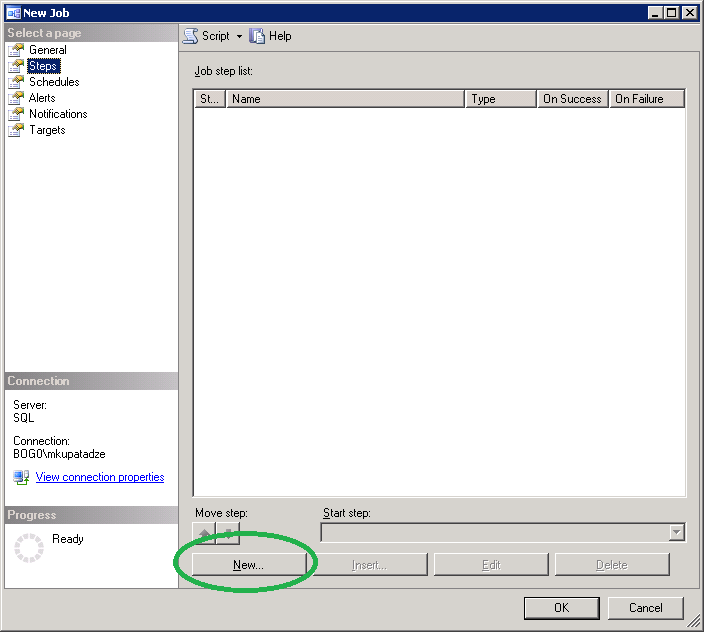
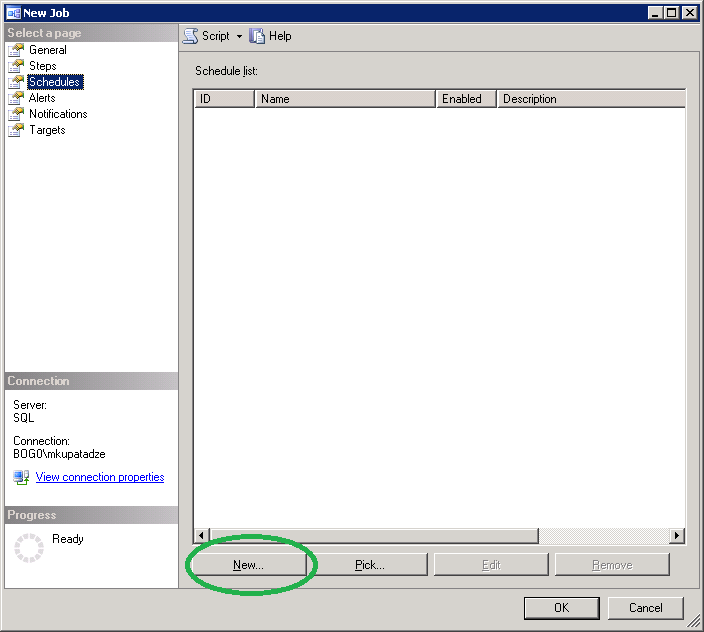
5. Creating job…

SQL Server Create New Job

SQL Server New Job General Tab

SQL Server New Job Steps Tab

Insert our code in the Command field:
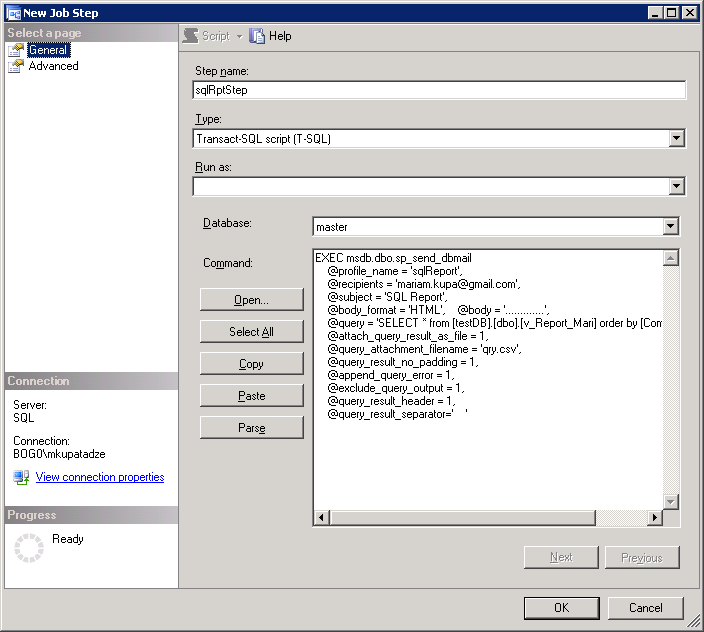
SQL Server New Job Steps General Tab

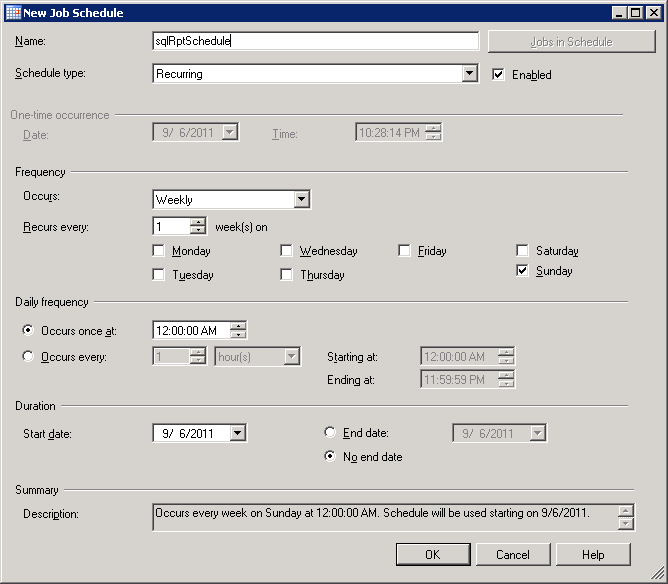
SQL Server New Job Schedules

SQL Server New Job Schedules Job Schedule

It is easy to understand, I will not explain… This window is for to schedule job for the specified time. Click OK..OK…

Usefull view for checking email status:

SELECT *
FROM msdb.dbo.sysmail_event_log


That is all..
ORA-20446: The owner of the job is not registered

If you have the following error in EM:

ORA-20446: The owner of the job is not registered ORA-06512: at "SYSMAN.MGMT_JOBS", line 168 ORA-06512: at "SYSMAN.MGMT_JOBS", line 86 ORA-06512: at line 1

It is said to be a bug in  Oracle 11g .

To solve this, you should login as a sys user and run the following command:

execute MGMT_USER.MAKE_EM_USER('USERNAME');

ORA-28221: REPLACE not specified

Very interesting situation. This error occurs, when user’s profile has limit password_verify_function, at the same time user doesn’t have ALTER USER privilege and trying to run the following statement:

ALTER USER my_user IDENTIFIED BY my_password;

* If user doesn’t have that limit in profile, he/she can change its password by this way without any problem.

* If she/he has that limit, it should have ALTER USER privilege to change password by this way without any problem.


There is also another way, if you are not able to change password by the previous command, but you must know old password:

ALTER USER my_user IDENTIFIED BY my_password REPLACE my_old_password;

Just one more trick in Oracle, that you should know…

Recreate Undo Tablespace

–Identify undo tablespace name

SQL> SELECT NAME,VALUE
     FROM v$parameter WHERE name IN ('undo_management','undo_tablespace');

NAME             VALUE
--------------- ----------
undo_management  AUTO
undo_tablespace  UNDOTBS1

–Define how undo tablespace was created

SQL> SELECT dbms_metadata.get_ddl('TABLESPACE','UNDOTBS1')
 FROM dual;

CREATE UNDO TABLESPACE "UNDOTBS1" DATAFILE
 'C:\ORACLE\PRODUCT\10.2.0\ORADATA\ORCL\UNDOTBS01.DBF' SIZE 26214400
AUTOEXTEND ON NEXT 5242880 MAXSIZE 32767M
BLOCKSIZE 8192
EXTENT MANAGEMENT LOCAL AUTOALLOCATE
 ALTER DATABASE DATAFILE
'C:\ORACLE\PRODUCT\10.2.0\ORADATA\ORCL\UNDOTBS01.DBF' RESIZE 28377088

–Create another, substitute undo tablespace

SQL> CREATE UNDO TABLESPACE UNDOTBS2 DATAFILE
      'C:\ORACLE\PRODUCT\10.2.0\ORADATA\ORCL\UNDOTBS02.DBF' SIZE 26214400
     AUTOEXTEND ON NEXT 5242880 MAXSIZE 32767M;

–Change parameter undo_tablespace value to newly created tablespace name. (I have started my DB by spfile)

SQL> ALTER SYSTEM SET undo_tablespace = 'UNDOTBS2' SCOPE=spfile;

–Shutdown database

SQL> shutdown immediate;

–Start the database

SQL> startup;

–Take old undo tbs. into offline mode

SQL> ALTER TABLESPACE UNDOTBS1 OFFLINE;

–Drop undo tbs. including contents and datafiles

SQL> DROP TABLESPACE UNDOTBS1 INCLUDING CONTENTS AND DATAFILES;

Uninstall Oracle Manually

1.Uninstall all Oracle components using the Oracle Universal Installer (OUI).

2.Run regedit.exe and delete the HKEY_LOCAL_MACHINE/SOFTWARE/ORACLE. This contains registry entires for all Oracle products. Delete any references to Oracle services left behind in the following part of the registry:  HKEY_LOCAL_MACHINE/SYSTEM/CurrentControlSet/Services/Ora*   It should be obvious which ones relate to Oracle.

3.Reboot your machine.

4.Delete the “C:\Oracle” directory, or whatever directory is your ORACLE_BASE.

5.Delete the “C:\Program Files\Oracle” directory.

6.Empty the contents of your “c:\temp” directory.

7.Empty your recycle bin.

Install VirtualBox Guest Additions on Centos 5.5

1. Login as a root user:

su –

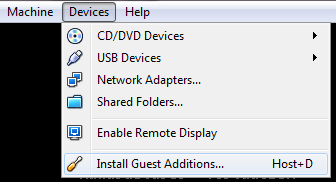
2. Go to the Devices->Install Guest Additions…

Install VirtualBox Guest Additions on Centos 5.5

3. Mount Guest Additions device:

mkdir /media/VGuestAdditions
mount -r /dev/cdrom /media/VGuestAdditions

4. Install the following packages:

yum install gcc
yum install kernel-devel
yum install kernel-headers

5. Install Guest Additions:

cd /media/VGuestAdditions
./VBoxLinuxAdditions.run

6. Restart the system:

reboot

Prevent to change SYS/SYSTEM password

Problem: How to Prevent a User Granted the ALTER USER Privilege From Changing SYS/SYSTEM password ?

You should write system event and here it is:

Assuming that you are preventing HR user from altering SYS/SYSTEM user.

–Connect as a sys user and run the following:

CREATE or REPLACE TRIGGER prohibit_alter_SYSTEM_SYS_pass
         BEFORE ALTER on HR.schema
         BEGIN
              IF SYSEVENT='ALTER' and DICTIONARY_OBJ_TYPE = 'USER' and
                 (DICTIONARY_OBJ_NAME = 'SYSTEM' or DICTIONARY_OBJ_NAME = 'SYS')
              THEN
                 RAISE_APPLICATION_ERROR(-20001,
                            'You are not allowed to alter SYSTEM/SYS user.');
              END IF;
         END;

I highlighted BEFORE keyword because, on metalink there is wrongly written AFTER TRIGGER. Because, if you write AFTER trigger this actually means that trigger will arise after action will be performed and this is wrong.

More specifically, if we write AFTER trigger, as metalink advices, HR user will actually change SYS/SYSTEM user password and then see the error message!!!!

sqlplus: error while loading shared libraries

Error Description: sqlplus: error while loading shared libraries: $ORACLE_HOME/lib/libclntsh.so.11.1: cannot restore segment prot after reloc: Permission denied

One of the way to solve this error is to disable SELinux(as some people advice on the forums). But it is related to the security risks.

So I decided to use Linux provided solution, which is safer:

–After I ran the following command:

# sqlplus / as sysdba

There appeard our error and some tip on the screen, indicating the solution of this error, I want to share it with you.

The brief summery is to run the following command:

$ chcon -t textrel_shlib_t '/u0/app/oracle/product/11.2.0/db_1/lib/libcntsh.so.11.1'

Note: My $ORACLE_HOME=/u0/app/oracle/product/11.2.0/db_1

The whole text in the message from Linux is the following , I think it is very interesting:

Summary
SELinux is preventing sqlplus from loading /u0/app/oracle/product/11.2.0/db_1/lib/libclntsh.so.11.1
which requires text relocation.

Detailed Description
The sqlplus application attempted to load /u0/app/oracle/product/11.2.0/db_1/lib/libclntsh.so.11.1 which requires text relocation.
This is a potential security problem. Most libraries do not need this permission.
Libraries are sometimes coded incorrectly and request this permission.
The SELinux Memory Protection Tests web page explains how to remove this requirement.
You can configure SELinux temporarily to allow /u0/app/oracle/product/11.2.0/db_1/lib/libclntsh.so.11.1
to use relocation as a workaround, until the library is fixed.
Please file a bug report against this package.

Allowing Access
If you trust /u0/app/oracle/product/11.2.0/db_1/lib/libclntsh.so.11.1 to run correctly,
you can change the file context to textrel_shlib_t.
 "chcon -t textrel_shlib_t '/u0/app/oracle/product/11.2.0/db_1/lib/libclntsh.so.11.1'"
You must also change the default file context files on the system in order to preserve
them even on a full relabel.
"semanage fcontext -a -t textrel_shlib_t '/u0/app/oracle/product/11.2.0/db_1/lib/libclntsh.so.11.1'"

The following command will allow this access:
  chcon -t textrel_shlib_t '/u0/app/oracle/product/11.2.0/db_1/lib/libclntsh.so.11.1'

...

SQL Tuning(World Scenario)

SQL Tuning is very big and difficult subject. Each SQL Tuning scenario is unique.

To solve the problems easily, you need a lot of experience.

I decided to write every SQL Tuning Scenario which I have had.

So, let’s start:

Look at this SQL:

SELECT
       distinct col1,
                col2,
                col3,
                col4FROM HR.Table1

where col2 = 040533424

  and col1 !=

‘Mariam’

order by col4 desc

It’s SQL plan is the following:

PLAN_TABLE_OUTPUT
--------------------------------------------------------------------------------
Plan hash value: 269539686
--------------------------------------------------------------------------------
| Id | Operation | Name | Rows | Bytes | Cost (%CPU)| Time
--------------------------------------------------------------------------------
| 0 | SELECT STATEMENT | | 2 | 134 | 2625 (5)| 00:00:1
|   1 |  SORT UNIQUE       |              |     2 |   134 |  2624   (5)| 00:00:1
|*  2 |   TABLE ACCESS FULL| TABLE1       |     2 |   134 |  2623   (5)| 00:00:1
--------------------------------------------------------------------------------

This table has index named col2_indx on col2 column.But in our plan it is not used, why??

Now let’s drill down:

SQL> desc HR.TABLE1

Name   Type         Nullable Default Comments
------ ------------ -------- ------- -------- 
col1   VARCHAR2(15) Y

col2 VARCHAR2(30) Y

col3   VARCHAR2(50) Y
col4   VARCHAR2(30) Y

As you can see col2 type is varchar2… But in our SQl statement value of this column is equal to number type…

So Oracle is trying to convert number type to varchar2 type and at this time looses the ability to use that index.

If you follow my posts on that blog, you may remember the post about FUNCTION BASED INDEXES. There is the following scenario.

If you have index on some column and in select you are using this column like that to_char(col2) or with some other function… Index on that column is missed. You can have function based index on to_char(col2) combination…

Now, let’s rewrite our SQL:

SELECT
       distinct col1,
                col2,
                col3,
                col4FROM HR.Table1

where col2 = ‘040533424’

 and col1 !=

‘Mariam’

order by col4 desc

Plan for this statement:

PLAN_TABLE_OUTPUT
--------------------------------------------------------------------------------
Plan hash value: 4243002513
--------------------------------------------------------------------------------
| Id | Operation | Name | Rows | Bytes | Cost (%CP
--------------------------------------------------------------------------------
| 0 | SELECT STATEMENT | | 2 | 134 | 7 (2
|   1 |  SORT ORDER BY                |              |     2 |   134 |     7  (2
|   2 |   HASH UNIQUE                 |              |     2 |   134 |     6  (1
|*  3 |    TABLE ACCESS BY INDEX ROWID| TABLE1       |     2 |   134 |     5   (

|* 4 | INDEX RANGE SCAN | COL2_INDX | 2 | | 3 (

--------------------------------------------------------------------------------

And this select is faster than the previous.

I hope it was helpful for you…

Sql Sever Backup Problem

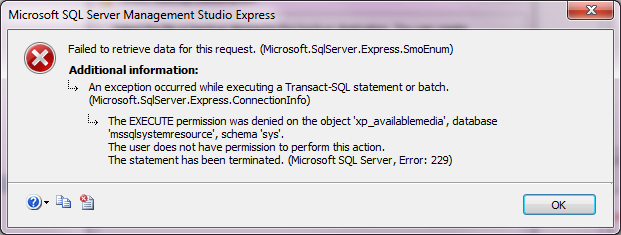
If you have the following error during backup/restore of SQL Server database:

image

Just click OK, and let’s start its workaround…

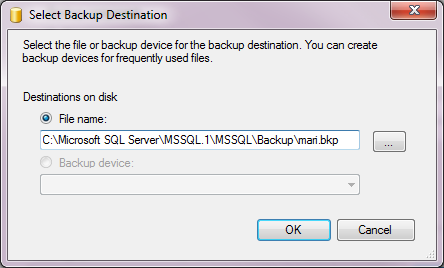
In Select Backup Destination window do not browse anything, or it will arise the previous error, just type the path and name of the backup file, like that:

image

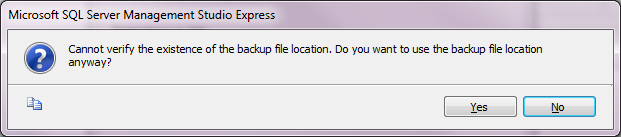
Click OK, there will appear the following window:

image

Click Yes… Your backup should work.

I have also checked my backup by restoring it and everything works fine…

Note: Support of the Microsoft recommends you the following workaround:

“To work around this behavior, assign the user profile to the sysadmin role. By doing so, the user profile has unlimited access to all SQL Server features.”

I did it without this security issueSmile


P.S I found another solution of it… especially by granting db_backupoperator role to that user….

NOTE: If you do not grant this role, user will be able to make a backup as I did in the previous section, but will not be able to restore database…