Retrieving data from Active Directory to SQL Server 2005

We will use Visual Basic script to retrieve data from Active Directory. This script will pass data to the SQL Server procedure, which will insert it to the database table.

Just for Note: I used WinNT in visual basic instead of LDAP, and it was smaller script than this one, which I have written below:). But when I was trying to run this script error code: 8000500D was arising, error was indicating to the department property… Unfortunately, I couldn’t find the solution how to retrieve department property using WinNT, that is why I decided to write code by LDAP(code is written below).

So let’s start.

1. Connect to the database.

–First of all let’s create a table, which will hold this information.

CREATE TABLE [ADUsersTable] (
[UserId]     [int] IDENTITY (1, 1) NOT NULL PRIMARY KEY,
[Username]   [nvarchar] (1000),
[FullName]   [nvarchar] (1000),
[Department] [nvarchar] (1000)
)

Note: If IDENTITY(1,1)option is new for you, click here to clarify.

–Create procedure.

CREATE PROCEDURE ad_addProc
@Username   nvarchar(1000),
@Fullname   nvarchar(1000),
@Department nvarchar(1000)
AS
BEGIN
   INSERT INTO [ADUsersTable] ([Username], [FullName], [Department])
   VALUES(@Username ,@Fullname,@Department)
END

2. On the computer,  where SQL server is installed, create a text file, insert the following Visual Basic script and rename this file to AdUsers.vbs

Option Explicit
Dim oDomain
Dim MyConnection
Dim MyCommand
Dim par1
Dim par2
Dim par3
‘Domain is bg.ge
Set oDomain = GetObject("LDAP://dc=bg,dc=ge")
Set MyConnection = CreateObject("ADODB.Connection")
'Create SQL connection string,  to connect to the database.
MyConnection.Open "Driver={SQL Server};server(local);
database=DBname;uid=BOG0\mkupatadze;pwd=*****;Trusted_Connection=yes;"

Set MyCommand = CreateObject("ADODB.Command")
Set MyCommand.ActiveConnection = MyConnection
Set par1 = MyCommand.CreateParameter("@Username", 202, 1, 1000)
Set par2 = MyCommand.CreateParameter("@Fullname", 202, 1, 1000)
Set par3 = MyCommand.CreateParameter("@Department", 202, 1, 1000)
'Note that ad_addProc is the procedure created in SQL Server database.
MyCommand.CommandText = "ad_addProc"
MyCommand.CommandType = 4
MyCommand.Parameters.Append par1
MyCommand.Parameters.Append par2
MyCommand.Parameters.Append par3
RetrDataFromAD(oDomain)
‘Write the recursive function.
Sub RetrDataFromAD(oArray)
   Dim oADObject
   For Each oADObject in oArray
     ‘If error occurs, script will not be terminated.
     On Error Resume Next
     ‘Clearing  values of parameters
     par1.Value =" "
     par2.Value =" "
     par3.Value =" "
     Select Case oADObject.Class
       Case "user"
          ‘sAMAccountName is the username
          par1.Value = oADObject.Get("sAMAccountName")
          par2.Value = oADObject.Get("name")
          par3.Value = oADObject.Get("department")
          MyCommand.Execute
       Case "organizationalUnit" , "container"
          RetrDataFromAD(oADObject)
     End Select
    Next
End Sub
MyConnection.Close()

Double Click on that file and to see the result run the following query:

Select *
from [ADUsersTable]

Identity Columns

The syntax of the identity property is the following:

IDENTITY[(seed ,increment)]

Note: If you do not indicate seed and increment options, the default value for each of them will be 1. So IDENTITY(1,1) and IDENTITY is the same.

When the column is created by this property , numeric sequence will be created for you and this column will hold the sequential values, started by seed and incremented by increment parameter values.

For example:

–Create table by this property

CREATE TABLE [ADUsersTable] (
[UserId]     [int] IDENTITY (1, 1) NOT NULL PRIMARY KEY,
[Username]   [nvarchar] (1000),
[FullName]   [nvarchar] (1000),
[Department] [nvarchar] (1000)
)

–Insert rows

INSERT INTO [ADUsersTable] ([Username], [FullName], [Department])
VALUES('MKUPATADZE' ,'MARIAM KUPATADZE','IT')

INSERT INTO [ADUsersTable] ([Username], [FullName], [Department])
VALUES('GBERIDZE' ,'GIORGI BERIDZE','IT')

–Query data

SELECT *
FROM [ADUsersTable]

–Result

USERID|USERNAME     |FULLNAME          |DEPARTMENT
 1    | MKUPTADZE   | MARIAM KUPATADZE | IT
 2    | GBERIDZE    | GIORGI BERIDZE   | IT

–Insert another row and rollback it, let’s see what happens

BEGIN TRAN

INSERT INTO [ADUsersTable] ([Username], [FullName], [Department])
VALUES('AGANDILIANI' ,'ANNA GANDILIANI','IT')

ROLLBACK TRAN

–Insert one more row

INSERT INTO [ADUsersTable] ([Username], [FullName], [Department])
VALUES('SCHELISHVILI' ,'SOPHO CHELISHVILI','IT')

–Query data

SELECT *
FROM [ADUsersTable]

–Result

USERID|USERNAME     |FULLNAME          |DEPARTMENT
 1    | MKUPTADZE   | MARIAM KUPATADZE | IT
 2    | GBERIDZE    | GIORGI BERIDZE   | IT
 4    | SCHELISHVILI| SOPHO CHELISHVILI| IT

As you can see rolling back the transaction does not reset the current value of the sequence.

–To see the current value of the sequence, run the following:

DBCC checkident(ADUsersTable)

My result

Checking identity information:current identity value '4',current column value '4'.

Inserting desired identity values

By default, you can’t indicate value during insert for the column which was created by IDENTITY property. If you try the following command:

INSERT ADUsersTable (UserId,Username,FullName,Department)
VALUES(3,'VDALAKISHVILI','VASIL DALAKISHVILI','IT')

–It will arise the following error

Cannot insert explicit value for identity column in table 'ADUsersTable'
when IDENTITY_INSERT is set to OFF.

–To solve this, set IDENTITY_INSERT to ON, insert rows and then set IDENTITY_INSERT to OFF

SET IDENTITY_INSERT ADUsersTable ON

INSERT ADUsersTable (UserId,Username,FullName,Department)
VALUES(3,'VDALAKISHVILI','VASIL DALAKISHVILI','IT')

SET IDENTITY_INSERT ADUsersTable OFF

Note: If you do not turn off IDENTITY_INSERT, then you will not be able to use the generated sequence. Every time you run the INSERT statement you will be forced to indicate value for USERID column.

–Query data

SELECT * FROM ADUsersTable

–Result

USERID|USERNAME      |FULLNAME           |DEPARTMENT
 1    | MKUPTADZE    | MARIAM KUPATADZE  | IT
 2    | GBERIDZE     | GIORGI BERIDZE    | IT
 3    | VDALAKISHVILI| VASIL DALAKISHVILI| IT
 4    | SCHELISHVILI | SOPHO CHELISHVILI | IT

–To see the current value of the sequence , run the following:

DBCC checkident(ADUsersTable)

–The result

Checking identity information:current identity value '4',current column value '4'.

Note: If the desired value is less then the current value of the sequence, the current value will not be affected. As in our case, we inserted value 3, the current value was 4, that’s why current value was not affected.

But if the desired value is more then the current value of the sequence, current value will be affected.

For example:

–Repeat the previous steps, but now let’s insert higher value than the current one

SET IDENTITY_INSERT ADUsersTable ON

INSERT ADUsersTable (UserId,Username,FullName,Department)
VALUES(7,'TMAISURADZE','TEMUR MAISURADZE','IT')

SET IDENTITY_INSERT ADUsersTable OFF

–Query data

SELECT * FROM ADUsersTable

–Result

USERID|USERNAME      |FULLNAME           |DEPARTMENT
 1    | MKUPTADZE    | MARIAM KUPATADZE  | IT
 2    | GBERIDZE     | GIORGI BERIDZE    | IT
 3    | VDALAKISHVILI| VASIL DALAKISHVILI| IT
 4    | SCHELISHVILI | SOPHO CHELISHVILI | IT
 7    | TMAISURADZE  | TEMUR MAISURADZE  | IT

–To see the current value of the sequence , run the following:

DBCC checkident(ADUsersTable)

–The result

Checking identity information:current identity value '7',current column value '7'.

That’s all. 🙂

JavaScript Closure Misunderstanding

Let’s list some well-known facts:

  • JavaScript blocks don’t have scope.
  • Only functions have scope.
  • Variable access speed depends on “distance” of scopes (in which scope is defined a variable and from which scope we want to retrieve it).
  • The furthest scope is global scope and it is considered as slowest scope (That is window object in browser implementation of JavaScript).
  • Closures are used to cache scope locally and make variable access faster (and for much more…).

Classical closure example is:

//without closure
window.singeltonObject = {/* properties of singleton object */};
getSingeltonObject = function(){
   return singeltonObject;
};
//with closure
getSingeltonObject = (function(){
    var singeltonObject = {/* properties of singleton object */};
    return function(){
          return singeltonObject;
    }
})();

Closure version looks difficult but it is very powerful (for example you can not modify your singelton object, it is closed in a local scope, while when you have defined it in global scope it is accessible from everywere). Les’t explain it:

//without closure
//global scope
window.singeltonObject = {};
getSingeltonObject = function(){
    //local scope
   return singeltonObject; //goes out of local scope in
                            //global scope, finds variable and
                            //reads it.
}
//with closure
//global scope
getSingeltonObject = (function(){
    //local scope1
    var singeltonObject = {};
    return function(){
          //local scope2
          //while definition of this function local scope1
          //is cached and singeltonObject will be found there,
          //it will not be searched in global scope
          //that's why it is faster and useful.
          return singeltonObject;
    }
})();

What happens when we have three or multiple deep closure? I mean, when we have such kind of code:

/**
*  @param {Number} personId
*  @return {Object}
*     Has method logPersonId that logs parameter
*/
getSingeltonObject = (function(){
    //scope0
    var singeltonObject;
    return function(personId){
          //scope1
          if(!singeltonObject){
               singeltonObject = {
                    logPersonId : function(){
                        console.log(personId);
                    }
               }
          }
          return singeltonObject;
    }
})();

At first glance everything is OK, but there is a bug:

getSingeltonObject(1).logPersonId(); // 1 will be logged
getSingeltonObject(123).logPersonId(); //still 1 will be
                              //logged instead of 123 :) why?

Because the function logPersonId is defined once, it caches the scope1 and at that time the parameter personId equals to 1. During the second call logPersonId is already defined and it has cached scope1 when personId was equal to 1 and it still “remembers” it. That is why in both calls value 1 was logged.

What is solution? scope0. We have to update personId in scope0 by creating a new variable in it (for example newPersonId) and assigning it personId everytime the getSingeltonObject is called. The code will look like this:

getSingeltonObject = (function(){
    //scope0
    var singeltonObject, newPersonId;
    return function(personId){
         //scope1
         newPersonId = personId;
          if(!singeltonObject){
               singeltonObject = {
                    logPersonId : function(){
                        console.log(newPersonId); //newPersonId
                    //will be found in scope0 and it will
                    //equal to parameter of getSingeltonObject
                    //function every time.
                    }
               }
          }
          return singeltonObject;
    }
})();

This was a little about JavaScript closure and its complexity.

What is orapwd?

Orapwd is the Oracle utility to create password file.  The syntax is the following:

orapwd file=file_name
password=password for SYS
[entries=number_of_users]
[force=Y/N]
[ignorecase=Y/N]
[nosysdba=Y/N]

Where,
file– is the password file name. If you do not indicate the full path, then file will be created in the current directory.
password-is the password for sys user.
entries– is the maximum number of users that can be granted sysdba or sysoper privileges.
force-if the value of this parameter is Y then the existing password file will be overwritten.
ignorecase– password will be case insensitive.

Note: parameters that are enclosed by ‘[‘ and ‘]’ are optional.

For example:

 orapwd file= pwdorcl password=sys entries=20

Explanation:

Password file, called pwdorcl.ora, will be created in the current directory. The password for sys user will be sys and maximum 20 users can be granted sysdba or sysoper privileges.

Note: Default location of the password file on Windows is %ORACLE_HOME%\database\ and name is pwd%ORACLE_SID%.ora ….. On Linux $ORACLE_HOME\dbs and name orapw$ORACLE_SID. If you do not consider this you will get error:  ORA-01017

In addition to password file creation:

The initialization parameter remote_login_passwordfile must be set to the appropriate value:

  • None: means that Oracle will behave like that the password file doesn’t exist. Which will cause that no privileged connections will be allowed over nonsecure connections.
  • Exclusive: means that the password file will be used with the only one database instance. Setting this value gives the ability to grant/revoke sysdba or sysoper privileges to/from users(Note that granting or revoking privs. causes the password file modifications). It also enables you to change password of SYS user with ALTER USER command. It is the default value.
  • Shared: It is used by multiple DBs, which are running on the same server, or with RAC. Setting this value prohibits you from changing the password file. If you try to change the password file generates the error. To make available to modify this file, first change this parameter to exclusive, modify file and change it back to the share value.

To see how many users are added to the password file run the following command:

select *
from v$pwfile_users

–My output is the following

USERNAME |SYSDBA |SYSOPER
SYS      |TRUE   |TRUE

Deleting password file

To remove the password file, first delete it and then set the initialization parameter remote_login_passwordfile to none. After that, the users that can authenticate by the operating system will be able to connect  to the database as sysdba/sysoper.

How to restore database in SQL Server 2005

I will discuss how to restore database in SQL Server 2005, by the very simple way.
So let’s start:

1. Run  SQL Server Management Studio.

2. In Object Explorer, choose Databases , right click and choose Restore Database…

Restore Database(SQL Server 2005)

3. In the new window, select the database name which you want to restore (my database name is MariamDB).

Destination for restore(SQL Server 2005)

4. On the same window, in Source for restore section, choose From device option, and click browse button.
Source for restore(SQL Server 2005)

5. In Specify Backup window, click Add button.
Specify Backup(SQL Server 2005)

6. Choose the destination where your backup(.bak) file exists, and click OK.
Locate Backup File(SQL Server 2005)

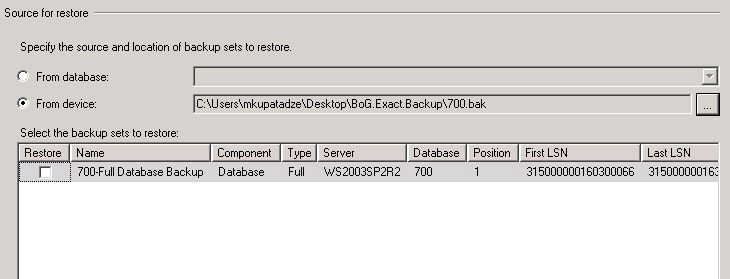
7. Picture should look like this:
Source for restore_Select the backup sets to restore(SQL Server 2005)

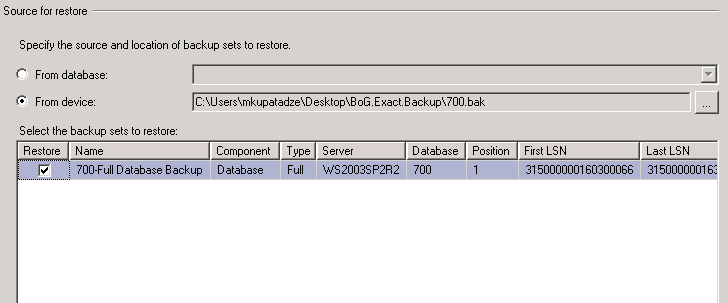
8. Check the row, which is showing your backup file information.
Source for restore_Select the backup sets to restore(checked)(SQL Server 2005)

9. Go to the options, and check Overwrite the existing database, and click OK.
Restore Database_Options(SQL Server 2005)

That is all! 🙂

How to Create Database Link in sql server 2005

Database link can be done in oracle(click here to see how).But if we want to do it in SQL server 2005 we should use linked servers.

Permissions to connect linked sever:

Port: 1433 must be open.

Create linked server:

1. Click Start, click All Programs, click Microsoft SQL Server 2005, and then click SQL Server Management Studio.
Run SQL Server Management Studio

2. In the Connect to Server dialog box, specify the name of SQL Server, and click Connect.

3.In SQL Server Management Studio, double-click Server Objects, right-click Linked Servers, and then click New Linked Server.

Create New Linked Server in SQL server

4. Click General, choose SQL Server option ,type the name of sql server in Linked server field

General->choose SQL Server option

5. Click Security , Choose Be made using the security context, fill Remote login and With password fields and click OK

Security->Be made using the security context option(SQL server)

6. The syntax to query data from linked server is the following:

select *
from [server name].[database name].[owner name].[table name]

–In our case

select *
from [LINKED_SQLSERVER_NAME].[database name].[owner name].[table name]

JavaScript shorthands

Let’s talk about shortening JavaScript code. Browser has to parse JavaScript source code every time when it is used in a web page, because JavaScript is a scripting language and the browser gets raw source code as a text. So, code shortening gives the following benefits:

  • Less amount of bytes will be downloaded from the server, which means that the download time will be shorter.
  • Browser parsing phase will take less time
  • Code will be written/read faster and so on.

That’s why shortening code is good. Now let’s talk about how and when code can be shortened:

Explanation
Longer Version Shorter Version
1. Shortening the function Boolean. This function takes one parameter and returnes Boolean type value true if that parameter is truthy and returns false otherwise.
Boolean(value)
!!value
2. Shortening the function Number. This function takes one parameter, converts it to number value and returns it.
Number(value)
+value
3. This is very useful shorthand. Often we need to get one or another value and one of them has more priority than another(in this case foo has more priority). Often this shorthand is used with default values:

prop = value || defaultValue;
if(foo){
  return foo;
}else{
  return bar;
}
foo || bar
4. This is opposite case than previous: We want to take the second variable if first is defined (or truthy) and we want the first variable if it is not defined (or falsy).
if(foo){
  return bar;
}else{
  return foo;
}
foo && bar
5. This is very useful shorthand too known as “ternary operation”. Often we need to get one or another value or do one or another job depended on some logic.
if(condition){
  return val1;
}else{
  return val2;
}
(condition) ? val1 : val2;
6. When we want to give a value to some variable only once and use it in multiple times; for example to initialize a class just once (“singelton” pattern). The common case is when caching a DOM element. In shorthand is used evaluation of logical expressions.
if(!val){
  //calculate val just once
  val = calcVal();
}
//use val variable
(!val && (val = calcVal()) );
//use val variable

Problem when using JavaScript keyword in code

It is well known advice/rule in programming that you must not use keywords in your own code (considered cases when programming language gives ability to do it). But sometimes when programmer is overtired may forget this rule and builds a huge logic and writes a big amount of code using language keywords. And then flow of code execution goes wrong or illogically. What is effective solution of this kind of situations?

Let’s discuss it when coding in JavaScript. For example, if you have defined array of this kind of objects:

{
	title		             : 'Employees',
	root		             : 'employeesList',
	display 	             : 'always',
	constructor: {
			fn			: someFunction,
			config		: {
				rootVisible	: false,
				listeners: {
              		                    click: function(node) {
                                                alert('Not implemented yet!');
				            }
				 }
			},
			type		: 'tree',
			children	: 'subEmployees',
			getText		: function(node){
			    return node.text || 'EMPTY';
			}
	}
}

Object looks quite complicated, there is used JavaScript’s keyword constructor, I’ve array that contains objects of this kind and have build logic on this array. Once I needed to check if i-th object had property constructor and as usual I wrote:

    for(var i=0; i<array.length; i+=1){
        if(array[i].constuctor){
            alert('has property constuctor');
        }else{
            alert('doesn\'t have constructor');
        }
    }

 
The result always was: has property constuctor. Of course it would have!!! 😀 why? Because every JavaScript object has property constructor since every object is directly or indirectly inherited from Object function (or class in this case) and Object.prototype object contains property constructor that is reference to function which created that object. So, every JavaScript object has property constructor because JavaScript language defines Object.prototype.constructor as reference to function that created object. (new ThisWillBeReturnedByConstructorPropertyOfObject() ), more shortly “constructor” is keyword :).

When I realized it I was confused for a second but then I remembered about function hasOwnProperty that also have every object (because Object.prototype.hasOwnProperty is defined by language). This function gets one parameter -{String} property of an object. And returns Boolean true if object has not inherited property and has defined it itself. So I changed my code like this and everything was corrected:

    for(var i=0; i<array.length; i+=1){
        if(array[i].hasOwnProperty("constuctor")){
            alert('has property constuctor');
        }else{
            alert('doesn\'t have constructor');
        }
    }

I do not provoke writing a bad code. All I wanted to say is that, unfortunately, if you have written a bad code, that I described above, there is a way by which you can go around of problem by a little change. In the most cases programmers do not have enough time to spend on not scheduled tasks.

How to Create Database Link in Oracle

— Add the following entry in tnsnames.ora file:

SERVICENAME1=
     (DESCRIPTION =
       (ADDRESS_LIST =
         (ADDRESS = (PROTOCOL = TCP)(HOST = hostname1)(PORT = 1521))
       )
       (CONNECT_DATA = (SERVICE_NAME = SERVICENAME1))
      )

–Connect to the database where you want to create db link and run the following command:

CREATE DATABASE LINK link_name
CONNECT TO myusername IDENTIFIED BY mypassword
USING 'SERVICENAME1';

Note:
myusername
->is an username by which you can connect SERVICENAME1 database
mypassword->is myusername‘s password

–Check if it works:

SELECT sysdate
FROM dual@link_name

If it returns sysdate, means it works:)

Expdp/Impdp fails,version incompatibility issue(Installing OLAP)

Real World Scenario

Exchanging data between Oracle 11.1.0 and Oracle 11.2.0 using export/import data pump caused the following error.

PLS-00201: identifier 'DBMS_CUBE_EXP.SCHEMA_INFO_IMP_BEG' must be declared
PLS-00201: identifier 'DBMS_CUBE_EXP.SCHEMA_INFO_IMP_LOOP' must be declared
PLS-00201: identifier 'DBMS_CUBE_EXP.SCHEMA_INFO_IMP_END' must be declared

Sometimes this happens when you are exchanging data not just between these specific versions of Oracle but between other versions too, especially between higher and lower versions.

One solution for this is to use exp instead of expdp. It really works, but if you still want to use expdp then you should manually install OLAP on that oracle version, which doesn’t have it.

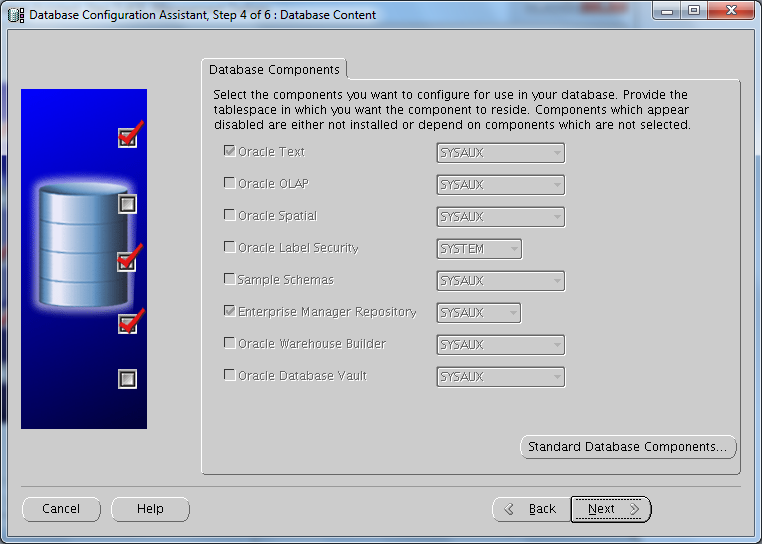
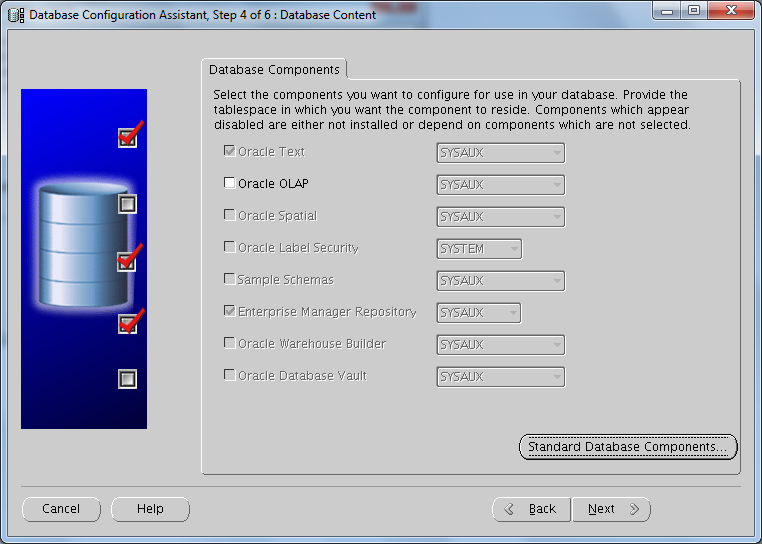
To determine if OLAP is installed or not just run DBCA(located in $ORACLE_HOME/bin). Choose “Configure Database Options”,press Next>> 3 times and if you see this, which means OLAP is not installed

Oracle OLAP is disabled

Do the following steps:

Step 1:

–Connect database as sysdba

export ORACLE_SID=db_sid
Sqlplus sys/sys_pass as sysdba

–Run the following query

SELECT value
FROM v$option
WHERE parameter = 'OLAP';

if the value is TRUE, OLAP is turned on. Go to Step 2.
If the value is FALSE, then shutdown DB and turn it on:

For Linux:

make -f $ORACLE_HOME/rdbms/lib/ins_rdbms.mk olap_on
make -f $ORACLE_HOME/rdbms/lib/ins_rdbms.mk ioracle

For Windows:

1. All oracle processes must be stopped. This includes the database (if any), listener, http (apache) server, intelligent agent, etc..
2. Change to the %ORACLE_HOME%\bin directory
3. Rename oraolapop10.dll.OFF to oraolapop10.dll
4. Restart the database

Step 2:

Verify that ‘JServer JAVA Virtual Machine’ is present and VALID in the database instance:

–Run the following query

SELECT comp_id, comp_name, status, substr(version,1,10) as version
FROM dba_registry
WHERE comp_id like 'JAVAVM';

–If the output is NOT like this:

Verify that 'JServer JAVA Virtual Machine' is present and VALID in the database instance


–Then run the following commands when connected as SYSDBA:

SQL>@?/javavm/install/initjvm.sql;
SQL>@?/xdk/admin/initxml.sql;
SQL>@?/xdk/admin/xmlja.sql;
SQL>@?/rdbms/admin/catjava.sql;

Note: ? is $ORACLE_HOME

Step 3:

Now we need to check or possibly  install the components for the XML Database

–Run the following query

select comp_name, version,status
from dba_registry
where comp_id in ('XDB','XML');

–If the output is NOT like this:

check components for the XML Database

Then you should run:

SQL> conn / as SYSDBA
SQL> @?/rdbms/admin/catqm.sql change_on_install XMLDB TEMP;

Step 4:

Check other  requirements:

–Run the following query

select comp_name, version,status
 from dba_registry
 where comp_name='Oracle Expression Filter'

–If the output is NOT like this:

Verify that Oracle Expression Filter is valid

Then run the following as SYS:

–This file is located in $ORACLE_HOME/rdbms/admin/

@catexf.sql

Step 5:

Finally to install  OLAP.

–Run the following script as sysdba

SQL>$ORACLE_HOME/olap/admin/olap.sql

Another Method to install OLAP is with DBCA

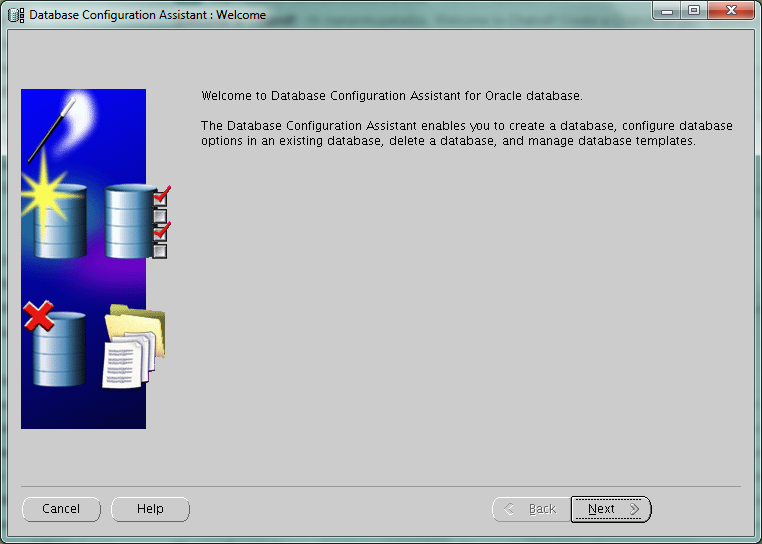
–Run DBCA and Click Next>>
Runing DBCA

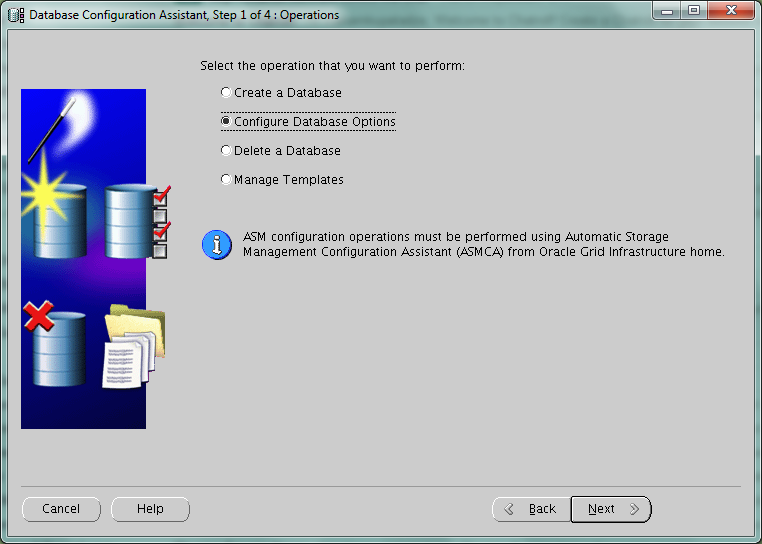
–Choose “Configure Database Options” and click Next>>
DBCA(Configure Database Options)

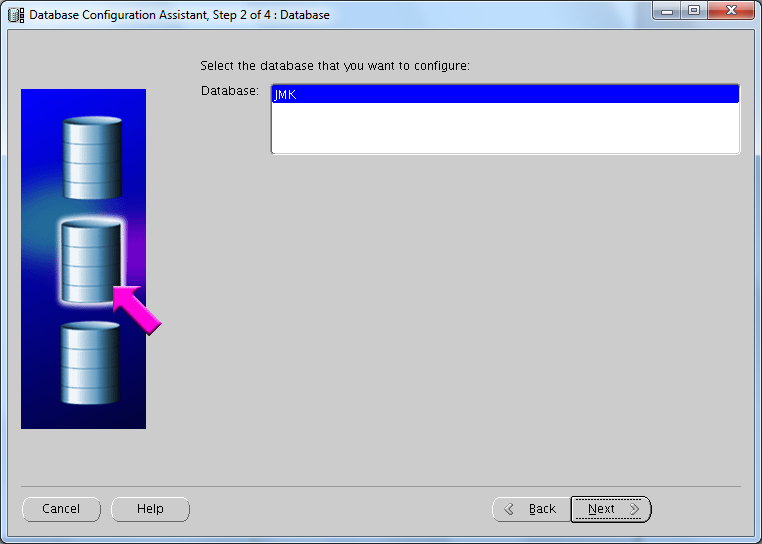
–Choose Database SID and click Next>>
DBCA(select database to configure)


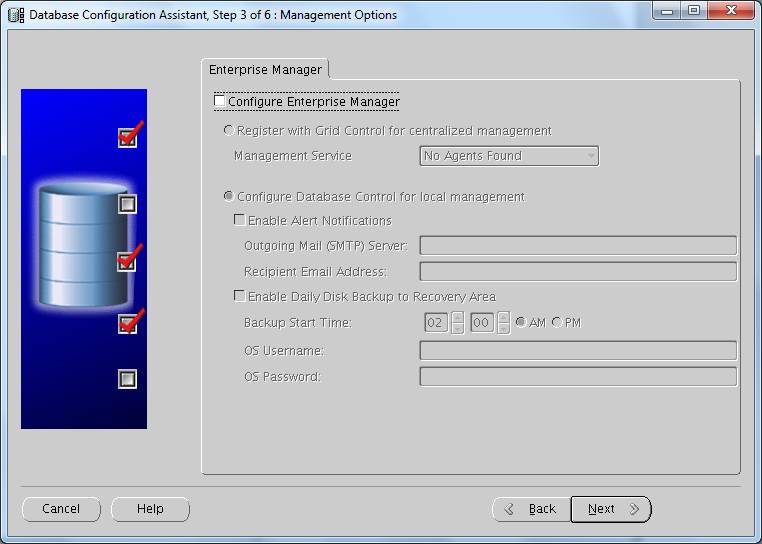
— Choose Enterprise Manager should be installed or not.Depends on your needs(I have unchecked it)

DBCA(Uncheck Configure Enterprise Manager)


–If you see this(OLAP is disabled),
DBCA(Oracle OLAP is disabled)


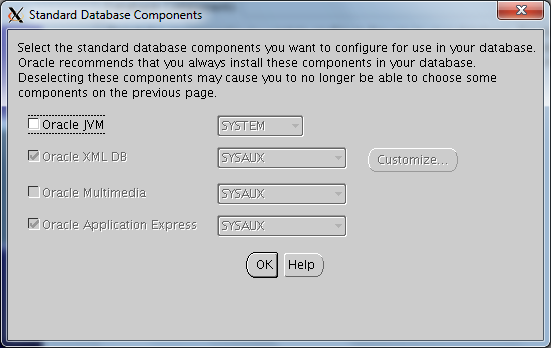
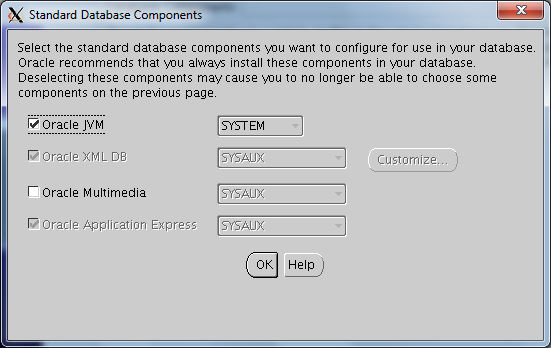
–Then press the button “Standard Database Components…”
Standard Database Components(Oracle JVM option)


–Check “Oracle JVM” and click OK

Standard Database Components(Checked Oracle JVM option)

–Now you should see this
DBCA(Oracle OLAP is enabled)


–Check the option “Oracle OLAP” and click Next>>