Move Oracle controlfile from filesystem to ASM

1. Find out controlfile locations:

Please note another copy of controlfile is already on ASM, +FRA diskgroup. We are moving the first one.

SQL> show parameter control_files

NAME				     TYPE	 VALUE
------------------------------------ ----------- ------------------------------
control_files			     string	 /u01/app/oracle/oradata/PRSH01
						 /control01.ctl, +FRA/PRSH01/co
						 ntrol02.ctl

2. Place database into nomount mode using RMAN and copy controlfile to new location:

$ rman target /

RMAN> startup nomount;
RMAN> restore controlfile to '+DATA' from '/u01/app/oracle/oradata/PRSH01/control01.ctl';

3. Note the name assigned to the controlfile:

[grid@prsh01 ~]$ asmcmd find --type CONTROLFILE +data *
+data/PRSH01/CONTROLFILE/current.261.1122675497

4. Modify the parameter from sqlplus:

SQL> alter system set control_files='+data/PRSH01/CONTROLFILE/current.261.1122675497','+FRA/PRSH01/control02.ctl' scope=spfile;

5. Restart database

SQL> shutdown immediate;
SQL> startup

6. Double check new location

SQL> show parameter control_files

NAME				     TYPE	 VALUE
------------------------------------ ----------- ------------------------------
control_files			     string	 +DATA/PRSH01/CONTROLFILE/curre
						 nt.261.1122675497, +FRA/PRSH01
						 /control02.ctl

Comparing speed between 2 cores vs 1 multi-threaded core

My colleague at Flashgrid, Mikhail Velikikh did a very interesting test case, and I want to share it with you.

He tested two Azure VMs:

DS2_v2 – 2 cores with 1 thread each
D2S_v5 – 1 core with 2 threads

So as you see the total number of threads is the same, and also both of them are Intel Xeon 8370C. The test showed that VM with 2 cores is processing more events than VM with 1 core and 2 threads.

The command used for this test is the following:

# curl --noproxy '*' -H Metadata:true -s -f "http://169.254.169.254/metadata/instance/compute?api-version=2017-12-01" | jq -r '.vmSize'

# lscpu

# sysbench --threads=2 cpu run

curl and lscpu commands are just showing current VM size and CPU info.

The output for DS2_v2 (processed 4282.14 events per second):

+ curl --noproxy '*' -H Metadata:true -s -f 'http://169.254.169.254/metadata/instance/compute?api-version=2017-12-01'
+ jq -r .vmSize
Standard_DS2_v2
+ lscpu
Architecture:                    x86_64
CPU op-mode(s):                  32-bit, 64-bit
Byte Order:                      Little Endian
Address sizes:                   46 bits physical, 48 bits virtual
CPU(s):                          2
On-line CPU(s) list:             0,1
Thread(s) per core:              1
Core(s) per socket:              2
Socket(s):                       1
NUMA node(s):                    1
Vendor ID:                       GenuineIntel
CPU family:                      6
Model:                           106
Model name:                      Intel(R) Xeon(R) Platinum 8370C CPU @ 2.80GHz
Stepping:                        6
CPU MHz:                         2793.436
BogoMIPS:                        5586.87
Hypervisor vendor:               Microsoft
Virtualization type:             full
L1d cache:                       96 KiB
L1i cache:                       64 KiB
L2 cache:                        2.5 MiB
L3 cache:                        48 MiB
NUMA node0 CPU(s):               0,1
Vulnerability Itlb multihit:     KVM: Mitigation: VMX unsupported
Vulnerability L1tf:              Mitigation; PTE Inversion
Vulnerability Mds:               Mitigation; Clear CPU buffers; SMT Host state unknown
Vulnerability Meltdown:          Mitigation; PTI
Vulnerability Mmio stale data:   Vulnerable: Clear CPU buffers attempted, no microcode; SMT Host state unknown
Vulnerability Retbleed:          Not affected
Vulnerability Spec store bypass: Vulnerable
Vulnerability Spectre v1:        Mitigation; usercopy/swapgs barriers and __user pointer sanitization
Vulnerability Spectre v2:        Mitigation; Retpolines, STIBP disabled, RSB filling, PBRSB-eIBRS Not affected
Vulnerability Srbds:             Not affected
Vulnerability Tsx async abort:   Mitigation; Clear CPU buffers; SMT Host state unknown
Flags:                           fpu vme de pse tsc msr pae mce cx8 apic sep mtrr pge mca cmov pat pse36 clflush mmx fxsr sse sse2 ss ht syscall nx pdpe1gb rdtscp lm constant_tsc rep_good nopl xtopology cpuid pni pclmulqdq ssse3 fma cx16 pcid sse4_1 sse4_2 movbe popcnt aes xsave avx f16c rdrand hypervisor lahf_lm abm 3dnowprefetch invpcid_single pti fsgsbase bmi1 hle avx2 smep bmi2 erms invpcid rtm avx512f avx512dq rdseed adx smap clflushopt avx512cd avx512bw avx512vl xsaveopt xsavec xsaves md_clear
+ sysbench --threads=2 cpu run
sysbench 1.0.20 (using bundled LuaJIT 2.1.0-beta2)

Running the test with following options:
Number of threads: 2
Initializing random number generator from current time


Prime numbers limit: 10000

Initializing worker threads...

Threads started!

CPU speed:
    events per second:  4282.14

General statistics:
    total time:                          10.0003s
    total number of events:              42832

Latency (ms):
         min:                                    0.46
         avg:                                    0.47
         max:                                    1.38
         95th percentile:                        0.47
         sum:                                19988.62

Threads fairness:
    events (avg/stddev):           21416.0000/28.00
    execution time (avg/stddev):   9.9943/0.00

The output for D2s_v5 (processed 3131.14 events per second):

+ curl --noproxy '*' -H Metadata:true -s -f 'http://169.254.169.254/metadata/instance/compute?api-version=2017-12-01'
+ jq -r .vmSize
Standard_D2s_v5
+ lscpu
Architecture:                    x86_64
CPU op-mode(s):                  32-bit, 64-bit
Byte Order:                      Little Endian
Address sizes:                   46 bits physical, 57 bits virtual
CPU(s):                          2
On-line CPU(s) list:             0,1
Thread(s) per core:              2
Core(s) per socket:              1
Socket(s):                       1
NUMA node(s):                    1
Vendor ID:                       GenuineIntel
CPU family:                      6
Model:                           106
Model name:                      Intel(R) Xeon(R) Platinum 8370C CPU @ 2.80GHz
Stepping:                        6
CPU MHz:                         2800.000
CPU max MHz:                     2800.0000
CPU min MHz:                     800.0000
BogoMIPS:                        5586.87
Virtualization:                  VT-x
Hypervisor vendor:               Microsoft
Virtualization type:             full
L1d cache:                       48 KiB
L1i cache:                       32 KiB
L2 cache:                        1.3 MiB
L3 cache:                        48 MiB
NUMA node0 CPU(s):               0,1
Vulnerability Itlb multihit:     Not affected
Vulnerability L1tf:              Not affected
Vulnerability Mds:               Not affected
Vulnerability Meltdown:          Not affected
Vulnerability Mmio stale data:   Vulnerable: Clear CPU buffers attempted, no microcode; SMT Host state unknown
Vulnerability Retbleed:          Vulnerable
Vulnerability Spec store bypass: Vulnerable
Vulnerability Spectre v1:        Mitigation; usercopy/swapgs barriers and __user pointer sanitization
Vulnerability Spectre v2:        Mitigation; Retpolines, STIBP disabled, RSB filling, PBRSB-eIBRS Not affected
Vulnerability Srbds:             Not affected
Vulnerability Tsx async abort:   Not affected
Flags:                           fpu vme de pse tsc msr pae mce cx8 apic sep mtrr pge mca cmov pat pse36 clflush mmx fxsr sse sse2 ss ht syscall nx pdpe1gb rdtscp lm constant_tsc rep_good nopl xtopology tsc_reliable nonstop_tsc cpuid aperfmperf pni pclmulqdq vmx ssse3 fma cx16 pcid sse4_1 sse4_2 x2apic movbe popcnt tsc_deadline_timer aes xsave avx f16c rdrand hypervisor lahf_lm abm 3dnowprefetch invpcid_single tpr_shadow vnmi ept vpid ept_ad fsgsbase tsc_adjust bmi1 hle avx2 smep bmi2 erms invpcid rtm avx512f avx512dq rdseed adx smap avx512ifma clflushopt clwb avx512cd sha_ni avx512bw avx512vl xsaveopt xsavec xgetbv1 xsaves avx512vbmi umip avx512_vbmi2 gfni vaes vpclmulqdq avx512_vnni avx512_bitalg avx512_vpopcntdq la57 rdpid fsrm arch_capabilities
+ sysbench --threads=2 cpu run
sysbench 1.0.20 (using bundled LuaJIT 2.1.0-beta2)

Running the test with following options:
Number of threads: 2
Initializing random number generator from current time


Prime numbers limit: 10000

Initializing worker threads...

Threads started!

CPU speed:
    events per second:  3131.14

General statistics:
    total time:                          10.0005s
    total number of events:              31318

Latency (ms):
         min:                                    0.34
         avg:                                    0.64
         max:                                    1.59
         95th percentile:                        0.64
         sum:                                19996.86

Threads fairness:
    events (avg/stddev):           15659.0000/22.00
    execution time (avg/stddev):   9.9984/0.00

Move Oracle datafiles from filesystem to ASM using RMAN

1. Connect to the database using RMAN and move database into mount mode:

$ rman target /
RMAN> shutdown immediate
RMAN> startup mount

2. Get information about target datafiles and tempfiles:

RMAN> report schema;

using target database control file instead of recovery catalog
Report of database schema for database with db_unique_name PRSH01

List of Permanent Datafiles
===========================
File Size(MB) Tablespace           RB segs Datafile Name
---- -------- -------------------- ------- ------------------------
1    1020     SYSTEM               YES     /u01/app/oracle/oradata/PRSH01/system01.dbf
3    490      SYSAUX               NO      /u01/app/oracle/oradata/PRSH01/sysaux01.dbf
4    850      UNDOTBS1             YES     /u01/app/oracle/oradata/PRSH01/undotbs01.dbf
7    5        USERS                NO      /u01/app/oracle/oradata/PRSH01/users01.dbf

List of Temporary Files
=======================
File Size(MB) Tablespace           Maxsize(MB) Tempfile Name
---- -------- -------------------- ----------- --------------------
1    114      TEMP                 32767       /u01/app/oracle/oradata/PRSH01/temp01.dbf

3. Copy datafiles from filesystem to ASM diskgroup, in our case to +DATA:

RMAN> copy datafile 1 to '+DATA';
RMAN> copy datafile 3 to '+DATA';
RMAN> copy datafile 4 to '+DATA';
RMAN> copy datafile 7 to '+DATA';
RMAN> switch datafile 1 to copy;
RMAN> switch datafile 3 to copy;
RMAN> switch datafile 4 to copy;
RMAN> switch datafile 7 to copy;

4. Place tempfile on +DATA:

RMAN> run{
2> set newname for tempfile 1 to '+DATA';
3> switch tempfile 1;
4> }

executing command: SET NEWNAME
renamed tempfile 1 to +DATA in control file

5. Double check that all files have a new name

RMAN> report schema;

Report of database schema for database with db_unique_name PRSH01

List of Permanent Datafiles
===========================
File Size(MB) Tablespace           RB segs Datafile Name
---- -------- -------------------- ------- ------------------------
1    1020     SYSTEM               ***     +DATA/PRSH01/DATAFILE/system.256.1122674191
3    570      SYSAUX               ***     +DATA/PRSH01/DATAFILE/sysaux.257.1122674225
4    910      UNDOTBS1             ***     +DATA/PRSH01/DATAFILE/undotbs1.258.1122674235
7    5        USERS                ***     +DATA/PRSH01/DATAFILE/users.259.1122674253

List of Temporary Files
=======================
File Size(MB) Tablespace           Maxsize(MB) Tempfile Name
---- -------- -------------------- ----------- --------------------
1    114      TEMP                 32767       +DATA

6. Open database:

RMAN> alter database open;

7. Check new file names. Note tempfile name will also be generated:

RMAN> report schema;

Report of database schema for database with db_unique_name PRSH01

List of Permanent Datafiles
===========================
File Size(MB) Tablespace           RB segs Datafile Name
---- -------- -------------------- ------- ------------------------
1    1020     SYSTEM               YES     +DATA/PRSH01/DATAFILE/system.256.1122674191
3    570      SYSAUX               NO      +DATA/PRSH01/DATAFILE/sysaux.257.1122674225
4    910      UNDOTBS1             YES     +DATA/PRSH01/DATAFILE/undotbs1.258.1122674235
7    5        USERS                NO      +DATA/PRSH01/DATAFILE/users.259.1122674253

List of Temporary Files
=======================
File Size(MB) Tablespace           Maxsize(MB) Tempfile Name
---- -------- -------------------- ----------- --------------------
1    114      TEMP                 32767       +DATA/PRSH01/TEMPFILE/temp.260.1122674673

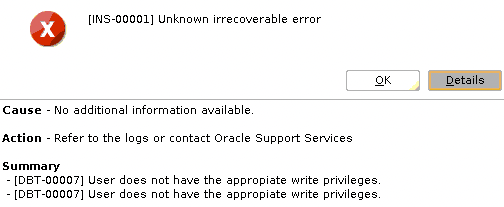
DBCA Fails With INS-00001 and DBT-00007

Problem:

While trying to run dbca from Oracle user I received the following error:

Cause - No additional information available.  
Action - Refer to the logs or contact Oracle Support Services  

Summary  
- [DBT-00007] User does not have the appropiate write privileges.  
- [DBT-00007] User does not have the appropiate write privileges.

Screenshot:

Solution:

Make sure the directory has the correct owner and permissions, otherwise set:

# chown oracle:oinstall $ORACLE_BASE/cfgtoollogs/dbca
# chmod 750 $ORACLE_BASE/cfgtoollogs/dbca

Rerun dbca.

Postfix: flush emails from the mail queue

Problem:

The customer was getting a lot system alerts even after disabling it. There were a lot of emails in the queue:

# mailq
-Queue ID-  --Size-- ----Arrival Time---- -Sender/Recipient-------
DB13ED78461   21597 Thu May 26 05:39:26  flashgrid@localhost.localdomain
(delivery temporarily suspended: connect to us-smtp-inbound-2.meme.com[~]:25: Connection timed out)
                                         alertdb@test.com

DA31AD9C4B5   21503 Thu May 26 10:32:16  flashgrid@localhost.localdomain
(delivery temporarily suspended: connect to us-smtp-inbound-2.meme.com[~]:25: Connection timed out)
                                         alertdb@test.com

DA701D9AC16   21601 Thu May 26 07:01:06  flashgrid@localhost.localdomain
(delivery temporarily suspended: connect to us-smtp-inbound-1.meme.com[~]:25: Connection timed out)
                                         alertdb@test.com

DA3B9D9C488   21503 Thu May 26 09:31:36  flashgrid@localhost.localdomain
(connect to us-smtp-inbound-1.meme.com[~]:25: Connection timed out)
                                         alertdb@test.com

[...]

Solution:

  • To remove all mail from all the queues ( hold, incoming, active and deferred ) , run :
# postsuper -d ALL
  • To remove all mails in the deferred queue only, run :
# postsuper -d ALL deferred

CRS-2549: Resource ‘ora.asmgroup’ cannot be placed on ‘rac1’ as it is not a valid candidate as per the placement policy

Problem:

After failed JDK patching on the 1st node, we tried troubleshooting and saw that ASM was not able to start:

# su - grid
$ sqlplus / as sysasm
SQL> startup nomount;
ORA-32004: obsolete or deprecated parameter(s) specified for ASM instance
ORA-39511: Start of CRS resource for instance '223' failed with error:[CRS-2549: Resource 'ora.asmgroup' cannot be placed on 'rac1' as it is not a valid candidate as per the placement policy
CRS-0223: Resource 'ora.asm' has placement error.
clsr_start_resource:260 status:223
clsrapi_start_asm:start_asmdbs status:223

Reason:

Prepatch modified RESOURCE_USE_ENABLED=0 for rac1 node:

[grid@rac1 ~]$ crsctl stat server -f

NAME=rac1
MEMORY_SIZE=63465
CPU_COUNT=8
CPU_CLOCK_RATE=2499
CPU_HYPERTHREADING=1
CPU_EQUIVALENCY=1000
DEPLOYMENT=other
CONFIGURED_CSS_ROLE=hub
RESOURCE_USE_ENABLED=0
SERVER_LABEL=
PHYSICAL_HOSTNAME=
CSS_CRITICAL=no
CSS_CRITICAL_TOTAL=0
RESOURCE_TOTAL=0
SITE_NAME=stsfilive
STATE=ONLINE
ACTIVE_POOLS=Free
STATE_DETAILS=
ACTIVE_CSS_ROLE=hub

NAME=rac2
MEMORY_SIZE=63465
CPU_COUNT=8
CPU_CLOCK_RATE=2499
CPU_HYPERTHREADING=1
CPU_EQUIVALENCY=1000
DEPLOYMENT=other
CONFIGURED_CSS_ROLE=hub
RESOURCE_USE_ENABLED=1
….

Solution:

Connect to the failing node and run:

[root@rac1 ~]# crsctl set resource use 1

Start ASM.

Flashgrid: Strict local was NOT disabled due to dependency errors!

Problem:

# flashgrid-cluster strict-read-local-disable
~~~~~~~~~~~~~~~~
Unable to revert 'ora.orcl.db': saved data doesn't match current dependencies!

Expected 'hard(fg.OGG.DisksReady, fg.OCR.DisksReady, fg.MGMT.DisksReady, fg.GRID.DisksReady, fg.DATA2.DisksReady, fg.DATA1.DisksReady, fg.ARCH.DisksReady, global:uniform:ora.DATA2.dg, uniform:global:ora.GRID.dg, uniform:global:ora.OCR.dg, uniform:global:ora.MGMT.dg, uniform:global:ora.OGG.dg, global:uniform:ora.DATA1.dg) pullup(fg.OGG.DisksReady, fg.OCR.DisksReady, fg.MGMT.DisksReady, fg.GRID.DisksReady, fg.DATA2.DisksReady, fg.DATA1.DisksReady, fg.ARCH.DisksReady, global:ora.GRID.dg, global:ora.OCR.dg, global:ora.MGMT.dg, global:ora.OGG.dg, global:ora.DATA2.dg, global:ora.DATA1.dg) weak(type:ora.listener.type, global:type:ora.scan_listener.type, uniform:ora.ons, global:ora.gns, global:uniform:ora.ARCH.dg)', found 'hard(fg.OGG.DisksReady, fg.OCR.DisksReady, fg.MGMT.DisksReady, fg.GRID.DisksReady, fg.DATA2.DisksReady, fg.DATA1.DisksReady, fg.ARCH.DisksReady, global:uniform:ora.DATA2.dg, uniform:global:ora.GRID.dg, uniform:global:ora.OCR.dg, uniform:global:ora.MGMT.dg, uniform:global:ora.OGG.dg, global:uniform:ora.ARCH.dg, global:uniform:ora.DATA1.dg) pullup(fg.OGG.DisksReady, fg.OCR.DisksReady, fg.MGMT.DisksReady, fg.GRID.DisksReady, fg.DATA2.DisksReady, fg.DATA1.DisksReady, fg.ARCH.DisksReady, global:ora.GRID.dg, global:ora.OCR.dg, global:ora.MGMT.dg, global:ora.OGG.dg, global:ora.DATA2.dg, global:ora.ARCH.dg, global:ora.DATA1.dg) weak(type:ora.listener.type, global:type:ora.scan_listener.type, uniform:ora.ons, global:ora.gns)'

Strict local was NOT disabled due to dependency errors!

The dependency attribute for the database resource is different than expected.

Solution:

Copy text after Expected until found sections, and modify dependencies manually. This process does not require any downtime and is safe to run. Please note, that your dependencies should be different, so instead of copying the text below use the output from the previous command to modify accordingly:

# crsctl modify resource ora.orcl.db -attr "START_DEPENDENCIES='hard(fg.OGG.DisksReady, fg.OCR.DisksReady, fg.MGMT.DisksReady, fg.GRID.DisksReady, fg.DATA2.DisksReady, fg.DATA1.DisksReady, fg.ARCH.DisksReady, global:uniform:ora.DATA2.dg, uniform:global:ora.GRID.dg, uniform:global:ora.OCR.dg, uniform:global:ora.MGMT.dg, uniform:global:ora.OGG.dg, global:uniform:ora.DATA1.dg) pullup(fg.OGG.DisksReady, fg.OCR.DisksReady, fg.MGMT.DisksReady, fg.GRID.DisksReady, fg.DATA2.DisksReady, fg.DATA1.DisksReady, fg.ARCH.DisksReady, global:ora.GRID.dg, global:ora.OCR.dg, global:ora.MGMT.dg, global:ora.OGG.dg, global:ora.DATA2.dg, global:ora.DATA1.dg) weak(type:ora.listener.type, global:type:ora.scan_listener.type, uniform:ora.ons, global:ora.gns, global:uniform:ora.ARCH.dg)'" -unsupported

Disable read local:

# flashgrid-cluster strict-read-local-disable

I would not recommend disabling it, to reenable please run # flashgrid-cluster strict-read-local-enable

The reason we were disabling it was because of testing and we’ve found that the resource had a dependency error that was causing problems. So in case you encounter the same, you know how to solve it.
Part 2: ora.storage fails to start, ORA-01017

Problem:

One of our customers changed ASM password file by mistake and regarding other actions, we are not sure. After node restart, they encountered ora.storage startup issue on the second node.

CRS-2672: Attempting to start 'ora.storage' on 'orcl02'
ORA-01017: invalid username/password; logon denied
CRS-5055: unable to connect to an ASM instance because no ASM instance is running in the cluster
CRS-2883: Resource 'ora.storage' failed during Clusterware stack start.
CRS-4406: Oracle High Availability Services synchronous start failed.
CRS-41053: checking Oracle Grid Infrastructure for file permission issues
CRS-4000: Command Start failed, or completed with errors.

I have followed my blog post to recover ASM passwordfile and add CRSUSER__ASM_001. The CRS started successfully on the first node but it still was not able to start on the second.

Reason:

When we checked password for CRSUSER__ASM_001 on both nodes, we got different results:

[grid@orcl01 ~]$ crsctl get credmaint -path ASM/Self/0b5330fe4bdf6f6ebffb09beab078d6e -credtype userpass -id 0 -attr passwd -local 
zSZDts1PQx8v7gRrdmH1EjIpSBsAt
[grid@orcl02 ~]$ crsctl get credmaint -path ASM/Self/0b5330fe4bdf6f6ebffb09beab078d6e -credtype userpass -id 0 -attr passwd -local 
rHgulYGfY17Uxbb9Tbd9VF3yr2Kvr

Which is not normal and they must be the same. This was the reason CRS was not able to start on the second node, because ASM passwordfile for CRSUSER__ASM_001 had value zSZDts1PQx8v7gRrdmH1EjIpSBsAt

Solution:

Verify and fix the credentials:

If you are not able to set up root ssh passwordless connectivity, you can run the following command as grid. Note in that case you will get “credfix: could not delete crs credentials for jxrucJl3”, this is because the command was not run as root and old credentials were not deleted. But new credentials are successfully created.

[grid@orcl01 ~]$ asmcmd --nocp credverify
credverify: More than one credential in password file, please run 'credfix' to fix the credentials.
​
[grid@orcl01 ~]$ asmcmd --nocp credfix
credfix: Credentials for JXRUCJL3 not in password file, trying next credential.
op=addcrscreds wrap=/tmp/creds0.xml
credfix: Creating new credentials, no valid credentials in OCR.
credfix: New user CRSUSER__ASM_004 created.
op=credimport wrap=/tmp/creds0.xml olr=true force=true
credfix: OLR for orcl01 has been fixed if credentials were created incorrectly.
credfix: Starting SSH session on node orcl02.
credfix: OLR for orcl02 has been fixed if credentials were created incorrectly. Exiting SSH session.
op=delcrscreds crs_user=jxrucJl3
ASMCMD-8202: internal error:
credfix: could not delete crs credentials for jxrucJl3

It is recommended to setup passwordless ssh connectivity for root user and then run credfix as root to have clean configuration without old entries:

[root@rac1 ~]# asmcmd --nocp credfix
..

Installing linux.x64_193000_client gets java.library.path system variable is missing or invalid

Problem:

While installing linux.x64_193000_client.zip on Linux, getting the following error:

Preparing to launch Oracle Universal Installer from /tmp/OraInstall2022-06-15_07-48-19AM. Please wait ...[oracle@mariclient client]$ Picked up _JAVA_OPTIONS: -Djava.io.tmpdir=/u01/tmp
The java.library.path system variable is missing or invalid. Please set java.library.path with a correct value and retry the operation.
Exception in thread "main" java.lang.NoClassDefFoundError: Could not initialize class oracle.sysman.oii.oiip.oiipg.OiipgPropertyLoader
	at oracle.sysman.oii.oiip.oiipg.OiipgBootstrap.isCleanMachine(OiipgBootstrap.java:484)
	at oracle.sysman.oii.oiii.OiiiInstallAreaControl.isCleanMachine(OiiiInstallAreaControl.java:3796)

Solution:

Install the following rpm and retry:

# yum install libnsl.x86_64

Terminal window xterm is not displayed in VNC

Problem:

After installing/starting the tiger VNC server, and connecting using VNC Viewer terminal window is not displayed.

# yum install tigervnc-server

Solution:

Install xterm:

# yum install xterm

Kill old VNC process and start again:

$ vncserver -kill :1
$ vncserver -geometry 1024x1024

Reconnect using VNC viewer, terminal should be displayed automatically.