Rename directories, subdirectories, files recursively that contain matching string

Problem:

I have copied /u01 directory (containing Oracle software) from another node. The Oracle software home includes directories and files with hostnames.

My task was to rename all directories, subdirectories, and files containing the specific hostname (in my case rac2) into rac1.

Let me show you the folder hierarchy that is challenging when you want to rename by script. For simplicity, this hierarchy is made up, but this type of dependency exists in /u01:

/u01/first_level_rac2/second_level_rac2/third_level_rac2.txt

We want to have:

/u01/first_level_rac1/second_level_rac1/third_level_rac1.txt

So finally, all folders or files containing the string rac2 should be replaced with rac1.

The challenge here is that you need to start renaming from the third_level, then rename second_level and later first_level. Otherwise, you will have accessibility issues with other subdirectories or files.

Solution:

If you want a shortcut, here is the code:

[root@rac1 ~]# find /u01 -depth -name "*rac2*" | while read i ; do
newname="$(echo ${i} |sed 's/\(.*\)rac2/\1rac1/')" ;
echo "mv" "${i}" "${newname}" >> rename_rac2_rac1.sh;
done

Later you need to run rename_rac2_rac1.sh file, which will contain mv statements for each matching file or folder.

Let me explain,

find /u01 -depth -name "*rac2*" – This will find all files and folders that contain rac2 keyword and will display the output with depth-first order.

Without depth, the output is the following:

/u01/first_level_rac2
/u01/first_level_rac2/second_level_rac2
/u01/first_level_rac2/second_level_rac2/third_level_rac2.txt

With -depth, you will see the next order:

/u01/first_level_rac2/second_level_rac2/third_level_rac2.txt
/u01/first_level_rac2/second_level_rac2
/u01/first_level_rac2

"$(echo ${i} |sed 's/\(.*\)rac2/\1rac1/')" – In this line, the value of i iterator (each line from find command) will be redirected to sed command that will replace the first occurrence of rac2 keyword searching from backward.

Later old name and a new name will be concatenated with mv statement and saved into rename_rac2_rac1.sh

This will be mv statements generated by the script:

mv /u01/first_level_rac2/second_level_rac2/third_level_rac2.txt /u01/first_level_rac2/second_level_rac2/third_level_rac1.txt

mv /u01/first_level_rac2/second_level_rac2 /u01/first_level_rac2/second_level_rac1

mv /u01/first_level_rac2 /u01/first_level_rac1

[WARNING] [INS-08102] Unexpected error occurred while transitioning from state ‘DBIdentification’

Problem:

While using dbca to create a database I get the following error:

[oracle@rac1 ~]$ dbca -silent -createDatabase \
>   -responseFile NO_VALUE \
>   -templateName New_Database.dbt \
>   -dbOptions "OMS:false,JSERVER:false,SPATIAL:false,IMEDIA:false,ORACLE_TEXT:false,SAMPLE_SCHEMA:false,CWMLITE:false,APEX:false,DV:false" \
>   -gdbname racdb \
>   -characterSet AL32UTF8 \
>   -sysPassword Oracle123 \
>   -systemPassword Oracle123 \
>   -databaseType MULTIPURPOSE \
>   -automaticMemoryManagement false \
>   -totalMemory 6144 \
>   -redoLogFileSize 512 \
>   -nodelist rac1,rac2 \
>   -storageType ASM \
>   -diskGroupName DATA01 \
>   -recoveryGroupName DATA01 \
>   -recoveryAreaSize 20000 \
>   -initParams "log_buffer=128M,processes=3000" \
>   -asmsnmpPassword Oracle123
[WARNING] [INS-08102] Unexpected error occurred while transitioning from state 'DBIdentification'
   CAUSE: No additional information available.
   ACTION: Contact Oracle Support Services or refer to the software manual.

On DBCA GUI it looks like this:

Solution:

On the Oracle site or on the Internet, there is no useful information that can help so far. The only place you should search for the reason is in dbca logs generated under /u01/app/oracle/cfgtoollogs/dbca

[root@rac1 dbca]# pwd
/u01/app/oracle/cfgtoollogs/dbca

[root@rac1 dbca]# ll
total 1344
drwxr-xr-x 2 root   root        4096 Jul 14 18:48 old
drwxr-x--- 2 oracle oinstall       6 Apr 28 16:25 orcl
-rw-r----- 1 oracle oinstall 1370046 Jul 14 18:51 trace.log_2023-07-14_06-51-03PM
-rw-r----- 1 oracle oinstall       0 Jul 14 18:51 trace.log_2023-07-14_06-51-03PM.lck

The latest trace file contains the following error messages:

[Thread-355] [ 2023-07-14 18:51:35.375 UTC ] [StreamReader.run:66]  OUTPUT> DIA-49802: missing read, write, or execute permission on specified ADR home directory [/u01/app/grid/diag/crs/rac1/crs/log]
[Thread-355] [ 2023-07-14 18:51:35.375 UTC ] [StreamReader.run:66]  OUTPUT>DIA-49801: actual permissions [rwxr-xr-x], expected minimum permissions [rwxrwx---] for effective user [oracle]
[Thread-355] [ 2023-07-14 18:51:35.375 UTC ] [StreamReader.run:66]  OUTPUT>DIA-48188: user missing read, write, or exec permission on specified directory
....
[Thread-363] [ 2023-07-14 19:01:53.417 UTC ] [StreamReader.run:66]  OUTPUT> DIA-48141: error creating directory during ADR initialization [/u01/app/grid/diag/crs/rac1/crs/trace]
[Thread-363] [ 2023-07-14 19:01:53.417 UTC ] [StreamReader.run:66]  OUTPUT>DIA-48189: OS command to create directory failed
[Thread-363] [ 2023-07-14 19:01:53.417 UTC ] [StreamReader.run:66]  OUTPUT>Linux-x86_64 Error: 1: Operation not permitted

Let’s check permissions on folders under /u01/app/grid/diag/crs/rac1/crs

[root@rac1 dbca]# ll /u01/app/grid/diag/crs/rac1/crs/

drwxr-xr-x 2 grid oinstall   21 Jul 14 16:09 alert
drwxr-xr-x 2 grid oinstall    6 Jul 12 21:33 cdump
drwxr-xr-x 2 grid oinstall    6 Jul 12 21:33 incident
drwxr-xr-x 2 grid oinstall    6 Jul 12 21:33 incpkg
drwxr-xr-x 2 grid oinstall 4096 Jul 12 21:33 lck
drwxrwxr-x 5 grid oinstall   48 Jul 12 21:33 log
drwxr-xr-x 2 grid oinstall 4096 Jul 12 21:33 metadata
drwxr-xr-x 2 grid oinstall    6 Jul 12 21:33 metadata_dgif
drwxr-xr-x 2 grid oinstall    6 Jul 12 21:33 metadata_pv
drwxr-xr-x 2 grid oinstall    6 Jul 12 21:33 stage
drwxr-xr-x 2 grid oinstall    6 Jul 12 21:33 sweep
drwxr-xr-x 2 grid oinstall 8192 Jul 14 18:43 trace

When I have the same case, I always check the same folder on a healthy server, let’s verify permissions on a healthy node:

[root@rac2 oraInventory]# ll /u01/app/grid/diag/crs/rac2/crs

drwxrwxr-x 2 grid oinstall    21 Apr 26 17:53 alert
drwxrwxr-x 5 grid oinstall    57 Jul 13 21:43 cdump
drwxrwxr-x 7 grid oinstall    89 Jul 13 21:43 incident
drwxrwxr-x 2 grid oinstall     6 Apr 26 17:53 incpkg
drwxrwxr-x 2 grid oinstall  4096 Jul 13 21:43 lck
drwxrwxr-x 5 grid oinstall    65 Jun  1 00:36 log
drwxrwxr-x 2 grid oinstall  4096 Apr 26 17:53 metadata
drwxrwxr-x 2 grid oinstall     6 Apr 26 17:53 metadata_dgif
drwxrwxr-x 2 grid oinstall     6 Apr 26 17:53 metadata_pv
drwxrwxr-x 2 grid oinstall   119 Jul 13 21:43 stage
drwxrwxr-x 2 grid oinstall   124 Jul 13 21:43 sweep
drwxrwxr-x 2 grid oinstall 32768 Jul 14 18:43 trace

Now it’s time to correct permissions on the problematic node:

[root@rac1 dbca]# chmod -R 775 /u01/app/grid/diag/crs/rac1/crs/*

[root@rac1 dbca]# ll /u01/app/grid/diag/crs/rac1/crs/

drwxrwxr-x 2 grid oinstall   21 Jul 14 16:09 alert
drwxrwxr-x 2 grid oinstall    6 Jul 12 21:33 cdump
drwxrwxr-x 2 grid oinstall    6 Jul 12 21:33 incident
drwxrwxr-x 2 grid oinstall    6 Jul 12 21:33 incpkg
drwxrwxr-x 2 grid oinstall 4096 Jul 12 21:33 lck
drwxrwxr-x 5 grid oinstall   48 Jul 12 21:33 log
drwxrwxr-x 2 grid oinstall 4096 Jul 12 21:33 metadata
drwxrwxr-x 2 grid oinstall    6 Jul 12 21:33 metadata_dgif
drwxrwxr-x 2 grid oinstall    6 Jul 12 21:33 metadata_pv
drwxrwxr-x 2 grid oinstall    6 Jul 12 21:33 stage
drwxrwxr-x 2 grid oinstall    6 Jul 12 21:33 sweep
drwxrwxr-x 2 grid oinstall 8192 Jul 14 18:43 trace

It is now possible for DBCA to proceed without any issues.
Good Luck!

Copy a file over SSH without SCP

Problem:

/usr/bin/scp binary was removed from the system. Which has caused the Oracle Patching process to fail.

scp binary is provided by openssh-clients rpm, which was present on the system, but scp binary was missing.

Troubleshooting/Testing:

The workaround is to copy scp binary from a similar healthy server (keep the same version). However, transferring a file to a location where it doesn’t exist can be a bit challenging. Let’s try:

[fg@rac1 ~]$ scp /usr/bin/scp racq:/tmp/scp
bash: scp: command not found
lost connection

We got lost connection, because scp is not on racq node.

Solution:

Need to use ssh and cat commands. For most systems root user login is not enabled, so you need to place the file under /tmp and then relocate to the correct location.

In my example, I have already set up fg user equivalency, so in my case, the format will be the following:

[fg@rac1 ~]$ ssh racq cat < /usr/bin/scp ">" /tmp/scp

Connect to the remote server and copy /tmp/scp to the correct location. Reset permissions.

[root@racq tmp]# cp /tmp/scp /usr/bin/scp
[root@racq tmp]# chmod 755 /usr/bin/scp
[root@racq tmp]# chown root:root /usr/bin/scp

The transfer should be working now:

[fg@rac1 ~]$ scp /usr/bin/scp racq:/tmp/scp
scp      100%   89KB  44.0MB/s   00:00

The process worked for a binary file, so it will work for a text file too.

aad_certhandler: The public key is of type ssh-rsa, not a certificate.

Problem:

I am currently experiencing difficulty connecting to the Azure VM using AD authentication. I am receiving an error message that states:

~ az ssh  vm -n rac1 -g marirac
OpenSSH_9.0p1, LibreSSL 3.3.6
...: Permission denied (publickey).
The OpenSSH server version in the target VM 7.4 is too old. Version incompatible with OpenSSH client version 9.0. Refer to https://bugzilla.mindrot.org/show_bug.cgi?id=3351 for more information.

When I check /var/log/secure log on the server side, it shows:

Jun  6 16:49:54 rac1 sshd[27249]: Connection closed by ... port 51572 [preauth]
Jun  6 16:54:44 rac1 sshd[31386]: nss_aad: This is an Azure machine
Jun  6 16:54:44 rac1 aad_certhandler[31393]: Version: 1.0.022600002; user: ...
Jun  6 16:54:44 rac1 aad_certhandler[31393]: The public key is of type ssh-rsa, not a certificate.
Jun  6 16:54:44 rac1 sshd[31386]: error: AuthorizedKeysCommand /usr/sbin/aad_certhandler ...
Jun  6 16:54:44 rac1 sshd[31386]: Connection closed by ... port 52092 [preauth]

I have intentionally redacted certain portions of the information for security reasons, although errors are still apparent.

Troubleshooting:

Client and server versions are different:

Server:

[root@rac1 ~]# ssh -V
OpenSSH_7.4p1, OpenSSL 1.0.2k-fips  26 Jan 2017

Client:

 ~ ssh -V
OpenSSH_9.0p1, LibreSSL 3.3.6

Workaround:

Pass the following option to ssh when using az ssh Command:

~ az ssh  vm -n rac1 -g marirac -- -o PubkeyAcceptedKeyTypes=+ssh-rsa-cert-v01@openssh.com

Azure CLI install ssh extension

Problem:

To enable AD authentication on a Linux OS Azure VM, you must install Azure CLI and have the SSH extension. However, the SSH extension is not installed automatically after installing Azure CLI.

I can guide you through the simple steps to add this extension.

Solution:

Ensure that the extension is not present:

~ az version
{
  "azure-cli": "2.49.0",
  "azure-cli-core": "2.49.0",
  "azure-cli-telemetry": "1.0.8",
  "extensions": {}
}

List available extensions:

~ az extension list-available --output table

Name    Version    Summary  Preview  Experimental  Installed
------- --------   -------  -------  ------------  --------------------------
...
ssh     1.1.6      SSH...   False    False         False
...

Add extension:

~ az extension add --name ssh

Ensure that the extension has been added:

~ az version
{
  "azure-cli": "2.49.0",
  "azure-cli-core": "2.49.0",
  "azure-cli-telemetry": "1.0.8",
  "extensions": {
    "ssh": "1.1.6"
  }
}

Export all images easily from Google Drive Word document

Let’s assume you have created a Word document on Google Drive and inserted tons of screenshots inside.

You have been asked to export all images from this document for verification. While there are multiple ways to accomplish this, I have found the fastest solution.

1. Go to the section File -> Download -> Web Page

2. Go to the Download location and unzip the file

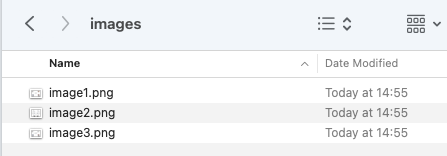
3. Under the extracted folder, you will find a sub-folder called images, which will contain all images that the Word document contains.

E492: Not an editor command: ASM2_ora_26576.trc

Problem:

I want to open ASM trace file using vim.

[root@rac2 trace]# ll +ASM2_ora_26576.trc
-rw-r----- 1 grid oinstall 1388 Mar  7 18:06 +ASM2_ora_26576.trc

But because of filename contains + sign, my command fails:

[root@rac2 trace]# vim +ASM2_ora_26576.trc

Error detected while processing command line:
E492: Not an editor command: ASM2_ora_26576.trc
Press ENTER or type command to continue

Solution:

Indicate — (two dashes)

[root@rac2 trace]# vim -- +ASM2_ora_26576.trc

From man page of vim — means the following:

 --          Denotes  the  end  of  the options.  Arguments after this will be handled as a file name.  This can be used to edit a filename that starts with a '-'.

Inserting entry in .db file from Linux shell

  • Create a text file containing necessary entries, e.g
[root@rac1 ~]# cat test.txt
ora.test.db
\92\c4\9dhard(global:uniform:ora.DATA.dg) pullup(global:ora.DATA.dg) weak(type:ora.listener.type, global:type:ora.scan_listener.type, uniform:ora.ons, global:ora.gns)\c4\c5hard(fg.DATA.DisksReady, global:uniform:ora.DATA.dg) pullup(fg.DATA.DisksReady, global:ora.DATA.dg) weak(type:ora.listener.type, global:type:ora.scan_listener.type, uniform:ora.ons, global:ora.gns)

Please note, this is a sample entry that was necessary in my case. You better know what should be there for your case.

  • Create output.db file from test.txt
[root@rac1 ~]# db_load -T -t btree -f test.txt output.db
  • Read data from output.db file to make sure that the entry is there using db_dump
[root@rac1 ~]# db_dump -p output.db
VERSION=3
format=print
type=btree
db_pagesize=4096
HEADER=END
 ora.test.db
 \92\c4\9dhard(global:uniform:ora.DATA.dg) pullup(global:ora.DATA.dg) weak(type:ora.listener.type, global:type:ora.scan_listener.type, uniform:ora.ons, global:ora.gns)\c4\c5hard(fg.DATA.DisksReady, global:uniform:ora.DATA.dg) pullup(fg.DATA.DisksReady, global:ora.DATA.dg) weak(type:ora.listener.type, global:type:ora.scan_listener.type, uniform:ora.ons, global:ora.gns)
DATA=END

/usr/local/Homebrew/Library/Homebrew/os/mac/version.rb:32:in `block in from_symbol’: unknown or unsupported macOS version: :dunno (MacOSVersionError)

Problem:

I am not able to install any software with brew on my Mac:

brew install iostat-tool
...
Traceback (most recent call last):
	11: from /usr/local/Homebrew/Library/Homebrew/brew.rb:31:in `<main>'
	10: from /usr/local/Homebrew/Library/Homebrew/brew.rb:31:in `require_relative'
	 9: from /usr/local/Homebrew/Library/Homebrew/global.rb:80:in `<top (required)>'
	 8: from /usr/local/Homebrew/Library/Homebrew/vendor/portable-ruby/2.6.3_2/lib/ruby/2.6.0/rubygems/core_ext/kernel_require.rb:54:in `require'
	 7: from /usr/local/Homebrew/Library/Homebrew/vendor/portable-ruby/2.6.3_2/lib/ruby/2.6.0/rubygems/core_ext/kernel_require.rb:54:in `require'
	 6: from /usr/local/Homebrew/Library/Homebrew/os.rb:7:in `<top (required)>'
	 5: from /usr/local/Homebrew/Library/Homebrew/os.rb:43:in `<module:OS>'
	 4: from /usr/local/Homebrew/Library/Homebrew/os/mac.rb:65:in `prerelease?'
	 3: from /usr/local/Homebrew/Library/Homebrew/os/mac.rb:28:in `version'
	 2: from /usr/local/Homebrew/Library/Homebrew/os/mac/version.rb:32:in `from_symbol'
	 1: from /usr/local/Homebrew/Library/Homebrew/os/mac/version.rb:32:in `fetch'
/usr/local/Homebrew/Library/Homebrew/os/mac/version.rb:32:in `block in from_symbol': unknown or unsupported macOS version: :dunno (MacOSVersionError)
...

Solution:

Reset brew and reinstall:

brew update-reset

==> Fetching /usr/local/Homebrew...
remote: Enumerating objects: 19541, done.
remote: Counting objects: 100% (239/239), done.
remote: Compressing objects: 100% (130/130), done.
remote: Total 19541 (delta 118), reused 179 (delta 79), pack-reused 19302
Receiving objects: 100% (19541/19541), 40.18 MiB | 32.55 MiB/s, done.
Resolving deltas: 100% (9869/9869), done.
From github.com:giobero/mydocflow
 * [new branch]          deployed-master   -> origin/deployed-master
 * [new branch]          dev               -> origin/dev
 * [new branch]          extjs4            -> origin/extjs4
 * [new branch]          extjs5            -> origin/extjs5
...


➜ /bin/bash -c "$(curl -fsSL https://raw.githubusercontent.com/Homebrew/install/HEAD/install.sh)"

==> Checking for `sudo` access (which may request your password)...
Password:
==> This script will install:
/usr/local/bin/brew
/usr/local/share/doc/homebrew
/usr/local/share/man/man1/brew.1
/usr/local/share/zsh/site-functions/_brew
/usr/local/etc/bash_completion.d/brew
/usr/local/Homebrew

Press RETURN/ENTER to continue or any other key to abort:
==> /usr/bin/sudo /usr/sbin/chown -R mari:admin /usr/local/Homebrew
==> Downloading and installing Homebrew...
remote: Enumerating objects: 59221, done.
remote: Counting objects: 100% (10444/10444), done.
remote: Compressing objects: 100% (49/49), done.
remote: Total 59221 (delta 10405), reused 10419 (delta 10393), pack-reused 48777

Make sure that brew was installed:

brew doctor

Please note that these warnings are just used to help the Homebrew maintainers
...

Warning: Broken symlinks were found. Remove them with `brew cleanup`:
  /usr/local/share/zsh/site-functions/_brew_cask

Run cleanup:

brew cleanup

Reinstall the target software:

brew install iostat-tool

==> Tapping homebrew/cask
Cloning into '/usr/local/Homebrew/Library/Taps/homebrew/homebrew-cask'...
remote: Enumerating objects: 706890, done.
remote: Counting objects: 100% (250/250), done.
remote: Compressing objects: 100% (169/169), done
...

This system has no repositories available through subscriptions.

Problem:

Enabling repos fails:

[root@app1 mari_scripts]# subscription-manager repos --enable rhel-7-server-optional-rpms \
>     --enable rhel-server-rhscl-7-rpms \
>     --enable rhel-7-server-devtools-rpms
This system has no repositories available through subscriptions.

Solution:

Run the following:

[root@app1 mari_scripts]# subscription-manager attach --auto

Installed Product Current Status:
Product Name: Red Hat Enterprise Linux Server
Status:       Subscribed

Reenable repositories:

[root@app1 mari_scripts]# subscription-manager repos --enable rhel-7-server-optional-rpms     --enable rhel-server-rhscl-7-rpms     --enable rhel-7-server-devtools-rpms
Repository 'rhel-7-server-optional-rpms' is enabled for this system.
Repository 'rhel-7-server-devtools-rpms' is enabled for this system.
Repository 'rhel-server-rhscl-7-rpms' is enabled for this system.