ORA-65086: cannot open/close the pluggable database

Problem:

Tried to open the pluggable database and got the error:

SQL> alter pluggable database PDB11 open;
alter pluggable database PDB11 open
*
ERROR at line 1:
ORA-65086: cannot open/close the pluggable database

Reason:

I have run unplug database before so database status was UNPLUGGED.

SQL> col PDB_NAME for a15
SQL> set linesize 800
SQL> select pdb_name,status from dba_pdbs;

PDB_NAME	STATUS
--------------- ----------
PDB11		UNPLUGGED
PDB$SEED	NORMAL
PDB12		NORMAL
PDB13		NORMAL

Solution:

To plug the database back to the container with the same name, first you need to drop it:

SQL> drop pluggable database PDB11 keep datafiles;
SQL> create pluggable database PDB11 using '/u01/app/oracle/myxml/PDB11.xml' nocopy tempfile reuse;

Check the status again:

SQL> col PDB_NAME for a15
SQL> set linesize 800
SQL> select pdb_name,status from dba_pdbs;

PDB_NAME	STATUS
--------------- ----------
PDB$SEED	NORMAL
PDB12		NORMAL
PDB13		NORMAL
PDB11		NEW

Open the database and make sure status became NORMAL:

SQL> alter pluggable database PDB11 open;

SQL> select pdb_name,status from dba_pdbs;

--------------- ----------
PDB$SEED	NORMAL
PDB12		NORMAL
PDB13		NORMAL
PDB11		NORMAL

Draw graph for Linux sar output using ksar

I’ve recently heard about this tool , as it is said we are learning things until the death (:

Our company is saving sar output in a text file periodicly and after performance or other issues we need to analyze it’s output to find out which resource was busy and when.. analyzing text file is time-consuming and can also cause eye tension.

Output in sar:

00:00:01        CPU      %usr     %nice      %sys   %iowait    %steal      %irq     %soft    %guest    %gnice     %idle
00:10:01        all      3.14      0.00      2.43      1.64      0.00      0.00      0.60      0.00      0.00     92.20
00:10:01          0      3.64      0.00      2.33      4.10      0.00      0.00      1.10      0.00      0.00     88.83

00:00:01      scall/s badcall/s  packet/s     udp/s     tcp/s     hit/s    miss/s   sread/s  swrite/s saccess/s sgetatt/s
00:10:01         0.00      0.00      0.00      0.00      0.00      0.00      0.00      0.00      0.00      0.00      0.00

...
00:00:01       totsck    tcpsck    udpsck    rawsck   ip-frag    tcp-tw
00:10:01         5682       656      1783         0         6       502
00:20:01         5651       668      1748         0         0       804

CPU, Network, Disk I/O, etc. activities are logged.

Same text file analyzed by ksar tool and graphycally displayed is the following:

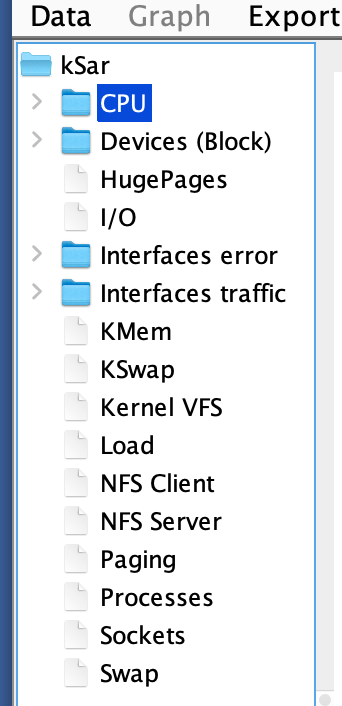
Full list of items that can be seen graphycally are the following:

Now I will show all necessary information that is necessary to use this tool:

1. Download a pre-built jar from GitHub releases page.

2. Run jar on your computer:

   java -jar ksar-5.2.4-b396_gf0680721-SNAPSHOT-all.jar

3. Click Data -> Load from a file…and choose output of sar in a text file

Full information about this tool: https://github.com/vlsi/ksar

Create database using DBCA in VNC

In this tutorial, we will configure VNC and create a database using DBCA.

Source: https://support.flashgrid.io/hc/en-us…

Gmail blocks emails from Postfix client on Linux

Problem:

I want to send email notification to my Gmail account from Linux server using Postfix client. Mails are not received and /var/log/maillog is full of the following error messages:

Aug 18 17:24:29 rac1 postfix/smtp[17580]: connect to gmail-smtp-in.l.google.com[74.125.69.27]:25: Connection timed out
Aug 18 17:24:29 rac1 postfix/smtp[17580]: connect to gmail-smtp-in.l.google.com[2607:f8b0:4001:c0d::1a]:25: Network is unreachable
Aug 18 17:24:59 rac1 postfix/smtp[17580]: connect to alt1.gmail-smtp-in.l.google.com[173.194.77.27]:25: Connection timed out
Aug 18 17:25:29 rac1 postfix/smtp[17580]: connect to alt2.gmail-smtp-in.l.google.com[173.194.219.27]:25: Connection timed out

Solution:

Configure Postfix and Gmail account accordingly.

1. Confirm that the myhostname parameter is configured with your server’s FQDN:

# grep ^myhostname /etc/postfix/main.cf
myhostname = rac1.example.com

2. Generate an App Password for Postfix:

Click on App passwords -> Select app dropdown -> choose Other (custom name) -> Enter “Postfix” -> click GENERATE.

Postfix app password is generated in yellow box, copy and save it (generated_password_goes_here will be changed by this value).

3. Fill SMTP Host, username, and password in /etc/postfix/sasl_passwd

# cat /etc/postfix/sasl_passwd
smtp.gmail.com your_username@gmail.com:generated_password_goes_here

4. Create the hash db file

# postmap /etc/postfix/sasl_passwd

5. Configure the Postfix Relay Server:

# grep ^relayhost /etc/postfix/main.cf
relayhost = [smtp.gmail.com]:587

6.  To enable authentication, add the following parameters in /etc/postfix/main.cf

smtp_sasl_auth_enable = yes
smtpd_tls_auth_only = yes
smtp_sasl_password_maps = hash:/etc/postfix/sasl_passwd
smtp_sasl_security_options = noanonymous
smtp_tls_security_level = encrypt

7. Reload Postfix service:

# systemctl reload postfix

8. For sending test email, I use Flashgrid tool:

[root@rac1 ~]# flashgrid-node test-alerts
FlashGrid 21.2.24.58935 #bb6005e9d66650d1996184c38d2fb8a2a78420a8
License: Active, Marketplace
Licensee: Flashgrid Inc.
Support plan: 24x7
~~~~~~~~~~~~~~~~~~~~~~~~~~~~~~~~~~~~~~~~~~~~~~~~~~~~~~~~~~~~~~~~~~~~~~~~~~~~~~~~
Test alerts were sent

The alert is received now:

Flashgrid CHM and Basic Troubleshooting Part 3

In this tutorial, we are gracefully stopping one node in 2-node cluster using flashgrid-node stop command.

The command is useful when you are doing maintenance tasks on one node, e.g upgrading OS, upgrading kernel.

ora.evmd and ora.mdnsd fails to start when http_proxy is set to https://

Problem:

After setting http_proxy to https string (export http_proxy=https://test) and then stopping and starting CRS got the following error:

CRS-2883: Resource 'ora.evmd' failed during Clusterware stack start.
CRS-4406: Oracle High Availability Services synchronous start failed.
CRS-41053: checking Oracle Grid Infrastructure for file permission issues
PRVG-2031 : Owner of file "/u01/app/19.3.0/grid/bin/CommonSetup.pm" did not match the expected value on node "rac1". [Expected = "root(0)" ; Found = "grid(3002)"]
....
PRVG-2031 : Owner of file "/u01/app/19.3.0/grid/lib/libnl19.a" did not match the expected value on node "rac1". [Expected = "root(0)" ; Found = "grid(3002)"]
CRS-4000: Command Start failed, or completed with errors.

Even after unsetting http_proxy and trying to stop CRS got the following:

[root@rac1 ~]# crsctl start crs -wait
CRS-4640: Oracle High Availability Services is already active
CRS-4000: Command Start failed, or completed with errors.

[root@rac1 ~]# crsctl stop crs -f
CRS-2791: Starting shutdown of Oracle High Availability Services-managed resources on 'rac1'
CRS-2679: Attempting to clean 'ora.mdnsd' on 'rac1'
CRS-2679: Attempting to clean 'ora.gpnpd' on 'rac1'
CRS-2679: Attempting to clean 'ora.evmd' on 'rac1'
CRS-2673: Attempting to stop 'ora.drivers.acfs' on 'rac1'
CRS-2677: Stop of 'ora.drivers.acfs' on 'rac1' succeeded
CRS-2680: Clean of 'ora.evmd' on 'rac1' failed
CRS-2680: Clean of 'ora.gpnpd' on 'rac1' failed
CRS-2680: Clean of 'ora.mdnsd' on 'rac1' failed
CRS-2799: Failed to shut down resource 'ora.evmd' on 'rac1'
CRS-2799: Failed to shut down resource 'ora.gpnpd' on 'rac1'
CRS-2799: Failed to shut down resource 'ora.mdnsd' on 'rac1'
CRS-2795: Shutdown of Oracle High Availability Services-managed resources on 'rac1' has failed
CRS-4687: Shutdown command has completed with errors.
CRS-4000: Command Stop failed, or completed with errors

So https entry in http_proxy variable caused my CRS even not being able to stop.

Solution:

The solution is simple, find processes that were started during previous attempt and kill them (be careful, not to kill anything that is not started from GI home):

[root@rac1 ~]# ps -ef|grep d.bin
root      1817     1  0 05:12 ?        00:00:01 /opt/flashgrid/bin/flashgrid_aio_srv
root      1821     1  0 05:12 ?        00:00:06 /opt/flashgrid/bin/flashgrid_target_srv
root      1824     1  0 05:12 ?        00:00:13 /opt/flashgrid/bin/flashgrid_initiator_srv
grid      1832     1  0 05:12 ?        00:00:04 /opt/flashgrid/bin/flashgrid_asm_srv
root      1845     1  0 05:12 ?        00:00:06 /opt/flashgrid/bin/flashgrid_cluster_srv
root      1879     1  0 05:12 ?        00:00:02 /opt/flashgrid/bin/flashgrid_iamback
root      1881     1  0 05:12 ?        00:00:00 /opt/flashgrid/bin/flashgrid_diskwatch
root      1884     1  0 05:12 ?        00:00:00 /opt/flashgrid/bin/flashgrid_reconstruct
root     10228 13775  0 05:43 pts/0    00:00:00 grep --color=auto d.bin
root     20305     1  2 05:16 ?        00:00:33 /u01/app/19.3.0/grid/bin/ohasd.bin reboot _ORA_BLOCKING_STACK_LOCALE=AMERICAN_AMERICA.US7ASCII
root     20631     1  0 05:16 ?        00:00:05 /u01/app/19.3.0/grid/bin/orarootagent.bin

[root@rac1 ~]# kill -9 20305 20631

[root@rac1 ~]# ps -ef|grep d.bin
root      1817     1  0 05:12 ?        00:00:01 /opt/flashgrid/bin/flashgrid_aio_srv
root      1821     1  0 05:12 ?        00:00:06 /opt/flashgrid/bin/flashgrid_target_srv
root      1824     1  0 05:12 ?        00:00:13 /opt/flashgrid/bin/flashgrid_initiator_srv
grid      1832     1  0 05:12 ?        00:00:04 /opt/flashgrid/bin/flashgrid_asm_srv
root      1845     1  0 05:12 ?        00:00:06 /opt/flashgrid/bin/flashgrid_cluster_srv
root      1879     1  0 05:12 ?        00:00:02 /opt/flashgrid/bin/flashgrid_iamback
root      1881     1  0 05:12 ?        00:00:00 /opt/flashgrid/bin/flashgrid_diskwatch
root      1884     1  0 05:12 ?        00:00:00 /opt/flashgrid/bin/flashgrid_reconstruct
root     10296 13775  0 05:43 pts/0    00:00:00 grep --color=auto d.bin

Make sure http_proxy is not set or instead of https there is http as a value:

[root@rac1 ~]# unset http_proxy

[root@rac1 ~]# echo $http_proxy

Or

[root@rac1 ~]# export http_proxy=http://test

Try to start CRS now:

[root@rac1 ~]# crsctl start crs -wait
CRS-4123: Starting Oracle High Availability Services-managed resources
CRS-2672: Attempting to start 'ora.evmd' on 'rac1'
CRS-2672: Attempting to start 'ora.mdnsd' on 'rac1'
CRS-2676: Start of 'ora.mdnsd' on 'rac1' succeeded
CRS-2676: Start of 'ora.evmd' on 'rac1' succeeded
CRS-2672: Attempting to start 'ora.gpnpd' on 'rac1'
CRS-2676: Start of 'ora.gpnpd' on 'rac1' succeeded
CRS-2672: Attempting to start 'ora.gipcd' on 'rac1'
CRS-2676: Start of 'ora.gipcd' on 'rac1' succeeded
CRS-2672: Attempting to start 'ora.crf' on 'rac1'
CRS-2672: Attempting to start 'ora.cssdmonitor' on 'rac1'
CRS-2676: Start of 'ora.cssdmonitor' on 'rac1' succeeded
CRS-2672: Attempting to start 'ora.cssd' on 'rac1'
CRS-2672: Attempting to start 'ora.diskmon' on 'rac1'
CRS-2676: Start of 'ora.diskmon' on 'rac1' succeeded
CRS-2676: Start of 'ora.crf' on 'rac1' succeeded
CRS-2676: Start of 'ora.cssd' on 'rac1' succeeded
CRS-2672: Attempting to start 'ora.cluster_interconnect.haip' on 'rac1'
CRS-2672: Attempting to start 'ora.ctssd' on 'rac1'
CRS-2676: Start of 'ora.ctssd' on 'rac1' succeeded
CRS-2676: Start of 'ora.cluster_interconnect.haip' on 'rac1' succeeded
CRS-2672: Attempting to start 'ora.asm' on 'rac1'
CRS-2676: Start of 'ora.asm' on 'rac1' succeeded
CRS-2672: Attempting to start 'ora.storage' on 'rac1'
CRS-2676: Start of 'ora.storage' on 'rac1' succeeded
CRS-2672: Attempting to start 'ora.crsd' on 'rac1'
CRS-2676: Start of 'ora.crsd' on 'rac1' succeeded
CRS-6017: Processing resource auto-start for servers: rac1
CRS-2673: Attempting to stop 'ora.LISTENER_SCAN1.lsnr' on 'rac2'
CRS-2672: Attempting to start 'ora.chad' on 'rac1'
CRS-2672: Attempting to start 'ora.ons' on 'rac1'
CRS-2677: Stop of 'ora.LISTENER_SCAN1.lsnr' on 'rac2' succeeded
CRS-2673: Attempting to stop 'ora.scan1.vip' on 'rac2'
CRS-2677: Stop of 'ora.scan1.vip' on 'rac2' succeeded
CRS-2672: Attempting to start 'ora.scan1.vip' on 'rac1'
CRS-2676: Start of 'ora.chad' on 'rac1' succeeded
CRS-2676: Start of 'ora.scan1.vip' on 'rac1' succeeded
CRS-2672: Attempting to start 'ora.LISTENER_SCAN1.lsnr' on 'rac1'
CRS-2676: Start of 'ora.LISTENER_SCAN1.lsnr' on 'rac1' succeeded
CRS-2676: Start of 'ora.ons' on 'rac1' succeeded
CRS-6016: Resource auto-start has completed for server rac1
CRS-6024: Completed start of Oracle Cluster Ready Services-managed resources
CRS-4123: Oracle High Availability Services has been started.

DPI-1030: unable to get or set error structure for thread local storage

Problem:

flashgrid-cluster command was showing that diskgroups were not mounted, while diskgroup were successfully mounted on all nodes:

Reason:

GI was upgraded and Flashgrid was not able to reconnect ASM.

Solution:

Restart flashgrid_asm service, please note that it does not cause any downtime and is safe to run during business hours:

 # systemctl restart flashgrid_asm.service

Linux STRESS command usage example

Problem:

During high CPU usage in kernel space we have noticed brownouts on our database nodes. For finding the reason of the problem we wanted to reproduce the issue and somehow trigger high %sy usage on our nodes.

I have found stress tool very useful and want to share my experience with you.

Solution:

1. Install stress tool via yum:

# yum install stress

2. Stress has several options to use:

[root@rac1 ~]# stress

`stress' imposes certain types of compute stress on your system

Usage: stress [OPTION [ARG]] ...
 -?, --help         show this help statement
     --version      show version statement
 -v, --verbose      be verbose
 -q, --quiet        be quiet
 -n, --dry-run      show what would have been done
 -t, --timeout N    timeout after N seconds
     --backoff N    wait factor of N microseconds before work starts
 -c, --cpu N        spawn N workers spinning on sqrt()
 -i, --io N         spawn N workers spinning on sync()
 -m, --vm N         spawn N workers spinning on malloc()/free()
     --vm-bytes B   malloc B bytes per vm worker (default is 256MB)
     --vm-stride B  touch a byte every B bytes (default is 4096)
     --vm-hang N    sleep N secs before free (default none, 0 is inf)
     --vm-keep      redirty memory instead of freeing and reallocating
 -d, --hdd N        spawn N workers spinning on write()/unlink()
     --hdd-bytes B  write B bytes per hdd worker (default is 1GB)

Example: stress --cpu 8 --io 4 --vm 2 --vm-bytes 128M --timeout 10s

Note: Numbers may be suffixed with s,m,h,d,y (time) or B,K,M,G (size).

To cause high %sy you need to use –vm option and find appropriate number of workers, in my case 50 workers were enough to cause an issue.

In the following example, stress will run 50 workers and timeout for the run will be 200s:

# stress --vm 50 --timeout 200s

From another terminal tab, run top command to monitor %sy usage (81.2%) :

See short video demonstration below:

Flashgrid CHM and Basic Troubleshooting Part 2

Flashgrid CHM and Basic Troubleshooting Part 1