Dbink hangs; enq: DX – contention

When I was monitoring v$session view, I’ve noticed the following event “enq: DX – contention”.

I want to share the information, which I’ve collected about this problem and also provide you by my solution.

This problem happens, when a query includes the references for remote objects via database link as well as its local function, that doesn’t exist at remote site.

Look at the following query:

select *
from  employees@db_link
where local_package.local_function(var1)=1


In this example, data is queried from employees table via “db_link” database link and there is also used the function “local_function”. That is causing “enq: DX – contention” event.

This case can make blocking lock on remote database.

As many administrators are saying this is an Oracle bug.

My solution is very simple and might be very helpful for many administrators:

I recommend you to make the following changes into your application, with the help of developers.

Try to migrate all remote objects that are used in this SQL into local database , if it is time and resource consuming then try the inverse-> migrate Local functions that are used in this SQL from local database to remote database.

So my solutions for the example shown above would be the followings:

1. Migrate local_package.local_function to remote database

or

2.Migrate employees table to local database.

I prefer the first, if the local function do not use other local functions.

I hope, it was helpful for many DBAs.

Install Oracle ODBC on Solaris(Unix)_Connect Oracle_to_SQL_Server

I’ve searched a lot of software for to connect Oracle and SQL Server databases. There are a lot of software, but I couldn’t use any of them except DataDirect ODBC. Unfortunately, this soft is not free. I couldn’t find any free software that works on unix.

Let’s start installation.

1. Download DataDirect ODBC driver from here.

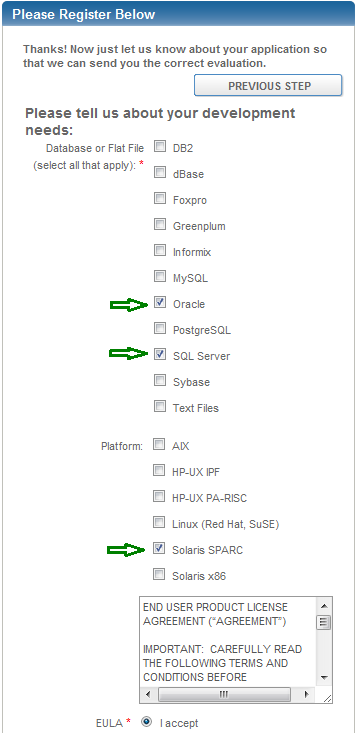
Choose your appropriate system(64-bit UNIX/Linux, 32-bit UNIX/Linux,…). After you choose it, there will appear Registration region. Fill it with your information and when you see the following section, do as it is shown on the picture:
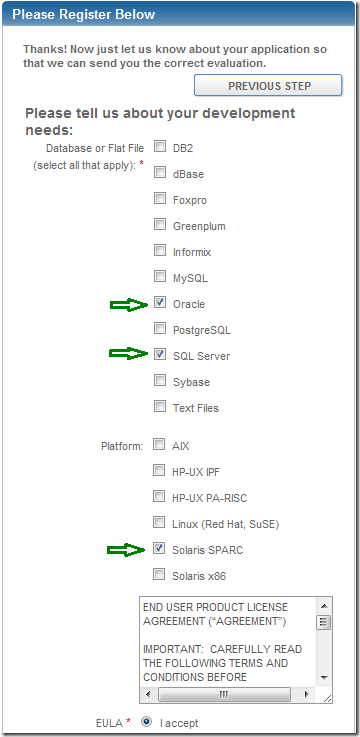
DataDirect Registration Region

I chose Oracle, SQL Server and Solaris SPARC…Because I am trying to connect Oracle Database to SQL Server Database, note Oracle Database is installed on Solaris SPARC.

2.  Extract Downloaded file:

# gunzip PROGRESS_DATADIRECT_CONNECT_ODBC_6.1.1_SOL_32.tar.Z

# tar -xvf PROGRESS_DATADIRECT_CONNECT_ODBC_6.1.1_SOL_32.tar

3. Go to the extracted file and run the following:

# ./unixmi.ksh
Installation……………………………………………………………………………

Solaris
Is this the current operating system on your machine (Y/N) ? [Y] PRESS ENTER

READ THE LICENSE TERMS(PRESS ENTER to read whole content)

…

EULA - Connect Products (revised 2/21/11)

Enter YES to accept the above agreement : YES

…

In the Key field, enter either EVAL or the Key provided.

Fill it with your registration information. I am writing EVAL because I just want to try it.

Name          :Mariam
Company       :JSC Bank of Georgia
Serial Number :EVAL
Key           :EVAL

…

1.   Drivers for All Supported Databases
2.   Single Driver
Please enter an option [1]: 2

1.   DB2 Wire Protocol
2.   dBASE
3.   Greenplum Wire Protocol
4.   Informix Wire Protocol
5.   MySQL Wire Protocol
6.   Oracle Wire Protocol
7.   PostgreSQL Wire Protocol
8.   SQL Server Wire Protocol
9.   Sybase Wire Protocol
10.  Teradata
11.  Text
12.  Informix (client)
13.  Oracle (client)
14.  SQL Server Legacy Wire Protocol

Please enter driver option: 8

To change this information, enter C. Otherwise, press Enter to continue. : PRESS ENTER
Enter the full path to the temporary install directory.[/tmp]:PRESS ENTER
Enter the full path to the install directory.[/opt/Progress/DataDirect/Connect_for_ODBC_61]: PRESS ENTER
Would you like to install another product (Y/N) ? [Y] N

…

Installation ended successfully.

3. Configure odbc.ini file, located in /opt/Progress/DataDirect/Connect_for_ODBC_61.

There will be written some information when you open this file, but the following entries are enough:

[MS_SQLServer2005]
Driver=/opt/Progress/DataDirect/Connect_for_ODBC_61/lib/ivsqls25.so
Description=SQL Server ODBC driver
Database=DB_NAME
Address=10.0.0.88,1433
Quoteld=No

Note I have changed the following values:

MS_SQLServer2000 – is your desired name, name it as you wish.(Will be used later)
Description – Just a descriptive text, write what you wish.
Database – Name of the SQL Server Database.
Address – Ip address of the server on which SQL Server Database is installed. 1433 is a default port for SQL Server.  Ensure that this port is opened on  firewall(Or you will not  be able to connect SQL Server)

4. Tnsnames.ora

DB_NAME_ALIAS=  
   (DESCRIPTION=
     (ADDRESS=(PROTOCOL=tcp)(HOST=10.0.0.11)(PORT=1522))
     (CONNECT_DATA=(sid=DB_NAME))
     (HS=OK)
  )

Where,

DB_NAME_ALIAS – is your desired name.
DB_NAME – Is SQL Server Database name
1522 – Is any free port, If you have multiple listeners on the server(where Oracle is installed) choose any port that is available.
10.0.0.11 – Ip of the server, where Oracle is installed

5. listener.ora

LISTENER_DB_NAME_ALIAS = 
  (DESCRIPTION_LIST=
     (DESCRIPTION =
       (ADDRESS_LIST =
        (ADDRESS = (PROTOCOL = tcp)(HOST = 10.0.0.11)(PORT = 1522))
       )
     ) 
  ) 

SID_LIST_LISTENER_DB_NAME_ALIAS=
   (SID_LIST=
     (SID_DESC=
     (SID_NAME=DB_NAME_ALIAS)
     (ORACLE_HOME=/u0/app/oracle/10.2.0/db)
     (PROGRAM= hsodbc)
     (ENVS="LD_LIBRARY_PATH=/opt/Progress/DataDirect/Connect_for_ODBC_61/lib:/u0/app/oracle/10.2.0/db/bin")
    )
)

Underlined entry is very important, or you will get  ORA-28500 error.

6.  Go to  the following directory: $ORACLE_HOME/hs/admin

There will be the file called inithsodbc.ora, copy that file and rename it like this: initDB_NAME_ALIAS.ora

# This is a sample agent init file that contains the HS parameters that are
# needed for an ODBC Agent.

#
# HS init parameters
#
HS_FDS_CONNECT_INFO = MS_SQLServer2005
HS_FDS_TRACE_LEVEL = 0
HS_FDS_TRACE_FILE_NAME = hsMSSqlMari.trc
HS_FDS_SHAREABLE_NAME=/opt/Progress/DataDirect/Connect_for_ODBC_61/lib/libodbc.so
set ODBCINI=/opt/Progress/DataDirect/Connect_for_ODBC_61/odbc.ini
#
# Environment variables required for the non-Oracle system
#

7.  Start the listener.

Before starting listener, ensure that ODBC lib directory is specified in the shared library environment variable:

LD_LIBRARY_PATH=/opt/Progress/DataDirect/Connect_for_ODBC_61/lib:/u0/app/oracle/10.2.0/db/bin

After that we can start listener:

$ lsnrctl start LISTENER_DB_NAME_ALIAS

8. Create database link:

SQL> create database link LINK_NAME     
     connect to “username”     
     identified by “password”     
     using ‘DB_NAME_ALIAS’;

Where,

username– is the user in SQL Server Database.
password – is its password

Do not forget to use quotas(“”).

9. Check if it works

SQL> select * from dual@LINK_NAME;

D
---
X

That’s it Smile

Install Oracle 10g on Open Suse 11.4

1. Download Oracle Databse 10g software from oracle site, from here.

2. Make sure that you have the following packages installed:

# rpm -q gcc gcc-c++ glibc libaio libaio-devel make openmotif openmotif-libs

My output:

gcc-4.5-19.1.i586
gcc-c++-4.5-19.1.i586
glibc-2.11.3-12.15.1.i686
libaio-0.3.107-7.1.i586
libaio-devel-0.3.107-7.1.i586
make-3.82-140.1.i586
openmotif-2.3.2-5.1.i586
openmotif-libs-2.3.2-5.1.i586

If any of them is not installed  run the following command for each of the uninstalled package. For example:
# zypper install gcc
And install the following package:
# zypper install libstdc++33
3.Create necessary groups, user and change the password for the newly created user:
# groupadd oinstall
# groupadd dba
# useradd -g oinstall -G dba oracle
# passwd oracle
4. If the oracle user’s home directory doesn’t exist, create it:
# mkdir /home/oracle
# chown -R oracle:dba /home/oracle
5. Let’s create the directory, where Oracle software should be installed:
# mkdir -p /u01/app/oracle/product/10.2.0/db_1
# chown -R oracle:oinstall /u01
6. Setting ORACLE_BASE, ORACLE_HOME environement variables:
# vi /etc/profile.d/oracle.sh
——————————————And add the following entries
ORACLE_BASE=/u01/app/oracle
ORACLE_HOME=/u01/app/oracle/product/10.2.0/db_1
And also:
# vi /etc/sysconfig/oracle
——————————————And add the following entries
ORACLE_BASE=/u01/app/oracle
ORACLE_HOME=/u01/app/oracle/product/10.2.0/db_1
Note that the default value for ORACLE_BASE is /opt/oracle
7. Connect as an oracle user and unzip downloaded file:
# su – oracle
oracle@mariamsuse:~> unzip 10201_database_linux32.zip
If you have already unzipped this file by another user just change the permissions, like:
# chown oracle:oinstall 10201_database_linux32.zip
and then extract.
8. Edit the file database/install/oraparam.ini 
[Certified Versions]
Linux=redhat-3,SuSE-9,redhat-4,UnitedLinux-1.0,asianux-1,asianux-2,SuSE-11


Note: At the end I have added SuSE-11

9. Go to the folder ……database/ and run:
# su – oracle
Password: 
           
oracle@mariamsuse:~> ./runInstaller
If something doesn’t work… exit from the existing terminal(command line) and reconnect.
Oracle Universal Installer should be started…
“During installation, there are 1 warning and 4 Waiting for verification. Just check all of them and proceed to installation.”

Oracle Latch Library Cache Troubleshooting

What are latches?

Latches are serialization mechanisms that protect areas of Oracle’s shared memory(the SGA). In simple terms latches prevent two processes from simultaneously  updating-and possible corrupting-the same area of the SGA.

The total number of latches in the system is defined by _kgl_latch_count parameter.(The maximum value of this parameter is 66). It cannot be seen in v$parameter. To change its value you should add it in init.ora file.

The major cause of library cache latch contention is the failure to use bind variables.

Note: The only changes that you can do at Oracle database level is to increase total number of latches(_kgl_latch_count parameter). Your aim is to find problematic SQLs that may have failure in using bind variables, or are badly written(junk) SQLs…

For to find possible problematic SQL statements we can do the following:

select p1text,p1raw
from v$session_wait
where EVENT='latch: library cache'


where value of p1text must be “address”.

Now let’s get the latch address:

select CHILD#
from v$latch_children
where ADDR=p1raw
 
and then query the following:
 
select *
from v$sqlarea
where CHILD_LATCH=child#
order by EXECUTIONS desc


Top of the result will be all SQL statements that have high execution number, accordingly they tend to be problematic statements, which should be optimized.

The following statements will help you to distinguish problematic and non-problematic SQLs.

These are several ways for to find them:

1. SQLs with high executions

select *
from v$db_object_cache
where CHILD_LATCH=child#
order by EXECUTIONS


2. SQLs with high lock counts

select *
from v$db_object_cache
where CHILD_LATCH=child#
order by lock


3. SQLs with high pin counts

select *
from v$db_object_cache
where CHILD_LATCH=child#
order by pins

Function-based index

There are several types of indices: B-tree, Bitmap, Function-based, IOT.

I will discuss what function-based index is and in what cases is it used.

Let’s start by creating a demo example.

–Create a test table

create table tesTable(
col1 number,
col2 VARCHAR2(50)
);

–Insert some values

insert into testable
values(1,‘Giorgi’);

commit;

insert into testable
values(2,‘Mariami’);

commit;

–Gather table statistics

begin
dbms_stats.gather_table_stats(null,‘TESTABLE’);
end;

–Check if the statistics is OK

select column_name,num_distinct,hidden_column
from dba_tab_cols
where table_name=‘TESTABLE’;

–Output

COLUMN_NAME NUM_DISTINCT HIDDEN_COLUMN
COL1 2 NO
COL2 2 NO


Let’s see the explain plan for the following sql statement:

explain plan for select *
from testable
where UPPER(col2)=‘MARIAMI’;

select * from table(dbms_xplan.display);

——————————————————————————
| Id  | Operation   | Name     | Rows  | Bytes | Cost (%CPU)| Time     |
——————————————————————————
|   0 | SELECT STATEMENT  |          |     1 |    40 |     2   (0)| 00:00:01 |
|*  1 |  TABLE ACCESS FULL| TESTABLE |     1 |    40 |     2   (0)| 00:00:01 |
——————————————————————————

If we have a big amount of data in this table, for example 1000000 rows what will happen?

Oracle will convert each row value into UPPER case and then compare it to our string. And this will happen 1000000  times Surprised smile

To make faster our query, there exists function-based index.

–Create function-based index

create index testable_func_indx on testable(upper(col2));

–Gather table statistics

begin
dbms_stats.gather_table_stats
(null,‘TESTABLE’);
end;

–Check if the statistics is OK

select column_name,num_distinct,hidden_column
from dba_tab_cols
where table_name=‘TESTABLE’;

–Output

COLUMN_NAME NUM_DISTINCT HIDDEN_COLUMN
COL1 2 NO
COL2 2 NO
SYS_NC00003$ 2 YES


As you can see there appeared hidden column by system generated name. Oracle behind the scenes creates a hidden virtual column on the parent table in order to capture the data characteristics of the function so that the CBO can make an accurate determination of the selectivity associated with using the function.

–See explain plan

explain plan for select *
from testable
where upper(col2)=‘MARIAMI’;

select * from table(dbms_xplan.display);

————————————————————————————————–
| Id  | Operation                   | Name               | Rows  | Bytes | Cost (%CPU)| Time     |
————————————————————————————————–
|   0 | SELECT STATEMENT            |                    |     1 |    40 |     1   (0)| 00:00:01 |
|   1 |  TABLE ACCESS BY INDEX ROWID| TESTABLE   |     1 |    40 |     1   (0)| 00:00:01 |
|*  2 |   INDEX RANGE SCAN | TESTABLE_FUNC_INDX |     1 |       |     1   (0)| 00:00:01 |
————————————————————————————————–

You see there is INDEX RANGE SCAN. It will be faster then FULL TABLE SCAN if there is a big amount of data.

If we want to use user-defined function instead of Oracle built-in function, such as UPPER, we should do the following:

create or replace function my_fun(x varchar2) RETURN VARCHAR2
deterministic
is
begin
return upper
(x);
end;

You must indicate that the function is deterministic,which means that for same input values the output will be the same. So you must not use random function or something like that .

explain plan for select *
from testable
where upper(col2)=‘MARIAMI’;

select * from table(dbms_xplan.display);

————————————————————————————————–
| Id  | Operation                   | Name               | Rows  | Bytes | Cost (%CPU)| Time     |
————————————————————————————————–
|   0 | SELECT STATEMENT            |                    |     1 |    40 |     1   (0)| 00:00:01 |
|   1 |  TABLE ACCESS BY INDEX ROWID| TESTABLE   |     1 |    40 |     1   (0)| 00:00:01 |
|*  2 |   INDEX RANGE SCAN | TESTABLE_FUNC_INDX |     1 |       |     1   (0)| 00:00:01 |
————————————————————————————————–

Insert multiple rows with a single INSERT statement

If you want to insert multiple rows in one table with a single INSERT statement do the following:

INSERT ALL INTO testTable(col1,col2,col3) VALUES(1,2,3)
           INTO testTable(col1,col2,col3) VALUES(4,5,6)
           INTO testTable(col1,col2,col3) VALUES(7,8,9)
           INTO testTable(col1,col2,col3) VALUES(10,11,12)
SELECT * FROM DUAL;
COMMIT;

If you want to insert multiple rows in multiple tables with a single insert statement do the following:

INSERT ALL INTO testTable_1(col1,col2,col3) VALUES(1,2,3)
           INTO testTable_2(col1,col2,col3) VALUES(4,5,6)
           INTO testTable_3(col1,col2,col3) VALUES(7,8,9)
           INTO testTable_4(col1,col2,col3) VALUES(10,11,12)
SELECT * FROM DUAL;
COMMIT;

You also are able to use when to insert specific values into tables, so adding some condition:

INSERT FIRST
   WHEN a < 50 THEN
       INTO testTable_1 VALUES(a,b,c)
   WHEN a > 50 AND a < 500 THEN
       INTO testTable_2 VALUES(a,b,c)   
   WHEN a > 500 AND a < 1000 THEN
       INTO testTable_3 VALUES(a,b,c)
   WHEN a > 1000  THEN
       INTO testTable_4 VALUES(a, b, c)
SELECT col1 AS a, col2 AS b, col3 AS c
FROM testTable_5
COMMIT;

FIRST means that if one of the condition is satisfied Oracle will stop checking other conditions. For example, if after selecting first row from the table  testTable_5 the condition
a > 50 AND a < 500 is satisfied, Oracle will insert just into testTable_2 and go again to the SELECT statement for selecting another row, till the end of table.

INSERT statement has another option ALL which will check each WHEN clause doesn’t matter if any condition is already satisfied or not.

Create Database Link in Another Schema

Creating database link has several restrictions. One of them is that you can’t create DB link in another schema, for example the following script is not correct:

create database link hr.remote_db_link
connect to k identified by k
using 'test'


If you run this then database link will be created with the name “hr.remote_db_link”  in your schema not in HR schema.

To solve this, there can be done the following:

–Create procedure from our user in HR which will execute database creation script

 create procedure hr."db_create_link_proc"
 is
 begin
      execute immediate  'create database link remote_db_link
                          connect to k identified by k
                          using ''test'' ';
 end;

–Execute that procedure from our schema

 begin
      hr."db_create_link_proc";
 end;

–Then you can drop this procedure from our schema

drop procedure hr."db_create_link_proc"

That is all.

Block Media Recovery

You can use Block Media Recovery to recover just corrupted blocks not entire datafile. It has several advantages:

1. It decreases Mean Time To Recover(MTTR). As I mentioned above, you need to recover just corrupted blocks and not all the blocks in datafile.

2. Affected datafile stays online. If you do not use Block Media Recovery you must take datafile offline, which means that affected datafile will be unavailable. During BMR just corrupted blocks are not available.

When you are recovering blocks you must know exact address of the block. Each block is recovered individually.

Also database must be in ARCHIVELOG mode and backup of the database must exist.

I have a table called TEST which is saved in TSTTBS tablespace. I have backuped database, then I’ve opened TSTTBS.DBF datafile by UltraEdit and spoiled block which
belongs to the TEST table. You do not need this steps Smile . I did it for to simulate block corruption.

SQL> select * from a;
select * from a
*
ERROR at line 1:
ORA-01578:ORACLE data block corrupted (file # 5, block # 11)
ORA-01110:data file 5:'C:\ORACLE\PRODUCT\10.2.0\ORADATA\TEST\TSTTBS.DBF'

Error shows that block number 12 is corrupted in datafile 5.

Connect target database by RMAN, and run the following:

RMAN> blockrecover datafile 5 block 11;

It should not take time like 00:00:00 or output shouldn’t be something unusual for example for the firs time I had the following output:

Starting blockrecover at 29-MAR-11
using channel ORA_DISK_1

starting media recovery
media recovery complete, elapsed time: 00:00:00

Finished blockrecover at 29-MAR-11

It was because I have had taken a bad backup. It may also happen when RMAN couldn’t find backup files or you have indicated wrong datafile number or block number.

The followings are restrictions and usage notes of BLOCKRECOVER:

  1. The target database must be mounted or open. You do not have to take a datafile offline if you are performing block media recovery on it.
  2. You can only perform complete media recovery of individual blocks. Point-in-time recovery of individual data blocks is not supported.
  3. You can only perform block media recovery on corrupt blocks.
  4. Blocks marked media corrupt are not accessible until recovery completes.
  5. You cannot perform block media recovery when using a backup control file.
  6. You cannot use proxy backups to perform block media recovery. If the only backups that you have are proxy backups, then you can restore them to a nondefault location on disk, which causes RMAN to view the restored files as datafile copies. You can then use the datafile copies for block media recovery.
  7. You must have a full backup of the file containing the corrupt blocks: block media recovery cannot use incremental backups.
  8. If RMAN fails to access a specific archived redo log file needed for block media recovery, it performs restore failover, trying all other backups listed in the RMAN repository that are suitable for use in this operation, and only fails if no suitable backup is available. See
  9. The datafile header block (block 1) cannot be recovered.
  10. You cannot perform block media recovery in NOARCHIVELOG mode.

Let’s check if corrupted block is recovered.

SQL> select * from a;
select * from a
*
ERROR at line 1:
ORA-01578: ORACLE data block corrupted (file # 5, block # 12)
ORA-01110:data file 5:'C:\ORACLE\PRODUCT\10.2.0\ORADATA\TEST\TSTTBS.DBF'

In our example after recovering block  #11 Oracle raised another error indicating that #12 block is corrupted(When multiple blocks are corrupted error is raised one by one). Let’s repeat above steps:

RMAN> blockrecover datafile 5 block 12;
SQL> select * from a;

VC
------------------
Testing Corruption

Configuring Flashback Database

Connect to your database as sysdba.

1.  Ensure that your database is in ARCHIVELOG mode.

SQL> select log_mode from v$database;

LOG_MODE
————————
NOARCHIVELOG

1.1 My database is not in ARCHIVELOG mode let’s enable it.

SQL> shutdown immediate;

SQL> startup mount;

SQL> alter database archivelog;

SQL> alter database open;

SQL> select log_mode from v$database;

LOG_MODE
——————-
ARCHIVELOG

2. Setting up flash recovery area.

SQL> show parameter db_recovery_file_dest;

NAME                                        TYPE             VALUE
————————————   ———–     ————-
db_recovery_file_dest           string
db_recovery_file_dest_size  big integer 0

First of all, db_recovery_file_dest_size parameter must be set.

SQL> alter system set db_recovery_file_dest_size=2G;

Then db_recovery_file_dest parameter.

SQL> alter system set db_recovery_file_dest=’D:\TEST\FLASHRECOVERY’;

3. Setting up retention period.

Because of flash recovery area is used in circular fashion, after some period of time(indicates db_flashback_retention_target,default is 1day) old data is overwritten. This parameter instructs Oracle to save flashback files for a certain minutes before overwriting.

SQL> alter system set db_flashback_retention_target=720;

In our case flashback data will be retained for 12 hours before overwriting.

4. Enable flashback logging.

SQL> shutdown immediate;

SQL> startup mount;

SQL> alter database flashback on;

At this time RVWR process will be started and flashback buffer will be allocated in SGA.

SQL> alter database open;

5. Check if flashbacking is enabled.

SQL> select flashback_on from v$database;

FLASHBACK_ON
———————–
YES

SQL Profile has higher priority than Hint!

Hints on SQL statement do not work???
You may have a syntax error, double check it. But if the syntax is OK, then this problem may be caused by the SQL profile, which doesn’t let hints to work.

Here, in this post I will explain the situation when there is applied SQL profile for some SQL statement and any attempt to use hints on that statement fails.

To solve this problem you should drop that SQL profile or disable it.

Note: This behavior has advantage. It assures that the SQL plan of the SQL statement will not be changed for future runs.

Let’s start…

–Create test table

create table test (n1 number
, n2 number );

–Insert some values

begin
for i in 1 .. 100000
loop
insert into test values(i,i+1);
commit;
end loop;
end;

–Create index

create index test_idx1 on test(n1);

–Analyze table

analyze table test estimate statistics;

–Run the following SQL statement

select /*+ no_index(test test_idx1) */ *
from test where n1=2;

–Calculate explain plan

explain plan for select /*+ no_index(test test_idx1) */ *
from test where n1=2;

select * from table(dbms_xplan.display);

–Output

————————————————————————-
| Id  | Operation         | Name | Rows  | Bytes | Cost (%CPU)| Time     |
————————————————————————–
|   0 | SELECT STATEMENT  |      |     1 |     8 |    49   (5)| 00:00:01 |
|*  1 |  TABLE ACCESS FULL| TEST |     1 |     8 |    49   (5)| 00:00:01 |
————————————————————————–

–Create SQL tuning task

declare
my_task_name varchar2(30);
my_sqltext   clob;
begin
my_sqltext := ‘select /*+ no_index(test test_idx1) */ * from test where n1=2’;

my_task_name := dbms_sqltune.create_tuning_task(
sql_text    => my_sqltext,
scope       => ‘comprehensive’,
time_limit  => 60,
task_name   => ‘my_sql_tuning_task’);
end;

–Execute SQL tuning task

begin
dbms_sqltune.execute_tuning_task( task_name => ‘my_sql_tuning_task’);
end;

–Generate report

select dbms_sqltune.report_tuning_task( ‘my_sql_tuning_task’)
from dual;

–Output

Recommendation (estimated benefit: 95.87%)
——————————————
– Consider accepting the recommended SQL profile.
execute dbms_sqltune.accept_sql_profile(task_name =>
‘my_sql_tuning_task’, replace => TRUE);

—————————————————————————————–
| Id  | Operation                   | Name      | Rows  | Bytes | Cost (%CPU)| Time     |
—————————————————————————————–
|   0 | SELECT STATEMENT            |           |     1 |     8 |     2   (0)| 00:00:01 |
|   1 |  TABLE ACCESS BY INDEX ROWID| TEST      |     1 |     8 |     2   (0)| 00:00:01 |
|*  2 |   INDEX RANGE SCAN          | TEST_IDX1 |     1 |       |     1   (0)| 00:00:01 |
—————————————————————————————–

–Accept SQL profile

begin
dbms_sqltune.accept_sql_profile(task_name =>’my_sql_tuning_task’
,replace => true
,name => ‘my_profile_name’);
end;

–Calculate explain plan again

explain plan for select /*+ no_index(test test_idx1) */ *
from test where n1=2;

select * from table(dbms_xplan.display);

–Output

—————————————————————————————–
| Id  | Operation                   | Name      | Rows  | Bytes | Cost (%CPU)| Time     |
—————————————————————————————–
|   0 | SELECT STATEMENT            |           |     1 |     8 |     2   (0)| 00:00:01 |
|   1 |  TABLE ACCESS BY INDEX ROWID| TEST      |     1 |     8 |     2   (0)| 00:00:01 |
|*  2 |   INDEX RANGE SCAN          | TEST_IDX1 |     1 |       |     1   (0)| 00:00:01 |
—————————————————————————————–

Note: We have indicated not to use index(/*+ NO_INDEX(TEST TEST_IDX1) */ ), but as explain plan shows, Oracle still uses this index.

If we drop sql profile hint will work. Let’s check it:

begin
dbms_sqltune.drop_sql_profile(name => ‘my_profile_name’);
end;

–Calculate explain plan

explain plan for select /*+ no_index(test test_idx1) */ *
from test where n1=2;

select * from table(dbms_xplan.display);

–Output

————————————————————————–
| Id  | Operation         | Name | Rows  | Bytes | Cost (%CPU)| Time     |
————————————————————————–
|   0 | SELECT STATEMENT  |      |     1 |     8 |    49   (5)| 00:00:01 |
|*  1 |  TABLE ACCESS FULL| TEST |     1 |     8 |    49   (5)| 00:00:01 |
————————————————————————–

So SQL profile has higher priority than hints!!!<- Important