Python: Manipulation on file content located in s3 archived as tar.gz without downloading

Problem:

Need to analyze several values from multiple files that are archived as tar.gz and located on s3. This operation must be performed without downloading or extracting tar.gz

HARBOR: I am neither the Python expert nor the developer, so it is assumed that I am having mistakes in it or script could be written shorter and easier way than I did.
But it satisfies my needs. So please use it as an example only and investigate the content of it.

Hierarcy of the tar.gz file is the following (sample):

-myfile.tar.gz
—folder1.tar.gz
—–flashgrid_cluster
—–files/node_monitor_error.log
—folder2.tar.gz
—–flashgrid_cluster
—–files/node_monitor_error.log

  1. Create extracts3tar.py file with the following content and grant executable permission to that file:

    Note: Update the following entries in the file according to your environment.
AWS_ACCESS_KEY_ID = "my key goes here"    
AWS_SECRET_ACCESS_KEY = "my secret key goes here"
AWS_STORAGE_BUCKET_NAME = "my bucket name goes here"

Content of extracts3tar.py:

#!/usr/bin/python2.7
import boto3
import tarfile
import joblib
import io
import sys

class S3Loader(object):
    AWS_ACCESS_KEY_ID = "my key goes here"
    AWS_SECRET_ACCESS_KEY = "my secret key goes here"
    AWS_REGION_NAME = "us-east-1"
    AWS_STORAGE_BUCKET_NAME = "my bucket name goes here"
    def __init__(self):
        self.s3_client = boto3.client("s3",
                                     aws_access_key_id=self.AWS_ACCESS_KEY_ID,
                                     aws_secret_access_key=self.AWS_SECRET_ACCESS_KEY)

    def load_tar_file_s3_into_object_without_download(self, s3_filepath):

        # Describing variables search pattern
        match = ("Disk latency above threshold")
        notmatch = (".lun")

        s3_object = self.s3_client.get_object(Bucket=self.AWS_STORAGE_BUCKET_NAME, Key=s3_filepath)
        wholefile = s3_object['Body'].read()
        fileobj = io.BytesIO(wholefile)

        # Opening first tar.gz file
        tar = tarfile.open(fileobj=fileobj)

        # Searching nested tar.gz files
        childgz = [f.name for f in tar.getmembers() if f.name.endswith('.gz')]

        # Extracting file named flashgrid_cluster which is located in the first tar.gz
        node1gz = tarfile.open(fileobj=tar.extractfile(childgz[0]))
        fgclustername = [f.name for f in node1gz.getmembers() if f.name.endswith('flashgrid_cluster')]
        fgclusternamecontent = node1gz.extractfile(fgclustername[0])

        # Extracting text that contains string "Cluster Name:"
        for fgclusternameline in fgclusternamecontent:
           if "Cluster Name:" in fgclusternameline:
             clustername=fgclusternameline
#        print(len(childgz))
#        print(clustername)
#        print(childgz)
#        nodegzlist=list('')
#        nodemonfilelist=list('')

# Extracting file node_monitor_error.log from all nested tar.gz files
        for i in childgz:
#          nodegzlist.append(tarfile.open(fileobj=tar.extractfile(i)))
           cur_gz_file_extracted = tarfile.open(fileobj=tar.extractfile(i))
#           print(tarfile.open(fileobj=tar.extractfile(i)).getmembers())
           cur_node_mon_file = [f.name for f in cur_gz_file_extracted.getmembers() if f.name.endswith('node_monitor-error.log')]

# Path to node_monitor_error.log contains hostname inside so extracting string that is the hostname
           cur_node_name = cur_node_mon_file[0].split("/")[0]
#           print(cur_node_name)
#           nodemonfilelist.append([f.name for f in curfile.getmembers() if f.name.endswith('node_monitor-error.log')])
#           print(nodemonfilelist[0],nodemonfilelist[1],nodemonfilelist[2])

# Extracting content of node_monitor_error.log file
           cur_node_mon_file_content = cur_gz_file_extracted.extractfile(cur_node_mon_file[0])
#           print(cur_node_mon_file_content)
#        fgclusternamecontent = node1gz.extractfile(fgclustername[0])

#        for fgclusternameline in fgclusternamecontent:
#           if "Cluster Name:" in fgclusternameline:
#             clustername=fgclusternameline

# Selecting lines from the extracted file and filtering based on match criteria (match, notmatch variables)
           for cur_node_mon_file_content_line in cur_node_mon_file_content:
            if match in cur_node_mon_file_content_line and not (notmatch in cur_node_mon_file_content_line):
               # Extracting time from the string, knowing the exact position
               time = cur_node_mon_file_content_line.split(" ")[0] + " " + cur_node_mon_file_content_line.split(" ")[1]
               cur_node_mon_file_line_splitted = cur_node_mon_file_content_line.split(" ")
               # Extracting necessary values after spliting the content by delimiter " "
               print(clustername.strip(),cur_node_name,cur_node_mon_file_line_splitted[8] , time,  cur_node_mon_file_line_splitted[17] + " " + cur_node_mon_file_line_splitted[18].strip())
#               print(nodemonfileline)

if __name__ == "__main__":
    s3_loader = S3Loader()
    try:

     # Script takes 1 argument
      s3_loader.load_tar_file_s3_into_object_without_download(s3_filepath=str(sys.argv[1]))

    except:
     pass

2. Run .py file and pass path of the tar.gz file

# ./extracts3tar.py "myfoldername/myfile.tar.gz"

So the search is happening for flashgrid_cluster and node_monitor_error.log file content, for which two nested tar.gz should be analyzed.

Note: For running the above script, I have to install the following rpms:

# wget https://dl.fedoraproject.org/pub/epel/epel-release-latest-7.noarch.rpm; yum install epel-release-latest-7.noarch.rpm
# yum install python-pip
# pip install boto3

UPDATE 20 June 2022:

On one of my env I was getting Syntax error while running script. I had to change the python version in the header:
From: #!/usr/bin/python2.7
To: #!/bin/python3

Then installed:
# pip3 install boto3
# pip3 install joblib

RMAN restore on ASM fails ORA-12547: TNS:lost contact, WARNING: ASMB0 exiting with error

Problem:

Our client was not able to restore controlfile on +FRA diskgroup:

RMAN> restore controlfile to '+FRA' from '<backup file location>';
....
RMAN-03002 failure of restore command at 2021/05/24 19:12:19
ORA-19870: error while restoring backup piece 
ORA-19504: failed to create file '+FRA'
ORA-17502: ksfdcre:4 Failed to create file +FRA
ORA-15001: diskgroup "FRA" does not exist or is not mounted
ORA-12547: TNS:lost contact

Reason:

oracle binary under GI home did not have correct permissions:

[grid@rac1 bin]$ ll oracle
-rwxr-x--x 1 grid oinstall 420332360 Oct 13  2020 oracle

Solution:

Change permissions to 6751 and retry the restore:

[grid@rac1 bin]$ chmod 6751 oracle

[grid@rac1 bin]$ ll oracle
-rwsr-s--x 1 grid oinstall 420332360 Oct 13  2020 oracle

rpm -qa gets thread died in Berkeley DB library

Problem:

After checking if flashgrid-clan package was installed, got this error:

error: rpmdb: BDB0113 Thread/process 2884/140438918064192 failed: BDB1507 Thread died in Berkeley DB library
error: db5 error(-30973) from dbenv->failchk: BDB0087 DB_RUNRECOVERY: Fatal error, run database recovery
error: cannot open Packages index using db5 - (-30973)
error: cannot open Packages database in /var/lib/rpm
error: rpmdb: BDB0113 Thread/process 2884/140438918064192 failed: BDB1507 Thread died in Berkeley DB library
error: db5 error(-30973) from dbenv->failchk: BDB0087 DB_RUNRECOVERY: Fatal error, run database recovery
error: cannot open Packages database in /var/lib/rpm
package flashgrid-clan is not installed

Reason:

If you see rpmdb errors during package management (rpm, yum), it means that the RPM database is corrupted.

Solution:

# mkdir /var/lib/rpm/backup
# cp -a /var/lib/rpm/__db* /var/lib/rpm/backup/
# rm -f /var/lib/rpm/__db.[0-9][0-9]*
# rpm --quiet -qa
# rpm --rebuilddb
# yum clean all

SQL Developer ORA-00604: error occurred at recursive SQL level 1 ORA-12705: Cannot access NLS data files or invalid environment specified

Problem:

Connection from the SQL Developer fails with the following error:

ORA-00604: error occurred at recursive SQL level 1 ORA-12705: Cannot access NLS data files or invalid environment specified

Solution:

Find sqldeveloper.conf file:

$ find / -name sqldeveloper.conf 2>>/dev/null

^@/System/Volumes/Data/Applications/SQLDeveloper.app/Contents/Resources/sqldeveloper/sqldeveloper/bin/sqldeveloper.conf
/Applications/SQLDeveloper.app/Contents/Resources/sqldeveloper/sqldeveloper/bin/sqldeveloper.conf

Add the following two parmeters in /Applications/SQLDeveloper.app/Contents/Resources/sqldeveloper/sqldeveloper/bin/sqldeveloper.conf

AddVMOption -Duser.language=en
AddVMOption -Duser.country=US

Restart SQL Developer and try connection again.

Backup and restore LUN0 and OS disk in Azure

==================================Backup process


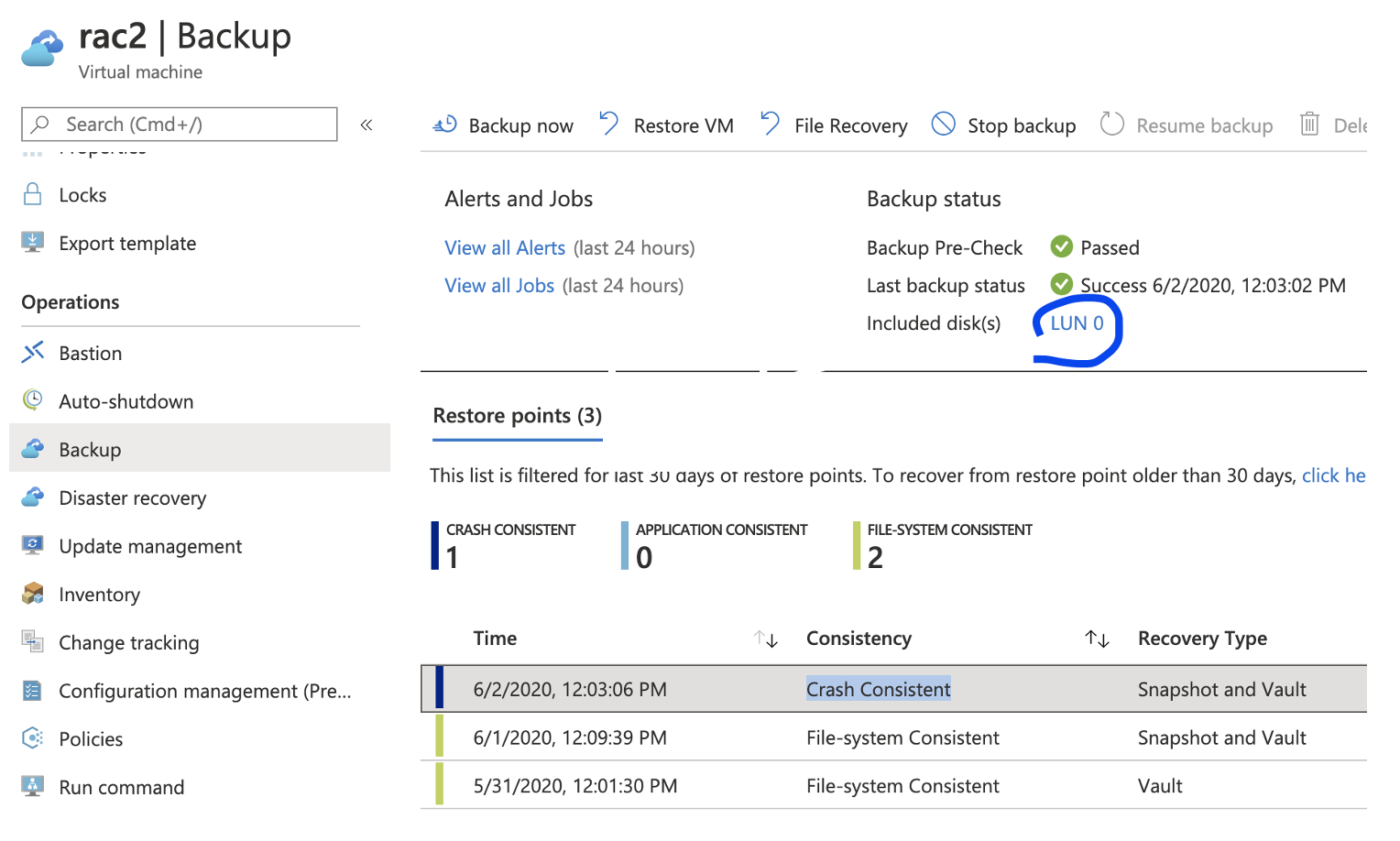
1. Configure backup for rac2 which includes only LUN0 (+ OS disk, by default)

Backup configuration script from CLI: 

az backup protection enable-for-vm --resource-group marirac --vault-name vault485 --vm rac2 --policy-name  mkpolicy --disk-list-setting include --diskslist 0

Check settings from Portal: 


2. Create test files on / and /u01

[root@rac2 ~]# touch /u01/mari_u01
[root@rac2 ~]# ll /u01/mari_u01
-rw-r–r– 1 root root 0 Jun  2 15:24 /u01/mari_u01

[root@rac2 ~]# touch /mari_root
[root@rac2 ~]# ll /mari_root
-rw-r–r– 1 root root 0 Jun  2 15:24 /mari_root


==================================Restore process

1. Find the latest restore point from Azure CLI:

az backup recoverypoint list --vault-name vault485 --resource-group marirac -c rac2 -i rac2 --backup-management-type AzureIaasVM


2. Restore OS and LUN0 disks:

az backup restore restore-disks --resource-group marirac --vault-name vault485 -c rac2 -i rac2  --target-resource-group marirac --storage-account mzx41qmarivol2asrcache --diskslist 0 --rp-name 5638874691908752817


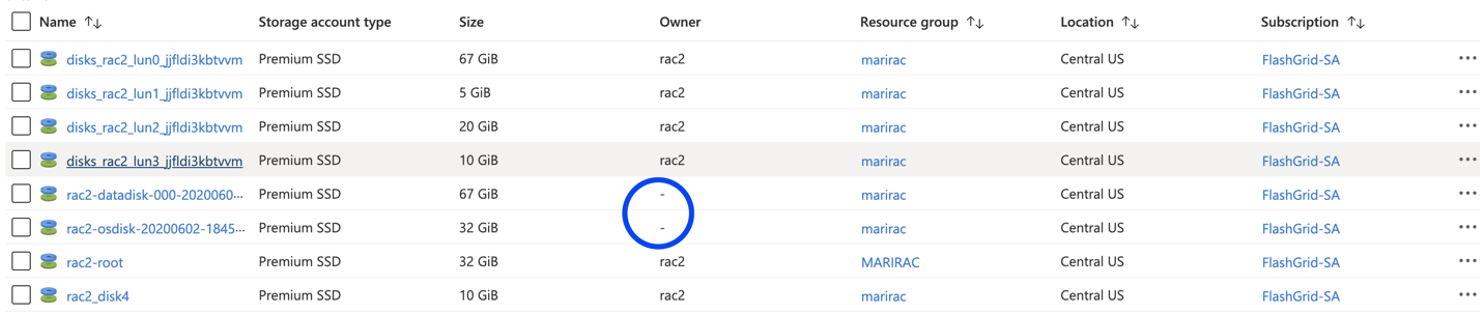
The above script restores them as managed disks, that are not attached to anything. Note restore did not replace the disk, it just restores as a new disk. 


3. To replace disks do the following:

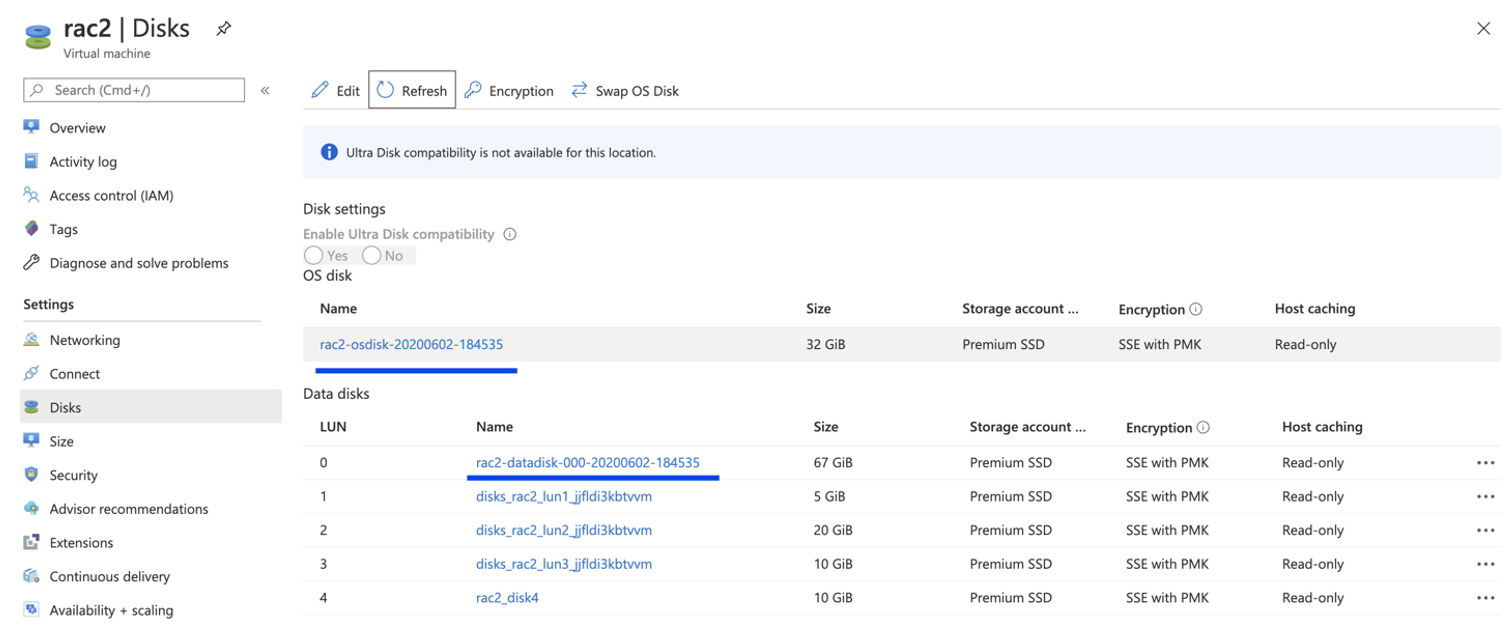
Detach old LUN0 -> Save -> Attach restored disk as Lun 0. 

To replace existing OS disk with restored one, click Switch OS disk and then start the VM. 


4. Check that files are not there anymore:

[root@rac2 ~]#  ll /mari_root
ls: cannot access /mari_root: No such file or directory

[root@rac2 ~]# ll /u01/mariu01
ls: cannot access /u01/mariu01: No such file or directory

Find 5 biggest files in Linux

I have used this command many times, but the interval between each usage is so big that I almost always forget the syntax.

So here it is:

# du -a / | sort -n -r | head -n 5

51190272	/
37705424	/root
33040524	/root/apache-tomcat-7.0.53
32802516	/root/apache-tomcat-7.0.53/logs
32802440	/root/apache-tomcat-7.0.53/logs/catalina.out

Check what is my public ip from command line

Problem:

Need to check what is server’s public ip.

Solution:

Simply run:

# dig +short myip.opendns.com @resolver1.opendns.com
40.89.251.13

ORA-15041 during rebalance OR add disk

Problem:

One of our customers had a disk offline for more than disk_repair_time, which caused Oracle to drop 1TB disk. The problem started after that, the drop command caused rebalance operation and because of less than 1TB free space on the diskgroup, the rebalance failed with ORA-15041. Mentioned rebalance caused some of the disks to become 100% full, so free MB on some disks were 0.

Adding disks did not help, because when we were checking free space on the existing disks we were getting the following output:

# su - grid
$ sqlplus / as sysasm
SQL> select disk_number "Disk #", free_mb 
     from v$asm_disk 
     where group_number = 1 
     order by 2

    Disk #    FREE_MB
---------- ----------
        13       0
         0       0
         4       0
         3       4
        11       132900
        ...

As mentioned our rebalance was failing:

Solution

It was AWS environment and in cloud we could easily increase disk size, so we increased all disks in the diskgorup by 200GB:

Resizing steps: https://dba010.com/2019/08/23/resize-asm-disks-in-aws-fg-enabled-cluster/

Triggered Rebalance:

# su - grid
$ sqlplus / as sysasm
SQL> ALTER DISKGROUP DATA REBALANCE POWER 13; 

And after several hours rebalance finished successfully.

Please note that initially we increased space on disks by 1GB and rebalance failed again, then we increased by 200GB and the operation was successful. So you may need to increase disk size several times.

Useful note from Oracle Doc ID 473271.1

Reduce high CPU usage by TFA

Problem:

Cluster nodes experienced high CPU usage, after investigation one of the top CPU consumers on the server has been found to be a TFA process (2nd place):

 # Fri Feb 19 17:44:01 2021
AllCPU  OneCPU  PID     User    PR      NI      STime   RSS     Name
--------------------------------------------------------------------------------
11.75%  94.02%  23895   root    20      0       17:43   87M     ora_m001_ORCL2
1.42%   11.39%  2468    root    20      0       Feb02   736M    /opt/oracle.ahf/jre/bin/java -server -Xms256m -Xmx512m -Djava.awt.headless=true -Ddisable.checkForUpdate=true -XX:HeapDumpPath=/u01/app/oracle.ahf/data/rac02/diag/tfa -XX:ParallelGCThreads=5 oracle.rat.tfa.TFAMain /opt/oracle.ahf/tfa

Workaround:

In newer version of TFA, you can set CPU resource limit.

tfactl setresourcelimit 
 [-tool tool_name] 
 [-resource resource_type] 
 [-value value]

To limit TFA to a maximum of 50% of a single CPU, run the following:

# tfactl setresourcelimit -value 0.5

For more information, please check TFA official documentation.

If you don’t have newer version of TFA, you need to upgrade it first.

Create shortcuts for frequently accessed servers

Life is too short, that’s why it’s mandatory to use shortcuts… Instead of typing frequently used ssh client options such as port, user, hostname, identity-file and so on, you can save that information in sshd config file and then access it with defined alias.

  • System wide config file location is /etc/ssh/ssh_config
  • User specific config file location is ~/.ssh/config same as $HOME/.ssh/config

Instead of connecting to the server everytime using the following command:

# ssh root@95.80.12.10 -i ~/.ssh/my_id_rsa

Save the following entries in ~/.ssh/config file:

# vim ~/.ssh/config
Host my_db
HostName 95.80.12.10
IdentityFile ~/.ssh/my_id_rsa
User root

And connect to the server using this simple way:

# ssh my_db

For other options check https://linuxize.com/post/using-the-ssh-config-file/