Connection using 11g ojdbc was very slow and most of the time was failing with Connection reset error after 60s (default inbound connection timeout). Database alert log contained WARNING: inbound connection timed out (ORA-3136) errors.
Reason:
Oracle 11g JDBC drivers use random numbers during authentication. Those random numbers are generated by OS using /dev/random and if there is faulty/slow hardware or not too much activity on the system this generation can be slow, which causes slowness during jdbc connection.
Solution:
Instead of /dev/random indicate non-blocking /dev/urandom as java command line argument:
# java -Djava.security.egd=file:/dev/../dev/urandom -cp ojdbc8.jar:. JDBCTest "stbyrac-scan.example.com"

jdbcurl=jdbc:oracle:thin:@(DESCRIPTION=(ADDRESS=(PROTOCOL=TCP)(HOST=stbyrac-scan.example.com)(PORT=1521))(CONNECT_DATA=(SERVER = DEDICATED)(SERVICE_NAME=orclgg)))

Connected to the database.
Executing query…
1
Please note that -Djava.security.egd=file:/dev/../dev/urandom parameter is required to have a stable connection. I will discuss the importance of this parameter in the next post.
My opatchauto outofplace patching failed on GI home. I was able to cleanup cloned GI home and information about it in inventory.xml, but after running opatchauto again I was getting the following error:
[root@rac1 29708703]# $ORACLE_HOME/OPatch/opatchauto apply -oh $ORACLE_HOME -outofplace
OPatchauto session is initiated at Sun Aug 18 20:40:43 2019
System initialization log file is /u01/app/18.3.0/grid/cfgtoollogs/opatchautodb/systemconfig2019-08-18_08-40-46PM.log.
Session log file is /u01/app/18.3.0/grid/cfgtoollogs/opatchauto/opatchauto2019-08-18_08-42-20PM.log
The id for this session is Z1CP
OPATCHAUTO-72115: Out of place patching apply session cannot be performed.
OPATCHAUTO-72115: Previous apply session  is not completed on node rac1.
OPATCHAUTO-72115: Please complete the previous apply  session across all nodes to perform apply session.
OPatchAuto failed.
Solution:
Clear checkpoint files from the previous session :
[root@rac1 29708703]# cd /u01/app/18.3.0/grid/.opatchauto_storage/rac1
[root@rac1 rac1]# ls
oopsessioninfo.ser
[root@rac1 rac1]# rm -rf oopsessioninfo.ser
In sqlplus, pressing backspace writes ^H and delete – [[D^. Your terminal settings affects keyboard behaviour in sqlplus.
Let’s improve our sqlplus – make backspace and delete keys work as expected and in addition to this let’s add a new feature such as maintaining command history.
Solution:
Install a readline wrapper (rlwrap) – it maintains a separate input history for each command.
[root@rac1 ~]# yum install rlwrap -y
Create alias for sqlplus in /etc/profile:
alias sqlplus='rlwrap sqlplus'
Reconnect to the terminal and check that alias is created:
[oracle@rac1 ~]$ alias
alias egrep='egrep --color=auto'
alias fgrep='fgrep --color=auto'
alias grep='grep --color=auto'
alias l.='ls -d .* --color=auto'
alias ll='ls -l --color=auto'
alias ls='ls --color=auto'
alias sqlplus='rlwrap sqlplus'
alias vi='vim'
alias which='alias | /usr/bin/which --tty-only --read-alias --show-dot --show-tilde'
Connect to sqlplus:
[oracle@rac1 ~]$ sqlplus / as sysdba
SQL>
And test your new sqlplus 🙂 :
Use backspace, delete, execute some command and then press arrow up to see previous command.
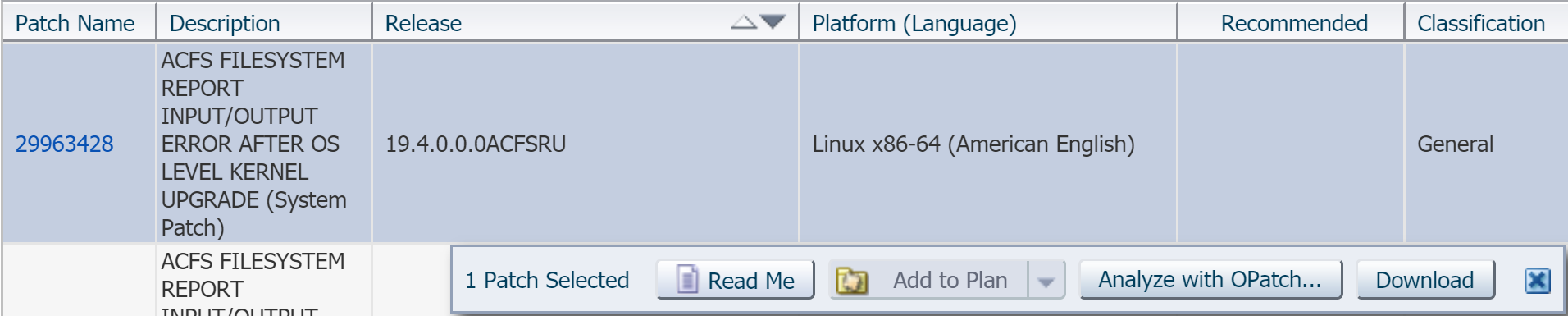
Recently, I was applying p29963428_194000ACFSRU_Linux-x86-64.zip on top of 19.4 GI home and got the following error:
==Following patches FAILED in analysis for apply:
 Patch: /u01/swtmp/29963428/29963428
 Log: /u01/app/19.3.0/grid/cfgtoollogs/opatchauto/core/opatch/opatch2019-08-07_10-07-56AM_1.log
 Reason: Failed during Analysis: CheckConflictAgainstOracleHome Failed, [ Prerequisite Status: FAILED, Prerequisite output:
 Summary of Conflict Analysis:
 There are no patches that can be applied now.
 Following patches have conflicts. Please contact Oracle Support and get the merged patch of the patches :
 29851014, 29963428
 Conflicts/Supersets for each patch are:
 Patch : 29963428
 Bug Conflict with 29851014 Conflicting bugs are: 29039918, 27494830, 29338628, 29031452, 29264772, 29760083, 28855761 ...
 After fixing the cause of failure Run opatchauto resume
Solution:
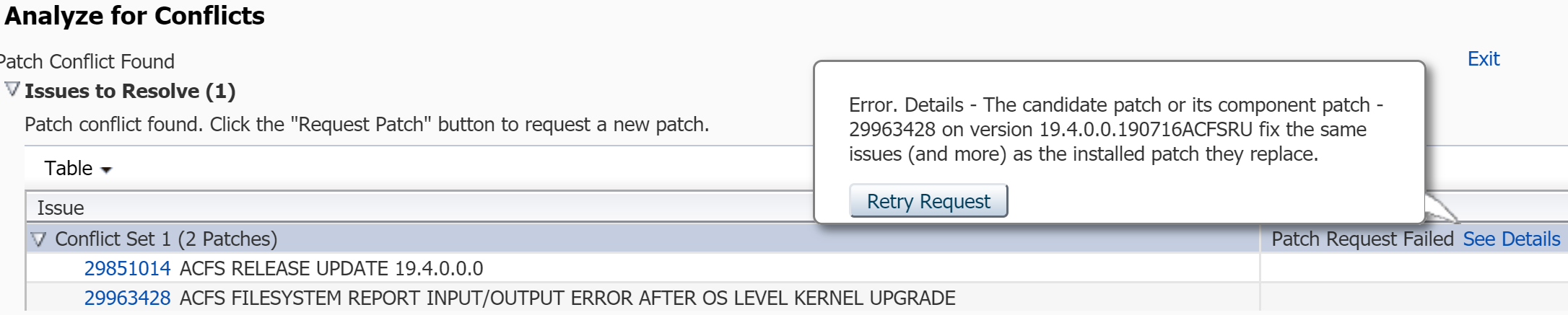
Oracle MOS note ID 1317012.1 describes steps how to check such conflicts and request conflict/merged patches in previous:
One of our customer incorrectly changed fstab file and rebooted the OS. As a result, VM was not able to start. Fortunately, cloud where this VM was located supported serial console.
Solution:
We booted in single user mode through serial console and reverted the changes back. To boot in single user mode and update necessary file, do as follows:
Connect to the serial console and while OS is booting in a grub menu press e to edit the selected kernel:
Find line that starts with linux16 ( if you don’t see it press arrow down ), go to the end of this line and type rd.break.
Press ctrl+x.
Wait for a while and system will enter into single user mode:
During this time /sysroot is mounted in read only mode, you need to remount it in read write:
switch_root:/# mount -o remount,rw /sysroot
switch_root:/# chroot /sysroot
You can revert any changes back by updating any file, in our case we updated fstab:
sh-4.2# vim /etc/fstab
You are a real hero, because you rescued your system!
On the left side -> under the section ELASTIC BLOCK STORE -> choose Volumes
Choose necessary disk -> click Actions button -> choose Modify Volume -> change Size Please note that all data disks (not quorum disk) must be increased under the same diskgroup, otherwise ASM will not let you to have different sized disks.
Choose another data disks and repeat the same steps.
4. Run the following on database nodes via root user:
# for i in /sys/block/*/device/rescan; do echo 1 > $i; done
5. Check that disks have correct sizes:
# flashgrid-node
6. Connect to the ASM instance from any database node and run:
[grid@rac1 ~]$ sqlplus / as sysasm
SQL*Plus: Release 19.0.0.0.0 - Production on Fri Aug 23 10:17:50 2019
Version 19.4.0.0.0
Copyright (c) 1982, 2019, Oracle.  All rights reserved.
Connected to:
Oracle Database 19c Enterprise Edition Release 19.0.0.0.0 - Production
Version 19.4.0.0.0

SQL> alter diskgroup GRID resize all;
Diskgroup altered.
# /u01/app/18.0.0/grid/OPatch/opatchauto apply /0/grid/29301682  -oh /u01/app/18.0.0/grid
 Can't call method "uid" on an undefined value at /u01/app/18.0.0/grid/OPatch/auto/database/bin/module/DBUtilServices.pm line 28.
Reason:
GI is not setup yet. You may have unzipped GI installation file, but have not run gridSetup.sh
$GI_HOME/oraInst.loc is missing.
Solution:
Setup GI by running gridSetup.sh
Copy the oraInst.loc from the other node, if you don’t have another node then please see the file content bellow:
Oracle 18c GI configuration precheck was failing with the following error:
Summary of node specific errors

primrac2  - PRVG-11069 : IP address "169.254.0.2" of network interface "idrac" on the node "primrac2" would conflict with HAIP usage.
- Cause:  One or more network interfaces have IP addresses in the range (169.254..), the range used by HAIP which can create routing conflicts.
- Action:  Make sure there are no IP addresses in the range (169.254..) on any network interfaces.

primrac1  - PRVG-11069 : IP address "169.254.0.2" of network interface "idrac" on the node "primrac1" would conflict with HAIP usage.
- Cause:  One or more network interfaces have IP addresses in the range (169.254..), the range used by HAIP which can create routing conflicts.
- Action:  Make sure there are no IP addresses in the range (169.254..) on any network interfaces.
On each node additional network interface – named idrac was started with the ip address 169.254.0.2. I tried to set static ip address in /etc/sysconfig/network-scripts/ifcfg-idrac , also tried to bring the interface down – but after some time interface was starting up automatically and getting the same ip address.
Servers were configured by system administrator and was not clear why this module was there, we are not using iDRAC module and the only option that we had was to remove/uninstall that module. (configuring module should also be possible to avoid such situation, but we keep our servers as clean as possible without having unsed services)
Solution:
Uninstalled iDRAC module (also expained in the above pdf):
# rpm -e dcism
After uninstalling it idrac interface did not started anymore, so we could continue GI configuration.






 DBA Knowledge Base