Reduction rxdrop/s – receive packet drops per second

Note: The post may seem related to Linux only. However, the issue of high rxdrop/s affects anything, especially Oracle database performance, if it occurs on the database server.

In this post, I will explain the parameters that affect the behavior of receive packet drops per second (rxdrop/s).
The post is more about workarounds and tuning values rather than identifying exactly what has changed and why the fragmentation level has increased.
We will discuss several key /etc/sysctl.conf parameters that can help make fragmentation more manageable, these are:

net.ipv4.ipfrag_high_thresh = 67108864
net.ipv4.ipfrag_low_thresh = 66060288
net.ipv4.ipfrag_time = 10

Problem:

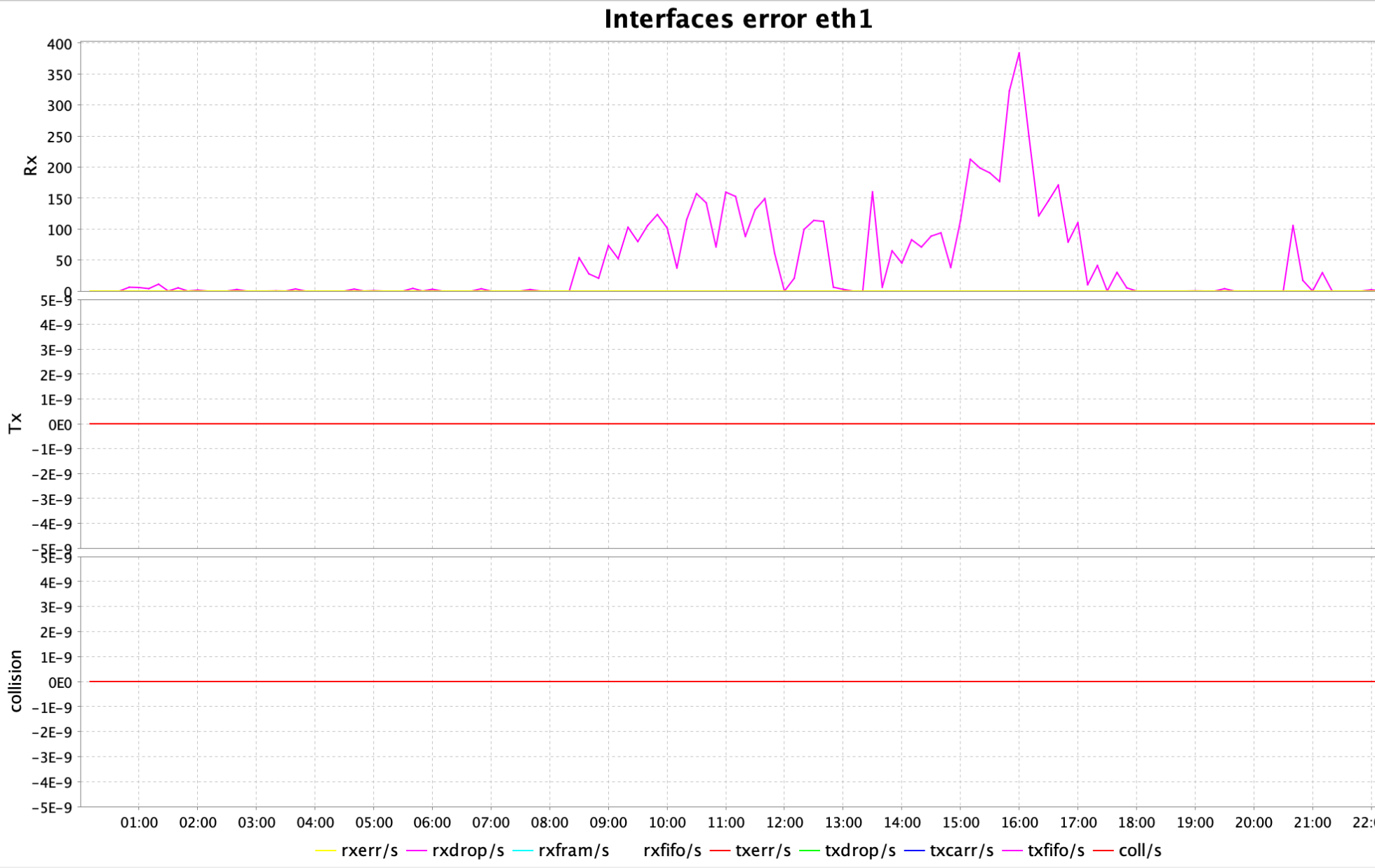
The ksar graph (a tool that interprets output from sar) was displaying peaks for interface errors on eth1 interface, particularly rxdrop/s:
Workaround:

The following kernel parameters in Linux control how the system handles IP packet fragments in the IPv4 stack.

  • The maximum memory threshold (in bytes) that the kernel can use to store IPv4 fragmented packets:

    net.ipv4.ipfrag_high_thresh = 67108864

When the total memory used for IP fragments exceeds 64 MB (67108864), the kernel will start dropping fragments until memory usage falls below the low threshold (ipfrag_low_thresh next parameter).

  • The minimum memory threshold to stop dropping fragments:

    net.ipv4.ipfrag_low_thresh = 66060288

Once memory drops below ~63 MB (66060288), fragment discarding stops.

  • The time (in seconds) the kernel will keep an incomplete, fragmented packet in memory before discarding it:

    net.ipv4.ipfrag_time = 10

The default is often 30 seconds. Here it’s reduced to 10 seconds.

    This helps prevent memory from being held too long by incomplete or malicious fragment streams, which are common in DoS attacks.

    After changing these parameters in /etc/sysctl.conf you need to run sysctl -p to apply the modified kernel parameters and make them effective at runtime.

    Oracle 23ai: ORA-40490 COLUMNS clause required

    Problem:

    While working with Oracle’s native JSON data type, I ran into a bit of a hiccup while trying to insert JSON data into a table:

    SQL> insert into json_table(data) 
    values(
    json_object(
    'name' value 'Mari',
    'age' value 34,
    'city' value 'Tbilisi'));

    I get the following error:

    ERROR at line 1:
    ORA-40490: COLUMNS clause required

    And similarly, for creating a JSON Search Index (this is the syntax that is provided by Oracle documentation by now)

    CREATE SEARCH INDEX mk_search_idx ON json_table(data) FOR JSON;

    It returns the same error:

    ERROR at line 1:
    ORA-40490: COLUMNS clause required

    At this point, I figured the issue had to be about the “COLUMNS clause”, which the error clearly mentions – but where exactly is it supposed to go?

    Solution:

    Turns out, Oracle wants you to explicitly declare the COLUMNS clause right after the table name. Here’s the syntax that finally worked for me:

    SQL> insert into json_table columns(data)
    values(
    json_object(
    'name' value 'Salome',
    'age' value 12,
    'city' value 'Tbilisi'));
    1 row created.

    SQL> commit;

    And similarly, for creating a JSON Search Index:

    SQL> CREATE SEARCH INDEX mk_search_idx ON json_table columns(data) FOR JSON;

    Index created.

    Checking supported MTU (Maximum Transmission Unit) for a system using PING

    When troubleshooting network issues, ensuring that packets are not being fragmented is crucial. One way to check the Maximum Transmission Unit (MTU) of a network path is by using the ping command with specific flags that test for fragmentation.

    What is MTU?

    MTU (Maximum Transmission Unit) is the largest size of a packet that can be sent over a network without fragmentation. If a packet exceeds the MTU, it is either fragmented or dropped (if fragmentation is disabled).

    To determine the MTU value that works for your connection, you can use the ping command with the Don’t Fragment (DF) flag, ensuring that packets exceeding the MTU are rejected instead of being fragmented.

    Using PING to check MTU

    A simple way to test MTU is by sending a ping with a specified packet size and ensuring it does not get fragmented:

    # ping 10.7.0.4 -c 2 -M do -s 1400

    Where:

    • 10.7.0.4: The destination IP address to which we are sending the ping
    • -c 2: Sends 2 pings before stopping
    • -M do: Enables strict Path MTU Discovery, meaning fragmentation is not allowed
    • -s 1400: Sets the ICMP payload size to 1400 bytes. The total packet size will be:
      • 1400 bytes (payload) + 8 bytes (ICMP header) + 20 bytes (IP header) = 1428 bytes.

    In the following example, we are successfully sending a packet with a size of 1400:

    [root@rac1 ~]# ping 10.0.1.4 -c 2 -M do -s 1400
    PING 10.0.1.4 (10.0.1.4) 1400(1428) bytes of data.
    1408 bytes from 10.0.1.4: icmp_seq=1 ttl=63 time=0.726 ms
    1408 bytes from 10.0.1.4: icmp_seq=2 ttl=63 time=0.720 ms

    --- 10.0.1.4 ping statistics ---
    2 packets transmitted, 2 received, 0% packet loss, time 1046ms

    Sending a packet of the size 1472 is also successful:

    [root@rac1 ~]# ping 10.0.1.4 -c 2 -M do -s 1472
    PING 10.0.1.4 (10.0.1.4) 1472(1500) bytes of data.
    1480 bytes from 10.0.1.4: icmp_seq=1 ttl=63 time=0.780 ms
    1480 bytes from 10.0.1.4: icmp_seq=2 ttl=63 time=0.759 ms

    --- 10.0.1.4 ping statistics ---
    2 packets transmitted, 2 received, 0% packet loss, time 1034ms
    rtt min/avg/max/mdev = 0.759/0.769/0.780/0.029 ms

    But sending a packet with the size 1473 is not successful:

    [root@rac1 ~]# ping 10.0.1.4 -c 2 -M do -s 1473
    PING 10.0.1.4 (10.0.1.4) 1473(1501) bytes of data.

    --- 10.0.1.4 ping statistics ---
    2 packets transmitted, 0 received, 100% packet loss, time 1023ms

    This indicates that the largest packet size you can send without fragmentation is 1472.

    Azure: Search for a specific VM series availability in region

    Use Azure CLI to retrieve available VM SKUs (sizes) in a specified region, filter them by a VM type, and formats the output.

    In this specific case, I am checking whether the E20as_v6 and E20s_v6 sizes are available in the eastus2 region and determining the zones in which they are offered:

    mari@Azure:~$ az vm list-skus --location eastus2 --all true --resource-type virtualMachines --output table | grep -E "E20as_v6|E20s_v6"

    virtualMachines eastus2 Standard_E20as_v6 1,2 None
    virtualMachines eastus2 Standard_E20s_v6 1,2 None

    Explanation of command/options:

    Command/OptionDescription
    az vm list-skusLists available VM SKUs (sizes)
    --location eastus2Specifies the Azure region (eastus2) where the VM SKUs should be retrieved.
    --all trueShow all information including vm sizes not available under the current subscription.
    --resource-type virtualMachinesFilters the SKU list specifically for virtual machines.
    --output tableFormats the output into a readable table format instead of JSON.
    | grep -E "E20as_v6|E20s_v6"Pipes (|) the output into grep, filtering only the lines containing E20as_v6 or E20s_v6.

    Explanation of the result:

    ValueDescription
    NoneThis column usually shows restrictions, such as NotAvailableForSubscription. Here, “None” means no restrictions apply, and the VM SKU can be deployed without limitations.
    1, 2VMs are available in 1 and 2 availability zones

    E-Series VMs are optimized for memory-intensive workloads such as in-memory databases, and big data applications.

    Release Schedule of Current Database Releases

    Determining the schedule for a new database release can be challenging. Online, you may encounter misleading information suggesting that the database has already launched when it is still not generally available (GA). To ensure you have accurate details, refer to the following metalink article.

    Release Schedule of Current Database Releases (Doc ID 742060.1)

    Also, verify the document’s update date found on the right side under Document Details -> Last Major Update -> Last Update.

    ORA-00904: “DBMS_XSTREAM_GG_ADM”.”SYNCHRONIZATION”, PLS-00201: identifier ‘DBMS_XSTREAM_GG_ADM’ must be declared

    Problem:

    While running command in GGSCI, I received the following messages:

    GGSCI (rac1.mycompany.mydomain as ggcw@orcl2) 4>  ADD TRANDATA HR.*
    ...
    2024-04-06 00:13:51 WARNING OGG-00706 Failed to add supplemental log group on table HR.TEST due to ORA-06550: line 1, column 46:
    PL/SQL: ORA-00904: "DBMS_XSTREAM_GG_ADM"."SYNCHRONIZATION": invalid identifier
    ORA-06550: line 1, column 39:
    PL/SQL: SQL Statement ignored
    ORA-06550: line 1, column 109:
    PLS-00201: identifier 'DBMS_XSTREAM_GG_ADM' must be declared
    ORA-06550: line 1, column 109:
    PL/SQL: Statement ignored
    ORA-06550: line 1, column 156:
    PLS-00201: identifier 'DBMS_CAPTURE_ADM' must be declared
    ORA-06550: line 1, column 156:
    PL/SQL: Statement ignored
    ORA-06550: line 1, column 263:
    PLS-00201: identifier 'DBMS_XSTREAM_GG_ADM' must be declared
    ORA-06550: line 1, column 263:
    PL/SQL: Statement ignored
    SQL DECLARE saved_sync varchar2(4); BEGIN select dbms_xstream_gg_adm.synchronization into saved_sync from dual; dbms_xstream_gg_adm.synchronization := 'NONE'; DBMS_CAPTURE_ADM.PREPARE_TABLE_INSTANTIATION(table_name => '"HR"."TEST"', supplemental_logging => 'none'); dbms_xstream_gg_adm.synchronization := saved_sync; END;.

    Solution:

    Connect to the database via sqlplus and grant the below privileges to GG user (ggcw in my case):

    exec dbms_goldengate_auth.grant_admin_privilege('ggcw');
    grant select any dictionary to ggcw;
    grant insert any table to ggcw;
    grant update any table to ggcw;
    grant delete any table to ggcw;

    Rerun the statement:

    GGSCI (rac1.mycompany.mydomain as ggcw@orcl2) 4>  ADD TRANDATA HR.*

    WARNING OGG-00706 Failed to add supplemental log group on table HR.TEST due to ORA-01031: insufficient privileges

    Problem:

    I received a warning while running the following command in GGSCI:

    GGSCI (rac1.mycompany.mydomain as ggcw@orcl2) 2> ADD TRANDATA HR.*
    ...
    2024-04-06 00:11:56 WARNING OGG-00706 Failed to add supplemental log group on table HR.TEST due to ORA-01031: insufficient privileges
    SQL ALTER TABLE "HR"."TEST" ADD SUPPLEMENTAL LOG GROUP "GGS_76882" ("A") ALWAYS ENABLE LOGICAL REPLICATION ALL KEYS /* GOLDENGATE_DDL_REPLICATION */.

    Solution:

    Connect to the database via sqlplus and grant necessary permission to GG user (ggcw in my case):

    $ export ORACLE_SID=orcl1
    $ sqlplus / as sysdba
    SQL> grant alter any table to ggcw;

    Rerun the statement:

    GGSCI (rac1.mycompany.mydomain as ggcw@orcl2) 4>  ADD TRANDATA HR.*

    OPatchauto fails: CLSRSC-180: An error occurred while executing the command ‘/bin/rpm -qf /sbin/init’

    Problem:

    During applying ACFS patch on top of GI home, I received the following error:

    Command failure output:
    ...
    2024/03/08 19:31:03 CLSRSC-180: An error occurred while executing the command '/bin/rpm -qf /sbin/init'

    After fixing the cause of failure Run opatchauto resume

    ]
    OPATCHAUTO-68061: The orchestration engine failed.
    OPATCHAUTO-68061: The orchestration engine failed with return code 1
    OPATCHAUTO-68061: Check the log for more details.
    OPatchAuto failed.

    OPatchauto session completed at Fri Mar 8 19:31:04 2024
    Time taken to complete the session 3 minutes, 38 seconds

    opatchauto failed with error code 42

    Troubleshooting:

    I attempted to manually execute the command that failed, and it returned a helpful error message:

    [root@rac1 tmp]# /bin/rpm -qf /sbin/init
    error: rpmdb: BDB0113 Thread/process 5003/139974823143296 failed: BDB1507 Thread died in Berkeley DB library
    error: db5 error(-30973) from dbenv->failchk: BDB0087 DB_RUNRECOVERY: Fatal error, run database recovery
    error: cannot open Packages index using db5 - (-30973)
    error: cannot open Packages database in /var/lib/rpm
    ...

    Solution:

    I have a solution for this type of error in another post. Let’s solve it again:

    [root@rac1 tmp]# rpm  --rebuilddb

    Rerun the failing command to make sure it was resolved:

    [root@rac1 tmp]# /bin/rpm -qf /sbin/init
    systemd-239-78.0.3.el8.x86_64

    If you encountered an error during patching, you can resume opatchauto at this point:

    [root@rac1 tmp]# /u01/app/19.3.0/grid/OPatch/opatchauto resume

    --------------------------------Summary--------------------------------

    Patching is completed successfully. Please find the summary as follows:

    Host:rac1
    CRS Home:/u01/app/19.3.0/grid
    Version:19.0.0.0.0
    Summary:

    ==Following patches were SUCCESSFULLY applied:

    Patch: /tmp/36114443/36114443
    Log: /u01/app/19.3.0/grid/cfgtoollogs/opatchauto/core/opatch/opatch2024-03-08_19-29-48PM_1.log

    Good luck, as always!

    How to find “IOPs per instance type” info in AWS?

    Problem:

    An instance’s EBS performance is limited by the performance of its attached volumes or the instance, whichever is lower.

    When attaching volumes, we need to consider the instance type’s limitations on maximum IOPs.

    Let’s determine the maximum IOPs that the target instance type can provide.

    Solution:

    There are multiple sources of information available, however, some of them are dry and lack detail.

    I will provide two possible ways to check that info in detail:

    AWS webpage: https://docs.aws.amazon.com/AWSEC2/latest/UserGuide/ebs-optimized.html

    AWS CLI:

     aws ec2 describe-instance-types \
     --instance-types r5.2xlarge \
     --query InstanceTypes[].EbsInfo

    In the above example, we used the r5.2xlarge instance type. Please specify your desired instance type to determine its corresponding EBS information.

    Rename directories, subdirectories, files recursively that contain matching string

    Problem:

    I have copied /u01 directory (containing Oracle software) from another node. The Oracle software home includes directories and files with hostnames.

    My task was to rename all directories, subdirectories, and files containing the specific hostname (in my case rac2) into rac1.

    Let me show you the folder hierarchy that is challenging when you want to rename by script. For simplicity, this hierarchy is made up, but this type of dependency exists in /u01:

    /u01/first_level_rac2/second_level_rac2/third_level_rac2.txt

    We want to have:

    /u01/first_level_rac1/second_level_rac1/third_level_rac1.txt

    So finally, all folders or files containing the string rac2 should be replaced with rac1.

    The challenge here is that you need to start renaming from the third_level, then rename second_level and later first_level. Otherwise, you will have accessibility issues with other subdirectories or files.

    Solution:

    If you want a shortcut, here is the code:

    [root@rac1 ~]# find /u01 -depth -name "*rac2*" | while read i ; do
    newname="$(echo ${i} |sed 's/\(.*\)rac2/\1rac1/')" ;
    echo "mv" "${i}" "${newname}" >> rename_rac2_rac1.sh;
    done

    Later you need to run rename_rac2_rac1.sh file, which will contain mv statements for each matching file or folder.

    Let me explain,

    find /u01 -depth -name "*rac2*" – This will find all files and folders that contain rac2 keyword and will display the output with depth-first order.

    Without depth, the output is the following:

    /u01/first_level_rac2
    /u01/first_level_rac2/second_level_rac2
    /u01/first_level_rac2/second_level_rac2/third_level_rac2.txt

    With -depth, you will see the next order:

    /u01/first_level_rac2/second_level_rac2/third_level_rac2.txt
    /u01/first_level_rac2/second_level_rac2
    /u01/first_level_rac2

    "$(echo ${i} |sed 's/\(.*\)rac2/\1rac1/')" – In this line, the value of i iterator (each line from find command) will be redirected to sed command that will replace the first occurrence of rac2 keyword searching from backward.

    Later old name and a new name will be concatenated with mv statement and saved into rename_rac2_rac1.sh

    This will be mv statements generated by the script:

    mv /u01/first_level_rac2/second_level_rac2/third_level_rac2.txt /u01/first_level_rac2/second_level_rac2/third_level_rac1.txt
    
    mv /u01/first_level_rac2/second_level_rac2 /u01/first_level_rac2/second_level_rac1
    
    mv /u01/first_level_rac2 /u01/first_level_rac1