SQL Server Reporting Services. Error: …Windows User Account Control (UAC) restrictions have been addressed

Error:
User ‘Domain\User’ does not have required permissions. Verify that sufficient permissions have been granted and Windows User Account Control (UAC) restrictions have been addressed.

Solution:

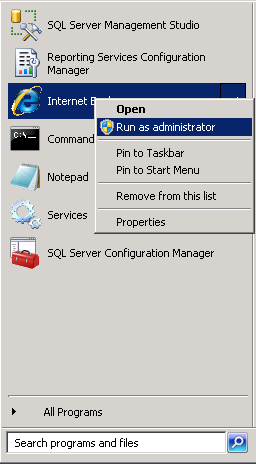
1. Run IE as Administrator:

image

2. Go to the Reporting Services address: http://localhost/Reports

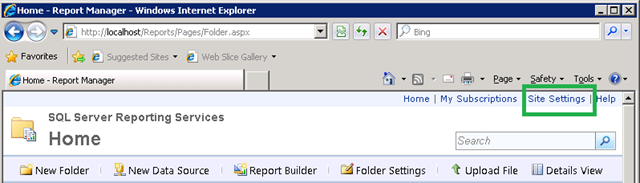
3. Go to the Site Settings:

image

4. In Security section –> click New Role Assignment

image

5. Add username or group that you want to grant permissions and choose appropriate role:

image

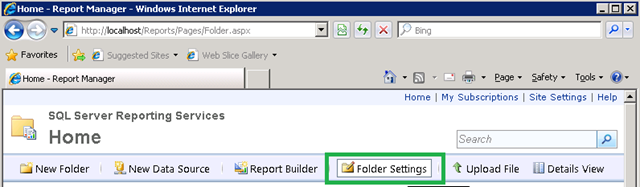
6. Go to the Home page and click Folder Settings:

image

7. Add username or group that you want to grant permission.

That’s all.

Migrate SQL Server Reporting Services to another server

Here are the steps how to migrate RS to another server using same database release. For example: From SQL Server 2008-> to SQL Server 2008.

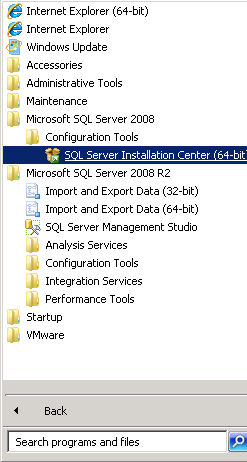
1. Install Database and Reporting Services on target server. If you have just database service installed , you can add Reporting Service by running SQL Server Installation Center:

image

follow the steps and check Reporting Services box for installation.

2.  Backup Reporting Service databases on source server, for me they are: ReportServer and ReportServerTempDB.

3. Backup Encryption Key on source server.

Run Reporting Services Configuration Manager:

image

Connect to the  Reporting Server –> Go to the Encryption Keys section and click Backup button.

image

It will ask you for the password , which will be needed for the restoration on target server.

4. Restore ReportServer and ReportServerTempDB databases(backed up in the 2-nd step) with the overwrite option on the target server.

5. On target server go to the Reporting Services Configuration Manager –> Encryption Keys section and restore the key. (Enter the password, when prompted, which you have indicated during backup of the key on source server )

Note, in Database section reporting service should point to the database named ReportServer .

You should now navigate to the reporting service address: http://target_server_hostname:80/Reports.

Change boot mode in Linux

There are 6 boot modes.

0 –  Halt (Shutdown)
1 – Single user mode
2 – Not yet implemented
3 – Full multi-user command line mode
4 – Not used.
5 – Full multi-user Graphical User Interface mode
6 – Reboot

Default mode is written into /etc/inittab file.

By changing the following line in that file,  the default boot mode will be changed:

id:5:initdefault:

If it is production server and you don’t need to use GUI interface you can set default boot mode to 3. This is beneficial, because  the mode 3 takes less memory(RAM)  than the mode 5.

id:3:initdefault:

Note: Be careful while changing the default mode, because the following values like 0(shutdown) or 6(reboot) will cause problems. Never try to set these values, I mean 0 or 6.

Recreate Oracle 11g OEM DBConsole manually for RAC

If you have problems with existing OEM, the best way is to reconfigure it. Here are the steps, how to do it correctly:

$ emca -config dbcontrol db -repos recreate -cluster

STARTED EMCA at Jan 22, 2013 6:04:10 PM
EM Configuration Assistant, Version 11.2.0.3.0 Production
Copyright (c) 2003, 2011, Oracle. All rights reserved.

Enter the following information:
Database unique name: orcl
Service name: orcl
Listener ORACLE_HOME [ /u01/app/11.2.0/grid ]:
Password for SYS user:
Database Control is already configured for the database orcl
You have chosen to configure Database Control for managing the database orcl
This will remove the existing configuration and the default settings and perform a fresh configuration
———————————————————————-
WARNING : While repository is dropped the database will be put in quiesce mode.
———————————————————————-
Do you wish to continue? [yes(Y)/no(N)]: y
Password for DBSNMP user:
Password for SYSMAN user:
Cluster name: oracle-db

!!!Stop here for a while: if you don’t know your cluster name run the following command:

$ su – grid
cemutlo -n

…continuing configuration

Email address for notifications (optional):
Outgoing Mail (SMTP) server for notifications (optional):
ASM ORACLE_HOME [ /u01/app/11.2.0/grid ]:
ASM port [ 1521 ]:
ASM username [ ASMSNMP ]:
ASM user password:
Jan 22, 2013 6:05:02 PM oracle.sysman.emcp.util.GeneralUtil initSQLEngineRemotely
WARNING: Error during db connection : ORA-12514: TNS:listener does not currently know of service requested in connect descriptor

—————————————————————–

You have specified the following settings

Database ORACLE_HOME ……………. /u01/app/oracle/product/11.2.0/db_1

Database instance hostname ……………. Listener ORACLE_HOME ……………. /u01/app/11.2.0/grid
Listener port number ……………. 1521
Cluster name ……………. oracle-db
Database unique name ……………. orcl
Email address for notifications …………… mariam.kupa@gmail.com
Outgoing Mail (SMTP) server for notifications …………… mail.tbilisi.gov.ge
ASM ORACLE_HOME ……………. /u01/app/11.2.0/grid
ASM port ……………. 1521
ASM user role ……………. SYSDBA
ASM username ……………. ASMSNMP

—————————————————————–
———————————————————————-
WARNING : While repository is dropped the database will be put in quiesce mode.
———————————————————————-
Do you wish to continue? [yes(Y)/no(N)]: y
Jan 22, 2013 6:05:18 PM oracle.sysman.emcp.EMConfig perform
INFO: This operation is being logged at /u01/app/oracle/cfgtoollogs/emca/orcl/emca_2013_01_22_18_04_10.log.
Jan 22, 2013 6:05:20 PM oracle.sysman.emcp.util.PortManager isPortInUse
WARNING: Specified port 5540 is already in use.
Jan 22, 2013 6:05:20 PM oracle.sysman.emcp.util.PortManager isPortInUse
WARNING: Specified port 5520 is already in use.
Jan 22, 2013 6:05:20 PM oracle.sysman.emcp.util.PortManager isPortInUse
WARNING: Specified port 1158 is already in use.
Jan 22, 2013 6:05:20 PM oracle.sysman.emcp.util.DBControlUtil stopOMS
INFO: Stopping Database Control (this may take a while) …
Jan 22, 2013 6:06:01 PM oracle.sysman.emcp.EMReposConfig invoke
INFO: Dropping the EM repository (this may take a while) …
Jan 22, 2013 6:08:00 PM oracle.sysman.emcp.EMReposConfig invoke
INFO: Repository successfully dropped
Jan 22, 2013 6:08:01 PM oracle.sysman.emcp.EMReposConfig createRepository
INFO: Creating the EM repository (this may take a while) …
Jan 22, 2013 6:11:39 PM oracle.sysman.emcp.EMReposConfig invoke
INFO: Repository successfully created
Jan 22, 2013 6:11:44 PM oracle.sysman.emcp.EMReposConfig uploadConfigDataToRepository
INFO: Uploading configuration data to EM repository (this may take a while) …
Jan 22, 2013 6:12:17 PM oracle.sysman.emcp.EMReposConfig invoke
INFO: Uploaded configuration data successfully
Jan 22, 2013 6:12:18 PM oracle.sysman.emcp.EMDBCConfig instantiateOC4JConfigFiles
INFO: Propagating /u01/app/oracle/product/11.2.0/db_1/oc4j/j2ee/OC4J_DBConsole_oracle-node1_orcl to remote nodes . ..
Jan 22, 2013 6:12:20 PM oracle.sysman.emcp.EMDBCConfig instantiateOC4JConfigFiles
INFO: Propagating /u01/app/oracle/product/11.2.0/db_1/oc4j/j2ee/OC4J_DBConsole_oracle-node2_orcl to remote nodes . ..
Jan 22, 2013 6:12:26 PM oracle.sysman.emcp.EMAgentConfig deployStateDirs
INFO: Propagating /u01/app/oracle/product/11.2.0/db_1/oracle-node1_orcl to remote nodes …
Jan 22, 2013 6:12:28 PM oracle.sysman.emcp.EMAgentConfig deployStateDirs
INFO: Propagating /u01/app/oracle/product/11.2.0/db_1/oracle-node2_orcl to remote nodes …
Jan 22, 2013 6:12:31 PM oracle.sysman.emcp.util.DBControlUtil secureDBConsole
INFO: Securing Database Control (this may take a while) …
Jan 22, 2013 6:13:00 PM oracle.sysman.emcp.util.DBControlUtil startOMS
INFO: Starting Database Control (this may take a while) …
Jan 22, 2013 6:13:20 PM oracle.sysman.emcp.EMDBPostConfig performConfiguration
INFO: Database Control started successfully
Jan 22, 2013 6:13:20 PM oracle.sysman.emcp.EMDBPostConfig performConfiguration
INFO: >>>>>>>>>>> The Database Control URL is https://oracle-node1.mr.gov.ge:1158/em <<<<<<<<<<<
Jan 22, 2013 6:13:22 PM oracle.sysman.emcp.EMDBPostConfig showClusterDBCAgentMessage
INFO:
**************** Current Configuration ****************
INSTANCE NODE DBCONTROL_UPLOAD_HOST
———- ———- ———————

orcl oracle-node1 oracle-node1.mr.gov.ge
orcl oracle-node2 oracle-node1.mr.gov.ge
Jan 22, 2013 6:13:22 PM oracle.sysman.emcp.EMDBPostConfig invoke
WARNING:
************************ WARNING ************************

Management Repository has been placed in secure mode wherein Enterprise Manager data will be encrypted. The encry ption key has been placed in the file: /u01/app/oracle/product/11.2.0/db_1/oracle-node1_orcl/sysman/config/emkey.o ra. Ensure this file is backed up as the encrypted data will become unusable if this file is lost.

***********************************************************
Enterprise Manager configuration completed successfully
FINISHED EMCA at Jan 22, 2013 6:13:22 PM

For me to access OEM the URL is  https://oracle-node1.mr.gov.ge:1158/em

Good Luck!

Table Locks and Foreign Keys

Brief Description:

After reading “Expert Indexing in Oracle Database 11g ” book, I decided to share the following information with you. Which, I think, is very very useful.

It is better to index foreign key columns to avoid locking issues. Note, that locking issues are avoided when index type is B-tree, not Bitmap.

The Scenario:

Note: This is the quote from the following book:

Expert Indexing in Oracle Database 11g
Maximum Performance for Your Database

Darl Kuhn
Sam R. Alapati
Bill Padfield

“Here’s a simple example that demonstrates the locking issue when foreign key columns are not indexed.

First, create two tables (DEPT and EMP) and associate them with a foreign key constraint.

create table emp(emp_id number primary key, dept_id number);

create table dept(dept_id number primary key);

alter table emp add constraint emp_fk1 foreign key (dept_id) references dept(dept_id);

Now insert some data.

insert into dept values(10);
insert into dept values(20);
insert into dept values(30);
insert into emp values(1,10);
insert into emp values(2,20);
insert into emp values(3,10);
commit;

Open two terminal sessions. From one, delete one record from the child table (don’t commit).

delete from emp where dept_id = 10;

Now attempt to delete from the parent table some data not impacted by the child table delete.

delete from dept where dept_id = 30;

The delete from the parent table hangs until the child table transaction is committed. Without a regular B-tree index on the foreign key column in the child table, any time you attempt to insert or delete in the child table, it places a table-wide lock on the parent table, which prevents deletes or updates in the parent table until the child table transaction completes.

Now run the prior experiment, except this time additionally create an index on the foreign key column of
the child table.

create index emp_fk1 on emp(dept_id);

You should be able to independently run the prior two delete statements. When you have a B-tree index on
the foreign key columns, if deleting from the child table, Oracle will not excessively lock all rows in the
parent table.”

ORA-00600: internal error code, arguments: [kmgs_parameter_update_timeout_1], [17510]

Error message:

ORA-00600: internal error code, arguments: [kmgs_parameter_update_timeout_1], [17510], [], [], [], [], [], [], [], [], [], []
ORA-17510: Attempt to do i/o beyond file size

One of the solution:

1. First of all check oracle file permissions.

cd $ORACLE_HOME/bin
ls -l oracle

-r-xr-s–x 1 oracle oinstall 210824720 Sep 15  2010 oracle

As you can see , my oracle file permissions are wrong, because it should be -rwsr-s—x.

So change it:

chmod 6751 oracle

ls -l oracle
-rwsr-s–x 1 oracle oinstall 210824720 Sep 15  2010 oracle


2. Re-create spfile.

The problem may be caused by a possible corruption of spfile. Oracle is not able to write entry into the spfile and the error occurs.

The solution:

export ORACLE_SID=orcl

sqlplus / as sysdba

create pfile from spfile;

shutdown immediate;

startup pfile=’/u01/app/oracle/product/11.2.0/db_1/dbs/initorcl.ora’;

create spfile from pfile=’/u01/app/oracle/product/11.2.0/db_1/dbs/initorcl.ora’;

shutdown immediate;

startup;


Good Luck!

Switchover: convert primary database to standby

–On Primary

— Convert primary database to standby

CONNECT / AS SYSDBA
ALTER DATABASE COMMIT TO SWITCHOVER TO STANDBY;

— Shutdown primary database

SHUTDOWN IMMEDIATE;

— Mount old primary database as standby database, open and enable real-time apply

STARTUP NOMOUNT;
ALTER DATABASE MOUNT STANDBY DATABASE;
ALTER DATABASE OPEN;

ALTER DATABASE RECOVER MANAGED STANDBY DATABASE using current logfile DISCONNECT FROM SESSION;

–On Standby

— Convert standby database to primary

CONNECT / AS SYSDBA
ALTER DATABASE COMMIT TO SWITCHOVER TO PRIMARY;

— Shutdown standby database

SHUTDOWN IMMEDIATE;

— Open old standby database as primary

STARTUP;

Enable Real-Time apply on Standby(Standalone,RAC)

In this post we will discuss how to enable real-time apply feature on standalone and Real Application Cluster standby databases.

On standalone standby:

1. See what is recovery mode for now:

SQL> select dest_name,status,type,recovery_mode
from v$archive_dest_status
where dest_id=1;

DEST_NAME               STATUS    TYPE           RECOVERY_MODE
———————– ——— ————– ————————-
LOG_ARCHIVE_DEST_1      VALID     LOCAL          MANAGED

2. Enable real-time apply

On physical:

SQL> recover managed standby database cancel;
Media recovery complete.

SQL> recover managed standby database using current logfile disconnect from session;
Media recovery complete.

On logical:

SQL> alter database start logical standby apply immediate;

3. Check

SQL>  select dest_name,status,type,recovery_mode
from v$archive_dest_status
where dest_id=1;

DEST_NAME               STATUS    TYPE           RECOVERY_MODE
———————– ——— ————– ————————-
LOG_ARCHIVE_DEST_1      VALID     LOCAL          MANAGED REAL TIME APPLY

On RAC standby:

1. See what is recovery mode for now:

SQL> select dest_name,status,type,recovery_mode
from v$archive_dest_status
where dest_id=1;

DEST_NAME               STATUS    TYPE           RECOVERY_MODE
———————– ——— ————– ————————-
LOG_ARCHIVE_DEST_1      VALID     LOCAL          MANAGED

2. Enable real-time apply

On node1:

SQL> recover managed standby database cancel;
Media recovery complete.

SQL> recover managed standby database using current logfile disconnect from session;
Media recovery complete.

3. Check

SQL>  select dest_name,status,type,recovery_mode
from v$archive_dest_status
where dest_id=1;

DEST_NAME               STATUS    TYPE           RECOVERY_MODE
———————– ——— ————– ————————-
LOG_ARCHIVE_DEST_1      VALID     LOCAL          MANAGED REAL TIME APPLY

Remove remembered password in SQL Server Management Studio

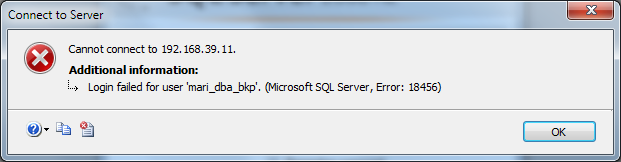
After entering into SQL Server database via SSMS using remembered password the following error window appeared:

image


Solution:

Note that, this method will clear all remembered passwords and the connect window will look like this:

image


image


If this is what you want, do the following steps:

1. Close SQL Server Management Studio.
2. Delete C:\Users\mkupatadze\AppData\Roaming\Microsoft\Microsoft SQL Server\100\Tools\Shell\SqlStudio.bin
3. Re-start SQL Server Management Studio.

Installing standalone standby database for RAC

In this post we will install standalone standby database for 2-node RAC. Assume that we have already configured RAC, if not see the instructions here.

RAC description:

Instance name: orcl1
Hostname        : node1

Instance name: orcl2
Hostname        : node2

Standby description:

Instance name will be: stbydb
Hostname                    :  stbynode

All of these instances are using ASM.

So let’s start…

On primary database:

0. Add entries in hosts file.

On standby :

127.0.0.1 localhost

192.168.34.150 node1
192.168.34.151 node2

10.10.2.50 node1-priv
10.10.2.51 node2-priv

192.168.34.154 node1-vip
192.168.34.155 node2-vip

192.168.34.160 rac-scan

192.168.34.156 stbynode

On node1,node2:

127.0.0.1               localhost.localdomain localhost

192.168.34.150 node1
192.168.34.151 node2

10.10.2.50 node1-priv
10.10.2.51 node2-priv

192.168.34.154 node1-vip
192.168.34.155 node2-vip

192.168.34.160 rac-scan

192.168.34.156 stbynode

1. Enable archiving.

On node1:

[oracle@node1 ~]$ export ORACLE_SID=orcl1

sqlplus / as sysdba

SQL> select log_mode from v$database;

LOG_MODE
————
NOARCHIVELOG

SQL> shutdown immediate;

SQL> startup mount;

On node2:

export ORACLE_SID=orcl2

sqlplus / as sysdba

SQL> shutdown immediate;

SQL> startup mount;

Note that: In RAC environment to take database to archivelog mode , you must take all instances into mount state.

On node1:

SQL> alter database archivelog;

SQL> alter database open;

On node2:

SQL> alter database open;

On any node:

SQL> select log_mode from v$database;

LOG_MODE
————
ARCHIVELOG

2. Enable force logging.

On node1:

SQL> select force_logging from v$database;

FOR

NO

SQL> alter database force logging;

SQL> select force_logging from v$database;

FOR

YES

3. Modify the following parameters:

On node1:

SQL> show parameter pfile

NAME                                 TYPE        VALUE
———————————— ———– ——————————
spfile                               string      +DATA/orcl/spfileorcl.ora

SQL> create pfile from spfile;

Edit the following parameters into initorcl1.ora:

log_file_name_convert=’+DATA/stbydb’,’+DATA/orcl’
db_file_name_convert=’+DATA/stbydb’,’+DATA/orcl’
fal_client=’orcl1′
fal_client=’orcl2′
fal_server=’stbydb’
log_archive_config=’dg_config=(orcl,stbydb)’
log_archive_dest_state_1=’enable’
log_archive_dest_state_2=’ENABLE’
log_archive_dest_state_3=’enable’
log_archive_dest_1=’LOCATION=USE_DB_RECOVERY_FILE_DEST  VALID_FOR=(ONLINE_LOGFILES,ALL_ROLES) DB_UNIQUE_NAME=orcl’
log_archive_dest_2=’SERVICE=stbydb LGWR ASYNC VALID_FOR=(ONLINE_LOGFILES,PRIMARY_ROLE) DB_UNIQUE_NAME=stbydb’
log_archive_dest_3=’LOCATION=+DATA/orcl/STANDBYLOG  VALID_FOR=(STANDBY_LOGFILES,STANDBY_ROLE) DB_UNIQUE_NAME=orcl’
log_archive_max_processes=7
log_archive_min_succeed_dest=2
remote_login_passwordfile=’EXCLUSIVE’
standby_file_management=’auto’
sec_case_sensitive_logon=FALSE

My initorcl1.ora looks like this:

orcl1.__db_cache_size=503316480
orcl2.__db_cache_size=486539264
orcl1.__java_pool_size=16777216
orcl2.__java_pool_size=16777216
orcl1.__large_pool_size=16777216
orcl2.__large_pool_size=16777216
orcl1.__oracle_base=’/u01/app/oracle’#ORACLE_BASE set from environment
orcl2.__oracle_base=’/u01/app/oracle’#ORACLE_BASE set from environment
orcl1.__pga_aggregate_target=587202560
orcl2.__pga_aggregate_target=587202560
orcl1.__sga_target=872415232
orcl2.__sga_target=872415232
orcl1.__shared_io_pool_size=0
orcl2.__shared_io_pool_size=0
orcl1.__shared_pool_size=318767104
orcl2.__shared_pool_size=335544320
orcl1.__streams_pool_size=0
orcl2.__streams_pool_size=0
*.audit_file_dest=’/u01/app/oracle/admin/orcl/adump’
*.audit_trail=’db’
*.cluster_database=true
*.compatible=’11.2.0.0.0′
*.control_files=’+DATA/orcl/controlfile/current.260.793127259′
*.db_block_size=8192
*.db_create_file_dest=’+DATA’
*.db_domain=”
*.db_name=’orcl’
*.db_recovery_file_dest=’+DATA’
*.db_recovery_file_dest_size=4039114752
*.diagnostic_dest=’/u01/app/oracle’
*.dispatchers='(PROTOCOL=TCP) (SERVICE=orclXDB)’
orcl2.instance_number=2
orcl1.instance_number=1
*.log_archive_format=’%t_%s_%r.dbf’
*.memory_target=1449132032
*.open_cursors=300
*.processes=150
*.remote_listener=’rac-scan:1521′
*.remote_login_passwordfile=’exclusive’
orcl1.thread=1
orcl2.thread=2
orcl2.undo_tablespace=’UNDOTBS1′
orcl1.undo_tablespace=’UNDOTBS2′
log_file_name_convert=’+DATA/stbydb’,’+DATA/orcl’
db_file_name_convert=’+DATA/stbydb’,’+DATA/orcl’
fal_client=’orcl1′
fal_client=’orcl2′
fal_server=’stbydb’
log_archive_config=’dg_config=(orcl,stbydb)’
log_archive_dest_state_1=’enable’
log_archive_dest_state_2=’ENABLE’
log_archive_dest_state_3=’enable’
log_archive_dest_1=’LOCATION=USE_DB_RECOVERY_FILE_DEST  VALID_FOR=(ONLINE_LOGFILES,ALL_ROLES) DB_UNIQUE_NAME=orcl’
log_archive_dest_2=’SERVICE=stbydb LGWR ASYNC VALID_FOR=(ONLINE_LOGFILES,PRIMARY_ROLE) DB_UNIQUE_NAME=stbydb’
log_archive_dest_3=’LOCATION=+DATA/orcl/STANDBYLOG  VALID_FOR=(STANDBY_LOGFILES,STANDBY_ROLE) DB_UNIQUE_NAME=orcl’
log_archive_max_processes=7
log_archive_min_succeed_dest=2
remote_login_passwordfile=’EXCLUSIVE’
standby_file_management=’auto’
*.sec_case_sensitive_logon=FALSE

SQL> shutdown immediate;

SQL> startup nomount pfile=’/u01/app/oracle/product/11.2.0/db_1/dbs/initorcl1.ora’

On node2:

[oracle@node2 ~]$ export ORACLE_SID=orcl2
[oracle@node2 ~]$ sqlplus / as sysdba

SQL> shutdown immediate;
Database closed.
Database dismounted.
ORACLE instance shut down.

On node1:

SQL> create spfile=’+DATA/ORCL/spfileorcl.ora’ from pfile=’/u01/app/oracle/product/11.2.0/db_1/dbs/initorcl1.ora’;

Edit initorcl1.ora file and write just the following entry:

SPFILE=’+DATA/ORCL/spfileorcl.ora’

And start the instance.

SQL> shutdown immediate;

SQL> startup

On node2:

If you try to open node2, it will stuck because it will try to send archivelog to standby location, which is not completely configured yet. So let node2 to be in down state.

3. Create same password files for all instances(passwords must be the same ).

On node1:

[oracle@node1 dbs]$ orapwd file=$ORACLE_HOME/dbs/orapworcl1 password=oracle force=y entries=5 ignorecase=y

On node2:

[oracle@node2 dbs]$ orapwd file=$ORACLE_HOME/dbs/orapworcl2 password=oracle force=y entries=5 ignorecase=y

On stbynode:

[oracle@stbynode ~]$ orapwd file=$ORACLE_HOME/dbs/orapwstbydb password=oracle entries=5 force=y  ignorecase=y

4. Create standby logfiles on primary.

On node1:

SQL> sqlplus / as sysdba
SQL>  select max(length(member)) from v$logfile;

MAX(LENGTH(MEMBER))
——————-
42

SQL> col member for a42
SQL> select group#,member,type from v$logfile order by 1;

GROUP# MEMBER                                     TYPE
———- —————————————— ——-
1 +DATA/orcl/onlinelog/group_1.261.793127267 ONLINE
2 +DATA/orcl/onlinelog/group_2.262.793127267 ONLINE
3 +DATA/orcl/onlinelog/group_3.266.793128605 ONLINE
4 +DATA/orcl/onlinelog/group_4.267.793128605 ONLINE

SQL> alter database add standby logfile thread 1;

SQL> alter database add standby logfile thread 2;

SQL> select group#,member,type from v$logfile order by 1;

GROUP# MEMBER                                     TYPE
———- —————————————— ——-
1 +DATA/orcl/onlinelog/group_1.261.793127267 ONLINE
2 +DATA/orcl/onlinelog/group_2.262.793127267 ONLINE
3 +DATA/orcl/onlinelog/group_3.266.793128605 ONLINE
4 +DATA/orcl/onlinelog/group_4.267.793128605 ONLINE
5 +DATA/orcl/onlinelog/group_5.273.793983817 STANDBY
5 +DATA/orcl/onlinelog/group_5.274.793983819 STANDBY
6 +DATA/orcl/onlinelog/group_6.271.793983823 STANDBY
6 +DATA/orcl/onlinelog/group_6.272.793983823 STANDBY

5. Create parameter file for standby database.

SQL> create pfile=’$ORACLE_HOME/dbs/initstbydb.ora’ from spfile;

Edit required parameters. Delete red entries. Green fields are corrected entries:

orcl2.__db_cache_size=486539264
orcl1.__
db_cache_size=503316480
orcl2.__java_pool_size=16777216
orcl1.__
java_pool_size=16777216
orcl2.__large_pool_size=16777216
orcl1.__
large_pool_size=16777216
orcl1.__oracle_base=’/u01/app/oracle’#ORACLE_BASE set from environment
orcl2.__oracle_base=’/u01/app/oracle’#ORACLE_BASE set from environment
orcl2.__pga_aggregate_target=587202560
orcl1.__
pga_aggregate_target=587202560
orcl2.__sga_target=872415232
orcl1.__
sga_target=872415232
orcl2.__shared_io_pool_size=0
orcl1.__shared_io_pool_size=0
orcl2.__shared_pool_size=335544320
orcl1.__
shared_pool_size=318767104
orcl2.__streams_pool_size=0
orcl1.__
streams_pool_size=0
*.audit_file_dest=’/u01/app/oracle/admin/stbydb/adump’
*.audit_trail=’db’
*.cluster_database=true
*.compatible=’11.2.0.0.0′
*.control_files=’+DATA/stbydb/controlfile/control01.ctl’
*.db_block_size=8192
*.db_create_file_dest=’+DATA’
*.db_domain=”
*.db_file_name_convert=‘+DATA/orcl’,’+DATA/stbydb’
*.db_name=’orcl’
*.db_unique_name=’stbydb’
*.db_recovery_file_dest=’+DATA’
*.db_recovery_file_dest_size=4039114752
*.diagnostic_dest=’/u01/app/oracle’
*.dispatchers='(PROTOCOL=TCP) (SERVICE=stbydbXDB)’
*.fal_client=’stbydb
*.fal_server=’orcl
orcl2.instance_number=2
orcl1.instance_number=1
*.log_archive_config=’dg_config=(orcl,stbydb)’
*.log_archive_dest_1=’LOCATION=USE_DB_RECOVERY_FILE_DEST  VALID_FOR=(ONLINE_LOGFILES,ALL_ROLES) DB_UNIQUE_NAME=stbydb
*.log_archive_dest_2=’SERVICE=orcl LGWR ASYNC VALID_FOR=(ONLINE_LOGFILES,PRIMARY_ROLE) DB_UNIQUE_NAME=orcl
*.log_archive_dest_3=’LOCATION=+DATA/stbydb/STANDBYLOG  VALID_FOR=(STANDBY_LOGFILES,STANDBY_ROLE) DB_UNIQUE_NAME=stbydb
*.log_archive_dest_state_1=’enable’
*.log_archive_dest_state_2=’ENABLE’
*.log_archive_dest_state_3=’enable’
*.log_archive_format=’%t_%s_%r.dbf’
*.log_archive_max_processes=7
*.log_archive_min_succeed_dest=2
*.log_file_name_convert=’+DATA/orcl‘,’+DATA/stbydb
*.memory_target=1449132032
*.open_cursors=300
*.processes=150
*.remote_listener=’rac-scan:1521′
*.remote_login_passwordfile=’EXCLUSIVE’
*.standby_file_management=’auto’
orcl1.thread=1
orcl2.thread=2
orcl2.
undo_tablespace=’UNDOTBS1′
orcl1.undo_tablespace=’UNDOTBS2′
sec_case_sensitive_logon=FALSE

—initstbydb.ora

db_cache_size=503316480
java_pool_size=16777216
large_pool_size=16777216
pga_aggregate_target=587202560
sga_target=872415232
shared_pool_size=318767104
streams_pool_size=0
*.audit_file_dest=’/u01/app/oracle/admin/stbydb/adump’
*.audit_trail=’db’
*.compatible=’11.2.0.0.0′
*.control_files=’+DATA/stbydb/controlfile/control01.ctl’
*.db_block_size=8192
*.db_create_file_dest=’+DATA’
*.db_domain=”
*.db_file_name_convert=’+DATA/orcl’,’+DATA/stbydb’
*.db_name=’orcl’
*.db_unique_name=’stbydb’
*.db_recovery_file_dest=’+DATA’
*.db_recovery_file_dest_size=4039114752
*.diagnostic_dest=’/u01/app/oracle’
*.dispatchers='(PROTOCOL=TCP) (SERVICE=stbydbXDB)’
*.fal_client=’stbydb’
*.fal_server=’orcl’
*.log_archive_config=’dg_config=(stbydb,orcl)’
*.log_archive_dest_1=’LOCATION=USE_DB_RECOVERY_FILE_DEST  VALID_FOR=(ONLINE_LOGFILES,ALL_ROLES) DB_UNIQUE_NAME=stbydb’
*.log_archive_dest_2=’SERVICE=orcl LGWR ASYNC VALID_FOR=(ONLINE_LOGFILES,PRIMARY_ROLE) DB_UNIQUE_NAME=orcl’
*.log_archive_dest_3=’LOCATION=+DATA/stbydb/STANDBYLOG  VALID_FOR=(STANDBY_LOGFILES,STANDBY_ROLE) DB_UNIQUE_NAME=stbydb’
*.log_archive_dest_state_1=’enable’
*.log_archive_dest_state_2=’ENABLE’
*.log_archive_dest_state_3=’enable’
*.log_archive_format=’%t_%s_%r.dbf’
*.log_archive_max_processes=7
*.log_archive_min_succeed_dest=2
*.log_file_name_convert=’+DATA/orcl’,’+DATA/stbydb’
*.memory_target=1449132032
*.open_cursors=300
*.processes=150
*.remote_listener=’rac-scan:1521′
*.remote_login_passwordfile=’EXCLUSIVE’
STANDBY_FILE_MANAGEMENT=’auto’
sec_case_sensitive_logon=FALSE

Copy parameter file to standby.

[oracle@node1 dbs]$ scp initstbydb.ora oracle@stbynode:$ORACLE_HOME/dbs

The authenticity of host ‘stbynode (192.168.34.156)’ can’t be established.
RSA key fingerprint is 73:fa:1f:a0:04:41:68:98:30:25:28:55:59:9c:07:9b.
Are you sure you want to continue connecting (yes/no)? yes
Warning: Permanently added ‘stbynode,192.168.34.156’ (RSA) to the list of known hosts.
oracle@stbynode’s password:
initstbydb.ora                                100% 1479     1.4KB/s   00:00

6. Create required directories on primary and standby databases.

On node1:

mkdir -p /u01/app/oracle/backup

On stbynode

mkdir -p  /u01/app/oracle/admin/stbydb/adump
mkdir -p /u01/app/oracle/backup

su – grid

[grid@stbynode ~]$ asmcmd
ASMCMD> ls
CRS/
DATA/
ASMCMD> cd data
ASMCMD> ls
ASMCMD> mkdir stbydb
ASMCMD> cd stbydb
ASMCMD> mkdir ARCHIVELOG CONTROLFILE DATAFILE ONLINELOG PARAMETERFILE STANDBYLOG TEMPFILE

7. Add tns entries in tnsnames.ora file and listener entry in listener.ora file:

–tnsnames.ora

On node1, node2 and stbynode:

ORCL =
(DESCRIPTION =
(ADDRESS = (PROTOCOL = TCP)(HOST = rac-scan)(PORT = 1521))
(CONNECT_DATA =
(SERVER = DEDICATED)
(SERVICE_NAME = orcl)
)
)

stbydb=
(DESCRIPTION =
(ADDRESS_LIST =
(ADDRESS = (PROTOCOL = TCP)(HOST = stbynode)(PORT = 1521))
)
(CONNECT_DATA =
(SERVICE_NAME = stbydb)
)
)

On node1, node2 and stbynode:

[oracle@node2 dbs]$ tnsping orcl

TNS Ping Utility for Linux: Version 11.2.0.1.0 – Production on 14-SEP-2012 17:04:13

Copyright (c) 1997, 2009, Oracle.  All rights reserved.

Used parameter files:

Used TNSNAMES adapter to resolve the alias
Attempting to contact (DESCRIPTION = (ADDRESS = (PROTOCOL = TCP)(HOST = rac-scan)(PORT = 1521)) (CONNECT_DATA = (SERVER = DEDICATED) (SERVICE_NAME = orcl)))
OK (20 msec)
[oracle@node2 dbs]$ tnsping stbydb

TNS Ping Utility for Linux: Version 11.2.0.1.0 – Production on 14-SEP-2012 17:04:20

Copyright (c) 1997, 2009, Oracle.  All rights reserved.

Used parameter files:

Used TNSNAMES adapter to resolve the alias
Attempting to contact (DESCRIPTION = (ADDRESS_LIST = (ADDRESS = (PROTOCOL = TCP)(HOST = stbynode)(PORT = 1521))) (CONNECT_DATA = (SERVICE_NAME = stbydb)))
OK (20 msec)

8. Add entry in oratab.

On stbynode:

vi /etc/oratab

+ASM:/u01/app/11.2.0/grid:N
stbydb:/u01/app/oracle/product/11.2.0/db_1:N

9. Making backups on primary(node1) and copy them to standby.

On node1:

export ORACLE_SID=orcl1
rman target /
RMAN> configure channel device type disk format ‘/u01/app/oracle/backup/%U’;
RMAN> backup database plus archivelog;
RMAN> backup current controlfile for standby;
RMAN> backup archivelog all;

[oracle@node1 ~]$ scp /u01/app/oracle/backup/* oracle@stbynode:/u01/app/oracle/backup/

10.  Duplicate database.

On stbynode:

[oracle@stbynode ~]$ export ORACLE_SID=stbydb
[oracle@stbynode ~]$ sqlplus / as sysdba

SQL> startup nomount;

[oracle@stbynode ~]$ export ORACLE_SID=stbydb
[oracle@stbynode ~]$ rman target sys/oracle@orcl auxiliary /

Recovery Manager: Release 11.2.0.1.0 – Production on Fri Sep 14 19:50:02 2012

Copyright (c) 1982, 2009, Oracle and/or its affiliates.  All rights reserved.

connected to target database: ORCL (DBID=1320907995)
connected to auxiliary database: ORCL (not mounted)

RMAN> duplicate target database for standby nofilenamecheck;

[oracle@stbynode ~]$ export ORACLE_SID=stbydb
[oracle@stbynode ~]$ sqlplus / as sysdba

SQL> ALTER DATABASE RECOVER MANAGED STANDBY DATABASE USING CURRENT LOGFILE DISCONNECT FROM SESSION;

11. Startup all.

On node2:

SQL> startup;

On stbynode:

alter database open;

12. Test.

On node1:

SQL> create table b(b number);
SQL> insert into b values(1);
SQL> commit;
SQL> alter system switch logfile;

On node2:

SQL> alter system switch logfile;

On stbynode:

SQL> select * from b;

B
———-
1

On node1:

ALTER SESSION SET nls_date_format=’DD-MON-YYYY HH24:MI:SS’;

SELECT sequence#, first_time, next_time
FROM v$archived_log
ORDER BY sequence#;
ALTER SYSTEM SWITCH LOGFILE;

SELECT sequence#, first_time, next_time
FROM v$archived_log
ORDER BY sequence#;
On node2:

SQL> alter system switch logfile;

On stbynode:

ALTER SESSION SET nls_date_format=’DD-MON-YYYY HH24:MI:SS’;

SELECT sequence#, first_time, next_time, applied
FROM v$archived_log
ORDER BY sequence#;