PIN_PACKS-TRIGGER-INVALID, DBMS_SHARED_POOL.KEEP must be declared 10g

To resolve the issue, do the following:

1. Connect as SYSDBA

$sqlplus / as sysdba

2. Create DBMS_SHARED_POOL package , grant necessary privileges and create dba_keepsizes view.

@?/rdbms/admin/dbmspool.sql

3. Recompile the trigger

alter trigger PIN_PACKS compile;

DBMS_SQLPA – PACKAGE BODY – INVALID 10g

To resolve the issue, do the following:

1. Connect as SYSDBA

$ sqlplus / as sysdba

2. Drop plan table

SQL> drop table plan_table;

Table dropped.


3. Recreate plan table

SQL> @?/rdbms/admin/utlxplan

Table created.

4. Re-create dbms_sqlpa package and public synonym

SQL> @?/rdbms/admin/prvtspao.plb

PL/SQL procedure successfully completed.

Package created.

No errors.

Synonym created.

No errors.

Package body created.

No errors.

5. Recompile all objects

SQL> @?/rdbms/admin/utlrp.sql

DBMS_SQLPA – PACKAGE BODY – INVALID 10g

To resolve the issue, do the following:

1. Connect as SYSDBA

$ sqlplus / as sysdba

2. Drop plan table

SQL> drop table plan_table;

Table dropped.


3. Recreate plan table

SQL> @?/rdbms/admin/utlxplan

Table created.

4. Re-create dbms_sqlpa package and public synonym

SQL> @?/rdbms/admin/prvtspao.plb

PL/SQL procedure successfully completed.

Package created.

No errors.

Synonym created.

No errors.

Package body created.

No errors.

5. Recompile all objects

SQL> @?/rdbms/admin/utlrp.sql

Configure Oracle database to use SSL with self-signed certificate

You can use Oracle SSL to encrypt data exchange between Oracle database and Oracle client.

For the first time, let’s check that data is not encrypted by default when the client is selecting some info from the database.

For demonstration of this I will use WireShark.

Checking…

1. Run WireShark and highlight network card by which you use to connect to the database. For me it is “”Local Area Connection 3”.

image

2. click Capture Options and in Capture Filter write :

src host 192.168.171.153 and dst host 192.168.59.51 and tcp port 1521

Description: src host –is client ip
dst host – is database ip
tcp port – is the database port number

This means to capture requests from client(192.168.171.153) to the database(192.168.59.51) using tcp port 1521.

3. click Start.

4. Connect to the database and run testing select:

select *
from dual

WireShark with a lot of rows will contain the row consisting the following text, that contains our select

image

Configuring SSL…

Wallet configuration on DB server

0. Lets create working folder called /0 for simplicity.

mkdir /0

chmod –R 777 /0

1. Create certification request using Oracle Wallet Manager (/u01/app/oracle/product/11.2.0/db_1/bin/owm).

su – oracle

owm

image

2.  Wallet->New

image

3.  Enter the password, which protects wallet from opening. OK

4. Click Yes(for creating necessary folders for wallet)

image

5. Click Yes(for creating certification request)

image

6. Fill the items by your info.

7. click OK

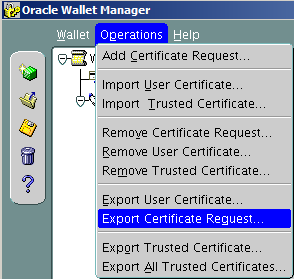
8. Highlight certification request and from menu choose Operations->Export Certificate Request

image

9. Save the file with the extension .csr in /0 folder

image

10. Download ssl.ca-0.1.tar.gz file for to generate trusted and user certificates.

Here I want to note that trusted certificate is like a public key which will be sent to the client and user certificate is like a private key which has only the database server.

Move downloaded file to the /0 folder and extract. Then move certification request to the extracted folder.

cd /0/
tar -xvf ssl.ca-0.1.tar.gz
mv /0/CerReq.csr  /0/ssl.ca-0.1/

1.10  Create a self-signed root certificate by running the new-root-ca.sh script. This will create a file called ca.crt

cd /0/ssl.ca-0.1/

./new-root-ca.sh
No Root CA key round. Generating one
Generating RSA private key, 1024 bit long modulus
…………………++++++
………………………………………………………..++++++
e is 65537 (0x10001)
Enter pass phrase for ca.key:enter the password
Verifying – Enter pass phrase for ca.key:enter the password

Self-sign the root CA…
Enter pass phrase for ca.key:enter the password
You are about to be asked to enter information that will be incorporated
into your certificate request.
What you are about to enter is what is called a Distinguished Name or a DN.
There are quite a few fields but you can leave some blank
For some fields there will be a default value,
If you enter ‘.’, the field will be left blank.
—–
Country Name (2 letter code) [MY]:GE
State or Province Name (full name) [Perak]:.     <- here is written dot (.)
Locality Name (eg, city) [Sitiawan]:Tbilisi
Organization Name (eg, company) [My Directory Sdn Bhd]:MjM
Organizational Unit Name (eg, section) [Certification Services Division]:IT
Common Name (eg, MD Root CA) []:ca_root
Email Address []:mariam.kupa@gmail.com

1.11 Create the self-signed server certificate by running the sign-server-cert.sh script.

./sign-server-cert.sh CerReq
CA signing: CerReq.csr -> CerReq.crt:
Using configuration from ca.config
Enter pass phrase for ./ca.key:enter the password for the ca
Check that the request matches the signature
Signature ok
The Subject’s Distinguished Name is as follows
commonName            : .PRINTABLE:’MjM’
organizationalUnitName: .PRINTABLE:’IT’
organizationName      : .PRINTABLE:’MjM’
localityName          : .PRINTABLE:’Tbilisi’
countryName           : .PRINTABLE:’GE’
Certificate is to be certified until Nov  5 12:40:48 2014 GMT (365 days)
Sign the certificate? [y/n]:y
1 out of 1 certificate requests certified, commit? [y/n]y
Write out database with 1 new entries
Data Base Updated
CA verifying: CerReq.crt <-> CA cert
CerReq.crt: OK

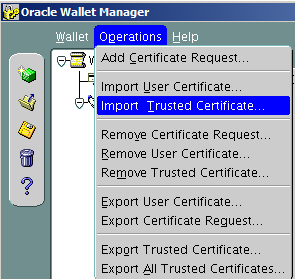
1.12 From the wallet manager import these certificates.

image

Operations-> Import Trusted Certificate

image

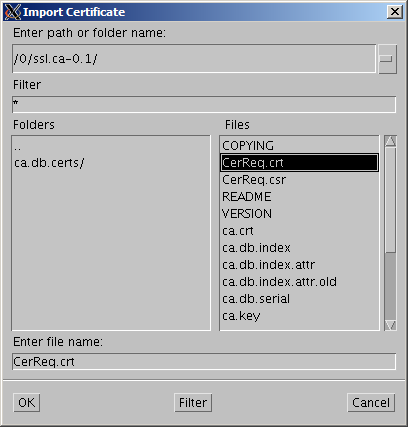
Select a file that contains the certificate. click OK.

image

Choose ca.crt

image

image

Choose CerReq.crt

Save the wallet from the menu Wallet->Save

image

click OK.

image

Check Auto Login and Exit.

Oracle Advanced Security and listener Configuration on DB Server

1.

su – oracle

netmgr

Choose Profile->Oracle Advanced Security-> SSL

choose server

image

Fill the items as it is shown on the picture, except that you should indicate your own wallet location. For me it is /u01/app/oracle/product/11.2.0/db_1/owm/wallets/oracle

Click File->Save Network Configuration.

2. Change listener entry on the database server by adding port 2484 using protocol TCPS :

# listener.ora Network Configuration File: /u01/app/oracle/product/11.2.0/db_1/network/admin/listener.ora
# Generated by Oracle configuration tools.

SID_LIST_LISTENER =
(SID_LIST =
(SID_DESC =
(GLOBAL_DBNAME = orcl)
(ORACLE_HOME = /u01/app/oracle/product/11.2.0/db_1)
(SID_NAME = orcl)
)
)

SSL_CLIENT_AUTHENTICATION = FALSE

WALLET_LOCATION =
(SOURCE =
(METHOD = FILE)
(METHOD_DATA =
(DIRECTORY = /u01/app/oracle/product/11.2.0/db_1/owm/wallets/oracle)
)
)

LISTENER =
(DESCRIPTION_LIST =
(DESCRIPTION =
(ADDRESS = (PROTOCOL = TCP)(HOST = server.gov.ge)(PORT = 1521))
)
(DESCRIPTION =
      (ADDRESS = (PROTOCOL = TCPS)(HOST = server.gov.ge)(PORT = 2484))
    )
)

ADR_BASE_LISTENER = /u01/app/oracle

Look at the highlighted section , I am using 2484 as a port  number ,which is Oracle recommended port for SSL , and  TCPS as a protocol .

Restart the listener

lsnrctl stop

lsnrctl start

Client Configuration

1.  Do the same steps as we did on the database server.

1.1 Create new wallet

1.2 Create certificate request

1.3 Copy trusted certificate, which we have generated on the database server

1.4 Import only trusted certificate.

1.5 Save

1.6  Check Auto Login and Save.

2. Run Network Manager

2.1 Profile->Oracle Advanced Security –>SSL

choose client.

image

Fill items as it is shown on the picture(indicate your wallet location)

3. Configure tnsnames.ora by the following entry:

orcl_ssl=
(DESCRIPTION =
(ADDRESS = (PROTOCOL = TCPS)(HOST = server.gov.ge)(PORT = 2484))
(CONNECT_DATA =
(SERVER = DEDICATED)
(SERVICE_NAME = orcl)
)
)

Check again by WhireShark.

You will see that no rows will contain clear words. Everything is encrypted.

Note: If you have any certification validation failure errors, first try to stop listener and start again..or write me on the comment and I will try to help you.

Accidentally deleted Central Inventory-How to re-create it?

Details:

Users: Oracle, Grid.
Homes: /u01/app/oracle/product/11.2.0/db_1 ,  /u01/app/11.2.0/grid
Local inventory: /u01/app/oracle/product/11.2.0/db_1/inventory ,  /u01/app/11.2.0/grid/inventory
Central inventory: /u01/app/oraInventory (it was accidentally deletedSad smile )

To Check:

0.

su  – oracle

1.

cd /u01/app/oracle/product/11.2.0/db_1/OPatch/

2.

./opatch lsinventory

Invoking OPatch 11.2.0.1.7

Oracle Interim Patch Installer version 11.2.0.1.7
Copyright (c) 2011, Oracle Corporation.  All rights reserved.

Oracle Home       : /u01/app/11.2.0/grid
Central Inventory : /u01/app/oraInventory
   from           : /etc/oraInst.loc
OPatch version    : 11.2.0.1.7
OUI version       : 11.2.0.3.0
Log file location : /u01/app/11.2.0/grid/cfgtoollogs/opatch/opatch2013-11-04_15-06-56PM.log

OPatch failed to locate Central Inventory.
Possible causes are:
    The Central Inventory is corrupted
    The oraInst.loc file specified is not valid.
LsInventorySession failed: OPatch failed to locate Central Inventory.
Possible causes are:
    The Central Inventory is corrupted
    The oraInst.loc file specified is not valid.

OPatch failed with error code 73

To Solve:

OUI is the great tool by which you can re-create Central or Local inventories.

Find the owner of the /u01/app folder. For me it is grid.

[oracle@oracle01 ~]$ ls -la /u01
total 12
drwxr-xr-x.  3 grid oinstall 4096 Sep 10 15:36 .
dr-xr-xr-x. 27 root root     4096 Oct 24 17:20 ..
drwxr-xr-x.  6 grid oinstall 4096 Nov  4 17:43 app

Login by the same user and run:

–To attach Oracle home

[grid@oracle01 ~]$ /u01/app/oracle/product/11.2.0/db_1/oui/bin/runInstaller -silent -attachHome -invPtrLoc /etc/oraInst.loc oracle_home="/u01/app/oracle/product/11.2.0/db_1" ORACLE_HOME_NAME="OraDb11g_home1"
Starting Oracle Universal Installer…

Checking swap space: must be greater than 500 MB.   Actual 8191 MB    Passed
The inventory pointer is located at /etc/oraInst.loc
The inventory is located at /u01/app/oraInventory
‘AttachHome’ was successful.

–To attach Grid home

[grid@oracle01 ~]$ /u01/app/11.2.0/grid/oui/bin/runInstaller -silent -attachHome -invPtrLoc /etc/oraInst.loc oracle_home="/u01/app/11.2.0/grid" ORACLE_HOME_NAME="Ora11g_gridinfrahome1"
Starting Oracle Universal Installer…

Checking swap space: must be greater than 500 MB.   Actual 8191 MB    Passed
The inventory pointer is located at /etc/oraInst.loc
The inventory is located at /u01/app/oraInventory
‘AttachHome’ was successful.


Check again:

[oracle@oracle01 OPatch]$ ./opatch lsinventory -all
Invoking OPatch 11.2.0.1.7

Oracle Interim Patch Installer version 11.2.0.1.7
Copyright (c) 2011, Oracle Corporation.  All rights reserved.

Oracle Home       : /u01/app/oracle/product/11.2.0/db_1
Central Inventory : /u01/app/oraInventory
   from           : /etc/oraInst.loc
OPatch version    : 11.2.0.1.7
OUI version       : 11.2.0.3.0
Log file location : /u01/app/oracle/product/11.2.0/db_1/cfgtoollogs/opatch/opatch2013-11-04_18-01-36PM.log

Lsinventory Output file location : /u01/app/oracle/product/11.2.0/db_1/cfgtoollogs/opatch/lsinv/lsinventory2013-11-04_18-01-36PM.txt

——————————————————————————–
List of Oracle Homes:
  Name          Location
   Ora11g_gridinfrahome1         /u01/app/11.2.0/grid
   OraDb11g_home1         /u01/app/oracle/product/11.2.0/db_1

Installed Top-level Products (1):

Oracle Database 11g                                                  11.2.0.3.0
There are 1 products installed in this Oracle Home.

There are no Interim patches installed in this Oracle Home.

——————————————————————————–

OPatch succeeded.

Transaction recovery: lock conflict caught and ignored

ALERT.LOG:

..... Transaction recovery: lock conflict caught and ignored
.....

And also some incident files are being created in $ORACLE_BASE/diag/rdbms/dbname/instancename/incident folder.

In my case the error started after SUPPLEMENTAL LOGGING enabled in a RAC environment. After disabling it the messages have not disappeared, but incident files are no longer being created.

1. Dead Trasaction

SQL> select b.name useg, b.inst# instid, b.status$ status, a.ktuxeusn

xid_usn, a.ktuxeslt xid_slot, a.ktuxesqn xid_seq, a.ktuxesiz undoblocks,

a.ktuxesta txstatus

from x$ktuxe a, undo$ b

where a.ktuxecfl like ‘%DEAD%’

and a.ktuxeusn = b.us#;

USEG INSTID STATUS XID_USN XID_SLOT XID_SEQ UNDOBLOCKS TXSTATUS
_SYSSMU7_881277423$ 1 3 7 13 1829999 1 ACTIVE
_SYSSMU8_4204495590$ 1 3 8 32 3045564 1 ACTIVE
_SYSSMU10_1314081219$ 1 3 10 3 11844457 1 ACTIVE

Transaction id is  XID_USN.XID_SLOT.XID_SEQ

So in our case, for the first row it will be 7.13.1829999

2.  Read transaction table from undo header.

ALTER SYSTEM DUMP UNDO HEADER ‘_SYSSMU7_881277423$’;

….

  TRN TBL::

 
  index  state cflags  wrap#    uel         scn            dba            parent-xid    nub     stmt_num    cmt

  ————————————————————————————————

   0x00    9    0x03  0x1bf45c  0x000b  0x0000.789de808  0x00c242eb  0x0000.000.00000000  0x00000001   0x00c242eb  1367258143

   0x01    9    0x00  0x1c031b  0x0014  0x0000.789e6018  0x00c242fa  0x0000.000.00000000  0x00000001   0x00000000  1367258225

   0x02    9    0x00  0x1c147a  0x000e  0x0000.789e694b  0x00c242fa  0x0000.000.00000000  0x00000001   0x00000000  1367258230

   0x03    9    0x00  0x1c06f9  0x0016  0x0000.789e601c  0x00c242fa  0x0000.000.00000000  0x00000001   0x00000000  1367258225

   0x04    9    0x00  0x1c06c8  0x0009  0x0000.789e3566  0x00c242f9  0x0000.000.00000000  0x00000001   0x00000000  1367258192

   0x05    9    0x00  0x1c1167  0x0015  0x0000.789e357f  0x00c242ec  0x0000.000.00000000  0x00000001   0x00000000  1367258192

   0x06    9    0x00  0x1c2716  0x0017  0x0000.789e69e1  0x00c242fa  0x0000.000.00000000  0x00000001   0x00000000  1367258230

   0x07    9    0x00  0x1c1045  0x000c  0x0000.789e1bdb  0x00c242eb  0x0000.000.00000000  0x00000001   0x00000000  1367258170

   0x08    9    0x00  0x1c2614  0x0005  0x0000.789e357e  0x00c242ec  0x0000.000.00000000  0x00000001   0x00000000  1367258192

   0x09    9    0x00  0x1bfa03  0x0021  0x0000.789e3574  0x00c242f9  0x0000.000.00000000  0x00000001   0x00000000  1367258192

   0x0a    9    0x00  0x1bf712  0x001e  0x0000.789e3246  0x00c242f1  0x0000.000.00000000  0x00000001   0x00000000  1367258190

   0x0b    9    0x00  0x1c1e01  0x0007  0x0000.789e1bd9  0x00c242eb  0x0000.000.00000000  0x00000001   0x00000000  1367258170

   0x0c    9    0x00  0x1c08e0  0x000a  0x0000.789e3244  0x00c242f1  0x0000.000.00000000  0x00000006   0x00000000  1367258190

   0x0d   10    0x90  0x1bec6f  0x0038  0x0000.789e783e  0x00c242fb  0x0000.000.00000000  0x00000001   0x00c242fb  0

   0x0e    9    0x00  0x1c068e  0x0010  0x0000.789e694d  0x00c242fa  0x0000.000.00000000  0x00000001   0x00000000  1367258230

   0x0f    9    0x00  0x1c151d  0x0012  0x0000.789e3578  0x00c242ec  0x0000.000.00000000  0x00000001   0x00000000  1367258192

   0x10    9    0x00  0x1c26bc  0x0006  0x0000.789e69df  0x00c242fa  0x0000.000.00000000  0x00000001   0x00000000  1367258230

   0x11    9    0x00  0x1c16eb  0x0000  0x0000.789cbd77  0x00c242eb  0x0000.000.00000000  0x00000001   0x00000000  1367257923

   0x12    9    0x00  0x1c082a  0x001d  0x0000.789e357c  0x00c242ec  0x0000.000.00000000  0x00000001   0x00000000  1367258192

   0x13    9    0x00  0x1c1459  0x001f  0x0000.789e7891  0x00c242fc  0x0000.000.00000000  0x00000001   0x00000000  1367258238

   0x14    9    0x00  0x1c14b8  0x0003  0x0000.789e601a  0x00c242fa  0x0000.000.00000000  0x00000001   0x00000000  1367258225

   0x15    9    0x00  0x1c0457  0x0020  0x0000.789e39d3  0x00c242ec  0x0000.000.00000000  0x00000001   0x00000000  1367258195

   0x16    9    0x00  0x1c1326  0x0002  0x0000.789e601d  0x00c242fa  0x0000.000.00000000  0x00000001   0x00000000  1367258225

   0x17    9    0x00  0x1c0db5  0x001c  0x0000.789e788a  0x00c242fc  0x0000.000.00000000  0x00000001   0x00000000  1367258238

   0x18    9    0x00  0x1bffe4  0x001b  0x0000.789e400d  0x00c242fa  0x0000.000.00000000  0x00000001   0x00000000  1367258200

   0x19    9    0x00  0x1c16e3  0x0001  0x0000.789e5fd2  0x00c242fa  0x0000.000.00000000  0x00000001   0x00000000  1367258225

   0x1a    9    0x00  0x1bdbb2  0x0018  0x0000.789e400b  0x00c242fa  0x0000.000.00000000  0x00000001   0x00000000  1367258200

   0x1b    9    0x00  0x1c1141  0x0019  0x0000.789e453a  0x00c242fa  0x0000.000.00000000  0x00000001   0x00000000  1367258204

   0x1c    9    0x00  0x1bc9a0  0x0013  0x0000.789e788e  0x00c242fc  0x0000.000.00000000  0x00000001   0x00000000  1367258238

   0x1d    9    0x00  0x1c02ef  0x0008  0x0000.789e357d  0x00c242ec  0x0000.000.00000000  0x00000001   0x00000000  1367258192

   0x1e    9    0x00  0x1c0b6e  0x0004  0x0000.789e3250  0x00c242f9  0x0000.000.00000000  0x00000009   0x00000000  1367258190

   0x1f    9    0x00  0x1c00ad  0xffff  0x0000.789e78a1  0x00c242fc  0x0000.000.00000000  0x00000001   0x00000000  1367258238

   0x20    9    0x00  0x1c166c  0x001a  0x0000.789e39dd  0x00c242fa  0x0000.000.00000000  0x00000002   0x00000000  1367258195

   0x21    9    0x00  0x1c160b  0x000f  0x0000.789e3576  0x00c242ec  0x0000.000.00000000  0x00000001   0x00000000  1367258192

  EXT TRN CTL::

  usn: 7

 
State# 10 means active transaction.

dba points to starting UNDO block address.

usn: Undo segment number

usn.index.wrap# gives transaction id.

 
An active transaction 0x0007.00d.001bec6f is available in slot 0x0d which has a dba of 0x00c242fb (12731131 in decimal)

3. Reading UNDO Block:

Identify fileID and blockID:

fileID:

select DBMS_UTILITY.DATA_BLOCK_ADDRESS_FILE(12731131) from x$dual;

3

blockID:

select DBMS_UTILITY.DATA_BLOCK_ADDRESS_BLOCK(12731131) from x$dual;

148219

Dumping block

alter system dump datafile 3 block 148219;


UNDO BLK: 
xid: 0x0007.00d.001bec6f  seq: 0x41f9 cnt: 0x6   irb: 0x5   icl: 0x0   flg: 0x0000

 
Rec Offset      Rec Offset      Rec Offset      Rec Offset      Rec Offset

—————————————————————————

0x01 0x1f98     0x02 0x1f2c     0x03 0x1d7c     0x04 0x1d10     0x05 0x1ca0    
0x06 0x1bfc    
 
*—————————–

* Rec #0x1  slt: 0x0d  objn: 0(0x00000000)  objd: 0  tblspc: 0(0x00000000)

*       Layer:   5 (Transaction Undo)   opc: 7  rci 0x00  
Undo type:  Regular undo    Begin trans    Last buffer split:  No

Temp Object:  No

Tablespace Undo:  No

rdba: 0x00000000Ext idx: 0

flg2: 0

*—————————–

uba: 0x00c242fa.41f9.37 ctl max scn: 0x0000.789b7668 prv tx scn: 0x0000.789bb8d7

txn start scn: scn: 0x0000.789e783e logon user: 88

prev brb: 12731116 prev bcl: 0

 
*—————————–

* Rec #0x2  slt: 0x0d  objn: 110769(0x0001b0b1)  objd: 110769  tblspc: 6(0x00000006)

*       Layer:  11 (Row)   opc: 1  rci 0x00  
Undo type:  Regular undo    User Undo Applied  Last buffer split:  No

Temp Object:  No

Tablespace Undo:  No

rdba: 0x00000000

*—————————–

KDO undo record:

KTB Redo

op: 0x04  ver: 0x01 
compat bit: 4 (post-11) padding: 1

op: L  itl: xid:  0x0012.01c.00322281 uba: 0x0102c5f0.3fa9.0a

                      flg: C—    lkc:  0     scn: 0x0000.789ca3f4

KDO Op code: LKR row dependencies Disabled

  xtype: XA flags: 0x00000000  bdba: 0x038180fc  hdba: 0x018d64e2

itli: 1  ispac: 0  maxfr: 4858

tabn: 0 slot: 14 to: 0

 
*—————————–

* Rec #0x3  slt: 0x0d  objn: 110769(0x0001b0b1)  objd: 110769  tblspc: 6(0x00000006)

*       Layer:  11 (Row)   opc: 1   rci 0x02  
Undo type:  Regular undo    User Undo Applied  Last buffer split:  No

Temp Object:  No

Tablespace Undo:  No

rdba: 0x00000000

*—————————–

KDO undo record:

KTB Redo

op: 0x02  ver: 0x01 
compat bit: 4 (post-11) padding: 1

op: C  uba: 0x00c242fb.41f9.02

KDO Op code: URP row dependencies Disabled

  xtype: XA flags: 0x00000000  bdba: 0x038180fc  hdba: 0x018d64e2

itli: 1  ispac: 0  maxfr: 4858

tabn: 0 slot: 14(0xe) flag: 0x2c lock: 1 ckix: 0

ncol: 9 nnew: 6 size: 0

col  1: [ 7]  78 71 04 1d 13 01 01

col  2: [ 2]  c1 13

col  3: [ 1]  80

col  4: [16]  10 e5 00 2e 10 d1 10 d0 10 d7 10 e3 10 db 10 d8

col  5: [174]

10 d0 10 ed 10 d0 10 e0 10 d8 10 e1 00 20 10 d0 00 2e 10 e0 00 2e 00 20 10

de 10 e0 10 dd 10 d9 10 e3 10 e0 10 d0 10 e2 10 e3 10 e0 10 d8 10 e1 00 20

10 e1 10 d0 10 d2 10 d0 10 db 10 dd 10 eb 10 d8 10 d4 10 d1 10 dd 00 20 10

dc 10 d0 10 ec 10 d8 10 da 10 d8 10 e1 00 20 10 e3 10 e4 10 e0 10 dd 10 e1

00 20 10 d2 10 d0 10 db 10 dd 10 db 10 eb 10 d8 10 d4 10 d1 10 d4 10 da 10

e1 00 20 10 d1 10 d0 10 e2 10 dd 10 dc 00 20 10 d2 10 d8 10 dd 10 e0 10 d2

10 d8 00 20 10 de 10 d4 10 e0 10 d0 10 dc 10 d8 10 eb 10 d4 10 e1 00 2e

col  6: [36]

00 54 00 01 04 0c 00 00 00 02 00 00 00 01 00 00 09 07 b0 63 00 10 09 00 00

00 00 00 00 00 00 00 00 00 00 00

 
*—————————–

* Rec #0x4  slt: 0x0d  objn: 89834(0x00015eea)  objd: 93214  tblspc: 6(0x00000006)

*       Layer:  11 (Row)   opc: 1   rci 0x03  
Undo type:  Regular undo    User Undo Applied  Last buffer split:  No

Temp Object:  No

Tablespace Undo:  No

rdba: 0x00000000

*—————————–

KDO undo record:

KTB Redo

op: 0x04  ver: 0x01 
compat bit: 4 (post-11) padding: 1

op: L  itl: xid:  0x000c.017.000d65d6 uba: 0x0103df2c.22a5.20

                      flg: C—    lkc:  0     scn: 0x0000.789c4694

KDO Op code: LKR row dependencies Disabled

  xtype: XA flags: 0x00000000  bdba: 0x03833994  hdba: 0x0181f832

itli: 1  ispac: 0  maxfr: 4858

tabn: 0 slot: 7 to: 0

 
*—————————–

* Rec #0x5  slt: 0x0d  objn: 89834(0x00015eea)  objd: 93214  tblspc: 6(0x00000006)

*       Layer:  11 (Row)   opc: 1  rci 0x04  
Undo type:  Regular undo   Last buffer split:  No

Temp Object:  No

Tablespace Undo:  No

rdba: 0x00000000

*—————————–

KDO undo record:

KTB Redo

op: 0x02  ver: 0x01 
compat bit: 4 (post-11) padding: 1

op: C  uba: 0x00c242fb.41f9.04

KDO Op code: LMN row dependencies Disabled

  xtype: XA flags: 0x00000000  bdba: 0x03833994  hdba: 0x0181f832

itli: 1  ispac: 0  maxfr: 4858

 
*—————————–

* Rec #0x6  slt: 0x0d  objn: 89703(0x00015e67)  objd: 92020  tblspc: 6(0x00000006)

*       Layer:  11 (Row)   opc: 1  rci 0x05  
Undo type:  Regular undo    User Undo Applied  Last buffer split:  No

Temp Object:  No

Tablespace Undo:  No

rdba: 0x00000000

*—————————–

KDO undo record:

irb points to last UNDO RECORD in UNDO block.

rci points to previous UNDO RECORD. if rci=0, it’s the first UNDO RECORD.

Recovery operation starts from irb and chain is followed by rci until rci is zero.

The transaction starts recovery from UNDO RECORD of 0x5.

4. Reading UNDO Records:


* Rec #0x5  slt: 0x0d  objn: 89834(0x00015eea)  objd: 93214  tblspc: 6(0x00000006)

*       Layer:  11 (Row)   opc: 1   rci 0x04  
….

* Rec #0x4  slt: 0x0d  objn: 89834(0x00015eea)  objd: 93214  tblspc: 6(0x00000006)

*       Layer:  11 (Row)   opc: 1   rci 0x03  
….

* Rec #0x3  slt: 0x0d objn: 110769(0x0001b0b1)  objd: 110769  tblspc: 6(0x00000006)

*       Layer:  11 (Row)   opc: 1   rci 0x02  

* Rec #0x2  slt: 0x0d  objn: 110769(0x0001b0b1)  objd: 110769  tblspc: 6(0x00000006)

*       Layer:  11 (Row)   opc: 1   rci 0x00  

objn means object id.

5. Find these objects

The following objects need recovery:

select * from dba_objects

where object_id in (89834,110769);

………………………………………………………..

This problem is Oracle Bug:9857702:

.....
Affects:
Product (Component) Oracle Server (Rdbms)  
Range of versions believed to be affected Versions >= 11.1 but BELOW 12.1  
Versions confirmed as being affected
•11.2.0.1 
•11.1.0.7 
 
Platforms affected Generic (all / most platforms affected)  

Fixed:
This issue is fixed in
•12.1 (Future Release) 
•11.2.0.2 (Server Patch Set) 
•11.1.0.7.8 Patch Set Update 
•11.1.0.7 Patch 40 on Windows Platforms  
.....

6. Workaround:

  • Recreate objects that need recovery.
  • Or drop them Smile

Automatic Tablespace Point-in-Time Recovery(TSPIR) in Oracle 11gR2

Automatic tablespace point-in-time recovery is very useful in the following situations:

1.  You want to recover just one tablespace to the point in time other than rest of the tablespaces.

2. You want to recover dropped tablespace.

3. You want to recover data in table that was lost after changing structure of the table. Note that you are not able to use Flashback Table feature to recover data that was lost after changing table structure, it is not permitted.

TSPITR has a number of restrictions, a quick summary of which follows:

1.  You can’t restore tablespaces with objects owned by SYS. Any tablespace with replicated master tables cannot be recovered with TSPITR.

2. Tablespaces with snapshot logs are not supported.

3. You can’t restore tablespaces that contain rollback segments.

4. If an object within the tablespace to be recovered has one of the following types, then TSPITR is not supported:

    1. VARRAY
    2. Nested tables 
    3. External files

5. The current physical structure of the undo and rollback segments in the target database
must be unchanged between the point you wish to recover to and the current point.

6. Once you have completed TSPITR on a given tablespace, all previous backups of that tablespace are no longer usable for future TSPITR recoveries of that tablespace. So you should backup your tablespace after TSPITR in case you need to run another TSPITR.

So, let’s start automatic TSPITR…Note that we are not using recovery catalog.

1. Identify the time to which you want to recover your tablespace. Don’t misidentify the time or you will not be able to retry the recovery.(As we mentioned in the section 6 of TSPITR restrictions, all previous backups will no longer be usable for future TSPITR)

2. Make sure that objects in that tablespace are self-contained.

Let’s say we have the tablesapace called “TEST”.  It contains table “TEST_TABLE” but indexes on that table resides on another tablespace called “TEST_IDX”. In this case, if you want to recover “TEST” tablespace to some point-in-time , then you must also recover “TEST_IDX” tablespace to the same point-in-time(or you will loose indexes).

To identify dependent tablesapaces, run the following:

SQL> select obj1_owner
       ,obj1_name
       ,obj1_type
       ,ts2_name
       ,reason
from sys.ts_pitr_check
where ( ts1_name in (‘TEST’)
and ts2_name not in (‘TEST’) )
or ( ts1_name not in (‘TEST’)
and ts2_name in (‘TEST’) );

OBJ1_OWNER OBJ1_NAME  OBJ1_TYPE TS2_NAME REASON
TEST_USR       TEST_TABLE TABLE           TEST_IDX Tables and associated indexes not fully contained in the recovery set

This would return no rows if there were no dependencies. If there were any, you would see a
row describing each of them, as shown above.

In our case, there is an index associated with TEST_TABLE table and it resides in TEST_IDX tablespace. We should restore it also.

3. Identify what objects will be dropped after recovering tablespace.

Run the following,

SQL> select *
from ts_pitr_objects_to_be_dropped
where tablespace_name=’TEST’

OWNER NAME CREATION_TIME TABLESPACE_NAME
TEST_USR TEST_TABLE 4/19/2013 12:19:18 PM TEST

For example, if you are going to recover tablespace to 4/19/2013 12:00:00PM  then TEST_TABLE will be dropped.

4. Start test case.

Now we create 2 tablespaces TEST and TEST_IDX . Create TEST_USR user. Create TEST_TABLE table in TEST tablespace and TEST_INDEX in TEST_IDX. Fill table with data. Backup database. Before dropping table we save current SCN and then  drop table. We will do TBSPIR until the saved SCN.

Step 0 :  Clean the previous failed TSPIR

SQL> exec dbms_backup_restore.manageauxinstance (‘instance_name’,1) ;

instance_name will be generated automatically, and you should see it in RMAN output.

Step 1. Create TEST and TEST_IDX tablespaces.

SQL> CREATE TABLESPACE TEST DATAFILE
  ‘D:\APP\ORACLE\ORADATA\ORCL\TEST.DBF’ SIZE 104857600
  AUTOEXTEND ON NEXT 1048576 MAXSIZE 32767M;
 
  SQL> CREATE TABLESPACE TEST_IDX DATAFILE
  ‘D:\APP\ORACLE\ORADATA\ORCL\TEST_IDX.DBF’ SIZE 104857600
  AUTOEXTEND ON NEXT 1048576 MAXSIZE 32767M; 

Step 2. Create TEST_USR user, grant privileges.

SQL> CREATE USER TEST_USR IDENTIFIED BY TEST
DEFAULT TABLESPACE TEST;

SQL> GRANT CONNECT,RESOURCE TO TEST_USR;

Step 3. Create TEST_TABLE table.

SQL> CREATE TABLE TEST_USR.TEST_TABLE(A DATE);

Step 4. Create TEST_INDEX index.

SQL> CREATE INDEX TEST_USR.TEST_INDEX
ON  TEST_USR.TEST_TABLE(A)
TABLESPACE TEST_IDX;

Step 5. Fill data.

SQL> INSERT INTO TEST_USR.TEST_TABLE
VALUES(SYSDATE);

SQL> INSERT INTO TEST_USR.TEST_TABLE
VALUES(SYSDATE);

SQL> COMMIT;

Step 6.

SQL> SELECT *
FROM TEST_USR.TEST_TABLE

A
4/19/2013 12:20:16 PM

Step 7. Backup database.

RMAN> backup database plus archivelog;

Step 8.  Note the current SCN.

SQL> SELECT CURRENT_SCN
FROM V$DATABASE

CURRENT_SCN
2091595

Step 9. Drop table.

DROP TABLE TEST_USR.TEST_TABLE

Step 10. Create tables in SYSTEM and TEST_IDX tablespaces.

SQL> CREATE TABLE TEST_USR.TEST_USR_SYSTEM(A DATE)
TABLESPACE SYSTEM;

SQL> INSERT INTO TEST_USR.TEST_USR_SYSTEM VALUES(SYSDATE);

SQL> COMMIT;

SQL> CREATE TABLE TEST_USR.TEST_USR_TEST_IDX(A DATE)
TABLESPACE TEST_IDX;

SQL> INSERT INTO TEST_USR.TEST_USR_TEST_IDX VALUES(SYSDATE);

SQL> COMMIT;

This is just for to see that just TEST and TEST_IDX tablespaces are affected. And not SYSTEM or any other tablespaces. Smile

Step 11. Do TSPIR.

Note: Auxiliary destination must already exist and oracle software owner must be able to write into it.

!!! You should recover dependent tablespaces also , or data in these tablespaces will be lost.

For example: If you just recover TEST tablespace, then index on TEST_TABLE will be lost(resides in TEST_IDX tablespasce)… Note also that if you try to recover just TEST_IDX tablespace it will cause the following error:

The transportable set is not self-contained, violation list is Index TEST_USR.TEST_INDEX in tablespace TEST_IDX points to table TEST_USR.TEST_TABLE in tablespace TEST.

!!! Recoverable tablespaces must not contain SYS objects, or it will fail.

!!! Identify the exact point of time or after recovering tablespace, you will not be able to re-run TSPIR by existing backups.

After recovering tablespaces, if you run list backup command:

RMAN> list backup;

File LV Type Ckp SCN    Ckp Time            Name
—- — —- ———- ——————- —-
1       Full 2084320    19-04-2013 16:52:21 D:\APP\ORACLE\ORADATA\ORCL\SYSTEM01.DBF
2       Full 2084320    19-04-2013 16:52:21 D:\APP\ORACLE\ORADATA\ORCL\SYSAUX01.DBF
3       Full 2084320    19-04-2013 16:52:21 D:\APP\ORACLE\ORADATA\ORCL\UNDOTBS01.DBF
4       Full 2084320    19-04-2013 16:52:21 D:\APP\ORACLE\ORADATA\ORCL\USERS01.DBF
5       Full 2084320    19-04-2013 16:52:21
6       Full 2084320    19-04-2013 16:52:21

There are empty strings across recovered tablespaces.

So after TSPIR , you must re-take backup of the recovered tablespaces.

Starting TSPIR…

RMAN> recover tablespace "TEST","TEST_IDX" until scn 2091595 auxiliary destination ‘D:\oracle’;

Starting recover at 19-04-2013 17:57:28
using target database control file instead of recovery catalog
allocated channel: ORA_DISK_1
channel ORA_DISK_1: SID=17 device type=DISK
RMAN-05026: WARNING: presuming following set of tablespaces applies to specified point-in-time

List of tablespaces expected to have UNDO segments
Tablespace SYSTEM
Tablespace UNDOTBS1

Creating automatic instance, with SID=’uecp’

initialization parameters used for automatic instance:
db_name=ORCL
db_unique_name=uecp_tspitr_ORCL
compatible=11.2.0.0.0
db_block_size=8192
db_files=200
sga_target=280M
processes=50
db_create_file_dest=D:\oracle
log_archive_dest_1=’location=D:\oracle’
#No auxiliary parameter file used

starting up automatic instance ORCL

Oracle instance started

Total System Global Area     292933632 bytes

Fixed Size                     1374164 bytes
Variable Size                100665388 bytes
Database Buffers             184549376 bytes
Redo Buffers                   6344704 bytes
Automatic instance created
Running TRANSPORT_SET_CHECK on recovery set tablespaces
TRANSPORT_SET_CHECK completed successfully

contents of Memory Script:
{
# set requested point in time
set until  scn 2091595;
# restore the controlfile
restore clone controlfile;
# mount the controlfile
sql clone ‘alter database mount clone database’;
# archive current online log
sql ‘alter system archive log current’;
# avoid unnecessary autobackups for structural changes during TSPITR
sql ‘begin dbms_backup_restore.AutoBackupFlag(FALSE); end;’;
}
executing Memory Script

executing command: SET until clause

Starting restore at 19-04-2013 17:58:39
allocated channel: ORA_AUX_DISK_1
channel ORA_AUX_DISK_1: SID=59 device type=DISK

channel ORA_AUX_DISK_1: starting datafile backup set restore
channel ORA_AUX_DISK_1: restoring control file
channel ORA_AUX_DISK_1: reading from backup piece D:\APP\ORACLE\FLASH_RECOVERY_AREA\ORCL\BACKUPSET\2013_04_19\O1_MF_NCSNF_TAG20130419T175122_8Q2M0XGP_.BKP
channel ORA_AUX_DISK_1: piece handle=D:\APP\ORACLE\FLASH_RECOVERY_AREA\ORCL\BACKUPSET\2013_04_19\O1_MF_NCSNF_TAG20130419T175122_8Q2M0XGP_.BKP tag=TAG20130419T175122
channel ORA_AUX_DISK_1: restored backup piece 1
channel ORA_AUX_DISK_1: restore complete, elapsed time: 00:00:01
output file name=D:\ORACLE\ORCL\CONTROLFILE\O1_MF_8Q2MDJ5K_.CTL
Finished restore at 19-04-2013 17:58:41

sql statement: alter database mount clone database

sql statement: alter system archive log current

sql statement: begin dbms_backup_restore.AutoBackupFlag(FALSE); end;

contents of Memory Script:
{
# set requested point in time
set until  scn 2091595;
plsql <<<– tspitr_2
declare
  sqlstatement       varchar2(512);
  offline_not_needed exception;
  pragma exception_init(offline_not_needed, -01539);
begin
  sqlstatement := ‘alter tablespace ‘||  ‘"TEST"’ ||’ offline immediate’;
  krmicd.writeMsg(6162, sqlstatement);
  krmicd.execSql(sqlstatement);
exception
  when offline_not_needed then
    null;
end; >>>;
plsql <<<– tspitr_2
declare
  sqlstatement       varchar2(512);
  offline_not_needed exception;
  pragma exception_init(offline_not_needed, -01539);
begin
  sqlstatement := ‘alter tablespace ‘||  ‘"TEST_IDX"’ ||’ offline immediate’;
  krmicd.writeMsg(6162, sqlstatement);
  krmicd.execSql(sqlstatement);
exception
  when offline_not_needed then
    null;
end; >>>;
# set destinations for recovery set and auxiliary set datafiles
set newname for clone datafile  1 to new;
set newname for clone datafile  3 to new;
set newname for clone datafile  2 to new;
set newname for clone tempfile  1 to new;
set newname for datafile  5 to
"D:\APP\ORACLE\ORADATA\ORCL\TEST.DBF";
set newname for datafile  6 to
"D:\APP\ORACLE\ORADATA\ORCL\TEST_IDX.DBF";
# switch all tempfiles
switch clone tempfile all;
# restore the tablespaces in the recovery set and the auxiliary set
restore clone datafile  1, 3, 2, 5, 6;
switch clone datafile all;
}
executing Memory Script

executing command: SET until clause

sql statement: alter tablespace "TEST" offline immediate

sql statement: alter tablespace "TEST_IDX" offline immediate

executing command: SET NEWNAME

executing command: SET NEWNAME

executing command: SET NEWNAME

executing command: SET NEWNAME

executing command: SET NEWNAME

executing command: SET NEWNAME

renamed tempfile 1 to D:\ORACLE\ORCL\DATAFILE\O1_MF_TEMP_%U_.TMP in control file

Starting restore at 19-04-2013 17:58:58
using channel ORA_AUX_DISK_1

channel ORA_AUX_DISK_1: starting datafile backup set restore
channel ORA_AUX_DISK_1: specifying datafile(s) to restore from backup set
channel ORA_AUX_DISK_1: restoring datafile 00001 to D:\ORACLE\ORCL\DATAFILE\O1_MF_SYSTEM_%U_.DBF
channel ORA_AUX_DISK_1: restoring datafile 00003 to D:\ORACLE\ORCL\DATAFILE\O1_MF_UNDOTBS1_%U_.DBF
channel ORA_AUX_DISK_1: restoring datafile 00002 to D:\ORACLE\ORCL\DATAFILE\O1_MF_SYSAUX_%U_.DBF
channel ORA_AUX_DISK_1: restoring datafile 00005 to D:\APP\ORACLE\ORADATA\ORCL\TEST.DBF
channel ORA_AUX_DISK_1: restoring datafile 00006 to D:\APP\ORACLE\ORADATA\ORCL\TEST_IDX.DBF
channel ORA_AUX_DISK_1: reading from backup piece D:\APP\ORACLE\FLASH_RECOVERY_AREA\ORCL\BACKUPSET\2013_04_19\O1_MF_NNNDF_TAG20130419T175122_8Q2LYVQ3_.BKP
channel ORA_AUX_DISK_1: piece handle=D:\APP\ORACLE\FLASH_RECOVERY_AREA\ORCL\BACKUPSET\2013_04_19\O1_MF_NNNDF_TAG20130419T175122_8Q2LYVQ3_.BKP tag=TAG20130419T175122
channel ORA_AUX_DISK_1: restored backup piece 1
channel ORA_AUX_DISK_1: restore complete, elapsed time: 00:01:05
Finished restore at 19-04-2013 18:00:04

datafile 1 switched to datafile copy
input datafile copy RECID=4 STAMP=813175204 file name=D:\ORACLE\ORCL\DATAFILE\O1_MF_SYSTEM_8Q2MF36L_.DBF
datafile 3 switched to datafile copy
input datafile copy RECID=5 STAMP=813175204 file name=D:\ORACLE\ORCL\DATAFILE\O1_MF_UNDOTBS1_8Q2MF3K3_.DBF
datafile 2 switched to datafile copy
input datafile copy RECID=6 STAMP=813175204 file name=D:\ORACLE\ORCL\DATAFILE\O1_MF_SYSAUX_8Q2MF3BV_.DBF

contents of Memory Script:
{
# set requested point in time
set until  scn 2091595;
# online the datafiles restored or switched
sql clone "alter database datafile  1 online";
sql clone "alter database datafile  3 online";
sql clone "alter database datafile  2 online";
sql clone "alter database datafile  5 online";
sql clone "alter database datafile  6 online";
# recover and open resetlogs
recover clone database tablespace  "TEST", "TEST_IDX", "SYSTEM", "UNDOTBS1", "SYSAUX" delete archivelog;
alter clone database open resetlogs;
}
executing Memory Script

executing command: SET until clause

sql statement: alter database datafile  1 online

sql statement: alter database datafile  3 online

sql statement: alter database datafile  2 online

sql statement: alter database datafile  5 online

sql statement: alter database datafile  6 online

Starting recover at 19-04-2013 18:00:06
using channel ORA_AUX_DISK_1

starting media recovery

archived log for thread 1 with sequence 15 is already on disk as file D:\APP\ORACLE\FLASH_RECOVERY_AREA\ORCL\ARCHIVELOG\2013_04_19\O1_MF_1_15_8Q2M11L9_.ARC
archived log for thread 1 with sequence 16 is already on disk as file D:\APP\ORACLE\FLASH_RECOVERY_AREA\ORCL\ARCHIVELOG\2013_04_19\O1_MF_1_16_8Q2MDSHL_.ARC
archived log file name=D:\APP\ORACLE\FLASH_RECOVERY_AREA\ORCL\ARCHIVELOG\2013_04_19\O1_MF_1_15_8Q2M11L9_.ARC thread=1 sequence=15
archived log file name=D:\APP\ORACLE\FLASH_RECOVERY_AREA\ORCL\ARCHIVELOG\2013_04_19\O1_MF_1_16_8Q2MDSHL_.ARC thread=1 sequence=16
media recovery complete, elapsed time: 00:00:02
Finished recover at 19-04-2013 18:00:10

database opened

contents of Memory Script:
{
# make read only the tablespace that will be exported
sql clone ‘alter tablespace  "TEST" read only’;
sql clone ‘alter tablespace  "TEST_IDX" read only’;
# create directory for datapump import
sql "create or replace directory TSPITR_DIROBJ_DPDIR as ”
D:\oracle”";
# create directory for datapump export
sql clone "create or replace directory TSPITR_DIROBJ_DPDIR as ”
D:\oracle”";
}
executing Memory Script

sql statement: alter tablespace  "TEST" read only

sql statement: alter tablespace  "TEST_IDX" read only

sql statement: create or replace directory TSPITR_DIROBJ_DPDIR as ”D:\oracle”

sql statement: create or replace directory TSPITR_DIROBJ_DPDIR as ”D:\oracle”

Performing export of metadata…
   EXPDP> Starting "SYS"."TSPITR_EXP_uecp":
   EXPDP> Processing object type TRANSPORTABLE_EXPORT/PLUGTS_BLK
   EXPDP> Processing object type TRANSPORTABLE_EXPORT/TABLE
   EXPDP> Processing object type TRANSPORTABLE_EXPORT/INDEX
   EXPDP> Processing object type TRANSPORTABLE_EXPORT/INDEX_STATISTICS
   EXPDP> Processing object type TRANSPORTABLE_EXPORT/POST_INSTANCE/PLUGTS_BLK
   EXPDP> Master table "SYS"."TSPITR_EXP_uecp" successfully loaded/unloaded
   EXPDP> ******************************************************************************
   EXPDP> Dump file set for SYS.TSPITR_EXP_uecp is:
   EXPDP>   D:\ORACLE\TSPITR_UECP_36510.DMP
   EXPDP> ******************************************************************************
   EXPDP> Datafiles required for transportable tablespace TEST:
   EXPDP>   D:\APP\ORACLE\ORADATA\ORCL\TEST.DBF
   EXPDP> Datafiles required for transportable tablespace TEST_IDX:
   EXPDP>   D:\APP\ORACLE\ORADATA\ORCL\TEST_IDX.DBF
   EXPDP> Job "SYS"."TSPITR_EXP_uecp" successfully completed at 18:01:30
Export completed

contents of Memory Script:
{
# shutdown clone before import
shutdown clone immediate
# drop target tablespaces before importing them back
sql ‘drop tablespace  "TEST" including contents keep datafiles’;
sql ‘drop tablespace  "TEST_IDX" including contents keep datafiles’;
}
executing Memory Script

database closed
database dismounted
Oracle instance shut down

sql statement: drop tablespace  "TEST" including contents keep datafiles

sql statement: drop tablespace  "TEST_IDX" including contents keep datafiles

Performing import of metadata…
   IMPDP> Master table "SYS"."TSPITR_IMP_uecp" successfully loaded/unloaded
   IMPDP> Starting "SYS"."TSPITR_IMP_uecp":
   IMPDP> Processing object type TRANSPORTABLE_EXPORT/PLUGTS_BLK
   IMPDP> Processing object type TRANSPORTABLE_EXPORT/TABLE
   IMPDP> Processing object type TRANSPORTABLE_EXPORT/INDEX
   IMPDP> Processing object type TRANSPORTABLE_EXPORT/INDEX_STATISTICS
   IMPDP> Processing object type TRANSPORTABLE_EXPORT/POST_INSTANCE/PLUGTS_BLK
   IMPDP> Job "SYS"."TSPITR_IMP_uecp" successfully completed at 18:01:57
Import completed

contents of Memory Script:
{
# make read write and offline the imported tablespaces
sql ‘alter tablespace  "TEST" read write’;
sql ‘alter tablespace  "TEST" offline’;
sql ‘alter tablespace  "TEST_IDX" read write’;
sql ‘alter tablespace  "TEST_IDX" offline’;
# enable autobackups after TSPITR is finished
sql ‘begin dbms_backup_restore.AutoBackupFlag(TRUE); end;’;
}
executing Memory Script

sql statement: alter tablespace  "TEST" read write

sql statement: alter tablespace  "TEST" offline

sql statement: alter tablespace  "TEST_IDX" read write

sql statement: alter tablespace  "TEST_IDX" offline

sql statement: begin dbms_backup_restore.AutoBackupFlag(TRUE); end;

Removing automatic instance
Automatic instance removed
auxiliary instance file D:\ORACLE\ORCL\DATAFILE\O1_MF_TEMP_8Q2MHOX7_.TMP deleted
auxiliary instance file D:\ORACLE\ORCL\ONLINELOG\O1_MF_3_8Q2MHJJJ_.LOG deleted
auxiliary instance file D:\ORACLE\ORCL\ONLINELOG\O1_MF_2_8Q2MHGMY_.LOG deleted
auxiliary instance file D:\ORACLE\ORCL\ONLINELOG\O1_MF_1_8Q2MHC0J_.LOG deleted
auxiliary instance file D:\ORACLE\ORCL\DATAFILE\O1_MF_SYSAUX_8Q2MF3BV_.DBF deleted
auxiliary instance file D:\ORACLE\ORCL\DATAFILE\O1_MF_UNDOTBS1_8Q2MF3K3_.DBF deleted
auxiliary instance file D:\ORACLE\ORCL\DATAFILE\O1_MF_SYSTEM_8Q2MF36L_.DBF deleted
auxiliary instance file D:\ORACLE\ORCL\CONTROLFILE\O1_MF_8Q2MDJ5K_.CTL deleted
Finished recover at 19-04-2013 18:02:05

RMAN>

Step 12. Make TEST and TEST_IDX tablespaces online.

ALTER TABLESPACE TEST ONLINE;

ALTER TABLESPACE TEST_IDX ONLINE;

Step 13.  Check what was and wasn’t recovered.

SQL> select *
from TEST_USR.TEST_USR_SYSTEM;

A
4/19/2013 5:53:01 PM

SQL> select *
from TEST_USR.TEST_USR_TEST_IDX;

ORA-00942: table or view does not exist

SQL> select *
from TEST_USR.TEST_TABLE;

A
4/19/2013 5:50:44 PM


So just “TEST” and “TEST_IDX” tablespaces are affected, nice Smile

Good Luck!

Create Oracle Backup Job in Backup Exec

It is very easy to backup Oracle from Backup Exec than Netbackup 🙂 So let’s discuss how to do it.

Some details:

Client Server IP: 10.0.1.100
Client Hostname: orcl_node
Media Server IP: 192.168.1.100

You should have installed RALUS Agent(Backup Exec client software) on client machine, if not see my post “Install Backup Exec Client(Remote Agent) on Linux”(There is also Agent configuration, but we will discuss this configuration in this post also, so just see the client installation section)

1. Configurations on client side

1.1 Oracle user (user that is the oracle software owner) must be in the beoper group.

# id oracle
uid=501(oracle) gid=503(oinstall) groups=503(oinstall),501(asmdba),504(dba),505(oper)

# usermod -G asmdba,dba,oper,beoper oracle

# id oracle
uid=501(oracle) gid=503(oinstall) groups=503(oinstall),501(asmdba),504(dba),505(oper),506(beoper)

1.2. Configure RALUS agent on client machine

# /opt/VRTSralus/bin/AgentConfig

Symantec Backup Exec Remote Agent Utility
     Choose one of the following options:
     1. Configure database access
     2. Configure Oracle instance information
     3. Quit
     Please enter your selection: 1

Configuring machine information
     Choose one of the following options:
     1. Add system credentials for Oracle operations
     2. Edit system credentials used for Oracle operations
     3. Remove system credentials used for Oracle operations
     4. View system credentials used for Oracle operations
     5. Quit
     Please enter your selection: 1
     Enter a user name that has local system credentials: oracle
     Enter the password:
     Re-enter password:
     Validating credentials…….
     Do you want to use a custom port to connect to the media server during Oracle operations? (Y/N): N
     Commit Oracle operation settings to the configuration file? (Y/N): Y
     SUCCESS: Successfully added the entry to the configuration file.

Configuring machine information
     Choose one of the following options:
     1. Add system credentials for Oracle operations
     2. Edit system credentials used for Oracle operations
     3. Remove system credentials used for Oracle operations
     4. View system credentials used for Oracle operations
     5. Quit
     Please enter your selection: 5

Symantec Backup Exec Remote Agent Utility
     Choose one of the following options:
     1. Configure database access
     2. Configure Oracle instance information
     3. Quit
     Please enter your selection: 2

If this computer is a RAC node, you must perform additional steps for configuration before you continue. Refer to the readme for these additional steps.

Configuring the Oracle Agent
Choose one of the following options:
1. Add a new Oracle instance to protect
2. Edit an existing Oracle instance
3. Delete an existing Oracle instance
4. View Oracle instance entries that have been added in the Remote Agent Utility
5. Quit
Please enter your selection: 1
     Select an Oracle instance to configure
Entry 1. orcl
Enter the number 0 to go back
Enter your selection: 1
     Enter the Oracle database SYSDBA user name: SYS
Enter the Oracle database SYSDBA password:
Re-enter password:
Validating credentials…….
Enter the media server name or IP address:      The length of the entered data is greater than the maximum permitted length.
Enter the media server name or IP address: 192.168.1.100
     Do you use a recovery catalog? (Y/N):N
     Do you want to use a customized job template? (Y/N): N
     Commit Oracle operation settings to the configuration file? (Y/N): Y
     Created symbolic link for /opt/VRTSralus/bin/libobk.so at /u01/app/oracle/product/11.2.0/db_1/lib/libobk.so
SUCCESS: Successfully added the entry to the configuration file.

Configuring the Oracle Agent
Choose one of the following options:
1. Add a new Oracle instance to protect
2. Edit an existing Oracle instance
3. Delete an existing Oracle instance
4. View Oracle instance entries that have been added in the Remote Agent Utility
5. Quit
Please enter your selection: 5

Symantec Backup Exec Remote Agent Utility
Choose one of the following options:
1. Configure database access
2. Configure Oracle instance information
3. Quit
Please enter your selection: 3

2. Configurations on media server side

Run Backup Exec from start menu.

2.1 Adding client info.

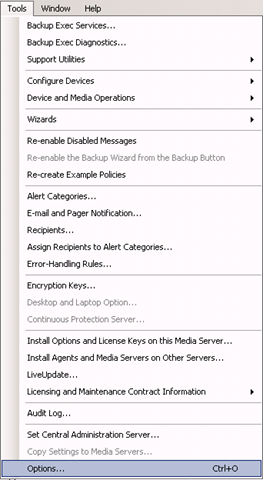
From the menu bar click Tools->Options

Backup_Exec_Tools_Options

In Job Defaults section –> Oracle –> click button Modify list

image

Click New button –> again New button –> and again New button

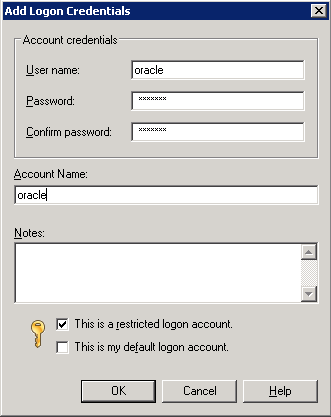
Fill the fields,

Username: oracle
Password:
Confirm Password:
Account Name: oracle

image

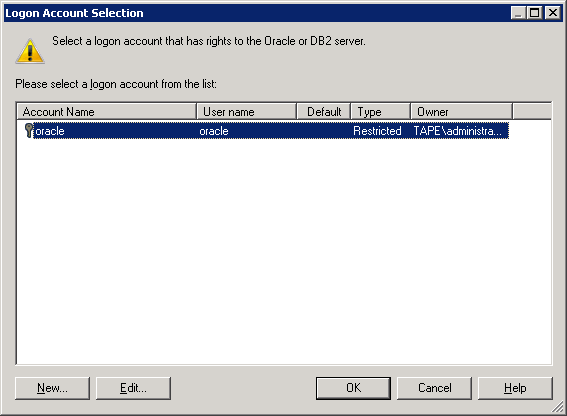
click OK

image

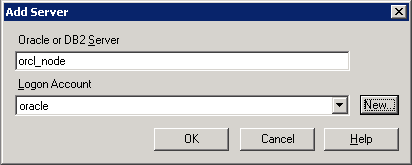
click OK.

image

click OK -> click OK –> click OK

2.2 Creating backup job.

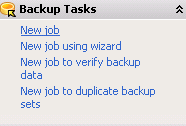
From the left pane-> Backup Tasks-> New job

image

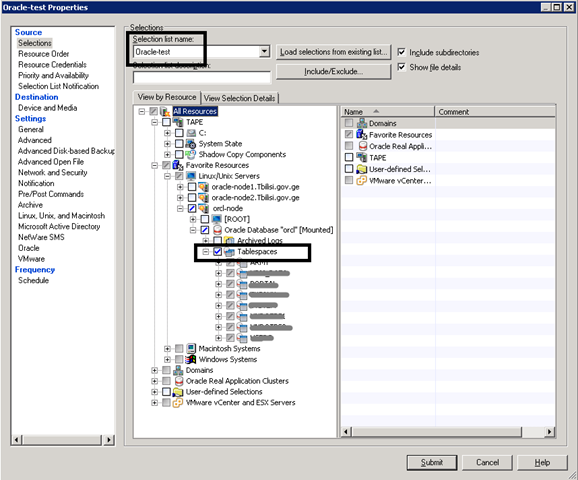
In Source section->Selections

Selection list name: Enter the name you want, let it be Oracle-test

Check View by Resource->All Resources-> Favorite Resources->orcl-node->Oracle Database “orcl”..->Tablespaces

image

I will not discuss all sections in detail, they are self-explanatory..

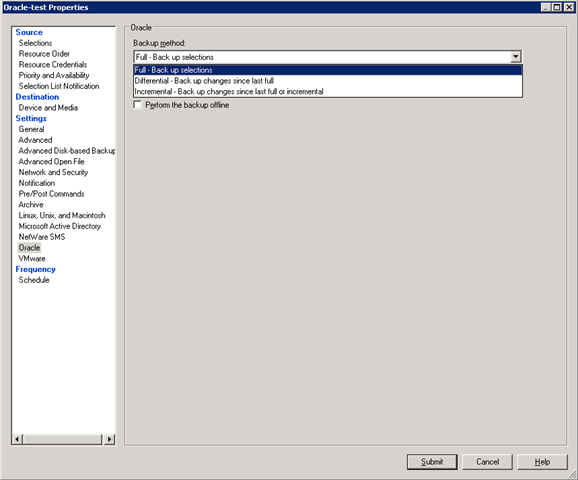
In Settings section-> Oracle –> choose Backup method and other necessary options like Delete backed up archive log files and so on…

image

By default job will run immediately after clicking the Submit button , but if you want to configure the schedule of your job , do the following:

In Frequency section –>Schedule->  choose Run according to schedule-> click Edit Schedule Details button and choose your appropriate schedule..

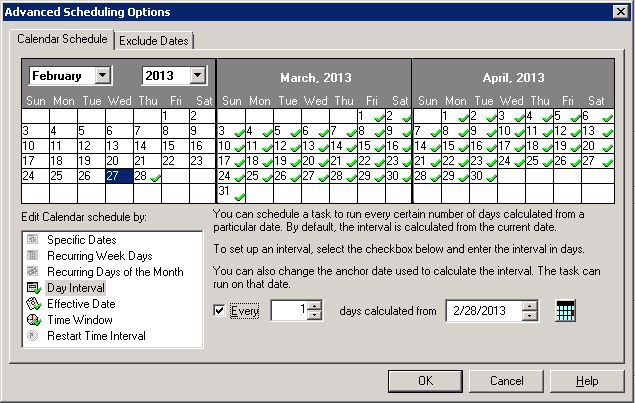
For example if you want your backup to run everyday at 1:00AM and no later than 11:00AM, click Day Interval –> check Every and write 1

image

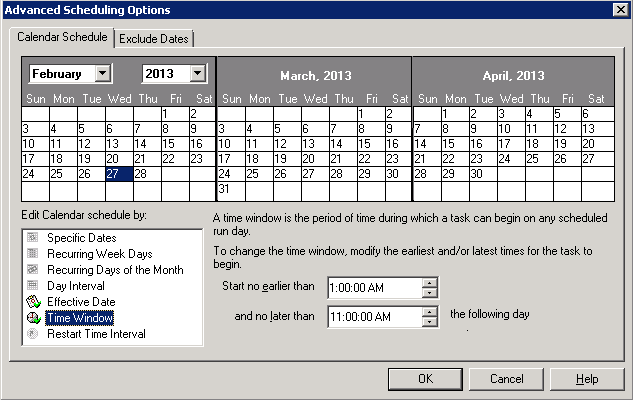
In Time Window, fill :

Start no earlier than: 1:00AM
and no later than: 11:00AM

image

Click OK.

Click Submit button.

That’s it.

Supported Oracle Versions and Operating Systems

I was trying to install Oracle 10.2.0.1 on Windows Server 2008 R2 and of course this installation was UNSUCCESSFUL. So I decide to post Oracle versions and Operating System list. Here it is:

Oracle versions

Windows Server versions

Oracle 10g, Release 2 (10.2.0.1.0)
  • Windows Server 2003 (64-bit)
Oracle 10g, Release 2 (10.2.0.2.0, 10.2.0.3.0)
    • Windows Server 2003 (64-bit)

    • Windows Server 2003 (64-bit) R2

Oracle 10g, Release 2 (10.2.0.4.0)
  • Windows Server 2003 (64-bit)

  • Windows Server 2003 (64-bit) R2

  • Windows Server 2008 (64-bit)

Oracle 10g, Release 2 (10.2.0.5.0)
  • Windows Server 2003 (64-bit)

  • Windows Server 2003 (64-bit) R2

  • Windows Server 2008 (64-bit)

  • Windows Server 2008 (64-bit) R2

Oracle 11g, Release 1 (11.1.0.6.0)
  • Windows Server 2003 (64-bit)

  • Windows Server 2003 (64-bit) R2

Oracle 11g, Release 1 (11.1.0.7.0)
  • Windows Server 2003 (64-bit)

  • Windows Server 2003 (64-bit) R2

  • Windows Server 2008 (64-bit)

Oracle 11g, Release 2 (11.2.0.1.0, 11.2.0.2.0)
  • Windows Server 2003 (64-bit)

  • Windows Server 2003 (64-bit) R2

  • Windows Server 2008 (64-bit)

  • Windows Server 2008 (64-bit) R2

Recreate Oracle 11g OEM DBConsole manually for RAC

If you have problems with existing OEM, the best way is to reconfigure it. Here are the steps, how to do it correctly:

$ emca -config dbcontrol db -repos recreate -cluster

STARTED EMCA at Jan 22, 2013 6:04:10 PM
EM Configuration Assistant, Version 11.2.0.3.0 Production
Copyright (c) 2003, 2011, Oracle. All rights reserved.

Enter the following information:
Database unique name: orcl
Service name: orcl
Listener ORACLE_HOME [ /u01/app/11.2.0/grid ]:
Password for SYS user:
Database Control is already configured for the database orcl
You have chosen to configure Database Control for managing the database orcl
This will remove the existing configuration and the default settings and perform a fresh configuration
———————————————————————-
WARNING : While repository is dropped the database will be put in quiesce mode.
———————————————————————-
Do you wish to continue? [yes(Y)/no(N)]: y
Password for DBSNMP user:
Password for SYSMAN user:
Cluster name: oracle-db

!!!Stop here for a while: if you don’t know your cluster name run the following command:

$ su – grid
cemutlo -n

…continuing configuration

Email address for notifications (optional):
Outgoing Mail (SMTP) server for notifications (optional):
ASM ORACLE_HOME [ /u01/app/11.2.0/grid ]:
ASM port [ 1521 ]:
ASM username [ ASMSNMP ]:
ASM user password:
Jan 22, 2013 6:05:02 PM oracle.sysman.emcp.util.GeneralUtil initSQLEngineRemotely
WARNING: Error during db connection : ORA-12514: TNS:listener does not currently know of service requested in connect descriptor

—————————————————————–

You have specified the following settings

Database ORACLE_HOME ……………. /u01/app/oracle/product/11.2.0/db_1

Database instance hostname ……………. Listener ORACLE_HOME ……………. /u01/app/11.2.0/grid
Listener port number ……………. 1521
Cluster name ……………. oracle-db
Database unique name ……………. orcl
Email address for notifications …………… mariam.kupa@gmail.com
Outgoing Mail (SMTP) server for notifications …………… mail.tbilisi.gov.ge
ASM ORACLE_HOME ……………. /u01/app/11.2.0/grid
ASM port ……………. 1521
ASM user role ……………. SYSDBA
ASM username ……………. ASMSNMP

—————————————————————–
———————————————————————-
WARNING : While repository is dropped the database will be put in quiesce mode.
———————————————————————-
Do you wish to continue? [yes(Y)/no(N)]: y
Jan 22, 2013 6:05:18 PM oracle.sysman.emcp.EMConfig perform
INFO: This operation is being logged at /u01/app/oracle/cfgtoollogs/emca/orcl/emca_2013_01_22_18_04_10.log.
Jan 22, 2013 6:05:20 PM oracle.sysman.emcp.util.PortManager isPortInUse
WARNING: Specified port 5540 is already in use.
Jan 22, 2013 6:05:20 PM oracle.sysman.emcp.util.PortManager isPortInUse
WARNING: Specified port 5520 is already in use.
Jan 22, 2013 6:05:20 PM oracle.sysman.emcp.util.PortManager isPortInUse
WARNING: Specified port 1158 is already in use.
Jan 22, 2013 6:05:20 PM oracle.sysman.emcp.util.DBControlUtil stopOMS
INFO: Stopping Database Control (this may take a while) …
Jan 22, 2013 6:06:01 PM oracle.sysman.emcp.EMReposConfig invoke
INFO: Dropping the EM repository (this may take a while) …
Jan 22, 2013 6:08:00 PM oracle.sysman.emcp.EMReposConfig invoke
INFO: Repository successfully dropped
Jan 22, 2013 6:08:01 PM oracle.sysman.emcp.EMReposConfig createRepository
INFO: Creating the EM repository (this may take a while) …
Jan 22, 2013 6:11:39 PM oracle.sysman.emcp.EMReposConfig invoke
INFO: Repository successfully created
Jan 22, 2013 6:11:44 PM oracle.sysman.emcp.EMReposConfig uploadConfigDataToRepository
INFO: Uploading configuration data to EM repository (this may take a while) …
Jan 22, 2013 6:12:17 PM oracle.sysman.emcp.EMReposConfig invoke
INFO: Uploaded configuration data successfully
Jan 22, 2013 6:12:18 PM oracle.sysman.emcp.EMDBCConfig instantiateOC4JConfigFiles
INFO: Propagating /u01/app/oracle/product/11.2.0/db_1/oc4j/j2ee/OC4J_DBConsole_oracle-node1_orcl to remote nodes . ..
Jan 22, 2013 6:12:20 PM oracle.sysman.emcp.EMDBCConfig instantiateOC4JConfigFiles
INFO: Propagating /u01/app/oracle/product/11.2.0/db_1/oc4j/j2ee/OC4J_DBConsole_oracle-node2_orcl to remote nodes . ..
Jan 22, 2013 6:12:26 PM oracle.sysman.emcp.EMAgentConfig deployStateDirs
INFO: Propagating /u01/app/oracle/product/11.2.0/db_1/oracle-node1_orcl to remote nodes …
Jan 22, 2013 6:12:28 PM oracle.sysman.emcp.EMAgentConfig deployStateDirs
INFO: Propagating /u01/app/oracle/product/11.2.0/db_1/oracle-node2_orcl to remote nodes …
Jan 22, 2013 6:12:31 PM oracle.sysman.emcp.util.DBControlUtil secureDBConsole
INFO: Securing Database Control (this may take a while) …
Jan 22, 2013 6:13:00 PM oracle.sysman.emcp.util.DBControlUtil startOMS
INFO: Starting Database Control (this may take a while) …
Jan 22, 2013 6:13:20 PM oracle.sysman.emcp.EMDBPostConfig performConfiguration
INFO: Database Control started successfully
Jan 22, 2013 6:13:20 PM oracle.sysman.emcp.EMDBPostConfig performConfiguration
INFO: >>>>>>>>>>> The Database Control URL is https://oracle-node1.mr.gov.ge:1158/em <<<<<<<<<<<
Jan 22, 2013 6:13:22 PM oracle.sysman.emcp.EMDBPostConfig showClusterDBCAgentMessage
INFO:
**************** Current Configuration ****************
INSTANCE NODE DBCONTROL_UPLOAD_HOST
———- ———- ———————

orcl oracle-node1 oracle-node1.mr.gov.ge
orcl oracle-node2 oracle-node1.mr.gov.ge
Jan 22, 2013 6:13:22 PM oracle.sysman.emcp.EMDBPostConfig invoke
WARNING:
************************ WARNING ************************

Management Repository has been placed in secure mode wherein Enterprise Manager data will be encrypted. The encry ption key has been placed in the file: /u01/app/oracle/product/11.2.0/db_1/oracle-node1_orcl/sysman/config/emkey.o ra. Ensure this file is backed up as the encrypted data will become unusable if this file is lost.

***********************************************************
Enterprise Manager configuration completed successfully
FINISHED EMCA at Jan 22, 2013 6:13:22 PM

For me to access OEM the URL is  https://oracle-node1.mr.gov.ge:1158/em

Good Luck!