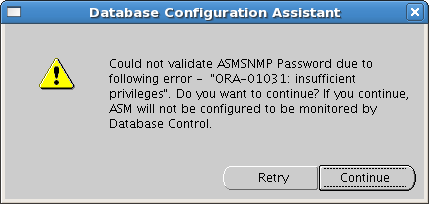
Could not validate ASMSNMP password due to…During DB creation

If you are creating database using DBCA and came across the following error:

Screenshot-Database Configuration Assistant

Do the following:

bash-3.2$ . oraenv
ORACLE_SID = [RDBMS] ? +ASM
The Oracle base for ORACLE_HOME=/u02/app/11.2.0/grid is /u01/app/oracle
bash-3.2$ sqlplus / as sysasm

SQL*Plus: Release 11.2.0.1.0 Production on Mon May 21 18:59:20 2012

Copyright (c) 1982, 2009, Oracle.  All rights reserved.
Connected to:
Oracle Database 11g Enterprise Edition Release 11.2.0.1.0 – 64bit Production
With the Automatic Storage Management option

SQL> create user ASMSNMP identified by testpas1;
create user ASMSNMP identified by testpas1
*
ERROR at line 1:
ORA-01990: error opening password file ‘/u02/app/11.2.0/grid/dbs/orapw’

SQL> exit
Disconnected from Oracle Database 11g Enterprise Edition Release 11.2.0.1.0 – 64bit Production
With the Automatic Storage Management option
bash-3.2$ echo $ORACLE_HOME
/u02/app/11.2.0/grid
bash-3.2$ cd /u02/app/11.2.0/grid/dbs/
bash-3.2$ orapwd file=orapw+ASM password=testpas1 entries=2
bash-3.2$ ls
ab_+ASM.dat  hc_+ASM.dat  init+ASM.ora  init.ora  orapw+ASM  spfile+ASM.ora
bash-3.2$ sqlplus / as sysasm

SQL*Plus: Release 11.2.0.1.0 Production on Mon May 21 19:01:20 2012

Copyright (c) 1982, 2009, Oracle.  All rights reserved.
Connected to:
Oracle Database 11g Enterprise Edition Release 11.2.0.1.0 – 64bit Production
With the Automatic Storage Management option

SQL> create user ASMSNMP identified by testpas1;

User created.

SQL> grant sysdba to ASMSNMP;

Grant succeeded.

That’s it. Re-run DBCA.

Could not validate ASMSNMP password due to…During DB creation

If you are creating database using DBCA and came across the following error:

Screenshot-Database Configuration Assistant

Do the following:

bash-3.2$ . oraenv
ORACLE_SID = [RDBMS] ? +ASM
The Oracle base for ORACLE_HOME=/u02/app/11.2.0/grid is /u01/app/oracle
bash-3.2$ sqlplus / as sysasm

SQL*Plus: Release 11.2.0.1.0 Production on Mon May 21 18:59:20 2012

Copyright (c) 1982, 2009, Oracle.  All rights reserved.
Connected to:
Oracle Database 11g Enterprise Edition Release 11.2.0.1.0 – 64bit Production
With the Automatic Storage Management option

SQL> create user ASMSNMP identified by testpas1;
create user ASMSNMP identified by testpas1
*
ERROR at line 1:
ORA-01990: error opening password file ‘/u02/app/11.2.0/grid/dbs/orapw’

SQL> exit
Disconnected from Oracle Database 11g Enterprise Edition Release 11.2.0.1.0 – 64bit Production
With the Automatic Storage Management option
bash-3.2$ echo $ORACLE_HOME
/u02/app/11.2.0/grid
bash-3.2$ cd /u02/app/11.2.0/grid/dbs/
bash-3.2$ orapwd file=orapw+ASM password=testpas1 entries=2
bash-3.2$ ls
ab_+ASM.dat  hc_+ASM.dat  init+ASM.ora  init.ora  orapw+ASM  spfile+ASM.ora
bash-3.2$ sqlplus / as sysasm

SQL*Plus: Release 11.2.0.1.0 Production on Mon May 21 19:01:20 2012

Copyright (c) 1982, 2009, Oracle.  All rights reserved.
Connected to:
Oracle Database 11g Enterprise Edition Release 11.2.0.1.0 – 64bit Production
With the Automatic Storage Management option

SQL> create user ASMSNMP identified by testpas1;

User created.

SQL> grant sysdba to ASMSNMP;

Grant succeeded.

That’s it. Re-run DBCA.

Candidate ASM disks not showing

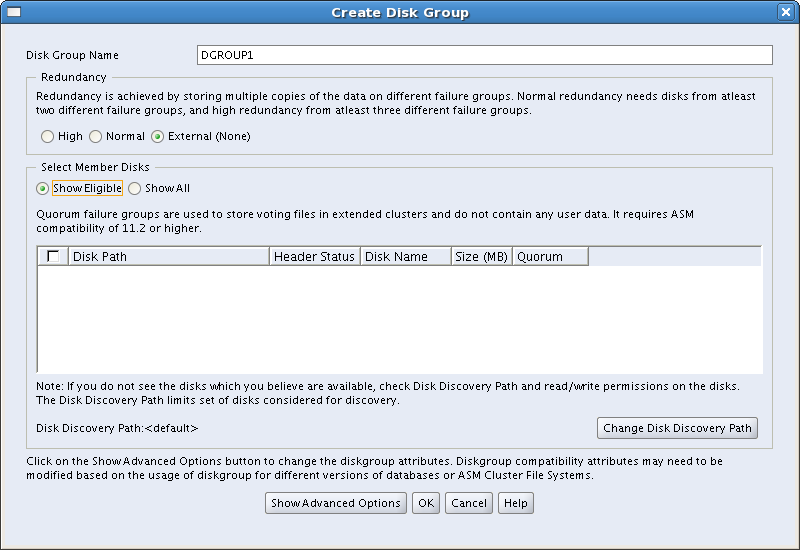
If you are in the middle of grid installation, and trying to create ASM disk group but Eligible(Candidate) disks location is empty, for example like this:Screenshot-Create Disk Group

moreover you have configured candidate disks using /etc/init.d/oracleasm and listdisks command showing the disk.

bash-3.2$ /etc/init.d/oracleasm listdisks

VOL1

Then follow my steps that may help:

1. Click “Change Disk Discovery Path” button

2. Enter the path /dev/oracleasm/disks and click OK

Screenshot-Change Disk Discovery Path

3. The picture should look like this:

Screenshot-Create Disk Group-1

That’s it. GOOD LUCK!

PL/SQL developer error_Could not initialize oci.dll

If you have the following error after trying to connect database using PL/SQL Developer

image

It means that you don’t have 32bits client installed.

Install 32bits client instead of 64bits version.

I hope, this simple solution will help you. Good Luck!

Oracle recycle bin

There exits two recycle bins USER_RECYCLEBIN  the same as RECYCLEBIN and DBA_RECYCLEBIN.

PREPARING DEMO…

–Create a test table

CREATE TABLE testtb (testcol NUMBER);

–Insert row

INSERT  INTO testtb VALUES(1);

COMMIT;

–Drop it

DROP TABLE  testtb;

–Query recycle bin

SELECT OBJECT_NAME,ORIGINAL_NAME,DROPTIME 
FROM   RECYCLEBIN;

–Output

OBJECT_NAME                     | ORIGINAL_NAME | DROPTIME

----------------------------------------------------------------------

BIN$nNV1TgjzTeeusBT1fqxeyw==$0  | TESTTB        | 2011-04-05:11:14:46

As you can see Oracle renames table to a system generated name which starts with BIN$.

PURGING….DELETING

This table is not actually dropped, it is just renamed and is still taking the place in the tablespace.

To relieve the space there is several ways:

–Globally clear the recycle bin

PURGE DBA_RECYCLEBIN;

–Clear recycle bin by tablespace

PURGE TABLESPACE users;

–Clear recycle bin in you schema

 PURGE RECYCLEBIN;
or
 USER_RECYCLEBIN;

–Purge individual object

PURGE TABLE "BIN$nNV1TgjzTeeusBT1fqxeyw==$0"

IMPORTANT NOTE!!!

In one of the Oracle tests, there is the question which says that you cannot purge object from the recycle bin by specifying its original name.

Like that:

PURGE TABLE testtb

BUT it works!!!

–Check it

SELECT OBJECT_NAME,ORIGINAL_NAME,DROPTIME 
FROM   RECYCLEBIN;

–Output

OBJECT_NAME  |  ORIGINAL_NAME | DROPTIME 

Sometimes Oracle purges objects itself from recycle bin in the following cases:

* When user hits its quota limit on the tablespace
      At that point oracle purges objects from the recycle bin using FIFO method. So purges the oldest one until it’s enough.

* Before a datafile is autoextended .

SELECTING…

I am using table which is created in DEMO section.

–Query

SELECT * FROM "BIN$nNV1TgjzTeeusBT1fqxeyw==$0"; 

–Output

TESTCOL 

1

FLASHBACKING…RECOVERING

FLASHBACK TABLE testtb TO BEFORE DROP

–Query

SELECT * FROM  testtb

–Output

TESTCOL 

1 

Now let’s do the following:

–Create a test table

CREATE TABLE testtb (testcol NUMBER);

–Drop it

DROP TABLE  testtb;

–Check the recycle bin

SELECT OBJECT_NAME,ORIGINAL_NAME,DROPTIME 
FROM   RECYCLEBIN;

–Output

OBJECT_NAME                    | ORIGINAL_NAME | DROPTIME

--------------------------------------------------------------------

BIN$wkk5qTDzS7OsaI+LHOVv6g==$0 | TESTTB        | 2011-04-05:14:07:08

Again repeat these steps:

–Create a test table

CREATE TABLE testtb (testcol NUMBER);

–Drop it

DROP TABLE  testtb;

–Check the recycle bin

SELECT OBJECT_NAME,ORIGINAL_NAME,DROPTIME 
FROM   RECYCLEBIN;

–Output

OBJECT_NAME                   | ORIGINAL_NAME | DROPTIME 

-------------------------------------------------------------------

BIN$wkk5qTDzS7OsaI+LHOVv6g==$0| TESTTB        | 2011-04-05:14:07:08 

BIN$ZdI0ZO98R8mLymiv96CALA==$0| TESTTB        | 2011-04-05:14:07:12

If you flashback the TESTTB table , the most resent one will be flashbacked. Let’s check it:

–Flashback table

FLASHBACK TABLE testtb TO BEFORE DROP

–Check the recycle bin

SELECT OBJECT_NAME,ORIGINAL_NAME,DROPTIME 
FROM   RECYCLEBIN;

–Output

OBJECT_NAME                    | ORIGINAL_NAME | DROPTIME 

--------------------------------------------------------------------

BIN$wkk5qTDzS7OsaI+LHOVv6g==$0 | TESTTB        | 2011-04-05:14:07:08

Look at the DROPTIME, it shows that the oldest entry was left in the recycle bin.

But if you want to flashback that one, not the current one, do it:

Assume that we have not flashbacked any table and we have the following entries in the recycle bin:

OBJECT_NAME                   | ORIGINAL_NAME | DROPTIME 

------------------------------------------------------------------

BIN$wkk5qTDzS7OsaI+LHOVv6g==$0| TESTTB        | 2011-04-05:14:07:08 

BIN$ZdI0ZO98R8mLymiv96CALA==$0| TESTTB        | 2011-04-05:14:07:12

And now we want to flashback the table which was dropped for the first time.

FLASHBACK TABLE "BIN$wkk5qTDzS7OsaI+LHOVv6g==$0" TO BEFORE DROP

–Check the recycle bin

SELECT OBJECT_NAME,ORIGINAL_NAME,DROPTIME
FROM   RECYCLEBIN;

–Output

OBJECT_NAME                    | ORIGINAL_NAME | DROPTIME 

--------------------------------------------------------------------

BIN$ZdI0ZO98R8mLymiv96CALA==$0 | TESTTB        | 2011-04-05:14:07:12

But if the table by this name already exist, then you will need to rename it before flashbacking:

FLASHBACK TABLE "BIN$wkk5qTDzS7OsaI+LHOVv6g==$0" 
TO BEFORE DROP RENAME TO testtb1

When the table is dropped and placed into the recycle bin the following objects that refers to that table also are placed in the recycle bin:

* Indexes

* LOG segments

* Triggers etc…

BUT the following objects are not placed into the recycle bin:

* Bitmap join indexes

* Materialized view logs

* Referential integrity constraints

So when you flashback the table the following objects such as bitmap join indexes, materialized view logs, referential integrity constraints will not be recovered.

If you drop index before dropping a table, this index will not be recovered during flashbacking the table. The same is with other objects that should be located into the recycle bin.

DISABLING RECYCLING…

The initialization parameter RECYCLEBIN identifies if the dropped object should be placed into the recycle bin or not.

The default value is ON, means that it should.

You can disable it at the system or session level.

ALTER SESSION SET RECYCLEBIN=OFF

After that no object will be placed into the recycle bin, consequently they can’t be flashbacked. If there were objects into the recycle bin before setting RECYCLEBIN  parameter to OFF you are able to flashback them.

There is another way to delete object without locating it into the recycle bin:

DROP TABLE testtb;
;

!!!IMPORTANT

Recycle bin exists for the tables only in non-SYSTEM, locally managed tablespaces. 

So you can’t flashback the table from recycle bin in SYS schema, because this schema  is located in SYSTEM tablespace and doesn’t have any recycle bin.
Changing SYSMAN password(can cause problems)

After changing SYSMAN password from PL/SQL Developer, Enterprise Manager showed me: Agent Unreachable. I started to drill down and checked status of the agent on Oracle server. It showed me that agent was started. But after running the following:

emctl upload

It showed me the exact error: ORA-28000: the account is locked.

Let’s clarify: I’ve changed SYSMAN password, but EM stores and uses the old password during connecting(because changes from PL/SQL developer was not reflected to EM repository) . That’s why SYSMAN account was going to lock.

If you try to go to the EM URL it will show some unusual messages, that database is in shutdown or needs recovery. Don’t do anything! (this is caused because of the SYSMAN password has been changed, neither database is down nor needs recovery)

Let’s just solve it.

1. Stop dbconsole

emctl stop dbconsole

2. Go to the file $ORACLE_HOME/<hostname_sid>/sysman/config/emoms.properties and change the following lines to:

oracle.sysman.eml.mntr.emdRepPwd=<your_new_password>

oracle.sysman.eml.mntr.emdRepPwdEncrypted=FALSE

Don’t worry about plain text password , it will be encrypted automatically after you save the file.

3. Start dbconsole

emctl start dbconsole

Enjoy!

Tablespace Backup Using Cron on Linux

Let’s do all things, step by step:

1. Create directories for Backup, Script and Logs.

mkdir -p /u02/Backup/Backup

mkdir -p /u02/Backup/Scripts

mkdir -p /u02/Backup/Logs

2. Create backup script.

export ORACLE_BASE=/u01/app/oracle

export ORACLE_HOME=/u01/app/oracle/product/11.2.0/db_1

export ORACLE_SID=my_sid

$ORACLE_HOME/bin/rman target / msglog /u02/Backup/Logs/BackupTBS_MYTABLESPACE.log append << EOF

run{

backup tablespace MYTAVLESPACE format '/u02/Backup/Backup/BackupTBS_MYTABLESPACE_%T.bkp';

delete noprompt backup of tablespace MYTABLESPACE completed before 'SYSDATE-1';

}

EOF

save this script as  MYTABLESPACE_disk_backup.sh

3. Change permissions and owner of this file.

chown oracle:oinstall MYTABLESPACE_disk_backup.sh

chmod a+x MYTABLESPACE_disk_backup.sh

4. Create cron job.

su - oracle

crontab -e

--add the following line(this script will run at 8:00 PM everyday)

00 20 * * * /u02/Backup/Scripts/MYTABLESPACE_disk_backup.sh

cron format is the following:

minute (0-59), hour (0-23, 0 = midnight), day (1-31), month (1-12), weekday (0-6, 0 = Sunday)
*                    *                                    *                *                   *

asterisk means –> every

5. Reload cron service

su -

service crond reload

That is all.

ORA-01017: invalid username/password; logon denied(database link error)

When I was creating database link from Oracle 10g to 11g like that:

SQL> create database link mylink_name connect to myuser_name identified by mypassword using 'MYSID';

Database link created

got ORA-01017 error.

Cause:

This may happen if in 11g database, there is enabled the following parameter:

SQL> show parameter sec_case_sensitive_logon;

NAME                                 TYPE        VALUE
----------------------------------- --------- ------------------------------
sec_case_sensitive_logon             boolean     TRUE


Solution:

Recreate database link by the following way:

SQL> drop database link mylink_name;

Database link dropped

SQL> create database link mylink_name connect to "myuser_name" identified by "mypassword" using 'MYSID';

Database link created

To check it:

SQL> select * from dual@mylink_name;

DUMMY
-----
X

ORA-01466 unable to read data – table definition has changed

This is a time-based read consistency error, which may occur during flashbacking object.

For example, I was running the following statement:

SELECT text
FROM dba_views AS OF TIMESTAMP to_timestamp('8-SEP-2011 6:14:35','DD-MON-YYYY HH24:MI:SS')

ORA-01466: unable to read data - table definition has changed


Let’s check undo_retention parameter:

SQL>  SELECT value/60/60 as Hours
 2    FROM v$parameter
 3    WHERE name='undo_retention';

    HOURS
---------
3.02777777

So my retention period is 3hours…If I want to flashback object to before more than 3 hours I will get ORA-01466.

Oracle 11.2.0.1.0 em.ear file not found

During the installation of Oracle 11.2.0.1.0 you may face the following error:

file not found

%ORACLE_HOME%\oc4j\j2ee\oc4j_applications\applications\em.ear file

image


The database installation package consist of two files:

win32_11gR2_database_1of2
win32_11gR2_database_2of2

To solve the problem: You should extract each of them and place win32_11gR2_database_2of2 content into win32_11gR2_database_1of2 folder before running installer.