Oracleasm deletedisk failed Unable to clear disk

I’ve deleted disk from ASM diskgroup:

ALTER DISKGROUP DATA01 DROP DISK DISK6;

After it finished dropping the disk and all extents were moved to the remaining disks, I tried to delete disk from the ASM library and return it to the system:

oracleasm deletedisk -v DISK6

Clearing disk header: oracleasm-write-label: Unable to open device "/dev/oracleasm/disks/DISK6": Device or resource busy
failed
Unable to clear disk "DISK6"

The reason is that oracle leaves the disk open even after removing it from the diskgroup.

There are two solutions:________________________________________________

1. One for  24/7 databases:

–Find the device name

[root@r2n1 ~]# blkid |grep oracleasm

/dev/sdd1: LABEL="DISK6" TYPE="oracleasm"

–Clear the device header manually

Make sure, you use the right device name. If you specify wrong device name, the operation is unrecoverable.

su –

dd if=/dev/zero of=/dev/sdd1 bs=1024 count=100

or

dd if=/dev/zero of=/dev/oracleasm/disks/DISK6 bs=1024 count=100

If you have RAC system , run dd on all nodes.

Another solution:

1. Reboot the server

# reboot

Or

Restart database instance and CRS services

–Shutdown database

$ export ORACE_SID=orcl
$ export ORACLE_HOME=/u01/app/oracle/product/11.2.0/db_1
$ sqlplus / as sysdba
SQL> shutdown immediate;

–Shutdown CRS services

./crsctl stop crs

–Start CRS services

./crsctl start crs

–Start database

$ export ORACE_SID=orcl
$ export ORACLE_HOME=/u01/app/oracle/product/11.2.0/db_1
$ sqlplus / as sysdba
SQL> startup;

2. Then delete the disk.

oracleasm deletedisk -v DISK6

PIN_PACKS-TRIGGER-INVALID, DBMS_SHARED_POOL.KEEP must be declared 10g

To resolve the issue, do the following:

1. Connect as SYSDBA

$sqlplus / as sysdba

2. Create DBMS_SHARED_POOL package , grant necessary privileges and create dba_keepsizes view.

@?/rdbms/admin/dbmspool.sql

3. Recompile the trigger

alter trigger PIN_PACKS compile;

DBMS_SQLPA – PACKAGE BODY – INVALID 10g

To resolve the issue, do the following:

1. Connect as SYSDBA

$ sqlplus / as sysdba

2. Drop plan table

SQL> drop table plan_table;

Table dropped.


3. Recreate plan table

SQL> @?/rdbms/admin/utlxplan

Table created.

4. Re-create dbms_sqlpa package and public synonym

SQL> @?/rdbms/admin/prvtspao.plb

PL/SQL procedure successfully completed.

Package created.

No errors.

Synonym created.

No errors.

Package body created.

No errors.

5. Recompile all objects

SQL> @?/rdbms/admin/utlrp.sql

DBMS_SQLPA – PACKAGE BODY – INVALID 10g

To resolve the issue, do the following:

1. Connect as SYSDBA

$ sqlplus / as sysdba

2. Drop plan table

SQL> drop table plan_table;

Table dropped.


3. Recreate plan table

SQL> @?/rdbms/admin/utlxplan

Table created.

4. Re-create dbms_sqlpa package and public synonym

SQL> @?/rdbms/admin/prvtspao.plb

PL/SQL procedure successfully completed.

Package created.

No errors.

Synonym created.

No errors.

Package body created.

No errors.

5. Recompile all objects

SQL> @?/rdbms/admin/utlrp.sql

Add/Drop ASM disks to DISKGROUP on RAC(or Standalone)

Note: The steps are described for RAC, but you can easily guess what are the steps for the standalone database.

1. First of all find the disk or partition name, that should be added to the ASM.

fdisk -l

My disk partition name is /dev/sdi1.

2. Assign the disk to ORACLEASM.

–On node1

/etc/init.d/oracleasm createdisk DISK7 /dev/sdi1

3. Scan disks in ALL NODES and list them to check if is presented.

–On node1

/etc/init.d/oracleasm scandisks
/etc/init.d/oracleasm listdisks

–On node2

/etc/init.d/oracleasm scandisks
/etc/init.d/oracleasm listdisks

4. Change the environment to the grid infrastructure, by setting ORACLE_SID to +ASM and so on :

$ . oraenv
ORACLE_SID = [media1] ? +ASM1
The Oracle base for ORACLE_HOME=/u01/app/11.2.0/grid is /u01/app/oracle

# Connect as an SYSASM

sqlplus / as sysasm

Note: If you don’t remember the password for the sysasm user see How to reset SYSASM password.

# Find the diskgroup name

SQL> select name from v$asm_diskgroup;

NAME
——————————
DATA01

# Increase power limit, if you want, to complete rebalance operation in a short time.

SQL>  alter system set asm_power_limit=10

# Indicate disks location by the parameter asm_diskstring

SQL> alter system set asm_diskstring=’ORCL:DISK*’

SQL> alter diskgroup DATA01 add disk ‘ORCL:DISK7’;

It will do the rebalance automatically.

# To drop the disk , do the following:

SQL >  alter diskgroup DATA01 drop disk DISK7;

It will rebalance first and then drops the disk automatically.

You can see the current operation in v$asm_operation view.

Note: Until the view v$asm_operation contains a record you are able to undrop the disks by the following way:

SQL> alter diskgroup DATA01 undrop disks;

If the operation is already completed , you are not able to undrop the disk . But you can re-add the disk , if you want.

That is all.

How to reset SYSASM password

By sysasm user can maintain ASM instance. The main idea is to separate storage administrator and database administrator responsibilities. To reset its password, do the following:

[oracle@r1n1 ~]$ . oraenv
ORACLE_SID = [orcl1] ? +ASM1
The Oracle base for ORACLE_HOME=/u01/app/11.2.0/grid is /u01/app/oracle

[oracle@r1n1 ~]$ asmcmd
ASMCMD> orapwusr –modify –password sys
Enter password: ********

Upgrade 10g XE to 11g XE

I’ve had a lot of trouble with 10g XE. Especially with its upgrading process to 11g XE. So I want to share my experience with you.

There are at least 2 options to do the upgrade.

First one is backup/restore and second one is export/import.

Note: I ‘ve installed 10g XE and 11g XE on separate servers(because couldn’t handle to install them together)

Note2: The 1st one doesn’t worked for me and is described shortly. The 2nd  one worked for me and is fully descriptive.

1. Take utlu112i.sql script from 11g XE and place it on 10g XE server.

2. Run this script on 10g XE.

Go to the gen_inst.sql file location or indicate a full path to the file:

sqlplus sys as sysdba @gen_inst.sql

3. Backup 10g XE database.

4. Restore to 11g XE

5. Startup upgrade.

6. Run the following scripts on 11g XE.

–Upgrade

sqlplus sys as sysdba @catupgrd.sql

–Recompile

sqlplus sys as sysdba @utlrp.sql

BUT these steps that are described on most of the blogs and sites did not work for me.

Another option that worked for me is export/import.

1. Take gen_inst.sql script from 11g XE.

2. Place and run this script on 10g XE.

sqlplus sys as sysdba @gen_inst.sql

It will generate install.sql, gen_apps.sql and other .sql files

3. On 10g XE

CREATE DIRECTORY DUMP_DIR AS ‘C:\oraclexe\dump_dir’;

GRANT read, write ON DIRECTORY DUMP_DIR TO public;

expdp ‘sys/passwd as sysdba’ full=Y EXCLUDE=SCHEMA:\"LIKE \’APEX_%\’\",SCHEMA:\"LIKE \’FLOWS_%\’\" directory=DUMP_DIR dumpfile=DB10G.DMPlogfile=expdpDB10G.log

expdp ‘sys/passwd as sysdba’ TABLES=FLOWS_FILES.WWV_FLOW_FILE_OBJECTS$ directory=DUMP_DIR dumpfile=DB10G2.dmp logfile=expdpDB10G2.log

Note: if ‘sys/passwd as sysdba’  doesn’t work try without it and then enter the credentials.

expdp  full=Y EXCLUDE=SCHEMA….
Username: sys@XE as sysdba
Password: *****

4. Import to 11g XE

CREATE DIRECTORY DUMP_DIR AS ‘C:\oraclexe\dump_dir’;
GRANT read, write ON DIRECTORY DUMP_DIR TO public;

impdp  ‘sys/passwd as sysdba’ full=Y directory=DUMP_DIR dumpfile=DB10G.DMP logfile=expdpDB10G1.log

impdp  ‘sys/passwd as sysdba’ directory=DUMP_DIR TABLE_EXISTS_ACTION=APPEND  TABLES=FLOWS_FILES.WWV_FLOW_FILE_OBJECTS$ dumpfile=DB10G2.DMP logfile=expdpDB10G1b.log

5. Run install.sql. It will run other scripts itself.

sqlplus sys as sysdba @install.sql

Configure Oracle database to use SSL with self-signed certificate

You can use Oracle SSL to encrypt data exchange between Oracle database and Oracle client.

For the first time, let’s check that data is not encrypted by default when the client is selecting some info from the database.

For demonstration of this I will use WireShark.

Checking…

1. Run WireShark and highlight network card by which you use to connect to the database. For me it is “”Local Area Connection 3”.

image

2. click Capture Options and in Capture Filter write :

src host 192.168.171.153 and dst host 192.168.59.51 and tcp port 1521

Description: src host –is client ip
dst host – is database ip
tcp port – is the database port number

This means to capture requests from client(192.168.171.153) to the database(192.168.59.51) using tcp port 1521.

3. click Start.

4. Connect to the database and run testing select:

select *
from dual

WireShark with a lot of rows will contain the row consisting the following text, that contains our select

image

Configuring SSL…

Wallet configuration on DB server

0. Lets create working folder called /0 for simplicity.

mkdir /0

chmod –R 777 /0

1. Create certification request using Oracle Wallet Manager (/u01/app/oracle/product/11.2.0/db_1/bin/owm).

su – oracle

owm

image

2.  Wallet->New

image

3.  Enter the password, which protects wallet from opening. OK

4. Click Yes(for creating necessary folders for wallet)

image

5. Click Yes(for creating certification request)

image

6. Fill the items by your info.

7. click OK

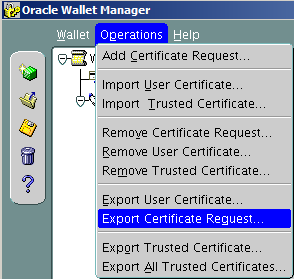
8. Highlight certification request and from menu choose Operations->Export Certificate Request

image

9. Save the file with the extension .csr in /0 folder

image

10. Download ssl.ca-0.1.tar.gz file for to generate trusted and user certificates.

Here I want to note that trusted certificate is like a public key which will be sent to the client and user certificate is like a private key which has only the database server.

Move downloaded file to the /0 folder and extract. Then move certification request to the extracted folder.

cd /0/
tar -xvf ssl.ca-0.1.tar.gz
mv /0/CerReq.csr  /0/ssl.ca-0.1/

1.10  Create a self-signed root certificate by running the new-root-ca.sh script. This will create a file called ca.crt

cd /0/ssl.ca-0.1/

./new-root-ca.sh
No Root CA key round. Generating one
Generating RSA private key, 1024 bit long modulus
…………………++++++
………………………………………………………..++++++
e is 65537 (0x10001)
Enter pass phrase for ca.key:enter the password
Verifying – Enter pass phrase for ca.key:enter the password

Self-sign the root CA…
Enter pass phrase for ca.key:enter the password
You are about to be asked to enter information that will be incorporated
into your certificate request.
What you are about to enter is what is called a Distinguished Name or a DN.
There are quite a few fields but you can leave some blank
For some fields there will be a default value,
If you enter ‘.’, the field will be left blank.
—–
Country Name (2 letter code) [MY]:GE
State or Province Name (full name) [Perak]:.     <- here is written dot (.)
Locality Name (eg, city) [Sitiawan]:Tbilisi
Organization Name (eg, company) [My Directory Sdn Bhd]:MjM
Organizational Unit Name (eg, section) [Certification Services Division]:IT
Common Name (eg, MD Root CA) []:ca_root
Email Address []:mariam.kupa@gmail.com

1.11 Create the self-signed server certificate by running the sign-server-cert.sh script.

./sign-server-cert.sh CerReq
CA signing: CerReq.csr -> CerReq.crt:
Using configuration from ca.config
Enter pass phrase for ./ca.key:enter the password for the ca
Check that the request matches the signature
Signature ok
The Subject’s Distinguished Name is as follows
commonName            : .PRINTABLE:’MjM’
organizationalUnitName: .PRINTABLE:’IT’
organizationName      : .PRINTABLE:’MjM’
localityName          : .PRINTABLE:’Tbilisi’
countryName           : .PRINTABLE:’GE’
Certificate is to be certified until Nov  5 12:40:48 2014 GMT (365 days)
Sign the certificate? [y/n]:y
1 out of 1 certificate requests certified, commit? [y/n]y
Write out database with 1 new entries
Data Base Updated
CA verifying: CerReq.crt <-> CA cert
CerReq.crt: OK

1.12 From the wallet manager import these certificates.

image

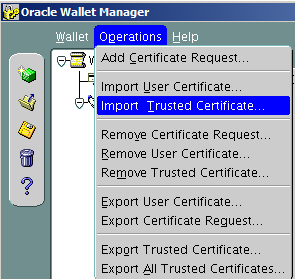
Operations-> Import Trusted Certificate

image

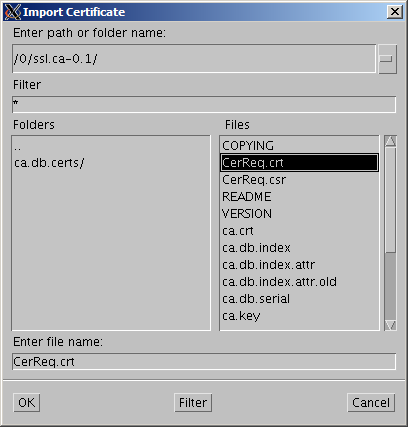
Select a file that contains the certificate. click OK.

image

Choose ca.crt

image

image

Choose CerReq.crt

Save the wallet from the menu Wallet->Save

image

click OK.

image

Check Auto Login and Exit.

Oracle Advanced Security and listener Configuration on DB Server

1.

su – oracle

netmgr

Choose Profile->Oracle Advanced Security-> SSL

choose server

image

Fill the items as it is shown on the picture, except that you should indicate your own wallet location. For me it is /u01/app/oracle/product/11.2.0/db_1/owm/wallets/oracle

Click File->Save Network Configuration.

2. Change listener entry on the database server by adding port 2484 using protocol TCPS :

# listener.ora Network Configuration File: /u01/app/oracle/product/11.2.0/db_1/network/admin/listener.ora
# Generated by Oracle configuration tools.

SID_LIST_LISTENER =
(SID_LIST =
(SID_DESC =
(GLOBAL_DBNAME = orcl)
(ORACLE_HOME = /u01/app/oracle/product/11.2.0/db_1)
(SID_NAME = orcl)
)
)

SSL_CLIENT_AUTHENTICATION = FALSE

WALLET_LOCATION =
(SOURCE =
(METHOD = FILE)
(METHOD_DATA =
(DIRECTORY = /u01/app/oracle/product/11.2.0/db_1/owm/wallets/oracle)
)
)

LISTENER =
(DESCRIPTION_LIST =
(DESCRIPTION =
(ADDRESS = (PROTOCOL = TCP)(HOST = server.gov.ge)(PORT = 1521))
)
(DESCRIPTION =
      (ADDRESS = (PROTOCOL = TCPS)(HOST = server.gov.ge)(PORT = 2484))
    )
)

ADR_BASE_LISTENER = /u01/app/oracle

Look at the highlighted section , I am using 2484 as a port  number ,which is Oracle recommended port for SSL , and  TCPS as a protocol .

Restart the listener

lsnrctl stop

lsnrctl start

Client Configuration

1.  Do the same steps as we did on the database server.

1.1 Create new wallet

1.2 Create certificate request

1.3 Copy trusted certificate, which we have generated on the database server

1.4 Import only trusted certificate.

1.5 Save

1.6  Check Auto Login and Save.

2. Run Network Manager

2.1 Profile->Oracle Advanced Security –>SSL

choose client.

image

Fill items as it is shown on the picture(indicate your wallet location)

3. Configure tnsnames.ora by the following entry:

orcl_ssl=
(DESCRIPTION =
(ADDRESS = (PROTOCOL = TCPS)(HOST = server.gov.ge)(PORT = 2484))
(CONNECT_DATA =
(SERVER = DEDICATED)
(SERVICE_NAME = orcl)
)
)

Check again by WhireShark.

You will see that no rows will contain clear words. Everything is encrypted.

Note: If you have any certification validation failure errors, first try to stop listener and start again..or write me on the comment and I will try to help you.

Accidentally deleted Central Inventory-How to re-create it?

Details:

Users: Oracle, Grid.
Homes: /u01/app/oracle/product/11.2.0/db_1 ,  /u01/app/11.2.0/grid
Local inventory: /u01/app/oracle/product/11.2.0/db_1/inventory ,  /u01/app/11.2.0/grid/inventory
Central inventory: /u01/app/oraInventory (it was accidentally deletedSad smile )

To Check:

0.

su  – oracle

1.

cd /u01/app/oracle/product/11.2.0/db_1/OPatch/

2.

./opatch lsinventory

Invoking OPatch 11.2.0.1.7

Oracle Interim Patch Installer version 11.2.0.1.7
Copyright (c) 2011, Oracle Corporation.  All rights reserved.

Oracle Home       : /u01/app/11.2.0/grid
Central Inventory : /u01/app/oraInventory
   from           : /etc/oraInst.loc
OPatch version    : 11.2.0.1.7
OUI version       : 11.2.0.3.0
Log file location : /u01/app/11.2.0/grid/cfgtoollogs/opatch/opatch2013-11-04_15-06-56PM.log

OPatch failed to locate Central Inventory.
Possible causes are:
    The Central Inventory is corrupted
    The oraInst.loc file specified is not valid.
LsInventorySession failed: OPatch failed to locate Central Inventory.
Possible causes are:
    The Central Inventory is corrupted
    The oraInst.loc file specified is not valid.

OPatch failed with error code 73

To Solve:

OUI is the great tool by which you can re-create Central or Local inventories.

Find the owner of the /u01/app folder. For me it is grid.

[oracle@oracle01 ~]$ ls -la /u01
total 12
drwxr-xr-x.  3 grid oinstall 4096 Sep 10 15:36 .
dr-xr-xr-x. 27 root root     4096 Oct 24 17:20 ..
drwxr-xr-x.  6 grid oinstall 4096 Nov  4 17:43 app

Login by the same user and run:

–To attach Oracle home

[grid@oracle01 ~]$ /u01/app/oracle/product/11.2.0/db_1/oui/bin/runInstaller -silent -attachHome -invPtrLoc /etc/oraInst.loc oracle_home="/u01/app/oracle/product/11.2.0/db_1" ORACLE_HOME_NAME="OraDb11g_home1"
Starting Oracle Universal Installer…

Checking swap space: must be greater than 500 MB.   Actual 8191 MB    Passed
The inventory pointer is located at /etc/oraInst.loc
The inventory is located at /u01/app/oraInventory
‘AttachHome’ was successful.

–To attach Grid home

[grid@oracle01 ~]$ /u01/app/11.2.0/grid/oui/bin/runInstaller -silent -attachHome -invPtrLoc /etc/oraInst.loc oracle_home="/u01/app/11.2.0/grid" ORACLE_HOME_NAME="Ora11g_gridinfrahome1"
Starting Oracle Universal Installer…

Checking swap space: must be greater than 500 MB.   Actual 8191 MB    Passed
The inventory pointer is located at /etc/oraInst.loc
The inventory is located at /u01/app/oraInventory
‘AttachHome’ was successful.


Check again:

[oracle@oracle01 OPatch]$ ./opatch lsinventory -all
Invoking OPatch 11.2.0.1.7

Oracle Interim Patch Installer version 11.2.0.1.7
Copyright (c) 2011, Oracle Corporation.  All rights reserved.

Oracle Home       : /u01/app/oracle/product/11.2.0/db_1
Central Inventory : /u01/app/oraInventory
   from           : /etc/oraInst.loc
OPatch version    : 11.2.0.1.7
OUI version       : 11.2.0.3.0
Log file location : /u01/app/oracle/product/11.2.0/db_1/cfgtoollogs/opatch/opatch2013-11-04_18-01-36PM.log

Lsinventory Output file location : /u01/app/oracle/product/11.2.0/db_1/cfgtoollogs/opatch/lsinv/lsinventory2013-11-04_18-01-36PM.txt

——————————————————————————–
List of Oracle Homes:
  Name          Location
   Ora11g_gridinfrahome1         /u01/app/11.2.0/grid
   OraDb11g_home1         /u01/app/oracle/product/11.2.0/db_1

Installed Top-level Products (1):

Oracle Database 11g                                                  11.2.0.3.0
There are 1 products installed in this Oracle Home.

There are no Interim patches installed in this Oracle Home.

——————————————————————————–

OPatch succeeded.

Transaction recovery: lock conflict caught and ignored

ALERT.LOG:

..... Transaction recovery: lock conflict caught and ignored
.....

And also some incident files are being created in $ORACLE_BASE/diag/rdbms/dbname/instancename/incident folder.

In my case the error started after SUPPLEMENTAL LOGGING enabled in a RAC environment. After disabling it the messages have not disappeared, but incident files are no longer being created.

1. Dead Trasaction

SQL> select b.name useg, b.inst# instid, b.status$ status, a.ktuxeusn

xid_usn, a.ktuxeslt xid_slot, a.ktuxesqn xid_seq, a.ktuxesiz undoblocks,

a.ktuxesta txstatus

from x$ktuxe a, undo$ b

where a.ktuxecfl like ‘%DEAD%’

and a.ktuxeusn = b.us#;

USEG INSTID STATUS XID_USN XID_SLOT XID_SEQ UNDOBLOCKS TXSTATUS
_SYSSMU7_881277423$ 1 3 7 13 1829999 1 ACTIVE
_SYSSMU8_4204495590$ 1 3 8 32 3045564 1 ACTIVE
_SYSSMU10_1314081219$ 1 3 10 3 11844457 1 ACTIVE

Transaction id is  XID_USN.XID_SLOT.XID_SEQ

So in our case, for the first row it will be 7.13.1829999

2.  Read transaction table from undo header.

ALTER SYSTEM DUMP UNDO HEADER ‘_SYSSMU7_881277423$’;

….

  TRN TBL::

 
  index  state cflags  wrap#    uel         scn            dba            parent-xid    nub     stmt_num    cmt

  ————————————————————————————————

   0x00    9    0x03  0x1bf45c  0x000b  0x0000.789de808  0x00c242eb  0x0000.000.00000000  0x00000001   0x00c242eb  1367258143

   0x01    9    0x00  0x1c031b  0x0014  0x0000.789e6018  0x00c242fa  0x0000.000.00000000  0x00000001   0x00000000  1367258225

   0x02    9    0x00  0x1c147a  0x000e  0x0000.789e694b  0x00c242fa  0x0000.000.00000000  0x00000001   0x00000000  1367258230

   0x03    9    0x00  0x1c06f9  0x0016  0x0000.789e601c  0x00c242fa  0x0000.000.00000000  0x00000001   0x00000000  1367258225

   0x04    9    0x00  0x1c06c8  0x0009  0x0000.789e3566  0x00c242f9  0x0000.000.00000000  0x00000001   0x00000000  1367258192

   0x05    9    0x00  0x1c1167  0x0015  0x0000.789e357f  0x00c242ec  0x0000.000.00000000  0x00000001   0x00000000  1367258192

   0x06    9    0x00  0x1c2716  0x0017  0x0000.789e69e1  0x00c242fa  0x0000.000.00000000  0x00000001   0x00000000  1367258230

   0x07    9    0x00  0x1c1045  0x000c  0x0000.789e1bdb  0x00c242eb  0x0000.000.00000000  0x00000001   0x00000000  1367258170

   0x08    9    0x00  0x1c2614  0x0005  0x0000.789e357e  0x00c242ec  0x0000.000.00000000  0x00000001   0x00000000  1367258192

   0x09    9    0x00  0x1bfa03  0x0021  0x0000.789e3574  0x00c242f9  0x0000.000.00000000  0x00000001   0x00000000  1367258192

   0x0a    9    0x00  0x1bf712  0x001e  0x0000.789e3246  0x00c242f1  0x0000.000.00000000  0x00000001   0x00000000  1367258190

   0x0b    9    0x00  0x1c1e01  0x0007  0x0000.789e1bd9  0x00c242eb  0x0000.000.00000000  0x00000001   0x00000000  1367258170

   0x0c    9    0x00  0x1c08e0  0x000a  0x0000.789e3244  0x00c242f1  0x0000.000.00000000  0x00000006   0x00000000  1367258190

   0x0d   10    0x90  0x1bec6f  0x0038  0x0000.789e783e  0x00c242fb  0x0000.000.00000000  0x00000001   0x00c242fb  0

   0x0e    9    0x00  0x1c068e  0x0010  0x0000.789e694d  0x00c242fa  0x0000.000.00000000  0x00000001   0x00000000  1367258230

   0x0f    9    0x00  0x1c151d  0x0012  0x0000.789e3578  0x00c242ec  0x0000.000.00000000  0x00000001   0x00000000  1367258192

   0x10    9    0x00  0x1c26bc  0x0006  0x0000.789e69df  0x00c242fa  0x0000.000.00000000  0x00000001   0x00000000  1367258230

   0x11    9    0x00  0x1c16eb  0x0000  0x0000.789cbd77  0x00c242eb  0x0000.000.00000000  0x00000001   0x00000000  1367257923

   0x12    9    0x00  0x1c082a  0x001d  0x0000.789e357c  0x00c242ec  0x0000.000.00000000  0x00000001   0x00000000  1367258192

   0x13    9    0x00  0x1c1459  0x001f  0x0000.789e7891  0x00c242fc  0x0000.000.00000000  0x00000001   0x00000000  1367258238

   0x14    9    0x00  0x1c14b8  0x0003  0x0000.789e601a  0x00c242fa  0x0000.000.00000000  0x00000001   0x00000000  1367258225

   0x15    9    0x00  0x1c0457  0x0020  0x0000.789e39d3  0x00c242ec  0x0000.000.00000000  0x00000001   0x00000000  1367258195

   0x16    9    0x00  0x1c1326  0x0002  0x0000.789e601d  0x00c242fa  0x0000.000.00000000  0x00000001   0x00000000  1367258225

   0x17    9    0x00  0x1c0db5  0x001c  0x0000.789e788a  0x00c242fc  0x0000.000.00000000  0x00000001   0x00000000  1367258238

   0x18    9    0x00  0x1bffe4  0x001b  0x0000.789e400d  0x00c242fa  0x0000.000.00000000  0x00000001   0x00000000  1367258200

   0x19    9    0x00  0x1c16e3  0x0001  0x0000.789e5fd2  0x00c242fa  0x0000.000.00000000  0x00000001   0x00000000  1367258225

   0x1a    9    0x00  0x1bdbb2  0x0018  0x0000.789e400b  0x00c242fa  0x0000.000.00000000  0x00000001   0x00000000  1367258200

   0x1b    9    0x00  0x1c1141  0x0019  0x0000.789e453a  0x00c242fa  0x0000.000.00000000  0x00000001   0x00000000  1367258204

   0x1c    9    0x00  0x1bc9a0  0x0013  0x0000.789e788e  0x00c242fc  0x0000.000.00000000  0x00000001   0x00000000  1367258238

   0x1d    9    0x00  0x1c02ef  0x0008  0x0000.789e357d  0x00c242ec  0x0000.000.00000000  0x00000001   0x00000000  1367258192

   0x1e    9    0x00  0x1c0b6e  0x0004  0x0000.789e3250  0x00c242f9  0x0000.000.00000000  0x00000009   0x00000000  1367258190

   0x1f    9    0x00  0x1c00ad  0xffff  0x0000.789e78a1  0x00c242fc  0x0000.000.00000000  0x00000001   0x00000000  1367258238

   0x20    9    0x00  0x1c166c  0x001a  0x0000.789e39dd  0x00c242fa  0x0000.000.00000000  0x00000002   0x00000000  1367258195

   0x21    9    0x00  0x1c160b  0x000f  0x0000.789e3576  0x00c242ec  0x0000.000.00000000  0x00000001   0x00000000  1367258192

  EXT TRN CTL::

  usn: 7

 
State# 10 means active transaction.

dba points to starting UNDO block address.

usn: Undo segment number

usn.index.wrap# gives transaction id.

 
An active transaction 0x0007.00d.001bec6f is available in slot 0x0d which has a dba of 0x00c242fb (12731131 in decimal)

3. Reading UNDO Block:

Identify fileID and blockID:

fileID:

select DBMS_UTILITY.DATA_BLOCK_ADDRESS_FILE(12731131) from x$dual;

3

blockID:

select DBMS_UTILITY.DATA_BLOCK_ADDRESS_BLOCK(12731131) from x$dual;

148219

Dumping block

alter system dump datafile 3 block 148219;


UNDO BLK: 
xid: 0x0007.00d.001bec6f  seq: 0x41f9 cnt: 0x6   irb: 0x5   icl: 0x0   flg: 0x0000

 
Rec Offset      Rec Offset      Rec Offset      Rec Offset      Rec Offset

—————————————————————————

0x01 0x1f98     0x02 0x1f2c     0x03 0x1d7c     0x04 0x1d10     0x05 0x1ca0    
0x06 0x1bfc    
 
*—————————–

* Rec #0x1  slt: 0x0d  objn: 0(0x00000000)  objd: 0  tblspc: 0(0x00000000)

*       Layer:   5 (Transaction Undo)   opc: 7  rci 0x00  
Undo type:  Regular undo    Begin trans    Last buffer split:  No

Temp Object:  No

Tablespace Undo:  No

rdba: 0x00000000Ext idx: 0

flg2: 0

*—————————–

uba: 0x00c242fa.41f9.37 ctl max scn: 0x0000.789b7668 prv tx scn: 0x0000.789bb8d7

txn start scn: scn: 0x0000.789e783e logon user: 88

prev brb: 12731116 prev bcl: 0

 
*—————————–

* Rec #0x2  slt: 0x0d  objn: 110769(0x0001b0b1)  objd: 110769  tblspc: 6(0x00000006)

*       Layer:  11 (Row)   opc: 1  rci 0x00  
Undo type:  Regular undo    User Undo Applied  Last buffer split:  No

Temp Object:  No

Tablespace Undo:  No

rdba: 0x00000000

*—————————–

KDO undo record:

KTB Redo

op: 0x04  ver: 0x01 
compat bit: 4 (post-11) padding: 1

op: L  itl: xid:  0x0012.01c.00322281 uba: 0x0102c5f0.3fa9.0a

                      flg: C—    lkc:  0     scn: 0x0000.789ca3f4

KDO Op code: LKR row dependencies Disabled

  xtype: XA flags: 0x00000000  bdba: 0x038180fc  hdba: 0x018d64e2

itli: 1  ispac: 0  maxfr: 4858

tabn: 0 slot: 14 to: 0

 
*—————————–

* Rec #0x3  slt: 0x0d  objn: 110769(0x0001b0b1)  objd: 110769  tblspc: 6(0x00000006)

*       Layer:  11 (Row)   opc: 1   rci 0x02  
Undo type:  Regular undo    User Undo Applied  Last buffer split:  No

Temp Object:  No

Tablespace Undo:  No

rdba: 0x00000000

*—————————–

KDO undo record:

KTB Redo

op: 0x02  ver: 0x01 
compat bit: 4 (post-11) padding: 1

op: C  uba: 0x00c242fb.41f9.02

KDO Op code: URP row dependencies Disabled

  xtype: XA flags: 0x00000000  bdba: 0x038180fc  hdba: 0x018d64e2

itli: 1  ispac: 0  maxfr: 4858

tabn: 0 slot: 14(0xe) flag: 0x2c lock: 1 ckix: 0

ncol: 9 nnew: 6 size: 0

col  1: [ 7]  78 71 04 1d 13 01 01

col  2: [ 2]  c1 13

col  3: [ 1]  80

col  4: [16]  10 e5 00 2e 10 d1 10 d0 10 d7 10 e3 10 db 10 d8

col  5: [174]

10 d0 10 ed 10 d0 10 e0 10 d8 10 e1 00 20 10 d0 00 2e 10 e0 00 2e 00 20 10

de 10 e0 10 dd 10 d9 10 e3 10 e0 10 d0 10 e2 10 e3 10 e0 10 d8 10 e1 00 20

10 e1 10 d0 10 d2 10 d0 10 db 10 dd 10 eb 10 d8 10 d4 10 d1 10 dd 00 20 10

dc 10 d0 10 ec 10 d8 10 da 10 d8 10 e1 00 20 10 e3 10 e4 10 e0 10 dd 10 e1

00 20 10 d2 10 d0 10 db 10 dd 10 db 10 eb 10 d8 10 d4 10 d1 10 d4 10 da 10

e1 00 20 10 d1 10 d0 10 e2 10 dd 10 dc 00 20 10 d2 10 d8 10 dd 10 e0 10 d2

10 d8 00 20 10 de 10 d4 10 e0 10 d0 10 dc 10 d8 10 eb 10 d4 10 e1 00 2e

col  6: [36]

00 54 00 01 04 0c 00 00 00 02 00 00 00 01 00 00 09 07 b0 63 00 10 09 00 00

00 00 00 00 00 00 00 00 00 00 00

 
*—————————–

* Rec #0x4  slt: 0x0d  objn: 89834(0x00015eea)  objd: 93214  tblspc: 6(0x00000006)

*       Layer:  11 (Row)   opc: 1   rci 0x03  
Undo type:  Regular undo    User Undo Applied  Last buffer split:  No

Temp Object:  No

Tablespace Undo:  No

rdba: 0x00000000

*—————————–

KDO undo record:

KTB Redo

op: 0x04  ver: 0x01 
compat bit: 4 (post-11) padding: 1

op: L  itl: xid:  0x000c.017.000d65d6 uba: 0x0103df2c.22a5.20

                      flg: C—    lkc:  0     scn: 0x0000.789c4694

KDO Op code: LKR row dependencies Disabled

  xtype: XA flags: 0x00000000  bdba: 0x03833994  hdba: 0x0181f832

itli: 1  ispac: 0  maxfr: 4858

tabn: 0 slot: 7 to: 0

 
*—————————–

* Rec #0x5  slt: 0x0d  objn: 89834(0x00015eea)  objd: 93214  tblspc: 6(0x00000006)

*       Layer:  11 (Row)   opc: 1  rci 0x04  
Undo type:  Regular undo   Last buffer split:  No

Temp Object:  No

Tablespace Undo:  No

rdba: 0x00000000

*—————————–

KDO undo record:

KTB Redo

op: 0x02  ver: 0x01 
compat bit: 4 (post-11) padding: 1

op: C  uba: 0x00c242fb.41f9.04

KDO Op code: LMN row dependencies Disabled

  xtype: XA flags: 0x00000000  bdba: 0x03833994  hdba: 0x0181f832

itli: 1  ispac: 0  maxfr: 4858

 
*—————————–

* Rec #0x6  slt: 0x0d  objn: 89703(0x00015e67)  objd: 92020  tblspc: 6(0x00000006)

*       Layer:  11 (Row)   opc: 1  rci 0x05  
Undo type:  Regular undo    User Undo Applied  Last buffer split:  No

Temp Object:  No

Tablespace Undo:  No

rdba: 0x00000000

*—————————–

KDO undo record:

irb points to last UNDO RECORD in UNDO block.

rci points to previous UNDO RECORD. if rci=0, it’s the first UNDO RECORD.

Recovery operation starts from irb and chain is followed by rci until rci is zero.

The transaction starts recovery from UNDO RECORD of 0x5.

4. Reading UNDO Records:


* Rec #0x5  slt: 0x0d  objn: 89834(0x00015eea)  objd: 93214  tblspc: 6(0x00000006)

*       Layer:  11 (Row)   opc: 1   rci 0x04  
….

* Rec #0x4  slt: 0x0d  objn: 89834(0x00015eea)  objd: 93214  tblspc: 6(0x00000006)

*       Layer:  11 (Row)   opc: 1   rci 0x03  
….

* Rec #0x3  slt: 0x0d objn: 110769(0x0001b0b1)  objd: 110769  tblspc: 6(0x00000006)

*       Layer:  11 (Row)   opc: 1   rci 0x02  

* Rec #0x2  slt: 0x0d  objn: 110769(0x0001b0b1)  objd: 110769  tblspc: 6(0x00000006)

*       Layer:  11 (Row)   opc: 1   rci 0x00  

objn means object id.

5. Find these objects

The following objects need recovery:

select * from dba_objects

where object_id in (89834,110769);

………………………………………………………..

This problem is Oracle Bug:9857702:

.....
Affects:
Product (Component) Oracle Server (Rdbms)  
Range of versions believed to be affected Versions >= 11.1 but BELOW 12.1  
Versions confirmed as being affected
•11.2.0.1 
•11.1.0.7 
 
Platforms affected Generic (all / most platforms affected)  

Fixed:
This issue is fixed in
•12.1 (Future Release) 
•11.2.0.2 (Server Patch Set) 
•11.1.0.7.8 Patch Set Update 
•11.1.0.7 Patch 40 on Windows Platforms  
.....

6. Workaround:

  • Recreate objects that need recovery.
  • Or drop them Smile