Automatic Tablespace Point-in-Time Recovery(TSPIR) in Oracle 11gR2

Automatic tablespace point-in-time recovery is very useful in the following situations:

1.  You want to recover just one tablespace to the point in time other than rest of the tablespaces.

2. You want to recover dropped tablespace.

3. You want to recover data in table that was lost after changing structure of the table. Note that you are not able to use Flashback Table feature to recover data that was lost after changing table structure, it is not permitted.

TSPITR has a number of restrictions, a quick summary of which follows:

1.  You can’t restore tablespaces with objects owned by SYS. Any tablespace with replicated master tables cannot be recovered with TSPITR.

2. Tablespaces with snapshot logs are not supported.

3. You can’t restore tablespaces that contain rollback segments.

4. If an object within the tablespace to be recovered has one of the following types, then TSPITR is not supported:

    1. VARRAY
    2. Nested tables 
    3. External files

5. The current physical structure of the undo and rollback segments in the target database
must be unchanged between the point you wish to recover to and the current point.

6. Once you have completed TSPITR on a given tablespace, all previous backups of that tablespace are no longer usable for future TSPITR recoveries of that tablespace. So you should backup your tablespace after TSPITR in case you need to run another TSPITR.

So, let’s start automatic TSPITR…Note that we are not using recovery catalog.

1. Identify the time to which you want to recover your tablespace. Don’t misidentify the time or you will not be able to retry the recovery.(As we mentioned in the section 6 of TSPITR restrictions, all previous backups will no longer be usable for future TSPITR)

2. Make sure that objects in that tablespace are self-contained.

Let’s say we have the tablesapace called “TEST”.  It contains table “TEST_TABLE” but indexes on that table resides on another tablespace called “TEST_IDX”. In this case, if you want to recover “TEST” tablespace to some point-in-time , then you must also recover “TEST_IDX” tablespace to the same point-in-time(or you will loose indexes).

To identify dependent tablesapaces, run the following:

SQL> select obj1_owner
       ,obj1_name
       ,obj1_type
       ,ts2_name
       ,reason
from sys.ts_pitr_check
where ( ts1_name in (‘TEST’)
and ts2_name not in (‘TEST’) )
or ( ts1_name not in (‘TEST’)
and ts2_name in (‘TEST’) );

OBJ1_OWNER OBJ1_NAME  OBJ1_TYPE TS2_NAME REASON
TEST_USR       TEST_TABLE TABLE           TEST_IDX Tables and associated indexes not fully contained in the recovery set

This would return no rows if there were no dependencies. If there were any, you would see a
row describing each of them, as shown above.

In our case, there is an index associated with TEST_TABLE table and it resides in TEST_IDX tablespace. We should restore it also.

3. Identify what objects will be dropped after recovering tablespace.

Run the following,

SQL> select *
from ts_pitr_objects_to_be_dropped
where tablespace_name=’TEST’

OWNER NAME CREATION_TIME TABLESPACE_NAME
TEST_USR TEST_TABLE 4/19/2013 12:19:18 PM TEST

For example, if you are going to recover tablespace to 4/19/2013 12:00:00PM  then TEST_TABLE will be dropped.

4. Start test case.

Now we create 2 tablespaces TEST and TEST_IDX . Create TEST_USR user. Create TEST_TABLE table in TEST tablespace and TEST_INDEX in TEST_IDX. Fill table with data. Backup database. Before dropping table we save current SCN and then  drop table. We will do TBSPIR until the saved SCN.

Step 0 :  Clean the previous failed TSPIR

SQL> exec dbms_backup_restore.manageauxinstance (‘instance_name’,1) ;

instance_name will be generated automatically, and you should see it in RMAN output.

Step 1. Create TEST and TEST_IDX tablespaces.

SQL> CREATE TABLESPACE TEST DATAFILE
  ‘D:\APP\ORACLE\ORADATA\ORCL\TEST.DBF’ SIZE 104857600
  AUTOEXTEND ON NEXT 1048576 MAXSIZE 32767M;
 
  SQL> CREATE TABLESPACE TEST_IDX DATAFILE
  ‘D:\APP\ORACLE\ORADATA\ORCL\TEST_IDX.DBF’ SIZE 104857600
  AUTOEXTEND ON NEXT 1048576 MAXSIZE 32767M; 

Step 2. Create TEST_USR user, grant privileges.

SQL> CREATE USER TEST_USR IDENTIFIED BY TEST
DEFAULT TABLESPACE TEST;

SQL> GRANT CONNECT,RESOURCE TO TEST_USR;

Step 3. Create TEST_TABLE table.

SQL> CREATE TABLE TEST_USR.TEST_TABLE(A DATE);

Step 4. Create TEST_INDEX index.

SQL> CREATE INDEX TEST_USR.TEST_INDEX
ON  TEST_USR.TEST_TABLE(A)
TABLESPACE TEST_IDX;

Step 5. Fill data.

SQL> INSERT INTO TEST_USR.TEST_TABLE
VALUES(SYSDATE);

SQL> INSERT INTO TEST_USR.TEST_TABLE
VALUES(SYSDATE);

SQL> COMMIT;

Step 6.

SQL> SELECT *
FROM TEST_USR.TEST_TABLE

A
4/19/2013 12:20:16 PM

Step 7. Backup database.

RMAN> backup database plus archivelog;

Step 8.  Note the current SCN.

SQL> SELECT CURRENT_SCN
FROM V$DATABASE

CURRENT_SCN
2091595

Step 9. Drop table.

DROP TABLE TEST_USR.TEST_TABLE

Step 10. Create tables in SYSTEM and TEST_IDX tablespaces.

SQL> CREATE TABLE TEST_USR.TEST_USR_SYSTEM(A DATE)
TABLESPACE SYSTEM;

SQL> INSERT INTO TEST_USR.TEST_USR_SYSTEM VALUES(SYSDATE);

SQL> COMMIT;

SQL> CREATE TABLE TEST_USR.TEST_USR_TEST_IDX(A DATE)
TABLESPACE TEST_IDX;

SQL> INSERT INTO TEST_USR.TEST_USR_TEST_IDX VALUES(SYSDATE);

SQL> COMMIT;

This is just for to see that just TEST and TEST_IDX tablespaces are affected. And not SYSTEM or any other tablespaces. Smile

Step 11. Do TSPIR.

Note: Auxiliary destination must already exist and oracle software owner must be able to write into it.

!!! You should recover dependent tablespaces also , or data in these tablespaces will be lost.

For example: If you just recover TEST tablespace, then index on TEST_TABLE will be lost(resides in TEST_IDX tablespasce)… Note also that if you try to recover just TEST_IDX tablespace it will cause the following error:

The transportable set is not self-contained, violation list is Index TEST_USR.TEST_INDEX in tablespace TEST_IDX points to table TEST_USR.TEST_TABLE in tablespace TEST.

!!! Recoverable tablespaces must not contain SYS objects, or it will fail.

!!! Identify the exact point of time or after recovering tablespace, you will not be able to re-run TSPIR by existing backups.

After recovering tablespaces, if you run list backup command:

RMAN> list backup;

File LV Type Ckp SCN    Ckp Time            Name
—- — —- ———- ——————- —-
1       Full 2084320    19-04-2013 16:52:21 D:\APP\ORACLE\ORADATA\ORCL\SYSTEM01.DBF
2       Full 2084320    19-04-2013 16:52:21 D:\APP\ORACLE\ORADATA\ORCL\SYSAUX01.DBF
3       Full 2084320    19-04-2013 16:52:21 D:\APP\ORACLE\ORADATA\ORCL\UNDOTBS01.DBF
4       Full 2084320    19-04-2013 16:52:21 D:\APP\ORACLE\ORADATA\ORCL\USERS01.DBF
5       Full 2084320    19-04-2013 16:52:21
6       Full 2084320    19-04-2013 16:52:21

There are empty strings across recovered tablespaces.

So after TSPIR , you must re-take backup of the recovered tablespaces.

Starting TSPIR…

RMAN> recover tablespace "TEST","TEST_IDX" until scn 2091595 auxiliary destination ‘D:\oracle’;

Starting recover at 19-04-2013 17:57:28
using target database control file instead of recovery catalog
allocated channel: ORA_DISK_1
channel ORA_DISK_1: SID=17 device type=DISK
RMAN-05026: WARNING: presuming following set of tablespaces applies to specified point-in-time

List of tablespaces expected to have UNDO segments
Tablespace SYSTEM
Tablespace UNDOTBS1

Creating automatic instance, with SID=’uecp’

initialization parameters used for automatic instance:
db_name=ORCL
db_unique_name=uecp_tspitr_ORCL
compatible=11.2.0.0.0
db_block_size=8192
db_files=200
sga_target=280M
processes=50
db_create_file_dest=D:\oracle
log_archive_dest_1=’location=D:\oracle’
#No auxiliary parameter file used

starting up automatic instance ORCL

Oracle instance started

Total System Global Area     292933632 bytes

Fixed Size                     1374164 bytes
Variable Size                100665388 bytes
Database Buffers             184549376 bytes
Redo Buffers                   6344704 bytes
Automatic instance created
Running TRANSPORT_SET_CHECK on recovery set tablespaces
TRANSPORT_SET_CHECK completed successfully

contents of Memory Script:
{
# set requested point in time
set until  scn 2091595;
# restore the controlfile
restore clone controlfile;
# mount the controlfile
sql clone ‘alter database mount clone database’;
# archive current online log
sql ‘alter system archive log current’;
# avoid unnecessary autobackups for structural changes during TSPITR
sql ‘begin dbms_backup_restore.AutoBackupFlag(FALSE); end;’;
}
executing Memory Script

executing command: SET until clause

Starting restore at 19-04-2013 17:58:39
allocated channel: ORA_AUX_DISK_1
channel ORA_AUX_DISK_1: SID=59 device type=DISK

channel ORA_AUX_DISK_1: starting datafile backup set restore
channel ORA_AUX_DISK_1: restoring control file
channel ORA_AUX_DISK_1: reading from backup piece D:\APP\ORACLE\FLASH_RECOVERY_AREA\ORCL\BACKUPSET\2013_04_19\O1_MF_NCSNF_TAG20130419T175122_8Q2M0XGP_.BKP
channel ORA_AUX_DISK_1: piece handle=D:\APP\ORACLE\FLASH_RECOVERY_AREA\ORCL\BACKUPSET\2013_04_19\O1_MF_NCSNF_TAG20130419T175122_8Q2M0XGP_.BKP tag=TAG20130419T175122
channel ORA_AUX_DISK_1: restored backup piece 1
channel ORA_AUX_DISK_1: restore complete, elapsed time: 00:00:01
output file name=D:\ORACLE\ORCL\CONTROLFILE\O1_MF_8Q2MDJ5K_.CTL
Finished restore at 19-04-2013 17:58:41

sql statement: alter database mount clone database

sql statement: alter system archive log current

sql statement: begin dbms_backup_restore.AutoBackupFlag(FALSE); end;

contents of Memory Script:
{
# set requested point in time
set until  scn 2091595;
plsql <<<– tspitr_2
declare
  sqlstatement       varchar2(512);
  offline_not_needed exception;
  pragma exception_init(offline_not_needed, -01539);
begin
  sqlstatement := ‘alter tablespace ‘||  ‘"TEST"’ ||’ offline immediate’;
  krmicd.writeMsg(6162, sqlstatement);
  krmicd.execSql(sqlstatement);
exception
  when offline_not_needed then
    null;
end; >>>;
plsql <<<– tspitr_2
declare
  sqlstatement       varchar2(512);
  offline_not_needed exception;
  pragma exception_init(offline_not_needed, -01539);
begin
  sqlstatement := ‘alter tablespace ‘||  ‘"TEST_IDX"’ ||’ offline immediate’;
  krmicd.writeMsg(6162, sqlstatement);
  krmicd.execSql(sqlstatement);
exception
  when offline_not_needed then
    null;
end; >>>;
# set destinations for recovery set and auxiliary set datafiles
set newname for clone datafile  1 to new;
set newname for clone datafile  3 to new;
set newname for clone datafile  2 to new;
set newname for clone tempfile  1 to new;
set newname for datafile  5 to
"D:\APP\ORACLE\ORADATA\ORCL\TEST.DBF";
set newname for datafile  6 to
"D:\APP\ORACLE\ORADATA\ORCL\TEST_IDX.DBF";
# switch all tempfiles
switch clone tempfile all;
# restore the tablespaces in the recovery set and the auxiliary set
restore clone datafile  1, 3, 2, 5, 6;
switch clone datafile all;
}
executing Memory Script

executing command: SET until clause

sql statement: alter tablespace "TEST" offline immediate

sql statement: alter tablespace "TEST_IDX" offline immediate

executing command: SET NEWNAME

executing command: SET NEWNAME

executing command: SET NEWNAME

executing command: SET NEWNAME

executing command: SET NEWNAME

executing command: SET NEWNAME

renamed tempfile 1 to D:\ORACLE\ORCL\DATAFILE\O1_MF_TEMP_%U_.TMP in control file

Starting restore at 19-04-2013 17:58:58
using channel ORA_AUX_DISK_1

channel ORA_AUX_DISK_1: starting datafile backup set restore
channel ORA_AUX_DISK_1: specifying datafile(s) to restore from backup set
channel ORA_AUX_DISK_1: restoring datafile 00001 to D:\ORACLE\ORCL\DATAFILE\O1_MF_SYSTEM_%U_.DBF
channel ORA_AUX_DISK_1: restoring datafile 00003 to D:\ORACLE\ORCL\DATAFILE\O1_MF_UNDOTBS1_%U_.DBF
channel ORA_AUX_DISK_1: restoring datafile 00002 to D:\ORACLE\ORCL\DATAFILE\O1_MF_SYSAUX_%U_.DBF
channel ORA_AUX_DISK_1: restoring datafile 00005 to D:\APP\ORACLE\ORADATA\ORCL\TEST.DBF
channel ORA_AUX_DISK_1: restoring datafile 00006 to D:\APP\ORACLE\ORADATA\ORCL\TEST_IDX.DBF
channel ORA_AUX_DISK_1: reading from backup piece D:\APP\ORACLE\FLASH_RECOVERY_AREA\ORCL\BACKUPSET\2013_04_19\O1_MF_NNNDF_TAG20130419T175122_8Q2LYVQ3_.BKP
channel ORA_AUX_DISK_1: piece handle=D:\APP\ORACLE\FLASH_RECOVERY_AREA\ORCL\BACKUPSET\2013_04_19\O1_MF_NNNDF_TAG20130419T175122_8Q2LYVQ3_.BKP tag=TAG20130419T175122
channel ORA_AUX_DISK_1: restored backup piece 1
channel ORA_AUX_DISK_1: restore complete, elapsed time: 00:01:05
Finished restore at 19-04-2013 18:00:04

datafile 1 switched to datafile copy
input datafile copy RECID=4 STAMP=813175204 file name=D:\ORACLE\ORCL\DATAFILE\O1_MF_SYSTEM_8Q2MF36L_.DBF
datafile 3 switched to datafile copy
input datafile copy RECID=5 STAMP=813175204 file name=D:\ORACLE\ORCL\DATAFILE\O1_MF_UNDOTBS1_8Q2MF3K3_.DBF
datafile 2 switched to datafile copy
input datafile copy RECID=6 STAMP=813175204 file name=D:\ORACLE\ORCL\DATAFILE\O1_MF_SYSAUX_8Q2MF3BV_.DBF

contents of Memory Script:
{
# set requested point in time
set until  scn 2091595;
# online the datafiles restored or switched
sql clone "alter database datafile  1 online";
sql clone "alter database datafile  3 online";
sql clone "alter database datafile  2 online";
sql clone "alter database datafile  5 online";
sql clone "alter database datafile  6 online";
# recover and open resetlogs
recover clone database tablespace  "TEST", "TEST_IDX", "SYSTEM", "UNDOTBS1", "SYSAUX" delete archivelog;
alter clone database open resetlogs;
}
executing Memory Script

executing command: SET until clause

sql statement: alter database datafile  1 online

sql statement: alter database datafile  3 online

sql statement: alter database datafile  2 online

sql statement: alter database datafile  5 online

sql statement: alter database datafile  6 online

Starting recover at 19-04-2013 18:00:06
using channel ORA_AUX_DISK_1

starting media recovery

archived log for thread 1 with sequence 15 is already on disk as file D:\APP\ORACLE\FLASH_RECOVERY_AREA\ORCL\ARCHIVELOG\2013_04_19\O1_MF_1_15_8Q2M11L9_.ARC
archived log for thread 1 with sequence 16 is already on disk as file D:\APP\ORACLE\FLASH_RECOVERY_AREA\ORCL\ARCHIVELOG\2013_04_19\O1_MF_1_16_8Q2MDSHL_.ARC
archived log file name=D:\APP\ORACLE\FLASH_RECOVERY_AREA\ORCL\ARCHIVELOG\2013_04_19\O1_MF_1_15_8Q2M11L9_.ARC thread=1 sequence=15
archived log file name=D:\APP\ORACLE\FLASH_RECOVERY_AREA\ORCL\ARCHIVELOG\2013_04_19\O1_MF_1_16_8Q2MDSHL_.ARC thread=1 sequence=16
media recovery complete, elapsed time: 00:00:02
Finished recover at 19-04-2013 18:00:10

database opened

contents of Memory Script:
{
# make read only the tablespace that will be exported
sql clone ‘alter tablespace  "TEST" read only’;
sql clone ‘alter tablespace  "TEST_IDX" read only’;
# create directory for datapump import
sql "create or replace directory TSPITR_DIROBJ_DPDIR as ”
D:\oracle”";
# create directory for datapump export
sql clone "create or replace directory TSPITR_DIROBJ_DPDIR as ”
D:\oracle”";
}
executing Memory Script

sql statement: alter tablespace  "TEST" read only

sql statement: alter tablespace  "TEST_IDX" read only

sql statement: create or replace directory TSPITR_DIROBJ_DPDIR as ”D:\oracle”

sql statement: create or replace directory TSPITR_DIROBJ_DPDIR as ”D:\oracle”

Performing export of metadata…
   EXPDP> Starting "SYS"."TSPITR_EXP_uecp":
   EXPDP> Processing object type TRANSPORTABLE_EXPORT/PLUGTS_BLK
   EXPDP> Processing object type TRANSPORTABLE_EXPORT/TABLE
   EXPDP> Processing object type TRANSPORTABLE_EXPORT/INDEX
   EXPDP> Processing object type TRANSPORTABLE_EXPORT/INDEX_STATISTICS
   EXPDP> Processing object type TRANSPORTABLE_EXPORT/POST_INSTANCE/PLUGTS_BLK
   EXPDP> Master table "SYS"."TSPITR_EXP_uecp" successfully loaded/unloaded
   EXPDP> ******************************************************************************
   EXPDP> Dump file set for SYS.TSPITR_EXP_uecp is:
   EXPDP>   D:\ORACLE\TSPITR_UECP_36510.DMP
   EXPDP> ******************************************************************************
   EXPDP> Datafiles required for transportable tablespace TEST:
   EXPDP>   D:\APP\ORACLE\ORADATA\ORCL\TEST.DBF
   EXPDP> Datafiles required for transportable tablespace TEST_IDX:
   EXPDP>   D:\APP\ORACLE\ORADATA\ORCL\TEST_IDX.DBF
   EXPDP> Job "SYS"."TSPITR_EXP_uecp" successfully completed at 18:01:30
Export completed

contents of Memory Script:
{
# shutdown clone before import
shutdown clone immediate
# drop target tablespaces before importing them back
sql ‘drop tablespace  "TEST" including contents keep datafiles’;
sql ‘drop tablespace  "TEST_IDX" including contents keep datafiles’;
}
executing Memory Script

database closed
database dismounted
Oracle instance shut down

sql statement: drop tablespace  "TEST" including contents keep datafiles

sql statement: drop tablespace  "TEST_IDX" including contents keep datafiles

Performing import of metadata…
   IMPDP> Master table "SYS"."TSPITR_IMP_uecp" successfully loaded/unloaded
   IMPDP> Starting "SYS"."TSPITR_IMP_uecp":
   IMPDP> Processing object type TRANSPORTABLE_EXPORT/PLUGTS_BLK
   IMPDP> Processing object type TRANSPORTABLE_EXPORT/TABLE
   IMPDP> Processing object type TRANSPORTABLE_EXPORT/INDEX
   IMPDP> Processing object type TRANSPORTABLE_EXPORT/INDEX_STATISTICS
   IMPDP> Processing object type TRANSPORTABLE_EXPORT/POST_INSTANCE/PLUGTS_BLK
   IMPDP> Job "SYS"."TSPITR_IMP_uecp" successfully completed at 18:01:57
Import completed

contents of Memory Script:
{
# make read write and offline the imported tablespaces
sql ‘alter tablespace  "TEST" read write’;
sql ‘alter tablespace  "TEST" offline’;
sql ‘alter tablespace  "TEST_IDX" read write’;
sql ‘alter tablespace  "TEST_IDX" offline’;
# enable autobackups after TSPITR is finished
sql ‘begin dbms_backup_restore.AutoBackupFlag(TRUE); end;’;
}
executing Memory Script

sql statement: alter tablespace  "TEST" read write

sql statement: alter tablespace  "TEST" offline

sql statement: alter tablespace  "TEST_IDX" read write

sql statement: alter tablespace  "TEST_IDX" offline

sql statement: begin dbms_backup_restore.AutoBackupFlag(TRUE); end;

Removing automatic instance
Automatic instance removed
auxiliary instance file D:\ORACLE\ORCL\DATAFILE\O1_MF_TEMP_8Q2MHOX7_.TMP deleted
auxiliary instance file D:\ORACLE\ORCL\ONLINELOG\O1_MF_3_8Q2MHJJJ_.LOG deleted
auxiliary instance file D:\ORACLE\ORCL\ONLINELOG\O1_MF_2_8Q2MHGMY_.LOG deleted
auxiliary instance file D:\ORACLE\ORCL\ONLINELOG\O1_MF_1_8Q2MHC0J_.LOG deleted
auxiliary instance file D:\ORACLE\ORCL\DATAFILE\O1_MF_SYSAUX_8Q2MF3BV_.DBF deleted
auxiliary instance file D:\ORACLE\ORCL\DATAFILE\O1_MF_UNDOTBS1_8Q2MF3K3_.DBF deleted
auxiliary instance file D:\ORACLE\ORCL\DATAFILE\O1_MF_SYSTEM_8Q2MF36L_.DBF deleted
auxiliary instance file D:\ORACLE\ORCL\CONTROLFILE\O1_MF_8Q2MDJ5K_.CTL deleted
Finished recover at 19-04-2013 18:02:05

RMAN>

Step 12. Make TEST and TEST_IDX tablespaces online.

ALTER TABLESPACE TEST ONLINE;

ALTER TABLESPACE TEST_IDX ONLINE;

Step 13.  Check what was and wasn’t recovered.

SQL> select *
from TEST_USR.TEST_USR_SYSTEM;

A
4/19/2013 5:53:01 PM

SQL> select *
from TEST_USR.TEST_USR_TEST_IDX;

ORA-00942: table or view does not exist

SQL> select *
from TEST_USR.TEST_TABLE;

A
4/19/2013 5:50:44 PM


So just “TEST” and “TEST_IDX” tablespaces are affected, nice Smile

Good Luck!

Create Oracle Backup Job in Backup Exec

It is very easy to backup Oracle from Backup Exec than Netbackup 🙂 So let’s discuss how to do it.

Some details:

Client Server IP: 10.0.1.100
Client Hostname: orcl_node
Media Server IP: 192.168.1.100

You should have installed RALUS Agent(Backup Exec client software) on client machine, if not see my post “Install Backup Exec Client(Remote Agent) on Linux”(There is also Agent configuration, but we will discuss this configuration in this post also, so just see the client installation section)

1. Configurations on client side

1.1 Oracle user (user that is the oracle software owner) must be in the beoper group.

# id oracle
uid=501(oracle) gid=503(oinstall) groups=503(oinstall),501(asmdba),504(dba),505(oper)

# usermod -G asmdba,dba,oper,beoper oracle

# id oracle
uid=501(oracle) gid=503(oinstall) groups=503(oinstall),501(asmdba),504(dba),505(oper),506(beoper)

1.2. Configure RALUS agent on client machine

# /opt/VRTSralus/bin/AgentConfig

Symantec Backup Exec Remote Agent Utility
     Choose one of the following options:
     1. Configure database access
     2. Configure Oracle instance information
     3. Quit
     Please enter your selection: 1

Configuring machine information
     Choose one of the following options:
     1. Add system credentials for Oracle operations
     2. Edit system credentials used for Oracle operations
     3. Remove system credentials used for Oracle operations
     4. View system credentials used for Oracle operations
     5. Quit
     Please enter your selection: 1
     Enter a user name that has local system credentials: oracle
     Enter the password:
     Re-enter password:
     Validating credentials…….
     Do you want to use a custom port to connect to the media server during Oracle operations? (Y/N): N
     Commit Oracle operation settings to the configuration file? (Y/N): Y
     SUCCESS: Successfully added the entry to the configuration file.

Configuring machine information
     Choose one of the following options:
     1. Add system credentials for Oracle operations
     2. Edit system credentials used for Oracle operations
     3. Remove system credentials used for Oracle operations
     4. View system credentials used for Oracle operations
     5. Quit
     Please enter your selection: 5

Symantec Backup Exec Remote Agent Utility
     Choose one of the following options:
     1. Configure database access
     2. Configure Oracle instance information
     3. Quit
     Please enter your selection: 2

If this computer is a RAC node, you must perform additional steps for configuration before you continue. Refer to the readme for these additional steps.

Configuring the Oracle Agent
Choose one of the following options:
1. Add a new Oracle instance to protect
2. Edit an existing Oracle instance
3. Delete an existing Oracle instance
4. View Oracle instance entries that have been added in the Remote Agent Utility
5. Quit
Please enter your selection: 1
     Select an Oracle instance to configure
Entry 1. orcl
Enter the number 0 to go back
Enter your selection: 1
     Enter the Oracle database SYSDBA user name: SYS
Enter the Oracle database SYSDBA password:
Re-enter password:
Validating credentials…….
Enter the media server name or IP address:      The length of the entered data is greater than the maximum permitted length.
Enter the media server name or IP address: 192.168.1.100
     Do you use a recovery catalog? (Y/N):N
     Do you want to use a customized job template? (Y/N): N
     Commit Oracle operation settings to the configuration file? (Y/N): Y
     Created symbolic link for /opt/VRTSralus/bin/libobk.so at /u01/app/oracle/product/11.2.0/db_1/lib/libobk.so
SUCCESS: Successfully added the entry to the configuration file.

Configuring the Oracle Agent
Choose one of the following options:
1. Add a new Oracle instance to protect
2. Edit an existing Oracle instance
3. Delete an existing Oracle instance
4. View Oracle instance entries that have been added in the Remote Agent Utility
5. Quit
Please enter your selection: 5

Symantec Backup Exec Remote Agent Utility
Choose one of the following options:
1. Configure database access
2. Configure Oracle instance information
3. Quit
Please enter your selection: 3

2. Configurations on media server side

Run Backup Exec from start menu.

2.1 Adding client info.

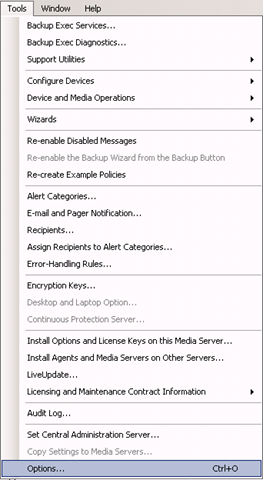
From the menu bar click Tools->Options

Backup_Exec_Tools_Options

In Job Defaults section –> Oracle –> click button Modify list

image

Click New button –> again New button –> and again New button

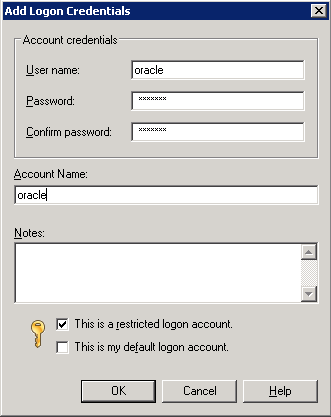
Fill the fields,

Username: oracle
Password:
Confirm Password:
Account Name: oracle

image

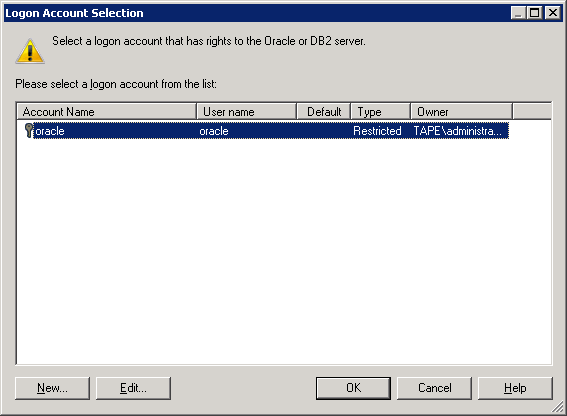
click OK

image

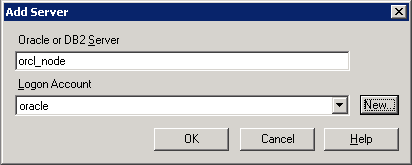
click OK.

image

click OK -> click OK –> click OK

2.2 Creating backup job.

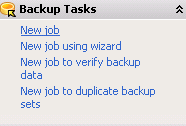
From the left pane-> Backup Tasks-> New job

image

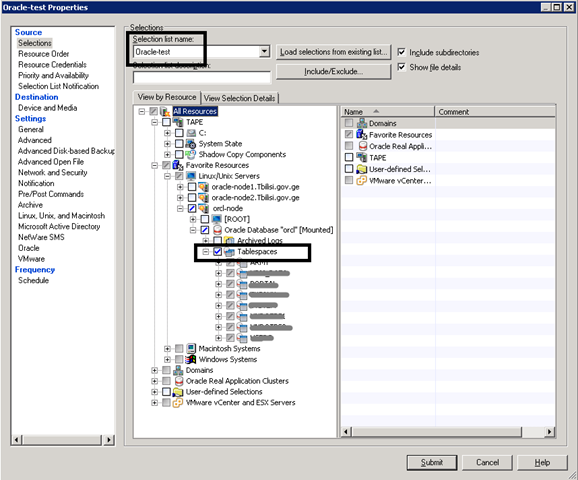
In Source section->Selections

Selection list name: Enter the name you want, let it be Oracle-test

Check View by Resource->All Resources-> Favorite Resources->orcl-node->Oracle Database “orcl”..->Tablespaces

image

I will not discuss all sections in detail, they are self-explanatory..

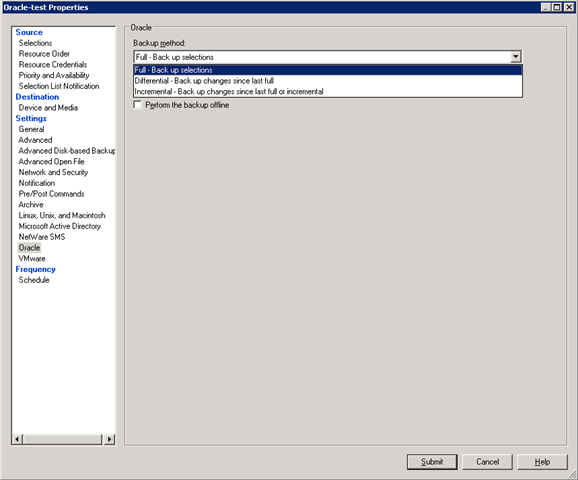
In Settings section-> Oracle –> choose Backup method and other necessary options like Delete backed up archive log files and so on…

image

By default job will run immediately after clicking the Submit button , but if you want to configure the schedule of your job , do the following:

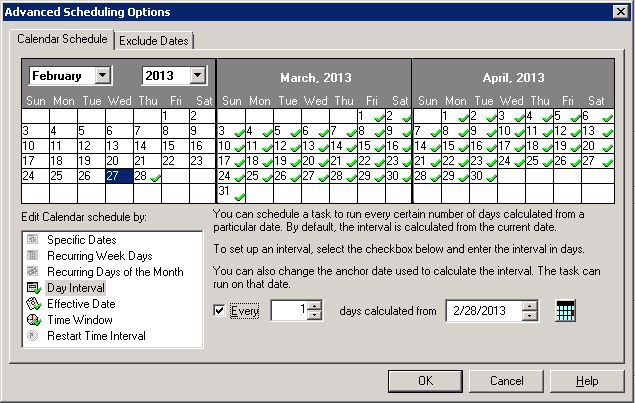
In Frequency section –>Schedule->  choose Run according to schedule-> click Edit Schedule Details button and choose your appropriate schedule..

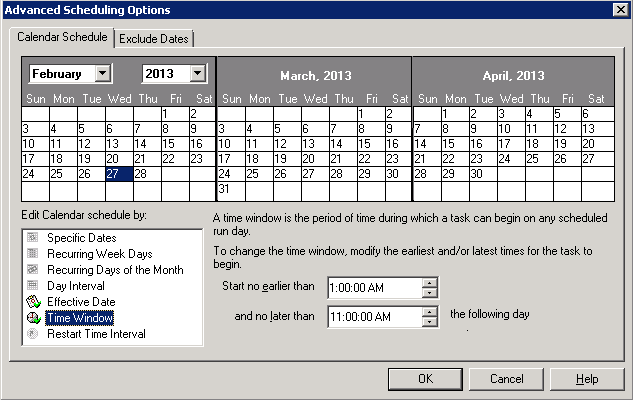
For example if you want your backup to run everyday at 1:00AM and no later than 11:00AM, click Day Interval –> check Every and write 1

image

In Time Window, fill :

Start no earlier than: 1:00AM
and no later than: 11:00AM

image

Click OK.

Click Submit button.

That’s it.

Supported Oracle Versions and Operating Systems

I was trying to install Oracle 10.2.0.1 on Windows Server 2008 R2 and of course this installation was UNSUCCESSFUL. So I decide to post Oracle versions and Operating System list. Here it is:

Oracle versions

Windows Server versions

Oracle 10g, Release 2 (10.2.0.1.0)
  • Windows Server 2003 (64-bit)
Oracle 10g, Release 2 (10.2.0.2.0, 10.2.0.3.0)
    • Windows Server 2003 (64-bit)

    • Windows Server 2003 (64-bit) R2

Oracle 10g, Release 2 (10.2.0.4.0)
  • Windows Server 2003 (64-bit)

  • Windows Server 2003 (64-bit) R2

  • Windows Server 2008 (64-bit)

Oracle 10g, Release 2 (10.2.0.5.0)
  • Windows Server 2003 (64-bit)

  • Windows Server 2003 (64-bit) R2

  • Windows Server 2008 (64-bit)

  • Windows Server 2008 (64-bit) R2

Oracle 11g, Release 1 (11.1.0.6.0)
  • Windows Server 2003 (64-bit)

  • Windows Server 2003 (64-bit) R2

Oracle 11g, Release 1 (11.1.0.7.0)
  • Windows Server 2003 (64-bit)

  • Windows Server 2003 (64-bit) R2

  • Windows Server 2008 (64-bit)

Oracle 11g, Release 2 (11.2.0.1.0, 11.2.0.2.0)
  • Windows Server 2003 (64-bit)

  • Windows Server 2003 (64-bit) R2

  • Windows Server 2008 (64-bit)

  • Windows Server 2008 (64-bit) R2

Install Oracle 11.2.0.3 with ASM on Centos 6.3

For RHEL 6, Oracle will provide ASMLib software and updates only when configured with a kernel distributed by Oracle. Oracle will not provide ASMLib packages for kernels distributed by Red Hat as part of RHEL 6. ASMLib updates will be delivered via Unbreakable Linux Network (ULN), which is available to customers with Oracle Linux support. ULN works with both Oracle Linux or Red Hat Linux installations, but ASMLib usage will require replacing any Red Hat kernel with a kernel provided by Oracle.

Because of the above announcement we use UDEV rules to prepare disks for ASM installation.

So let’s start.

1. Install required RPMs.

RPM names:

compat-libcap1-1.10-1.i686.rpm
compat-libcap1-1.10-1.x86_64.rpm
compat-libstdc++-33-3.2.3-69.el6.x86_64.rpm
elfutils-devel-0.152-1.el6.x86_64.rpm
elfutils-libelf-devel-0.152-1.el6.x86_64.rpm
gcc-c++-4.4.6-4.el6.x86_64.rpm
glibc-2.12-1.80.el6.i686.rpm
glibc-devel-2.12-1.80.el6.i686.rpm
libaio-0.3.107-10.el6.i686.rpm
libaio-devel-0.3.107-10.el6.x86_64.rpm
libattr-2.4.44-7.el6.i686.rpm
libcap-2.16-5.5.el6.i686.rpm
libgcc-4.4.6-4.el6.i686.rpm
libstdc++-devel-4.4.6-4.el6.x86_64.rpm
libtool-ltdl-2.2.6-15.5.el6.i686.rpm
ncurses-devel-5.7-3.20090208.el6.i686.rpm
ncurses-libs-5.7-3.20090208.el6.i686.rpm
nss-softokn-freebl-3.12.9-11.el6.i686.rpm
pdksh-5.2.14-30.x86_64.rpm
readline-6.0-4.el6.i686.rpm

If you have Centos installation disk, these RPMs should be locate there. Or you can download them from  http://rpm.pbone.net/

Note: if during installing pdksh-5.2.14-30.x86_64.rpm it says that package conflicts with ksh then you should erase ksh package and install pdksh, like this:

# rpm -qa | grep ksh
# rpm -e ksh-…
# rpm –ivh pdksh-5.2.14-30.x86_64.rpm

2. Configure Kernel:

# vi /etc/sysctl.conf

kernel.shmall = 2097152
kernel.shmmax = 982431744
kernel.shmmni = 4096
kernel.sem = 250 32000 100 128
fs.file-max = 6815744
fs.aio-max-nr = 1048576
net.ipv4.ip_local_port_range = 9000 65500
net.core.rmem_default = 262144
net.core.rmem_max = 4194304
net.core.wmem_default = 262144
net.core.wmem_max = 1048576

To make changes take effect:

# sysctl –p

Edit /etc/pam.d/login :

# vi /etc/pam.d/login

session required pam_limits.so

Edit /etc/security/limits.conf:

# vi /etc/security/limits.conf

oracle soft  nproc   2047
oracle hard  nproc   16384
oracle soft  nofile  1024
oracle hard  nofile  65536

grid   soft  nproc   2047
grid   hard  nproc   16384
grid   soft  nofile  1024
grid   hard  nofile  65536

Run the following to add lines in /etc/pam.d/login:

[root@orcl ~]# cat >> /etc/pam.d/login <<EOF
session required pam_limits.so
EOF

Run the following to add lines in /etc/profile:

[root@orcl ~]# cat >> /etc/profile <<EOF
if [ \$USER = "oracle" ] || [ \$USER = "grid" ]; then
if [ \$SHELL = "/bin/ksh" ]; then
ulimit -p 16384
ulimit -n 65536
else
ulimit -u 16384 -n 65536
fi
umask 022
fi
EOF

Run the following to add lines in /etc/csh.login

[root@orcl ~]# cat >> /etc/csh.login <<EOF
if ( \$USER == "oracle" || \$USER == "grid" )
then
limit maxproc 16384
limit descriptors 65536
endif
EOF

Disable SELinux:

# /usr/sbin/getenforce
Enforcing

# /usr/sbin/setenforce 0

To make changes permanent, change /etc/sysconfig/selinux file by the following way:

cat /etc/sysconfig/selinux

# This file controls the state of SELinux on the system.
# SELINUX= can take one of these three values:
#     enforcing – SELinux security policy is enforced.
#     permissive – SELinux prints warnings instead of enforcing.
#     disabled – No SELinux policy is loaded.
SELINUX=disabled
# SELINUXTYPE= can take one of these two values:
#     targeted – Targeted processes are protected,
#     mls – Multi Level Security protection.
SELINUXTYPE=targeted

To check the status again:

# /usr/sbin/getenforce
Disabled

3.  Creating OS groups and users.

#Creating groups for Grid Infrastructure

groupadd asmadmin
groupadd asmdba
groupadd asmoper

#Creating groups for Oracle Software

groupadd oinstall
groupadd dba
groupadd oper

#Creating user for Grid Infrastructure

useradd -g oinstall -G dba,asmadmin,asmdba,asmoper -d /home/grid grid

#Creating user for Oracle Software

useradd -g oinstall -G dba,oper,asmdba -d /home/oracle oracle

#Setting password for users

passwd grid
passwd oracle

4. Creating necessary directories

mkdir -p /u01/app/grid
mkdir -p /u01/app/11.2.0/grid
mkdir -p /u01/app/oracle
chown -R grid:oinstall /u01
chown oracle:oinstall /u01/app/oracle
chmod -R 775 /u01

5. Creating .bash_profile-s

#For Oracle user

su – oracle
vi .bash_profile

if [ -f ~/.bashrc ]; then
. ~/.bashrc
fi

ORACLE_SID=orcl; export ORACLE_SID

ORACLE_UNQNAME=orcl; export ORACLE_UNQNAME

JAVA_HOME=/usr/local/java; export JAVA_HOME

ORACLE_BASE=/u01/app/oracle; export ORACLE_BASE

ORACLE_HOME=$ORACLE_BASE/product/11.2.0/db_1
export ORACLE_HOME

ORACLE_TERM=xterm; export ORACLE_TERM

NLS_DATE_FORMAT="DD-MON-YYYY HH24:MI:SS"
export NLS_DATE_FORMAT

TNS_ADMIN=$ORACLE_HOME/network/admin; export TNS_ADMIN

ORA_NLS11=$ORACLE_HOME/nls/data; export ORA_NLS11

PATH=.:${JAVA_HOME}/bin:${PATH}:$HOME/bin:$ORACLE_HOME/bin
PATH=${PATH}:/usr/bin:/bin:/usr/bin/X11:/usr/local/bin
PATH=${PATH}:/u01/app/common/oracle/bin
export PATH

LD_LIBRARY_PATH=$ORACLE_HOME/lib
LD_LIBRARY_PATH=${LD_LIBRARY_PATH}:$ORACLE_HOME/oracm/lib
LD_LIBRARY_PATH=${LD_LIBRARY_PATH}:/lib:/usr/lib:/usr/local/lib
export LD_LIBRARY_PATH

CLASSPATH=$ORACLE_HOME/JRE
CLASSPATH=${CLASSPATH}:$ORACLE_HOME/jlib
CLASSPATH=${CLASSPATH}:$ORACLE_HOME/rdbms/jlib
CLASSPATH=${CLASSPATH}:$ORACLE_HOME/network/jlib
export CLASSPATH

THREADS_FLAG=native; export THREADS_FLAG

export TEMP=/tmp
export TMPDIR=/tmp

umask 022

#For Grid user

su – grid
vi .bash_profile

if [ -f ~/.bashrc ]; then
. ~/.bashrc
fi

ORACLE_SID=+ASM; export ORACLE_SID

JAVA_HOME=/usr/local/java; export JAVA_HOME

ORACLE_BASE=/u01/app/grid; export ORACLE_BASE

ORACLE_HOME=/u01/app/11.2.0/grid; export ORACLE_HOME

ORACLE_TERM=xterm; export ORACLE_TERM

NLS_DATE_FORMAT="DD-MON-YYYY HH24:MI:SS"; export NLS_DATE_FORMAT

TNS_ADMIN=$ORACLE_HOME/network/admin; export TNS_ADMIN

ORA_NLS11=$ORACLE_HOME/nls/data; export ORA_NLS11

PATH=.:${JAVA_HOME}/bin:${PATH}:$HOME/bin:$ORACLE_HOME/bin
PATH=${PATH}:/usr/bin:/bin:/usr/bin/X11:/usr/local/bin
PATH=${PATH}:/u01/app/common/oracle/bin
export PATH

LD_LIBRARY_PATH=$ORACLE_HOME/lib
LD_LIBRARY_PATH=${LD_LIBRARY_PATH}:$ORACLE_HOME/oracm/lib
LD_LIBRARY_PATH=${LD_LIBRARY_PATH}:/lib:/usr/lib:/usr/local/lib
export LD_LIBRARY_PATH

CLASSPATH=$ORACLE_HOME/JRE
CLASSPATH=${CLASSPATH}:$ORACLE_HOME/jlib
CLASSPATH=${CLASSPATH}:$ORACLE_HOME/rdbms/jlib
CLASSPATH=${CLASSPATH}:$ORACLE_HOME/network/jlib
export CLASSPATH

THREADS_FLAG=native; export THREADS_FLAG

export TEMP=/tmp
export TMPDIR=/tmp

umask 022


6. Add disks for ASM

If your disk is not partitioned yet, partition it by fdisk utility.

At this point you will need SCSI identifier.

So if your disk is physical just run the following command to identify it:

# scsi_id -g -u -d /dev/sdb
36000c292dfddac7b8934d3293313098e

Or if you have virtual disk , you will need to set disk.EnableUUID parameter to TRUE to see this identifier:

Shutdown VM, go to the directory where VM files are stored and edit VMX file. Add the following line:

disk.EnableUUID = "TRUE"

Restart your VM and run the above command (scsi_id -g -u -d /dev/sdb)

We will use this identifier for the UDEV rules to set permissions and alias for the new device in /etc/udev/rules.d/50-udev.rules file.

# vi /etc/udev/rules.d/50-udev.rules

KERNEL=="sd?1", BUS=="scsi", PROGRAM=="/sbin/scsi_id -g -u -d /dev/$parent",
RESULT=="36000c292dfddac7b8934d3293313098e", NAME="oracleasm/asm-disk1",
OWNER="oracle", GROUP="dba", MODE="0660"

Restart udev, by the following way:

# /sbin/start_udev
Starting udev:                                             [  OK  ]

Check that alias exists:

# ls -la /dev/oracleasm/*
brw-rw—- 1 oracle dba 8, 17 Feb 18 12:49 /dev/oracleasm/asm-disk1

7. Install grid

Go to the grid installation folder and run:

./runInstaller

Step 1:

Skip Software Updates.

Step 2:

Configure Oracle Grid Infrastructure for a Standalone Server.

Step 3:

Click Next.

Step 4:

Select the Change Discovery Path button and enter /dev/oracleasm.

There should appear /dev/oracleasm/asm-disk-1 and check it.

Type disk group name as DATA01.

Step 5:

Set the passwords for the SYS and ASMSNMP accounts:

Step 6:

ASM Database Administrator(OSDBA) Group : asmdba
ASM Instance Administration Operator(OSOPER) Group: asmoper
ASM Instance Administrator(OSASM) Group: asmadmin

Step 7:

Click Next.

Step 8:

Click Next.

Step 9:

Click Install.

After pop-upping the window , asking to run

      • /u01/app/oraInventory/orainstRoot.sh
  • /u01/app/oracle/product/11.2.0/db_1/root.sh

run these scripts one by one and click OK on pop-up window.

Note: if root.sh script shows the error like this:

…error while loading shared libraries: libcap.so.1: …

Then in your system libcap-1 and libcap-2 RPMs are missing, first install them.

8. Install database

Go to the database installation folder and run:

./runInstaller

Step 1:

I don’t want any more spam thanks.

Step 2:

Skip the updates.

Step 3:

Create and configure a database.

Step 4:

Server Class.

Step 5:

Single instance database installation.

Step 6:

Advanced install.

Step 7:

Choose the languages you want.

Step 8:

Enterprise Edition.

Step 9:

Choose the defaults.
Note: Grid and Database must be in the different folders.

Step 10:

General Purpose / Transaction Processing.

Step 11:

Write a database name.

Step 12:

Use Oracle Enterprise Manager Database Control for database management.

Step 13:

Use Automatic Storage Management.

Step 15:

Do not enable automated backups

Step 16:

Select the DATA01 diskgroup.

Step 17:

Set the passwords for the database.

Step 18:

Accept the defaults.

Database Administrator(OSDBA) Group: dba
Database Operator(OSOPER) Group: oper

Step 19:

Click Install to start the installer.

After the installation requires to run root.sh script, run it.

That is all.

SQL Server Reporting Services. Error: …Windows User Account Control (UAC) restrictions have been addressed

Error:
User ‘DomainUser’ does not have required permissions. Verify that sufficient permissions have been granted and Windows User Account Control (UAC) restrictions have been addressed.

Solution:

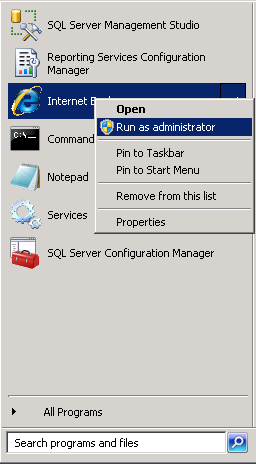
1. Run IE as Administrator:

image

2. Go to the Reporting Services address: http://localhost/Reports

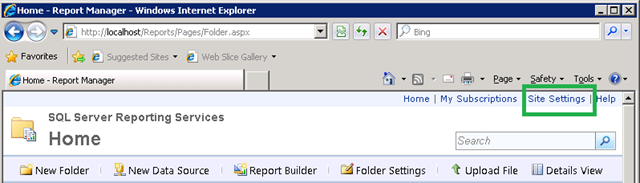
3. Go to the Site Settings:

image

4. In Security section –> click New Role Assignment

image

5. Add username or group that you want to grant permissions and choose appropriate role:

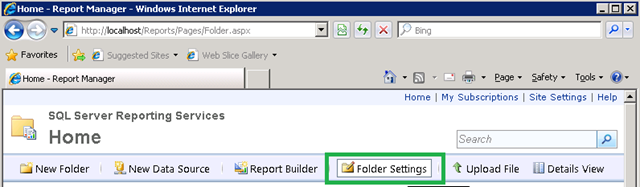
image

6. Go to the Home page and click Folder Settings:

image

7. Add username or group that you want to grant permission.

That’s all.

SQL Server Reporting Services. Error: …Windows User Account Control (UAC) restrictions have been addressed

Error:
User ‘Domain\User’ does not have required permissions. Verify that sufficient permissions have been granted and Windows User Account Control (UAC) restrictions have been addressed.

Solution:

1. Run IE as Administrator:

image

2. Go to the Reporting Services address: http://localhost/Reports

3. Go to the Site Settings:

image

4. In Security section –> click New Role Assignment

image

5. Add username or group that you want to grant permissions and choose appropriate role:

image

6. Go to the Home page and click Folder Settings:

image

7. Add username or group that you want to grant permission.

That’s all.

Migrate SQL Server Reporting Services to another server

Here are the steps how to migrate RS to another server using same database release. For example: From SQL Server 2008-> to SQL Server 2008.

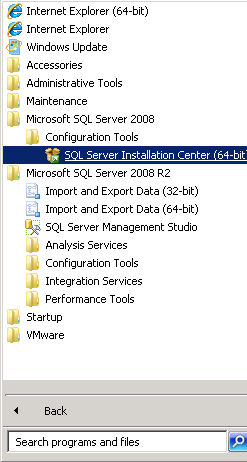
1. Install Database and Reporting Services on target server. If you have just database service installed , you can add Reporting Service by running SQL Server Installation Center:

image

follow the steps and check Reporting Services box for installation.

2.  Backup Reporting Service databases on source server, for me they are: ReportServer and ReportServerTempDB.

3. Backup Encryption Key on source server.

Run Reporting Services Configuration Manager:

image

Connect to the  Reporting Server –> Go to the Encryption Keys section and click Backup button.

image

It will ask you for the password , which will be needed for the restoration on target server.

4. Restore ReportServer and ReportServerTempDB databases(backed up in the 2-nd step) with the overwrite option on the target server.

5. On target server go to the Reporting Services Configuration Manager –> Encryption Keys section and restore the key. (Enter the password, when prompted, which you have indicated during backup of the key on source server )

Note, in Database section reporting service should point to the database named ReportServer .

You should now navigate to the reporting service address: http://target_server_hostname:80/Reports.

Recreate Oracle 11g OEM DBConsole manually for RAC

If you have problems with existing OEM, the best way is to reconfigure it. Here are the steps, how to do it correctly:

$ emca -config dbcontrol db -repos recreate -cluster

STARTED EMCA at Jan 22, 2013 6:04:10 PM
EM Configuration Assistant, Version 11.2.0.3.0 Production
Copyright (c) 2003, 2011, Oracle. All rights reserved.

Enter the following information:
Database unique name: orcl
Service name: orcl
Listener ORACLE_HOME [ /u01/app/11.2.0/grid ]:
Password for SYS user:
Database Control is already configured for the database orcl
You have chosen to configure Database Control for managing the database orcl
This will remove the existing configuration and the default settings and perform a fresh configuration
———————————————————————-
WARNING : While repository is dropped the database will be put in quiesce mode.
———————————————————————-
Do you wish to continue? [yes(Y)/no(N)]: y
Password for DBSNMP user:
Password for SYSMAN user:
Cluster name: oracle-db

!!!Stop here for a while: if you don’t know your cluster name run the following command:

$ su – grid
cemutlo -n

…continuing configuration

Email address for notifications (optional):
Outgoing Mail (SMTP) server for notifications (optional):
ASM ORACLE_HOME [ /u01/app/11.2.0/grid ]:
ASM port [ 1521 ]:
ASM username [ ASMSNMP ]:
ASM user password:
Jan 22, 2013 6:05:02 PM oracle.sysman.emcp.util.GeneralUtil initSQLEngineRemotely
WARNING: Error during db connection : ORA-12514: TNS:listener does not currently know of service requested in connect descriptor

—————————————————————–

You have specified the following settings

Database ORACLE_HOME ……………. /u01/app/oracle/product/11.2.0/db_1

Database instance hostname ……………. Listener ORACLE_HOME ……………. /u01/app/11.2.0/grid
Listener port number ……………. 1521
Cluster name ……………. oracle-db
Database unique name ……………. orcl
Email address for notifications …………… mariam.kupa@gmail.com
Outgoing Mail (SMTP) server for notifications …………… mail.tbilisi.gov.ge
ASM ORACLE_HOME ……………. /u01/app/11.2.0/grid
ASM port ……………. 1521
ASM user role ……………. SYSDBA
ASM username ……………. ASMSNMP

—————————————————————–
———————————————————————-
WARNING : While repository is dropped the database will be put in quiesce mode.
———————————————————————-
Do you wish to continue? [yes(Y)/no(N)]: y
Jan 22, 2013 6:05:18 PM oracle.sysman.emcp.EMConfig perform
INFO: This operation is being logged at /u01/app/oracle/cfgtoollogs/emca/orcl/emca_2013_01_22_18_04_10.log.
Jan 22, 2013 6:05:20 PM oracle.sysman.emcp.util.PortManager isPortInUse
WARNING: Specified port 5540 is already in use.
Jan 22, 2013 6:05:20 PM oracle.sysman.emcp.util.PortManager isPortInUse
WARNING: Specified port 5520 is already in use.
Jan 22, 2013 6:05:20 PM oracle.sysman.emcp.util.PortManager isPortInUse
WARNING: Specified port 1158 is already in use.
Jan 22, 2013 6:05:20 PM oracle.sysman.emcp.util.DBControlUtil stopOMS
INFO: Stopping Database Control (this may take a while) …
Jan 22, 2013 6:06:01 PM oracle.sysman.emcp.EMReposConfig invoke
INFO: Dropping the EM repository (this may take a while) …
Jan 22, 2013 6:08:00 PM oracle.sysman.emcp.EMReposConfig invoke
INFO: Repository successfully dropped
Jan 22, 2013 6:08:01 PM oracle.sysman.emcp.EMReposConfig createRepository
INFO: Creating the EM repository (this may take a while) …
Jan 22, 2013 6:11:39 PM oracle.sysman.emcp.EMReposConfig invoke
INFO: Repository successfully created
Jan 22, 2013 6:11:44 PM oracle.sysman.emcp.EMReposConfig uploadConfigDataToRepository
INFO: Uploading configuration data to EM repository (this may take a while) …
Jan 22, 2013 6:12:17 PM oracle.sysman.emcp.EMReposConfig invoke
INFO: Uploaded configuration data successfully
Jan 22, 2013 6:12:18 PM oracle.sysman.emcp.EMDBCConfig instantiateOC4JConfigFiles
INFO: Propagating /u01/app/oracle/product/11.2.0/db_1/oc4j/j2ee/OC4J_DBConsole_oracle-node1_orcl to remote nodes . ..
Jan 22, 2013 6:12:20 PM oracle.sysman.emcp.EMDBCConfig instantiateOC4JConfigFiles
INFO: Propagating /u01/app/oracle/product/11.2.0/db_1/oc4j/j2ee/OC4J_DBConsole_oracle-node2_orcl to remote nodes . ..
Jan 22, 2013 6:12:26 PM oracle.sysman.emcp.EMAgentConfig deployStateDirs
INFO: Propagating /u01/app/oracle/product/11.2.0/db_1/oracle-node1_orcl to remote nodes …
Jan 22, 2013 6:12:28 PM oracle.sysman.emcp.EMAgentConfig deployStateDirs
INFO: Propagating /u01/app/oracle/product/11.2.0/db_1/oracle-node2_orcl to remote nodes …
Jan 22, 2013 6:12:31 PM oracle.sysman.emcp.util.DBControlUtil secureDBConsole
INFO: Securing Database Control (this may take a while) …
Jan 22, 2013 6:13:00 PM oracle.sysman.emcp.util.DBControlUtil startOMS
INFO: Starting Database Control (this may take a while) …
Jan 22, 2013 6:13:20 PM oracle.sysman.emcp.EMDBPostConfig performConfiguration
INFO: Database Control started successfully
Jan 22, 2013 6:13:20 PM oracle.sysman.emcp.EMDBPostConfig performConfiguration
INFO: >>>>>>>>>>> The Database Control URL is https://oracle-node1.mr.gov.ge:1158/em <<<<<<<<<<<
Jan 22, 2013 6:13:22 PM oracle.sysman.emcp.EMDBPostConfig showClusterDBCAgentMessage
INFO:
**************** Current Configuration ****************
INSTANCE NODE DBCONTROL_UPLOAD_HOST
———- ———- ———————

orcl oracle-node1 oracle-node1.mr.gov.ge
orcl oracle-node2 oracle-node1.mr.gov.ge
Jan 22, 2013 6:13:22 PM oracle.sysman.emcp.EMDBPostConfig invoke
WARNING:
************************ WARNING ************************

Management Repository has been placed in secure mode wherein Enterprise Manager data will be encrypted. The encry ption key has been placed in the file: /u01/app/oracle/product/11.2.0/db_1/oracle-node1_orcl/sysman/config/emkey.o ra. Ensure this file is backed up as the encrypted data will become unusable if this file is lost.

***********************************************************
Enterprise Manager configuration completed successfully
FINISHED EMCA at Jan 22, 2013 6:13:22 PM

For me to access OEM the URL is  https://oracle-node1.mr.gov.ge:1158/em

Good Luck!

Table Locks and Foreign Keys

Brief Description:

After reading “Expert Indexing in Oracle Database 11g ” book, I decided to share the following information with you. Which, I think, is very very useful.

It is better to index foreign key columns to avoid locking issues. Note, that locking issues are avoided when index type is B-tree, not Bitmap.

The Scenario:

Note: This is the quote from the following book:

Expert Indexing in Oracle Database 11g
Maximum Performance for Your Database

Darl Kuhn
Sam R. Alapati
Bill Padfield

“Here’s a simple example that demonstrates the locking issue when foreign key columns are not indexed.

First, create two tables (DEPT and EMP) and associate them with a foreign key constraint.

create table emp(emp_id number primary key, dept_id number);

create table dept(dept_id number primary key);

alter table emp add constraint emp_fk1 foreign key (dept_id) references dept(dept_id);

Now insert some data.

insert into dept values(10);
insert into dept values(20);
insert into dept values(30);
insert into emp values(1,10);
insert into emp values(2,20);
insert into emp values(3,10);
commit;

Open two terminal sessions. From one, delete one record from the child table (don’t commit).

delete from emp where dept_id = 10;

Now attempt to delete from the parent table some data not impacted by the child table delete.

delete from dept where dept_id = 30;

The delete from the parent table hangs until the child table transaction is committed. Without a regular B-tree index on the foreign key column in the child table, any time you attempt to insert or delete in the child table, it places a table-wide lock on the parent table, which prevents deletes or updates in the parent table until the child table transaction completes.

Now run the prior experiment, except this time additionally create an index on the foreign key column of
the child table.

create index emp_fk1 on emp(dept_id);

You should be able to independently run the prior two delete statements. When you have a B-tree index on
the foreign key columns, if deleting from the child table, Oracle will not excessively lock all rows in the
parent table.”

ORA-00600: internal error code, arguments: [kmgs_parameter_update_timeout_1], [17510]

Error message:

ORA-00600: internal error code, arguments: [kmgs_parameter_update_timeout_1], [17510], [], [], [], [], [], [], [], [], [], []
ORA-17510: Attempt to do i/o beyond file size

One of the solution:

1. First of all check oracle file permissions.

cd $ORACLE_HOME/bin
ls -l oracle

-r-xr-s–x 1 oracle oinstall 210824720 Sep 15  2010 oracle

As you can see , my oracle file permissions are wrong, because it should be -rwsr-s—x.

So change it:

chmod 6751 oracle

ls -l oracle
-rwsr-s–x 1 oracle oinstall 210824720 Sep 15  2010 oracle


2. Re-create spfile.

The problem may be caused by a possible corruption of spfile. Oracle is not able to write entry into the spfile and the error occurs.

The solution:

export ORACLE_SID=orcl

sqlplus / as sysdba

create pfile from spfile;

shutdown immediate;

startup pfile=’/u01/app/oracle/product/11.2.0/db_1/dbs/initorcl.ora’;

create spfile from pfile=’/u01/app/oracle/product/11.2.0/db_1/dbs/initorcl.ora’;

shutdown immediate;

startup;


Good Luck!